
![Angi.com [Only $0.9💰] Scraper (Resilient Leads & Profiles) avatar](https://images.apifyusercontent.com/er13HkA6jgRg1YRcUlb3BGwdDD1V9W4f66j-bN6kN3A/rs:fill:250:250/cb:1/aHR0cHM6Ly9hcGlmeS1pbWFnZS11cGxvYWRzLXByb2QuczMudXMtZWFzdC0xLmFtYXpvbmF3cy5jb20vbmduOHZSRVNUa3NleVdFNnAtYWN0b3ItOFlzNlYxSTBRdzd1YlBDYkotcG50SHhlMU5RSS1BbmdpLndlYnA.webp)
Angi.com [Only $0.9💰] Scraper (Resilient Leads & Profiles)
Pricing
from $0.90 / 1,000 results
Angi.com [Only $0.9💰] Scraper (Resilient Leads & Profiles)
[Only $0.8💰] Extract high-quality contractor leads from Angi.com (Angie's List). Scrape business names, phone numbers, full addresses, ratings, review counts, and service categories. Just input a ZIP code or category link to instantly get structured local business data in JSON or CSV.
Pricing
from $0.90 / 1,000 results
Rating
5.0
(2)
Developer

Muhamed Didovic
Maintained by CommunityActor stats
0
Bookmarked
51
Total users
5
Monthly active users
a day ago
Last modified
Categories
Share
Angi.com Scraper (Leads & Profiles)
How it works
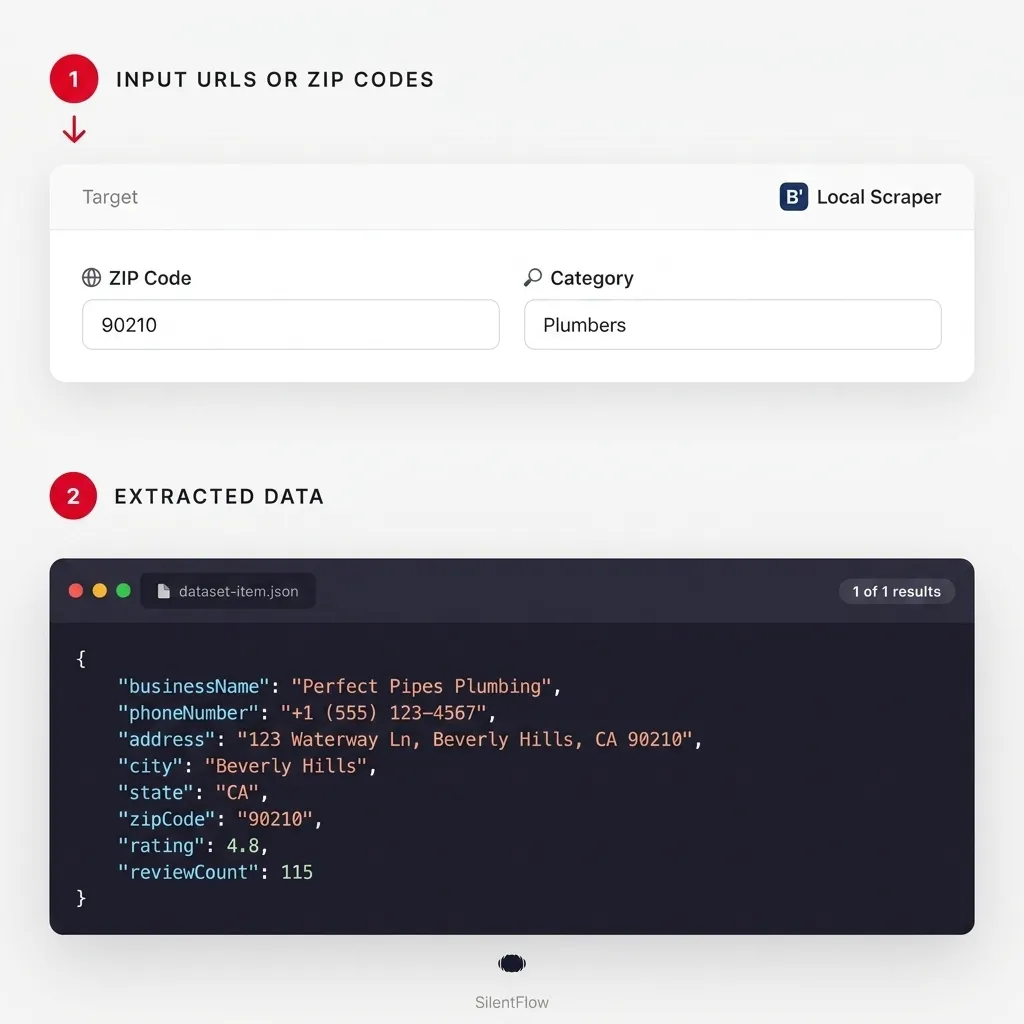
Unlock the Full Power of Angi Home Services Data - The most resilient scraper for extracting high-quality leads, professional profiles, and business details from Angi.com (formerly Angie's List). Whether you're conducting market research, performing competitor analysis, or building a local service database, our scraper delivers precise, structured data at scale.
"From garage builders and plumbers to roofers and electricians, turn Angi's massive directory into your strategic advantage."
Why Use This Scraper?
- Multiple Starting Points: Start from the entire US directory, a specific state, a city, a service category, or directly input professional profile URLs.
- Enterprise-Grade Resilience: Implements parallel TLS fingerprint racing (
impit) and intelligent proxy rotation to bypass aggressive Cloudflare and anti-bot blocks. - Deep Directory Discovery: Automatically discovers nested states → cities → categories → professional profiles without manual pagination.
- Structured Output: Extract clean, verified business names, addresses, phone numbers, and service categories.
- Export Ready: Supports deeply nested JSON for developers or flattened CSV formats for CRM imports.
Overview
The Angi.com Scraper is designed to seamlessly navigate Angi's Next.js infrastructure. By relying on a custom internal handler rather than standard browser automation, it maintains high throughput and bypasses limitations that block standard crawlers. The output focuses primarily on business profile rows, regardless of where the scrape starts.
Supported Inputs
You can mix and match different types of Angi URLs in the startUrls input:
- US Directory Root:
https://www.angi.com/companylist/us/(Scrapes the entire US) - Near Me Root:
https://www.angi.com/nearme/ - State Hubs:
https://www.angi.com/companylist/us/tx/(Scrapes all cities in Texas) - City Hubs:
https://www.angi.com/companylist/us/al/adamsville/ - Category Lists:
https://www.angi.com/nearme/garage-builders/ - Direct Profiles:
https://www.angi.com/companylist/us/al/cullman/access-garage-doors-of-birmingham-reviews-1.htm - ZIP Codes: Just input a 5-digit ZIP code like
90210and the scraper will automatically resolve it to the corresponding city hub!
Use Cases
| Audience | Example Use Case |
|---|---|
| Sales & Lead Gen | Build targeted contact lists of local contractors (e.g., all plumbers in Texas) with verified phone numbers. |
| Market Researchers | Analyze service density and categorize businesses by specific niches across different ZIP codes. |
| Marketing Agencies | Offer specialized marketing or SEO services to home service professionals found on Angi. |
| Competitor Analysis | Track local competitors, their listed services, operating hours, and service areas. |
How It Works
- You provide URLs: Input one or more Angi directory, category, or profile URLs.
- Actor categorizes inputs: The scraper detects the URL type (hub, state, city, category, or profile).
- Deep fan-out: For directory URLs, the scraper automatically navigates the hierarchy to discover individual business profiles.
- Data extraction: The actor fetches the Next.js build data for each profile, extracting robust business information.
- Dataset export: The extracted profiles are saved to your Apify dataset, ready for JSON or CSV download.
Input Configuration
Here is a typical configuration. The useInternalHandler flag is enabled by default to ensure maximum anti-bot resilience.
Output Overview
The scraper's primary dataset items are business profile rows.
- Nested JSON: Keeps objects intact (e.g.,
contactInfo.address.city). - Flattened (CSV-friendly): If you enable
flattenDatasetOutput, nested objects are flattened into dot-separated keys (e.g.,contactInfo_address_city), ensuring no columns are dropped in Excel.
Sample JSON Output
Key Output Fields
Top-Level Group
url(String): The direct URL to the professional's profile on Angi.category(Object): Details about the specific service niche.state(Object): Geographic state container.city(Object): Local city container.
Company Data
companyProfile(Object): The core data container extracted from the profile page.businessInfo(Object): Contains the officialbusinessName,amenities, andhoursInfo.contactInfo(Object): Contains arrays foremails,phoneNumbers, and the physicaladdressobject.slug(Object): Canonical URL and aliases.logoUrl(String): Full URL to the business logo.images(Array): Gallery of business-provided images or project photos.
Note: For ease of use in flat exports like CSV, key profile fields are also mirrored at the top level.
FAQ
Can I scrape a specific category nationwide?
Yes! Input a nationwide category URL like https://www.angi.com/nearme/garage-builders/, and the scraper will automatically navigate through all states and cities for that category.
Does it extract emails? The scraper extracts emails only when they are publicly available on the business profile. Many businesses do not expose their email publicly.
What is the "flattenDatasetOutput" option? Angi's data is deeply nested. If you want to download a CSV for Excel or Google Sheets, enable this option. It unpacks nested objects so that every data point gets its own column.
Support
- For issues or feature requests, please use the Issues section of this actor.
- If you need customization or have questions, feel free to contact the author:
- Author's website: https://muhamed-didovic.github.io/
- Email: muhamed.didovic@gmail.com
Additional Services
- Request Customization: Need specific filters or custom fields? muhamed.didovic@gmail.com
- Dataset Purchases: Looking for a pre-scraped dataset of all Angi pros? Reach out for pricing.
- API Access: High-volume API services available for enterprise integrations.
🤖 For AI Agents & LLM Apps
Compact reference for AI agents calling this actor via the Apify MCP server or the Apify API (actor: memo23/angi-scraper).
Purpose: Scrape Angi.com business profiles from directory, state, city, category or profile URLs (or ZIP codes) — one row per home-service professional, fanning out the directory hierarchy automatically.
Minimal input:
ZIP mode instead of URLs: { "zipCodes": ["90210"], "zipCodeCategory": "plumbing" } — a 5-digit ZIP resolves to its city directory; zipCodeCategory is optional (empty = whole city).
Output: one dataset row per business profile — url, category {text, title, link}, state {text, title, href}, city {text, title, link}, companyProfile { businessInfo {businessName, amenities, hoursInfo}, contactInfo {emails, phoneNumbers, address {street1, city, state, country, postalCode}}, slug, logoUrl, images }. With flattenDatasetOutput these become dot-separated columns (e.g. companyProfile_contactInfo_address_city).
Behaviors an agent should know:
startUrlsaccepts the US directory root, state/city hubs, category lists and direct profile URLs; directory and category URLs fan out to individual profiles automatically.- Alternatively pass
zipCodes(resolved to city directories);zipCodeCategorynarrows to one service category. - Set
maxItemsto cap the run — omit or0means no limit, and directory/category fan-outs can return very large volumes. flattenDatasetOutput: truefor CSV/Excel (dot-separated keys);false(default) keeps nested JSON.- Angi blocks aggressively — the actor uses a built-in residential proxy and parallel TLS-fingerprint racing;
maxRequestRetriesdefaults to 30 andattemptsPerRoundto 3. enrichEmails: true(experimental, best-effort) addscontactEmail,contactWebsiteand anemailEnrichmentobject; emails are otherwise only present when public on the profile.- Pay-per-event billing — see the Pricing tab on the actor page.
⚠️ Disclaimer
This Actor is an independent tool and is not affiliated with, endorsed by, or sponsored by Angi Inc. (formerly Angie's List) or any of its subsidiaries or affiliates. All trademarks mentioned are the property of their respective owners.
The scraper accesses only publicly available Angi business-directory and professional-profile pages — no authenticated endpoints, no login-only or account data, and nothing behind the Angi.com login wall. Users are responsible for ensuring their use complies with Angi's Terms of Service, applicable data-protection law (including GDPR and CCPA where relevant), and any contractual obligations of their own organisation.
SEO Keywords
angi scraper, scrape angi, Angi.com scraper, angi leads scraper, angi api, Angie's List scraper, contractor scraper, home services scraper, local business directory scraper, contractor lead generation, home service leads, plumber scraper, electrician directory data, roofing contractor leads, service provider data, local contractor database, home improvement leads, business profile scraper, us contractor directory, angi profiles export


![Autotrader.com.au [$1💰] Australia Search & Details Scraper🇦🇺 avatar](https://images.apifyusercontent.com/pCkelbtHnioCVauMT6DM9tGYD81m-FmuhD-rXFDHMC4/rs:fill:76:76/cb:1/aHR0cHM6Ly9hcGlmeS1pbWFnZS11cGxvYWRzLXByb2QuczMudXMtZWFzdC0xLmFtYXpvbmF3cy5jb20vbmduOHZSRVNUa3NleVdFNnAtYWN0b3ItYWFINGlJOWIwc2dNNkNWeVMtanhmc2ZZeEVBWi1hdXRvdHJhZGVyLWF1cy5wbmc.webp)


![PagesJaunes.fr [Only $1💰] Leads with Emails & Phones Included avatar](https://images.apifyusercontent.com/uMN5TI32QLYckKvL9uH4AJGz3I7gn-fGG2kdd8fgZso/rs:fill:76:76/cb:1/aHR0cHM6Ly9hcGlmeS1pbWFnZS11cGxvYWRzLXByb2QuczMudXMtZWFzdC0xLmFtYXpvbmF3cy5jb20vbmduOHZSRVNUa3NleVdFNnAtYWN0b3ItSzhsMEdzNnpiZDd2bUJMRGotcFg2QjVHZm9oay1sb2dvXzJ4LnBuZw.webp)
