
Best Buy Scraper — Prices, Stock, Reviews & Search Rank
Pricing
from $1.67 / 1,000 products
Best Buy Scraper — Prices, Stock, Reviews & Search Rank
Scrape Best Buy by SKU, URL, keyword or category page: price, savings, rating, stock, UPC, full specs, dimensions and description. Keywords return the ranked grid with sponsored tiles flagged. Optional ZIP-level availability, customer reviews and brand / open-box filters.
Pricing
from $1.67 / 1,000 products
Rating
0.0
(0)
Developer

Muhamed Didovic
Maintained by CommunityActor stats
0
Bookmarked
2
Total users
2
Monthly active users
a day ago
Last modified
Categories
Share
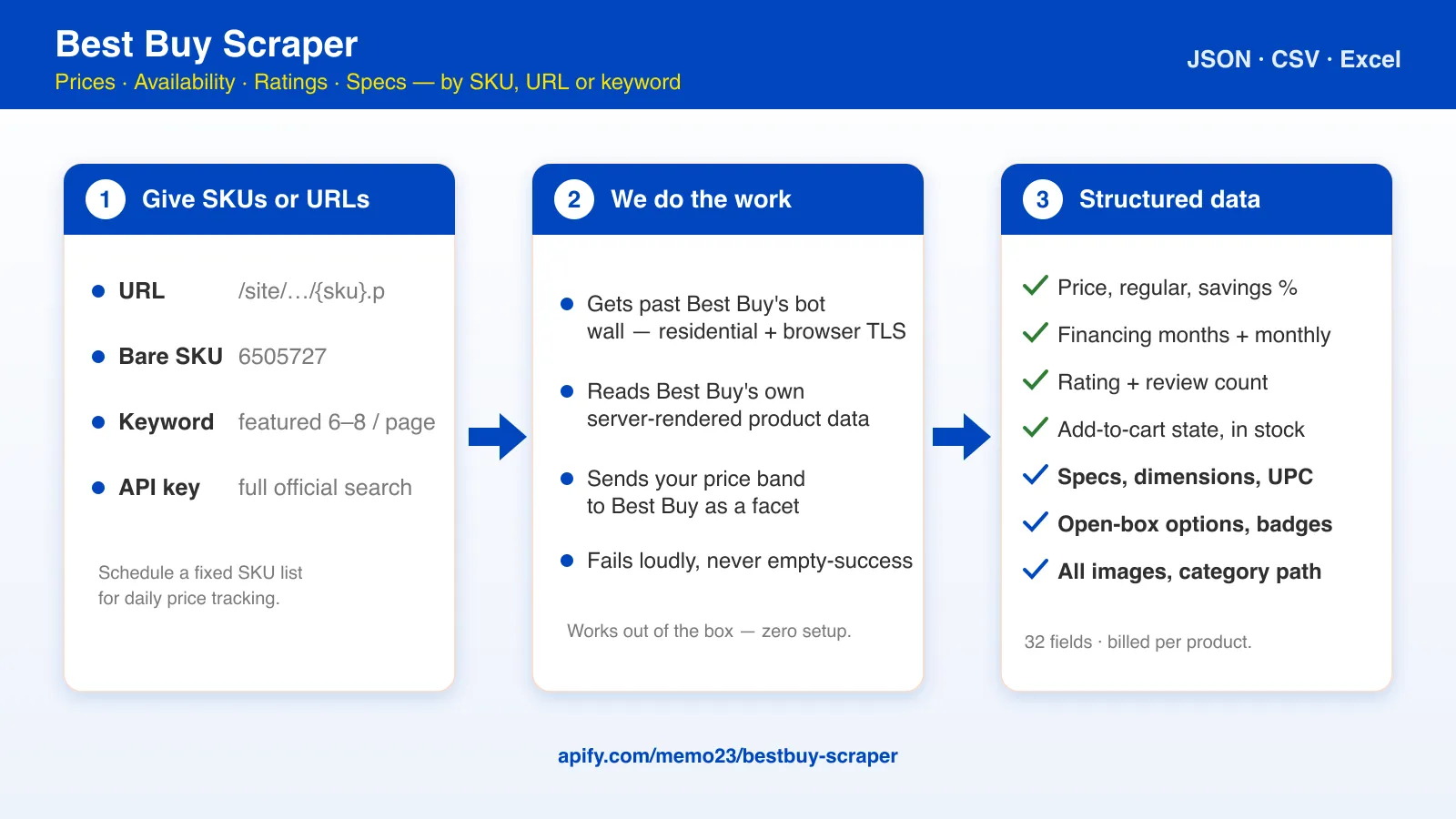
Track any Best Buy product by SKU, URL, keyword or category page. One row per product with the current price, regular price, savings, financing terms, rating, review count, add-to-cart state, open-box count, model number, images, UPC, the full specification sheet, dimensions, description and feature bullets. Keyword and category pages return Best Buy's ranked results grid with sponsored tiles flagged. Add a ZIP code and every row also carries what a shopper there would be offered. Turn on reviews and each review comes through as its own row. JSON, CSV or Excel out.
Why Use This Scraper?
- ✅ Built for price monitoring — give it the SKUs you care about, schedule it, and get today's price, regular price, savings %, financing and stock state for each. That is what most Best Buy scraping runs are actually doing.
- ✅ Rank and ad position, which nothing else on the Store reports — a keyword or category page returns Best Buy's grid in rank order with
searchRank,isSponsoredandsearchPageon every row, page after page untilmaxItems. - ✅ Availability by ZIP code — set
zipCodeand each row adds Best Buy's add-to-cart state for that region. It genuinely differs: one laptop came backADD_TO_CARTfor New York and Miami andSOLD_OUTfor Anchorage in the same minute. One small request per 20 products, no extra rows. - ✅ Customer reviews on the same run —
includeReviewsadds a row per review: stars, headline, full text, author, verified-purchase badge, helpful votes, date, pros and cons. Each is a billed row, 3 per product by default. - ✅ Filters Best Buy applies itself — brand, open-box, Top-Rated, sold-by-Best-Buy and a price band are sent as Best Buy's own facets, so the site narrows the results and your item budget goes further. The run log reports any filter Best Buy did not honour.
- ✅ Best Buy's own data — prices, ratings, stock state, model number and images are read from the data Best Buy embeds for its own front end, not scraped off the layout.
- ✅ The full spec sheet, no key needed — every row carries the UPC, every specification Best Buy lists (30–100 per product), dimensions and weight, the long description and the feature bullets.
- ✅ Official API, your key — set
bestbuyApiKeyand lookups and searches go through api.bestbuy.com instead, with no proxy and no bot wall. Your key, your terms; the actor only makes the calls. - ✅ Fails loudly — a run that could not fetch anything ends
FAILEDwith the reason, never as an empty "success".
Overview
Best Buy renders its pages with Next.js and Apollo. The scraper reads the data Best Buy embeds for its own front end, so field names and values are the site's own. It fetches over a residential US connection with a browser TLS fingerprint, because Best Buy's edge refuses datacenter IPs and plain HTTP clients outright; you do not configure any of that.
Product rows (type: "product") go to the run's main dataset. With reviews on, review rows (type: "review") go to a second dataset of the same run, aliased reviews, so each table holds one kind of row. Product URLs, SKUs, keywords and category pages all yield the same product row shape.
Best Buy's bot protection blocks product pages for anything that is not a full browser, so the scraper never opens one. It looks products up through Best Buy's search, four SKUs per request, which is also why it stays cheap. Products that search no longer lists (sold out, clearance) come from Best Buy's price service instead, with their rating from the reviews service. UPC, specifications, dimensions, description and feature bullets come from the product service Best Buy's own mobile app reads, 12 products per request.
Supported Inputs
Product URLs and SKUs (the reliable path)
| Form | Example |
|---|---|
| Canonical | https://www.bestbuy.com/site/sony-wh-1000xm5/6505727.p?skuId=6505727 |
| Short | https://www.bestbuy.com/site/-/6505727.p |
| App-router | https://www.bestbuy.com/product/sony-wh-1000xm5/J7XSRH5CPW/sku/6505727 |
| Bare SKU | 6505727 in the SKUs field |
Keyword search
A keyword (or a pasted searchpage.jsp?st=… URL) returns Best Buy's results grid in rank order: 18 organic products per page plus the sponsored tiles, with searchRank, isSponsored and searchPage on every row. searchTotalResults carries Best Buy's own match count for the search. The scraper pages through (cp=2, cp=3 …) until maxItems. Best Buy sends only the first few tiles of each page filled in; the rest are looked up four at a time, so a full page costs about five requests.
With your own key from developer.bestbuy.com in bestbuyApiKey, the same keyword goes through the official Products API instead.
Category and browse pages
Paste a Best Buy category URL — the ones ending in .c?id=… — and it is walked exactly like a keyword search, same ranked grid, same sponsored flags, same pagination.
Landing pages that have no product grid (/site/promo/…, /site/shop/…) are reported in the log and skipped rather than silently fetched.
Filters
| Filter | How it works |
|---|---|
brands | Best Buy's brand_facet. Use its own labels — HP, Samsung, Insignia™. Several brands match any of them. A label Best Buy does not use matches nothing, and the log says so. |
openBoxOnly | Best Buy's Condition~Open-Box facet. Searches and category pages only. It also makes Best Buy drop the sort order. Rows keep the new-item price; the open-box prices are in openBoxOffers and openBoxLowestPrice. |
soldByBestBuyOnly | Best Buy's bbyonly_facet — drop marketplace sellers. It took a 7,230-result laptop search down to 1,112. Every row also carries sellerType and soldByBestBuy either way. |
topRatedOnly | Best Buy's own "Top-Rated" cut, which it does not define as a number. On one test it took a 7,230-result search down to 395. |
minRating | Applied to the rows (1–5). Best Buy has no numeric rating facet, only topRatedOnly. |
minPrice / maxPrice | Both set → Best Buy's price facet, so the site narrows server-side. One bound → applied to the rows. |
onSaleOnly, skipOutOfStock | Applied to the rows. |
sortBy | Best Buy's own sort: best match, best selling, best discount, price up / down, customer rating, new arrivals. Changes which products land inside your item budget. Best Buy ignores it while openBoxOnly is on — the log says which order it used. |
Unsupported inputs
- ❌ Shelf counts for one named store ("3 in stock at the 23rd St store") — that sits behind Best Buy's bot wall, which no HTTP scraper gets past.
zipCodegives you regional availability instead. - ❌ Anything behind a Best Buy account (cart, order history, member pricing)
- ❌ Landing pages with no product grid (
/site/promo/…,/site/shop/…)
Use Cases
| Audience | Use case |
|---|---|
| Price trackers & deal sites | Schedule a fixed SKU list; diff price, regularPrice, savingsPercent, onSale and buttonState between runs |
| Resellers & arbitrage | Watch clearance (NOT_AVAILABLE at a marked-down price) and open-box counts on high-value SKUs; openBoxOnly turns a category into an open-box feed |
| Regional availability checks | Run one SKU list against several zipCode values to see where a product is actually buyable |
| Brands & agencies | Verify your products' Best Buy price, badges, rating and review count against MAP and competitors |
| Search & merchandising analysts | Track which products rank where for a keyword, and which tiles are sponsored |
| Review & voice-of-customer research | includeReviews gives full review text with verified-purchase badges, pros and cons, ready for sentiment work |
| Developers with an API key | Use the actor as a scheduled, exportable front end to the official Best Buy Products API |
How It Works
- Input — product URLs, SKUs, keywords or category URLs; optionally a Best Buy API key, a ZIP code and reviews.
- Route — with a key, products come from
api.bestbuy.com. Without one, grid pages are fetched over a residential US exit with a Chrome TLS fingerprint; SKUs are looked up four per search. - Parse — Best Buy's Apollo server-state is read and merged per SKU: the product record, its price block, review info, fulfillment states and images.
- Filter — brand, open-box, Top-Rated and a full price band go to Best Buy as facets so fewer pages are fetched; price, rating, on-sale and stock filters are also applied to the rows.
- Enrich — with a ZIP code, one small request per 20 products adds Best Buy's button state for that region. With reviews on, each product's reviews are fetched in parallel.
- Output — one row per product to the main dataset, and one row per review to the
reviewsdataset, each exportable as JSON, CSV or Excel.
Input Configuration
| Field | Type | Default | Notes |
|---|---|---|---|
startUrls | array | [] | Product URLs (any form), search-page URLs, or category URLs ending in .c?id=…. |
skus | array | [] | Bare SKU numbers. |
searchQueries | array | [] | Keywords. See the scope note above. |
maxItems | integer | 100 | Cap on product rows across all inputs. Review rows are counted separately. |
includeDetails | boolean | true | For grid results, return every product on the page (about five requests per page). Off: only the few tiles Best Buy sends filled in, one request per page. |
minPrice / maxPrice | integer | – | USD. With both set, sent to Best Buy as a facet; a single bound is applied to rows after fetching. |
brands | array | [] | Brand names as Best Buy labels them. Sent as its brand_facet. |
minRating | integer | – | 1–5. Applied to the rows. |
topRatedOnly | boolean | false | Best Buy's own "Top-Rated" facet. |
openBoxOnly | boolean | false | Best Buy's Condition~Open-Box facet. Grid pages only. Open-box prices per condition are in openBoxOffers on every row, with or without this filter. |
soldByBestBuyOnly | boolean | false | Keep only products Best Buy sells and ships itself (not marketplace sellers). |
onSaleOnly | boolean | false | Keep only price < regularPrice. |
skipOutOfStock | boolean | false | Drop SOLD_OUT / NOT_AVAILABLE products. |
sortBy | select | Best-Match | Best Buy's own sort order for grid pages. A pasted URL that already sorts keeps its own. |
zipCode | string | – | US ZIP. Adds zipButtonState / inStockAtZip to every row. |
includeReviews | boolean | false | Also write each product's reviews, one row each, to the run's reviews dataset. Each review is billed as a review event, at the same price as a product. |
maxReviewsPerProduct | integer | 3 | Reviews per product. Best Buy serves 20 per page. Each review is a billed row, so this is what turning reviews on costs. |
reviewSort | select | MOST_RECENT | MOST_RECENT or MOST_HELPFUL — the only two orders Best Buy honours. |
bestbuyApiKey | string (secret) | – | Your Best Buy Developer API key. Switches product lookups and searches to the official API. |
maxConcurrency | integer | 4 | Lookups in flight. Bandwidth is the cost, not CPU. |
proxy | object | residential US | Forced residential; set only to use your own residential pool. The API path ignores it, except for ZIP availability and reviews. |
A cp= page number in a pasted grid URL is ignored — the walk always starts at page 1 and paginates from there.
Common scenarios
Daily price watch on ten SKUs
Is it buyable in Anchorage?
HP laptops, biggest discounts first, with reviews
That run writes 25 product rows plus up to 250 review rows, because maxReviewsPerProduct is raised from its default of 3. Leave it at 3 unless you want the depth.
Open-box TVs from the category page
Deals under $200 for a keyword, full official results
Quick, cheap look at the top of a results page (no key)
Output Overview
One row per product in the main dataset, plus one row per review in the reviews dataset when includeReviews is on. Prices are USD numbers. Fields Best Buy did not provide are null, never omitted, so CSV columns stay stable across runs.
On the run page, the Output tab shows a Products table and a Reviews table. To export reviews, open the Storage tab and pick the reviews dataset from the Dataset dropdown; the Export button at the top of the run page exports products only. Through the API, the run record lists both datasets under storageIds.datasets (default for products, reviews for reviews); read GET /v2/datasets/{id}/items on either.
Until 28 October 2026, review rows are still written to the main dataset next to the products (told apart by
type) and billed as regular rows. From that date they move to thereviewsdataset automatically.
Output Samples
Product row (from a keyword, with a ZIP code), trimmed
Review row (reviews dataset, includeReviews: true)
Clearance product (sold out, so it comes from the price service)
Key Output Fields
Identity
sku,url,name,brand,model,upc,condition,isNew,categoryPath[]
Price
price— what the buyer pays nowregularPrice,savings,savingsPercent,onSalefinanceMonths,financeMonthly— Best Buy's financing line when offeredcurrency— alwaysUSD
Seller
sellerType— Best Buy's own classification:1Pis Best Buy,3Pa marketplace sellersoldByBestBuy—sellerTyperead as a boolean
Availability
-
buttonState— Best Buy's own add-to-cart state (ADD_TO_CART,PRE_ORDER,SOLD_OUT,NOT_AVAILABLE,COMING_SOON,SEE_ALL_OPTIONS, …) -
inStock—true/falseread frombuttonState;nullwhen Best Buy showed no button -
openBoxOptions— number of open-box conditions on offer -
openBoxOffers[]— each open-box offer, cheapest first:condition(Fair / Good / Excellent),price, andsavingsagainst the new price -
openBoxLowestPrice— the cheapest open-box price,nullwhen there is noneExample from a laptop with three open-box offers (SKU 6615874, 2026-10-14): new
price699,openBoxOffersFair 634.99 / Good 655.99 / Excellent 676.99,openBoxLowestPrice634.99.
Regional availability (with zipCode only)
zipCode— the ZIP the check was made againstzipButtonState— Best Buy's button state for that region; differs frombuttonState, which is its default locationinStockAtZip—true/falseread fromzipButtonState
Social proof
rating,reviewCount,badges[]
Review rows (reviews dataset, with includeReviews only)
rating,title,text,author,recommended,submittedAthelpfulVotes,unhelpfulVotes,commentCountbadges[]— e.g.Verified Purchaser,Incentivizedpros[],cons[],daysOfOwnership,photos[]qualityRating,valueRating,easeOfUseRating— sub-scores, on some categories only
Detail
upc,description,highlights[](feature bullets),specifications{}(every spec Best Buy lists, flattened),dimensions{}(height,width,depth,weight)
Search context (grid rows only)
searchRank— position among the organic tiles of that results page (1-based);nullfor sponsored-only tiles, product URLs and SKUsisSponsored,searchPagesearchTotalResults— Best Buy's own match count for that search or category, after the facets
FAQ
Why is a row missing its specifications or UPC? Rarely, Best Buy's product service does not answer for a product, or the lookup fails after three attempts. The row is still written with its price, stock and rating, and the run log says how many products had no details.
How does zipCode work, and can I get per-store shelf counts?
zipCode asks Best Buy what its add-to-cart button would say for a shopper in that region, which is exactly how its own site decides what to offer. Shelf counts for one named store come from an endpoint Best Buy only answers for a full browser session, so no HTTP scraper can reach them — including this one.
Do reviews cost extra?
Yes, at the same price as a product row: each review is charged as a review event. The run stops adding reviews once your spending limit is reached. At the default of 3, 50 products means 150 review rows on top of the 50 products; at 10 it would be 500. maxReviewsPerProduct is the dial, and maxItems does not bound it.
I set a sort order and the results came back in a different one. Best Buy honours the sort on its own, but silently ignores it when the Open-Box filter is on — on search and category pages alike. The actor reads the order back off the page and the run log names what Best Buy actually used, so you are never guessing.
Can I tell Best Buy's own listings from marketplace ones?
Yes. Every row carries sellerType (1P for Best Buy, 3P for a marketplace seller) and soldByBestBuy. Set soldByBestBuyOnly to drop the marketplace side using Best Buy's own filter. The official API path does not expose the split, so both fields are null there.
Why did a brand filter return nothing?
Best Buy matches brand labels exactly as it writes them — Insignia™, not Insignia; HP, not Hewlett-Packard. The run log prints Best Buy's own match count after the filters, so a zero shows up immediately. Open a product page on Best Buy and copy the brand as shown.
I searched for something meaningless and still got billed rows.
Best Buy never returns an empty search: for a keyword it does not recognise it serves a generic grid, and the actor scrapes what the site returns. Check searchTotalResults and the product names on the first run of a new keyword.
Why do a few rows have no images or financing? Sold-out and clearance products drop out of Best Buy's search, so they are read from Best Buy's price service, which carries price, savings and stock state but no images or financing. Rating and review count are added from the reviews service.
Is the API key required? No. Product URLs, SKUs, keywords and category pages all work without it. Specifications, dimensions, UPC and description come back without it. A key only switches lookups and searches to the official API. Keys are free at developer.bestbuy.com.
What does an API key NOT do?
Three things stay on the website. A pasted results or category URL cannot be walked through the API — it is a website construct with no browse equivalent — so those URLs are skipped and named in the log; use keywords instead, or drop the key. openBoxOnly, topRatedOnly and soldByBestBuyOnly are Best Buy website facets with no API counterpart and have no effect on an API-key run; the log says so. And ZIP availability and reviews read bestbuy.com either way, so a run that uses them still goes through the proxy.
Whose terms apply when I use my API key? Yours. Best Buy's API terms restrict caching beyond a temporary basis; the actor simply makes the calls your key entitles you to and hands you the rows.
Does it work outside the US? The actor always exits through a US residential IP, so the buyer's location does not matter. Prices are US prices.
What does inStock: null mean?
Best Buy rendered the product without an add-to-cart state (rare, usually marketplace or pre-release listings). buttonState will be null too.
Why is regularPrice sometimes null?
Clearance and discontinued items carry a current price but no regular price on Best Buy's side.
How much bandwidth does a run use? A grid page is about 60 KB on the wire and covers four looked-up products, or a whole results page of rank data. ZIP availability and reviews are small JSON calls. A 100-product run is a few MB.
Support
- For issues or feature requests, please use the Issues section of this actor.
- If you need customization or have questions, feel free to contact the author:
- Author's website: https://muhamed-didovic.github.io/
- Email: muhamed.didovic@gmail.com
Additional Services
- Request customization or whole dataset: muhamed.didovic@gmail.com
- If you need anything else scraped, or this actor customized, email: muhamed.didovic@gmail.com
- For API services of this scraper (no Apify fee, just usage fee for the API), contact: muhamed.didovic@gmail.com
Explore More Scrapers
- Etsy Scraper — live cart demand, ad slots, prices, reviews
- Amazon Reviews Scraper
- eBay Search Scraper
🤖 For AI Agents & LLM Apps
Compact reference for agents calling this actor through the Apify MCP server or the Apify API (actor: memo23/bestbuy-scraper).
Purpose: current price, availability and rating for Best Buy products by SKU, URL, keyword or category page; the ranked results grid with sponsored tiles flagged; optional per-ZIP availability and customer reviews. Every row includes UPC, specifications, dimensions, description and feature bullets.
Minimal input:
Output: product rows (type: "product") — sku, url, name, brand, model, upc, condition, price, regularPrice, savings, savingsPercent, onSale, financeMonths, financeMonthly, currency, rating, reviewCount, buttonState, inStock, isNew, image, images, badges, openBoxOptions, openBoxOffers, openBoxLowestPrice, sellerType, soldByBestBuy, zipCode, zipButtonState, inStockAtZip, searchRank, isSponsored, searchPage, searchTotalResults, description, highlights, specifications, dimensions, categoryPath, scrapedAt. Review rows (type: "review", in the run's separate reviews dataset, not the default one) — sku, productName, productUrl, reviewId, rating, title, text, author, recommended, submittedAt, helpfulVotes, unhelpfulVotes, commentCount, badges, qualityRating, valueRating, easeOfUseRating, daysOfOwnership, pros, cons, photos.
Behaviors an agent should know:
- Prefer
skus/startUrlsfor exact products. A keyword or.c?id=…category URL returns the ranked grid (searchRank,isSponsored,searchPage,searchTotalResults).upc,description,specificationsanddimensionsare filled on every row without a key; anullthere means Best Buy's product service did not answer for that product. priceis the buyer's price; compare withregularPriceandonSalefor discounts.inStockis derived frombuttonState.buttonStateis Best Buy's default location. For a region, setzipCodeand readzipButtonState/inStockAtZip. Shelf stock for one named store is not available.sellerType/soldByBestBuyseparate Best Buy's own listings (1P) from marketplace sellers (3P); both arenullon the API path.maxItemscaps product rows only. Every review is billed as areviewevent at the product price, soincludeReviewsmultiplies the billed count by up tomaxReviewsPerProduct. Reviews are not in the default dataset; take the run'sstorageIds.datasets.reviewsid and read that dataset.brands,openBoxOnly,topRatedOnlyandsoldByBestBuyOnlyare Best Buy's own website facets and need its exact labels; the last three have no equivalent on the API path and are reported as skipped there;minRating,onSaleOnlyandskipOutOfStockare applied to the rows and drop them before they are billed. The log reports any facet Best Buy ignored.- A run with nothing fetched ends
FAILEDwith a status message naming the cause; an empty result set with successful fetches endsSUCCEEDED.
⚠️ Disclaimer
This scraper collects only publicly available product data from bestbuy.com. It does not bypass any login, does not access accounts or member pricing, and does not solve CAPTCHAs. When a Best Buy Developer API key is supplied, requests are made under that key holder's own agreement with Best Buy. Use the data responsibly and in line with Best Buy's terms and applicable law in your jurisdiction. Best Buy is a trademark of Best Buy Co., Inc.; this actor is not affiliated with or endorsed by Best Buy.
SEO Keywords
best buy scraper, bestbuy scraper, best buy price tracker, best buy price monitoring, best buy product data, best buy sku lookup, best buy availability checker, best buy stock checker, best buy stock checker by zip, best buy reviews scraper, best buy customer reviews, best buy api, best buy products api, best buy search rank tracker, best buy sponsored products, best buy open box tracker, best buy category scraper, best buy deals scraper, retail price monitoring api, electronics price tracker


![Trendyol [$0.5💰] Products · Prices · Reviews · Seller Emails avatar](https://images.apifyusercontent.com/cRzCnHdsziHFdoI-fVpwR1Ng5yzS2TbwwhLB-IzSzpo/rs:fill:76:76/cb:1/aHR0cHM6Ly9hcGlmeS1pbWFnZS11cGxvYWRzLXByb2QuczMudXMtZWFzdC0xLmFtYXpvbmF3cy5jb20vbmduOHZSRVNUa3NleVdFNnAtYWN0b3ItRlFnTll6UDE0bGt2N3FDZUctYU1Cc0gxdU55RS10cmVuZHlvbC1jb20tbG9nby1zcXVhcmUtdHJhbnNwYXJlbnQtcG5nLTUucG5n.webp)

![Apartments.com $1.3💰 [US + Canada w/ EMAILS] Search | Property avatar](https://images.apifyusercontent.com/XV_hcwtAz2XuvHrXtvsi3puOxWgBrcJwLFjLyZTiX8w/rs:fill:76:76/cb:1/aHR0cHM6Ly9hcGlmeS1pbWFnZS11cGxvYWRzLXByb2QuczMudXMtZWFzdC0xLmFtYXpvbmF3cy5jb20vbmduOHZSRVNUa3NleVdFNnAtYWN0b3ItaHA0WEFKeURxSEw0cnhVRk8tYUc0UDJQc1B1Qi1hcGFydG1lbnRzLnBuZw.webp)


