
Chrome Web Store Scraper: Extensions, Reviews & Developers
Pricing
from $0.30 / 1,000 extensions
Chrome Web Store Scraper: Extensions, Reviews & Developers
Scrape the Chrome Web Store by search term, category, top chart, link or extension id: users, rating, rating count, version, permissions, badges. Add last updated date, size, languages, developer e-mail, phone and address, trader status, privacy data, manifest and user reviews.
Pricing
from $0.30 / 1,000 extensions
Rating
0.0
(0)
Developer

Muhamed Didovic
Maintained by CommunityActor stats
0
Bookmarked
2
Total users
1
Monthly active users
2 days ago
Last modified
Categories
Features
Share

Chrome extensions as clean rows, with their users, ratings and reviews. Search the Chrome Web Store, read whole categories and the Popular, Trending and New charts, or look up extensions by id. Every row has the user count, average rating, number of ratings, category and badges. Turn on full details for the version, last update, size, permissions, host access, languages, the developer and their published contact details, privacy disclosures and similar extensions. Add reviews as their own rows, with developer replies.
Why Use This Scraper?
- Every way into the store. Search terms, categories, top charts, extension ids and store links.
- User counts and ratings. Users, average rating and number of ratings on every row.
- Permissions and privacy. Permissions, host access, optional permissions, sites the extension runs on, and what data it says it collects.
- Developer details. Developer name, legal name, the contact email, phone and address traders publish, and their other listings.
- Version tracking. Current version, last update, package size, manifest version and minimum Chrome version.
- Reviews with replies. Stars, text, date, reviewed version, helpful votes and the developer's reply.
Overview
This actor is for extension developers watching competitors and their reviews, security teams auditing permissions, lead-generation teams building lists of extension publishers, and market researchers sizing categories.
You give it search terms, a category, a chart or extension ids. It returns one row per extension in the store's order, plus review rows when asked for. The dataset exports as JSON, CSV, Excel or through the API, and a RUN_SUMMARY record lists what each input delivered.
Supported Inputs
| What you give | What you get |
|---|---|
A search term, e.g. vpn, password manager | The store's results in order |
A category, e.g. productivity/developer | That category, by relevance, rating or trend |
| A chart: popular, trending, new and notable | The chart in order |
An extension id, e.g. nngceckbapebfimnlniiiahkandclblb | That extension with full details |
| A store link (detail, search or category) | The same |
Use Cases
- Competitor tracking: users, ratings and versions of the extensions in your niche.
- Review analysis: what users praise and complain about, and how developers reply.
- Security reviews: permissions and host access across a category.
- Lead generation: extension publishers with their published contact details.
- Market research: category size, leaders and new arrivals.
How It Works
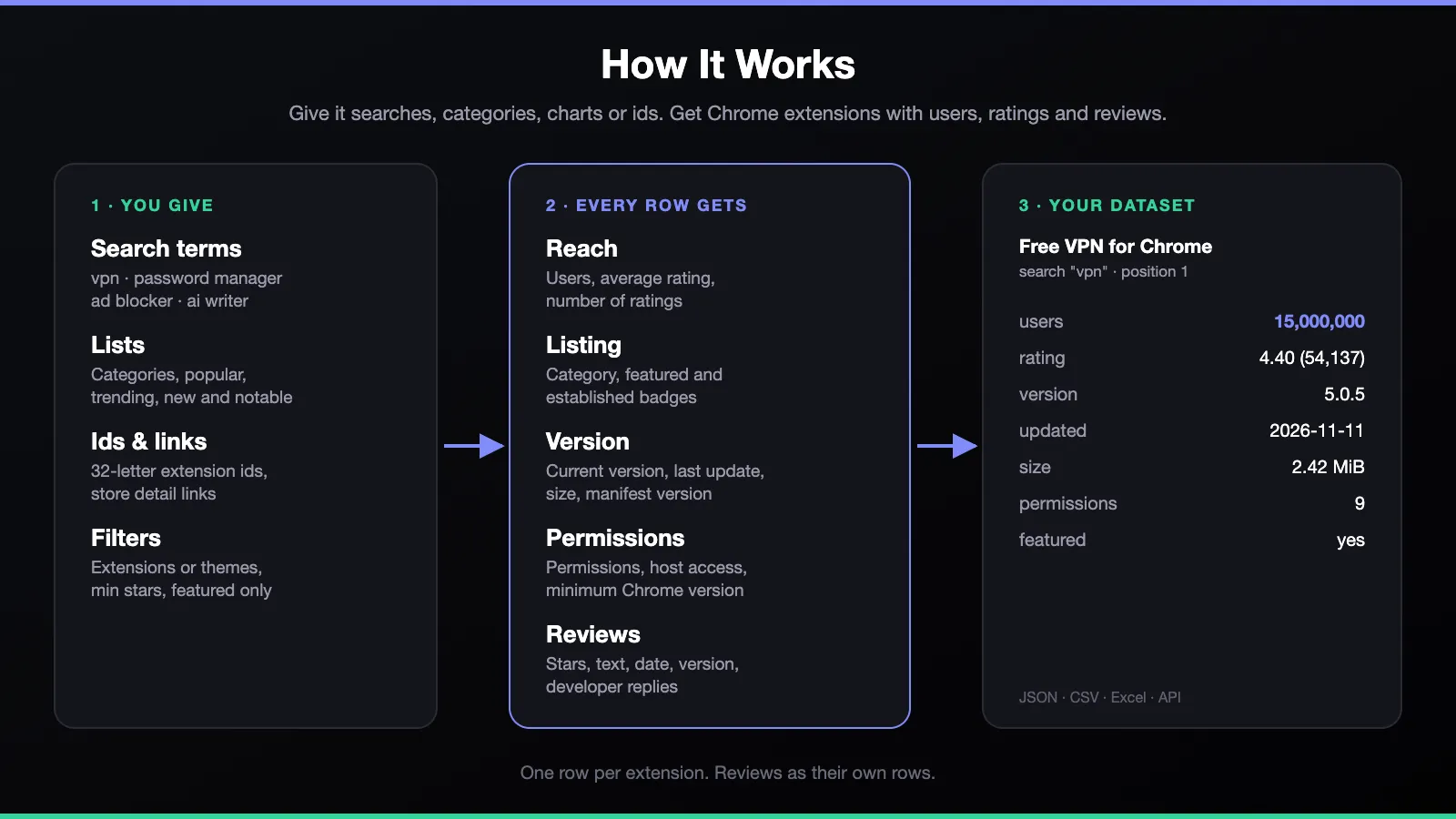
- Add search terms, a category, a chart or ids.
- Each list is read in the store's order, up to your limit.
- Full details and reviews are added when you turn them on.
- Extensions and reviews become rows, duplicates dropped.
- Export the dataset as JSON, CSV or Excel, or read it through the API.
Input Configuration
| Field | Type | Default | Description |
|---|---|---|---|
searchTerms | array | none | What a user would type in the store. |
startUrls | array | none | Detail, search or category links. |
extensionIds | array | none | 32-letter extension ids, each with full details. |
category | string | none | A store category, e.g. productivity/developer. |
topChart | string | none | popular, trending or new_and_notable. |
itemType | string | all | Extensions, themes or both. |
minStars, featuredOnly, establishedOnly | The store's own filters. | ||
categoryOrder | string | relevance | Relevance, highest rated, trending or recently updated. |
country, language | string | us, en | Store region and language. |
maxItemsPerSearch | integer | 100 | Upper limit per list. |
includeDetails | boolean | false | Version, size, permissions, developer, privacy, similar items. |
includeReviews | boolean | false | Reviews as separate rows. |
maxReviewsPerItem | integer | 20 | Reviews per extension. |
reviewOrder, reviewStars, reviewLanguage | Order and filters for reviews. |
The developer-tools category with details
Reviews of two extensions, lowest rated first
Output Overview
Extension rows (recordType: extension): extensionId, title, itemType, usersCount, averageRating, ratingsCount, summary, categoryName, categorySlug, featuredBadge, establishedBadge, madeByGoogle, currentVersion, manifestVersion, minChromeVersion, firstPublishedAt, permissions, hostPermissions, optionalPermissions, homepageUrl, iconUrl, listingUrl, fromInput, position, scrapedAt.
With full details: updatedOn, packageSize, fullDescription, supportedLanguages, inAppPurchases, websiteOwnerVerified, contentScriptSites, developer, legalName, contactEmail, contactPhone, contactAddress, contactWebsite, isTrader, publisherUrl, privacyPolicy, collectsUserData, dataCollected, supportUrl, mediaItems, similarItems.
Review rows (recordType: review): reviewId, extensionId, extensionTitle, stars, reviewText, reviewerName, postedAt, editedAt, helpfulVotes, reviewedVersion, reviewLanguage, developerReply, developerReplyAt, reviewUrl.
Output Samples
Key Output Fields
usersCount,averageRating,ratingsCount: reach and reputation.currentVersion,updatedOn,packageSize: how actively it is maintained.permissions,hostPermissions,dataCollected: what it can access and what it collects.developer,contactEmail,publisherUrl: who publishes it.
FAQ
Which store region?
The US store in English by default. The German store and other languages are available through country and language.
Why is an extension "not found"? It was removed from the store, or it is not offered in the chosen region.
What does the free Apify plan get? Up to 20 rows from the first input per run. Any paid Apify plan removes the limit.
How much does it cost? $0.01 per run start, $0.0003 per extension ($0.30 per 1,000), $0.0008 more per extension with full details ($0.80 per 1,000), and $0.0001 per review ($0.10 per 1,000). 1,000 extensions with full details cost $1.11. Duplicates and the run summary are never charged. Set "Max cost per run" in the run options and the run stops by itself at that amount.
Support
Found a bug or missing a field? Open an issue on the actor's Issues tab with your run link and input.
Additional Services
Need a scheduled feed of a category, review alerts or a custom export? Ask on the Issues tab; tailored work is available.
Explore More Scrapers
- WHOIS & DNS Lookup: registration, DNS and email records of the developers' domains.
Full list at apify.com/memo23.
🤖 For AI Agents & LLM Apps
Compact reference for agents calling this actor through the Apify MCP server or the Apify API (actor: memo23/chrome-web-store-scraper).
Purpose: Chrome Web Store extensions by search, category, chart or id, with optional full details and reviews.
Minimal input:
Output: extension rows (extensionId, title, usersCount, averageRating, ratingsCount, categoryName, currentVersion, permissions, listingUrl); with includeDetails: updatedOn, packageSize, developer, contactEmail, privacy fields, similarItems; review rows when includeReviews is on. Every row has recordType.
Behaviors an agent should know:
maxItemsPerSearchbounds each list and so the cost.- Extension ids always come with full details.
- Billing: $0.01 per run start, one
extensioncharge per extension ($0.0003), oneextension-detailscharge per extension with details ($0.0008), onereviewcharge per review ($0.0001).
⚠️ Disclaimer
This Actor is an independent tool and is not affiliated with, endorsed by, or sponsored by Google. All trademarks mentioned are the property of their respective owners.
It returns publicly available store listings and public reviews, including contact details developers publish as traders. Users are responsible for making sure their use complies with the store's terms, applicable data-protection law (GDPR and similar) and their own contractual obligations.
SEO Keywords
chrome web store scraper, chrome extension scraper, chrome extension reviews, chrome web store api, extension user count, chrome extension permissions, chrome extension data, chrome web store categories, extension developer contacts, browser extension market research, chrome web store export to csv


