
![Facebook Public Group Posts & Comments [Only $1.5💰] NO COOKIES avatar](https://images.apifyusercontent.com/ebo9kb_wV1xwMorNdH_UbSCsQZ0eyLEbYCzQ5NBGrYY/rs:fill:250:250/cb:1/aHR0cHM6Ly9hcGlmeS1pbWFnZS11cGxvYWRzLXByb2QuczMudXMtZWFzdC0xLmFtYXpvbmF3cy5jb20vbmduOHZSRVNUa3NleVdFNnAtYWN0b3ItazJFR0dTR0xkcXNyV29TNnEtVmd4S2k2bXRjay1GYWNlYm9va19sb2dvXyUyOHNxdWFyZSUyOS5wbmc.webp)
Facebook Public Group Posts & Comments [Only $1.5💰] NO COOKIES
Pricing
from $1.50 / 1,000 results
Facebook Public Group Posts & Comments [Only $1.5💰] NO COOKIES
[Only $1.5💰] Scrape Facebook public group posts and comments extract text, dates, media URLs, author info, engagement metrics (likes/shares), and detailed comment threads. Perfect for social listening, market research, or tracking community trends. High-speed, stealthy, and requires no login
Pricing
from $1.50 / 1,000 results
Rating
5.0
(3)
Developer

Muhamed Didovic
Maintained by CommunityActor stats
12
Bookmarked
2K
Total users
598
Monthly active users
9.7 hours
Issues response
a day ago
Last modified
Categories
Share
Facebook Group Posts & Comments Scraper
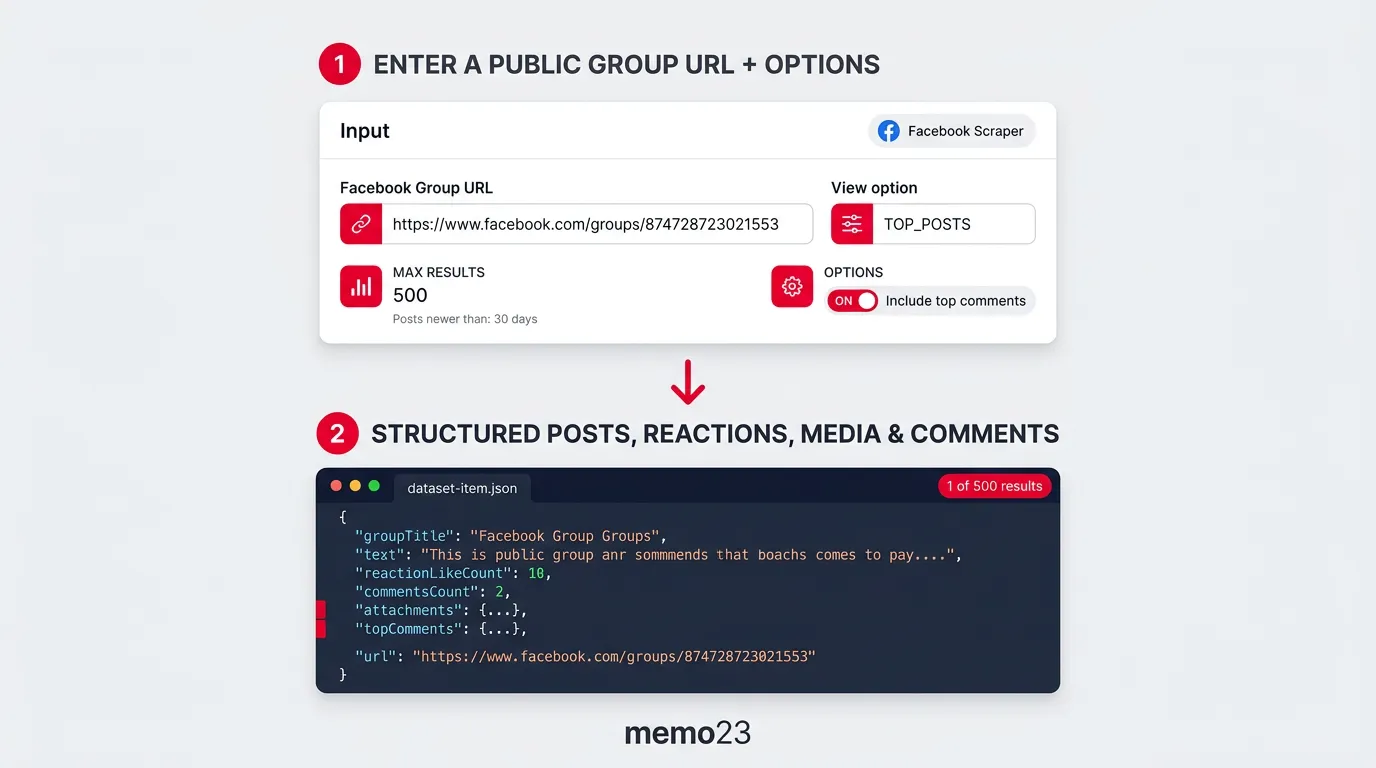
Unlock the Full Power of Facebook Group Communities - The fastest and most reliable scraper to extract group posts, top comments, and engagement metrics from public Facebook Groups. By bypassing heavy browser automation and extracting data directly from Facebook's GraphQL API, this actor delivers comprehensive, real-time insights while saving you compute time and resources.
"From community management and market research to brand monitoring, we turn Facebook Group data into your competitive advantage."
Overview
The Facebook Group Posts & Comments Scraper is your go-to tool for extracting deep community data. Ideal for marketers, researchers, and community managers, it tracks post content, reaction counts, media attachments, and the most valuable discussions happening in the comments section.
With easy setup, relative date filtering, and multiple export formats (JSON, CSV, Excel), it's a good fit for anyone who needs Facebook group activity as one clean record per post.
Use Cases
Who is this scraper for?
- Marketing Teams: Track brand mentions and monitor sentiment inside highly engaged community hubs.
- Researchers: Analyze chronological timelines of group discussions, trending topics, and member interactions.
- Community Managers: Identify top contributors, highly engaging post formats, and overall group health metrics.
- Data Analysts: Build historical datasets of Facebook group activity for predictive modeling.
How It Works
- Provide Input: Enter one or more public Facebook Group URLs and configure your desired sorting option (Top Posts, Recent Activity, etc.).
- Set Filters: Optionally provide a date cutoff (e.g.,
30 daysor2026-03-01) to stop scraping once older posts are reached. - Extraction: The scraper navigates the GraphQL feed, intelligently paginating and collecting deep post data and top comments without rendering heavy UI elements.
- Export Data: Download your dataset, one record per post, in JSON, CSV, or Excel format.
Features
- Multiple Sorting Options: Scrape feeds using "New posts" (Chronological), "Newest activity" (Recent Activity), "Most relevant" (Top Posts), or "BuySell items".
- Smart Date Filtering: Only fetch posts newer than a specific date (e.g.,
2026-03-01) or relative time (e.g.,30 days,2 weeks). The scraper stops paginating automatically when it hits older content. - Comprehensive Post Data: Extracts post text, legacy and GraphQL IDs, post URLs, creation timestamps, and group titles.
- Engagement Metrics: Extracts reaction counts (Like, Love, Haha, Wow, Sad, Angry), comment counts, and share counts.
- Media Attachments: Retrieves images and videos attached to the post with their direct URIs.
- Optional Top Comments: Toggle to pull the top/most interesting comments for each post (including comment text, author ID/name, and direct comment URL).
- Keyword Search Filter: Optionally keep only posts whose text contains a given phrase (case-insensitive). The scraper keeps paginating until it collects
maxItemsmatching posts or the feed runs out. - Marketplace Listing Detection: Posts in buy/sell groups that come from a Marketplace listing are flagged and enriched with the listing ID, URL, price, and sold/live/pending status.
- Optional Location Enrichment: Toggle to fetch each detected Marketplace listing's page for its location (text + latitude/longitude) and structured title — data the group feed does not include.
- Monitoring Mode (only new posts): Toggle to return only posts the scraper hasn't delivered in previous runs. It remembers post IDs across runs and stops paginating once it reaches already-seen posts — ideal for scheduled runs that should surface just what's new since last time.
- Photo Count: Every post reports
photoCount(the true number of photos) andadditionalPhotoCount(how many exist beyond the ones returned inattachments), so you always know when a post has more photos than the feed inlines — no extra request needed.
Input Configuration
The scraper requires a simple JSON input. Here are the core fields:
| Field | Type | Description | Default |
|---|---|---|---|
startUrls | Array | Required. List of Facebook group URLs to scrape (e.g. [{ "url": "https://www.facebook.com/groups/12345" }]). | [] |
viewOption | String | How to sort posts. Options: CHRONOLOGICAL, RECENT_ACTIVITY, TOP_POSTS, CHRONOLOGICAL_LISTINGS. | "CHRONOLOGICAL" |
search | String | Keep only posts whose text contains this phrase (case-insensitive). The scraper keeps paginating until it collects maxItems matches or the feed ends. Leave empty to scrape all posts. Facebook's group search is login-gated, so matching runs client-side over the feed — a keyword search across many groups or a long date range reads a lot of pages and can be slow and compute-heavy, so narrow the groups or date range if a run stops on its cost or time limit. | undefined |
onlyPostsNewerThan | String | Stop paginating when hitting posts older than this date (e.g., 2026-04-20, 1 month). | undefined |
onlyPostsOlderThan | String | Upper bound on the window: keep only posts published before this point (e.g. 2026-02-01, 20 days). Pair it with onlyPostsNewerThan for a closed date range. Posts newer than this bound are skipped free of charge while the scraper seeks back to your window. If the window is very far in the past, that seek can be too deep to reach in a single run — the scraper then stops with a message asking you to use a more recent date, rather than running on to the timeout. | undefined |
includeComments | Boolean | Extract the top comments Facebook inlines in the group feed (no extra requests). Fast, but Facebook only inlines a curated subset and for many posts inlines none, so topComments is often empty even when commentsCount is above zero. For reliable comments use fetchAllComments. | false |
fetchAllComments | Boolean | Reliable comments: for each post that has comments, make one extra request to the post's page and return the comments Facebook renders there (text, author name/ID, profile picture, direct comment URL). Use this when includeComments comes back empty. Adds one request per commented post (posts with zero comments are skipped), so runs are slower. Returns the top-level comments shown on the post page; enable includeCommentReplies to also get replies. | false |
includeCommentReplies | Boolean | Deepest comment mode: pulls each post's top-level comments and their replies (nested, marked with threadingDepth) from Facebook's comment view. Most complete and slowest — busy posts take several requests. Supersedes fetchAllComments when both are on, and falls back to top-level comments if Facebook rotates its comment endpoint. | false |
enrichMarketplaceListings | Boolean | For each post detected as a Marketplace/buy-sell listing, make one extra request to the listing page to add its location (text + latitude/longitude) and structured title. Adds one request per listing, so runs are a bit slower. Non-listing posts are unaffected. | false |
monitoringMode | Boolean | Return only posts not seen in previous runs. Remembers delivered post IDs across runs and stops paginating once it reaches already-seen posts. Ideal for scheduled runs. Already-seen posts are still fetched to be recognized as duplicates, so they are billed at the lower Additional data rate rather than the full result rate. | false |
maxItems | Integer | Maximum number of posts to scrape per group. | 100 |
proxy | Object | Proxy configuration. Highly recommended to use Residential Proxies to avoid blocks. | Apify Auto |
Example Input
Example Input (a closed date range)
Everything posted in January 2026, and nothing else:
Example Input (buy/sell group with Marketplace enrichment)
Output Structure
Each dataset item is one Facebook group post, with around 30 fields: the post text, author, timestamps, reactions and comment counts, photos, and (when enabled) comments.
What "structured" means here: every post comes back as the fixed fields below, with the author's own words unchanged in text. On posts that read like a listing, the scraper also pulls the price, bedrooms, bathrooms, floor area and phone numbers out of that text into parsed* fields. It reads common English phrasing and leaves a field empty rather than guessing. Posts that come from a Facebook Marketplace listing also carry Facebook's own marketplacePrice, plus marketplaceTitle, marketplaceLocation, and coordinates when enrichMarketplaceListings is on.
Key Output Fields
- Post Core:
facebookUrl,inputUrl,facebookId,groupTitle,url,legacyId,id,text,time - Shared posts (reshares):
attachedStoryText— when a post reshares another post,textholds the sharer's caption andattachedStoryTextholds the full text of the original nested post (where listing details usually live). Absent on non-shares; if a reshare has no caption of its own, the original text is used astext. - Timestamps:
timeis the post's own creation time, verified against the post's ID before it is returned.timeSourcetells you how much to trust it —story(verified),unverified(only one candidate, no ID to check it against),unit(Facebook returned only a feed-unit/bundle timestamp, sotimeisnull),unknown(no timestamp at all).unitTimecarries the feed-unit/bundle timestamp when the post arrived inside an aggregated unit such as "X added 5 listings" — it is not a creation time.timeisnullrather than approximated whenever the real value can't be established. - User Info:
user.id,user.name - Engagement:
feedbackId,topReactionsCount,reactionLikeCount,reactionLoveCount,reactionHahaCount,commentsCount,sharesCount,likesCount - Images/Media:
attachments(Array containing thumbnails, direct URIs, heights, widths, and types), plusphotoCount(total photos on the post) andadditionalPhotoCount(photos beyond those returned inattachments;0when all are included) - Comments (If enabled):
topComments(Array containing comment IDs, text, depth, profile info, and direct comment URLs) - Marketplace (listing posts only):
isMarketplaceListing,marketplaceListingId,marketplaceUrl,marketplacePrice,marketplaceIsSold,marketplaceIsLive,marketplaceIsPending - Marketplace Enrichment (if
enrichMarketplaceListings: true):marketplaceLocation(text, e.g."Cebu City, PH-07"),marketplaceLatitude,marketplaceLongitude,marketplaceTitle - Listing details read from the text (listing-like posts only):
parsedPrice(a number, e.g.245000for "$245k"),parsedPriceText(as written),parsedPricePeriod(month,weekornightfor rents),parsedBedrooms,parsedBathrooms,parsedSquareFeet,parsedSquareMeters,parsedPhone(the first number; US/Canada numbers as+1XXXXXXXXXX),parsedPhones(every number found)
Marketplace fields are only present on posts that actually originate from a Marketplace listing. Regular posts never carry these fields.
The
parsed*fields are present only when the post text contains at least one of them. They come from the author's own wording, and a value the text doesn't state clearly is left empty rather than guessed.
JSON Output Sample
(Shortened for readability)
JSON Output Sample (Marketplace listing with enrichment)
(Shortened for readability)
JSON Output Sample (for-sale post with listing details)
(Illustrative example, shortened for readability)
Coming from another Facebook Groups scraper?
Four things people most often ask for when they switch, and what this Actor does about each.
| What you want | Here |
|---|---|
| A real date range, not just "last N days" | onlyPostsNewerThan and onlyPostsOlderThan combine into a closed window. Verified on a live group: a 60-to-20-days-ago range returned 53 posts, every one inside the window and none outside. |
| Not to be billed for posts you filtered out | Posts skipped because they are newer than your onlyPostsOlderThan bound are free. Reaching an older window means paging past everything more recent, and that traversal is our cost, not yours. |
| Not to be billed when a run returns nothing | Results are charged per delivered row. A run that delivers nothing charges no result fees, and an empty run is reported as a failure rather than a silent success. |
| Control over feed order | viewOption exposes all four of Facebook's orderings (CHRONOLOGICAL, RECENT_ACTIVITY, TOP_POSTS, CHRONOLOGICAL_LISTINGS) instead of picking one for you. |
One honest limit worth knowing before you switch: Facebook's public group feed only serves a limited recent window, and no scraper can filter its way past that. If you ask for a range the feed no longer reaches, this Actor tells you exactly how far back it got and why it stopped, rather than returning an empty dataset that looks like a bug.
Running scheduled? monitoringMode remembers the post IDs it already delivered, so a repeating job pays the full result rate only for genuinely new posts.
FAQ
Can I scrape private Facebook groups? No. This scraper is designed strictly for public Facebook groups that are visible to anyone on the internet without requiring a login session.
Are comments always extracted?
No, to keep datasets clean and fast, comments are optional, and there are two ways to get them. includeComments: true pulls the "Top/Most Interesting" comments Facebook inlines directly in the group feed — this is free of extra requests but Facebook inlines only a curated subset, and for many posts it inlines none, so topComments can be empty even when the post has comments. For reliable coverage set fetchAllComments: true: the scraper then fetches each commented post's page and returns the comments Facebook renders there. It adds one request per post that has comments (posts with none are skipped), so it is slower — use it when includeComments returns empty.
Why is commentsCount higher than the number of comments in topComments?
commentsCount is Facebook's total for the post, which includes replies. With fetchAllComments alone, topComments holds the top-level comments Facebook renders on the post page — replies sit behind a "view more" click and aren't included, so on a large thread the list is a subset. Enable includeCommentReplies to also pull the replies (each carries threadingDepth, where 0 is a top-level comment and 1 is a reply).
Does the scraper split post text into fields like price, bedrooms, or phone number?
Yes, for posts that read like a listing. The price, bedrooms, bathrooms, square feet or metres, and phone numbers are pulled out of the text into parsed* fields, and the text itself stays unchanged in text. The parsing reads common English phrasing ("3bd/2ba", "3 bed 2 bath", "$245,000", "245k", "$1,450/month", "(336) 555-0142") and leaves a field empty rather than guessing, so a post in another language or an unusual format can come back with some fields empty. Posts that come from a Marketplace listing also carry Facebook's own marketplacePrice.
Is this scraper fast?
Yes. Unlike traditional scrapers that load entire browser engines (Puppeteer/Playwright) to scroll down pages, this actor directly queries Facebook's backend GraphQL APIs using CheerioCrawler. This drastically reduces run times and compute usage costs.
Why did the scraper stop before reaching maxItems?
If you provided a onlyPostsNewerThan date filter, the scraper will immediately stop paginating as soon as it detects it has reached a chronological section of the feed older than your requested timeframe, saving you requests.
How do I scrape a specific month, or everything before a date?
Set onlyPostsOlderThan for the upper bound, and add onlyPostsNewerThan for the lower one if you want a closed range. The feed runs newest-first, so a run targeting an older window pages past the recent posts first; those skipped posts are not charged, and the run does not give up while it is still seeking your window.
How do I get the location of Marketplace listings?
Enable enrichMarketplaceListings. The group feed only carries the listing ID and price, so the scraper makes one extra request per detected listing to its page and adds marketplaceLocation, marketplaceLatitude, marketplaceLongitude, and marketplaceTitle. Because this is one additional request per listing, listing-heavy runs are slightly slower and use a little more proxy traffic. It is off by default, so normal runs are unaffected.
Why are there no marketplace* fields on my posts?
Those fields only appear on posts that originate from a Marketplace/buy-sell listing. Regular discussion posts will not have them. Marketplace listings are most common in buy/sell groups (try viewOption: "CHRONOLOGICAL").
Can I match group posts to listings from a Marketplace scraper (de-duplication)?
Yes. The marketplaceListingId field is the canonical Facebook listing ID — the same number you see in both https://www.facebook.com/marketplace/item/{id}/ and https://www.facebook.com/commerce/listing/{id}. It maps 1:1 to the listing ID produced by a Marketplace scraper, so you can keep a set of IDs you have already collected and skip any group post whose marketplaceListingId is already in that set. This field is always present on listing posts, regardless of the enrichMarketplaceListings toggle (that toggle only adds location and title on top).
Explore More Scrapers
If you found this Facebook Group Posts & Comments Scraper useful, be sure to check out our other powerful scrapers and actors at memo23's Apify profile. We offer a wide range of tools to enhance your web scraping and automation needs across various platforms and use cases.
Support
- For issues or feature requests, please use the Issues section of this actor.
- If you need customization or have questions, feel free to contact the author:
- Author's website: https://muhamed-didovic.github.io/
- Email: muhamed.didovic@gmail.com
Additional Services
- Request customization or whole dataset: muhamed.didovic@gmail.com
- If you need anything else scraped, or this actor customized, email: muhamed.didovic@gmail.com
- For API services of this scraper (no Apify fee, just usage fee for the API), contact: muhamed.didovic@gmail.com
🤖 For AI Agents & LLM Apps
Compact reference for AI agents calling this actor via the Apify MCP server or the Apify API (actor: memo23/facebook-public-group-posts-scraper).
Purpose: Extracts posts from public Facebook groups — text, engagement counts, media, optional top comments, and Marketplace listing data — via Facebook's GraphQL feed API, no browser and no login.
Minimal input:
Keyword mode: add "search": "your phrase" (case-insensitive text filter), or paste a group search URL (https://www.facebook.com/groups/<id>/search/?q=keyword) as the start URL.
Output: one dataset row per post — facebookUrl, inputUrl, facebookId, groupTitle, url, legacyId, id, text, attachedStoryText (the nested original post's text, on reshares only), time (post's own creation time, null when unverifiable), timeSource (story | unverified | unit | unknown), unitTime (feed-unit/bundle timestamp, null when not aggregated), user {id, name}, feedbackId, topReactionsCount, reactionLikeCount, reactionLoveCount, reactionHahaCount, commentsCount, sharesCount, likesCount, attachments[], photoCount, additionalPhotoCount; topComments[] when includeComments: true (feed-inlined) or fetchAllComments: true (fetched from each post's page — reliable); isMarketplaceListing, marketplaceListingId, marketplaceUrl, marketplacePrice, marketplaceIsSold on Marketplace listing posts, plus marketplaceLocation, marketplaceLatitude, marketplaceLongitude, marketplaceTitle when enrichMarketplaceListings: true; parsedPrice, parsedPriceText, parsedPricePeriod, parsedBedrooms, parsedBathrooms, parsedSquareFeet, parsedSquareMeters, parsedPhone, parsedPhones[] on posts whose text reads like a listing.
Behaviors an agent should know:
- Always set
maxItems(posts per group, default 100). Public groups only — private or login-gated groups are not supported. viewOptionpicks the feed sort:CHRONOLOGICAL(new posts, default),RECENT_ACTIVITY(newest activity),TOP_POSTS(most relevant),CHRONOLOGICAL_LISTINGS(buy/sell items).onlyPostsNewerThan(absolute2026-04-20or relative30 days) stops pagination at older posts, so runs can end before reachingmaxItems;onlyPostsNewerThanHoursoverrides it when set.onlyPostsOlderThan(same formats) is the UPPER bound. Use both together for a closed date range. Posts newer than this bound are skipped without charge while the scraper seeks back to the window, so requesting an older range does not bill for the recent posts it passes.includeComments,fetchAllCommentsandenrichMarketplaceListingsare off by default.includeCommentsreads the comments Facebook inlines in the feed (no extra requests, often empty).fetchAllCommentsand Marketplace enrichment each add one extra request per applicable post (a post with comments / a detected listing).monitoringMode: truereturns only posts not delivered in previous runs (post IDs are remembered across runs) — for scheduled runs.- Billing follows the Pricing tab on the actor page. On a pay-per-event plan,
monitoringModere-checks already-seen posts at the lower additional-data rate rather than the full result rate.
⚠️ Disclaimer
This Actor is an independent tool and is not affiliated with, endorsed by, or sponsored by Meta Platforms, Inc. or any of its subsidiaries. All trademarks mentioned, including Facebook and Facebook Marketplace, are the property of their respective owners.
The scraper accesses only publicly available Facebook group posts, comments, and Marketplace listings — no authenticated endpoints, paid features, or content behind the facebook.com login wall, and private or login-gated groups are not supported. Users are responsible for ensuring their use complies with facebook.com's Terms of Service, applicable data-protection law (GDPR, CCPA, etc.), and any contractual obligations of their own organization.
SEO Keywords
facebook group scraper, scrape facebook groups, facebook posts scraper, facebook group posts API, facebook.com scraper, Apify facebook, facebook comments scraper, facebook marketplace scraper, social media scraper, group feed scraper, social media monitoring, community insights data, brand sentiment tracking, post engagement data, lead generation data, social media intelligence, community data mining, marketplace listings data


