

Facebook Comments Extractor 🗨️⚡: Data, Details & Analytics
Pricing
from $0.30 / 1,000 results
Facebook Comments Extractor 🗨️⚡: Data, Details & Analytics
💠 $0.5 / 1,000 results ·⚡ High-speed comment scraping for 100+ Facebook URLs per run — extract comments, replies, shared links, and images across Posts, Videos, Reels, and Groups.
Pricing
from $0.30 / 1,000 results
Rating
4.9
(6)
Developer

TheDoor
Maintained by CommunityActor stats
8
Bookmarked
1.2K
Total users
245
Monthly active users
4 days ago
Last modified
Categories
Share
⚡ Facebook Comment Scraper — 100+ Post URLs in One Run
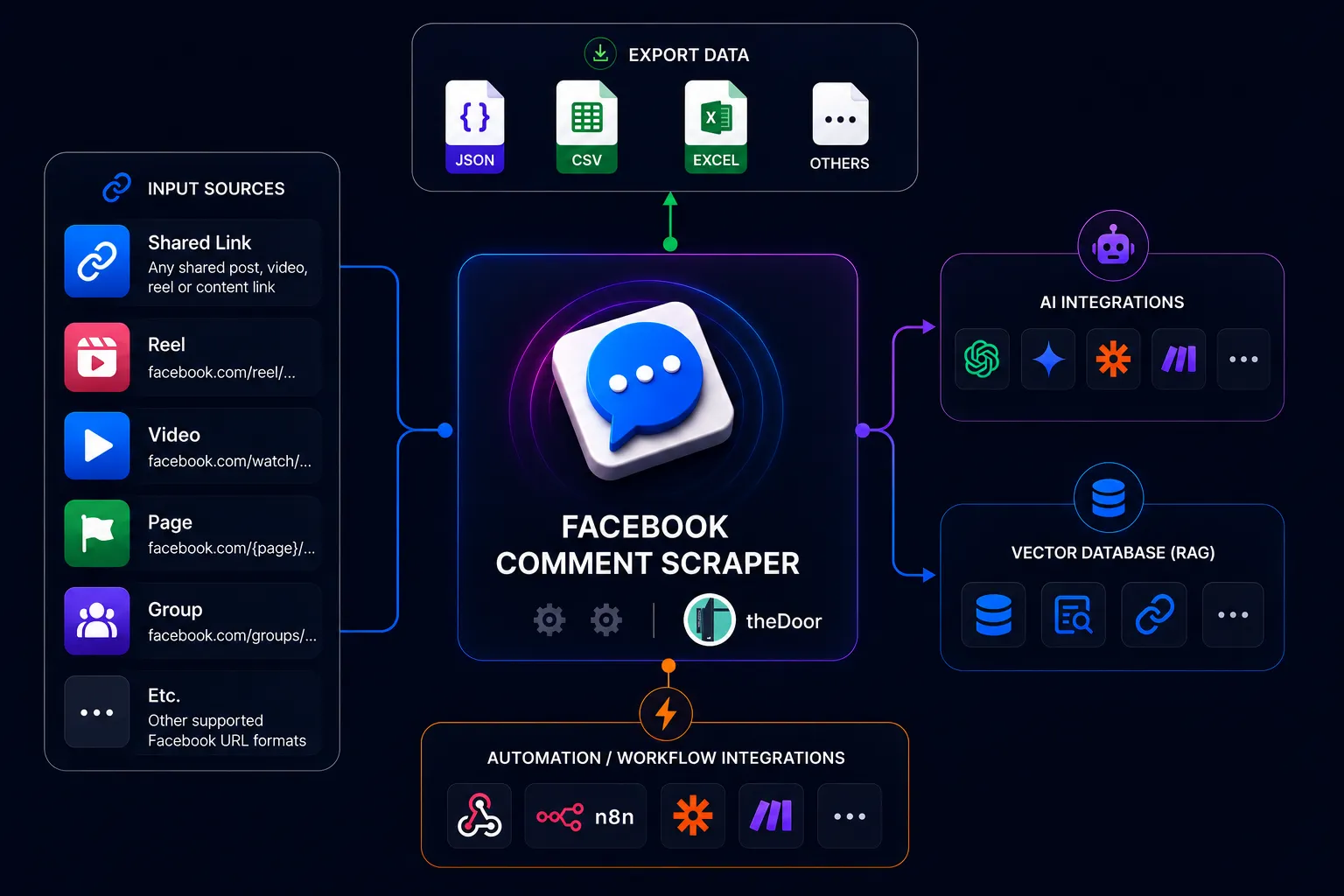
Scrape comments from 100+ Facebook URLs in one run at high speed, including replies, images, shared links, reaction totals, and author profiles. Supports Posts, Videos, Reels, Groups, and almost every common Facebook URL format. Built for AI agents, SaaS applications, and automation workflows.
⚡ Fast & Reliable
Built for high-volume comment collection in AI agents, SaaS apps, and automation workflows:
- ⚡ 100+ Facebook URLs in one run with asynchronous bulk processing
- 🚀 Thousands of comments in minutes with automatic retry on transient errors
- 🌐 Almost all common URL types — posts, photos, videos, reels, groups, share links, and profile posts
- 🖼️ Rich comment data — author profiles, profile pictures, comment images, media, and shared links
- 📊 Engagement data — reaction totals, per-type reactions, replies, timestamps, and direct comment URLs
Explore the full Facebook scraping toolkit
Need the posts before collecting comments? Use the Facebook Group Post Scraper for public group posts or the Facebook Page Scraper for page posts. Then send the resulting post URLs to this Actor to collect comments and replies.
📋 Supported URL Formats
| URL type | Example pattern | Accepted |
|---|---|---|
| Shared post link | facebook.com/share/p/{share_id}/ | ✅ |
| Shared video link | facebook.com/share/v/{share_id}/ | ✅ |
| Shared reel link | facebook.com/share/r/{share_id}/ | ✅ |
| Reel | facebook.com/reel/{reel_id} | ✅ |
| Watch video | facebook.com/watch/?v={video_id} | ✅ |
| Page video | facebook.com/{page}/videos/{video_id} | ✅ |
| Group post | facebook.com/groups/{group}/permalink/{post_id}/ | ✅ |
| Group post (posts path) | facebook.com/groups/{group}/posts/{post_id}/ | ✅ |
| Page post | facebook.com/{page}/posts/{post_id} | ✅ |
| Page post with pfbid | facebook.com/{page}/posts/pfbid{...} | ✅ |
| Legacy permalink | facebook.com/permalink.php?story_fbid={post_id}&id={page_id} | ✅ |
| Photo post | facebook.com/photo/?fbid={photo_id} | ✅ |
| Legacy photo link | facebook.com/photo.php?fbid={photo_id} | ✅ |
Shared links are automatically resolved to the underlying Facebook post before comments are collected. Reel links are normalized to the equivalent Watch surface when needed for reliable comment access.
📥 Input Configuration
Simple Input Example
Fixed Number of Comments
This collects up to 100 comments per Post URL.
All Available Comments
Use targetComments: -1 to collect all available comments. The Actor will
continue through every available comment page instead of stopping at a fixed
limit.
Limit Replies per Comment
This collects up to 50 comments, each with up to 10 replies (nested replies included).
Comments From the Last 7 Days
Set commentsNewerThan to get only comments posted within a relative time, for
example "24 hours", "7 days", or "30 minutes", the same format as
postsNewerThan in our Page and Group Actors. Use targetComments: -1 to get
every comment in that time. With includeReplies on, their replies are included.
Only Newest Comments for the Next Run
A run never returns comments you already got from this post in a previous run. Your first run gets comments as usual. Every next run on the same post gets only comments posted after your last run, so you don't pay for the same comments twice. This is ideal for scheduled runs that monitor a post. Replies to new comments are included; new replies to old comments are not. Each Apify account keeps its own progress per post.
With commentsNewerThan or onlyNewComments, comments are sorted newest
first and orderingMode is ignored. targetComments still limits how many
comments you get per run.
Input Options
| Field | Type | Required | Default | Description |
|---|---|---|---|---|
postUrls | List of Post URLs | Yes | - | Facebook Post URLs, including posts, videos, reels, photos, groups, and share links. Use an array even for one post |
orderingMode | Text | No | "ALL" | Comment order: "MOST_RELEVANT", "NEWEST", or "ALL" |
targetComments | Number | No | 100 | Maximum comments per URL. Use -1 to fetch all available comments |
includeReplies | Boolean | No | false | When true, also return replies (nested replies included); when false, return only top-level comments |
maxReplies | Number | No | 100 | Maximum replies per top-level comment (nested replies count too). Used only when includeReplies is true. -1 = all, 0 = none |
includeReactions | Boolean | No | true | Include total reactions and reaction type counts |
commentsNewerThan | Text | No | - | Only comments posted within a relative time: "7 days", "24 hours", "30 minutes". Empty = all dates |
onlyNewComments | Boolean | No | false | Only newest comments for the next run: never returns comments you already got from this post in a previous run; each next run gets only comments posted after your last run |
orderingMode controls the order in which Facebook returns comments:
ALL— every comment, in Facebook's ranked order (default)MOST_RELEVANT— Facebook's ranked comments, with comments Facebook filters out (such as likely spam) removedNEWEST— newest comments first
targetComments controls how many comments are collected per Post URL. Set it to
-1 to fetch all available comments, regardless of the selected ordering
mode. This is recommended when completeness is more important than run time or
cost.
includeReplies controls reply collection. It is off by default, so only
top-level comments are returned. Set it to true to also get replies, including
nested replies. The Console displays this as a single on/off checkbox.
maxReplies limits the replies collected for each top-level comment, counting
nested replies at every level. It applies only when includeReplies is true
and is ignored otherwise. For example, targetComments: 50 with
maxReplies: 10 returns up to 50 comments, each with up to 10 replies. The
default is 100 replies per comment; use -1 to collect all replies.
Each Post URL is checked before comment collection begins. Unavailable or restricted posts are skipped, while other valid posts continue processing normally. Reel links are automatically normalized when needed for reliable comment access.
postUrls must always be an array. For one URL, use for example:
📤 Output Structure
Example Output
Each result represents one comment or reply. These examples show the main fields:
Output Fields
| Field | Type | Description |
|---|---|---|
post_url | string | Source Facebook URL |
id | string | Unique comment/reply ID |
comment_url | string | Direct Facebook URL for the comment/reply |
text | string | Comment text content |
timestamp | integer | Unix timestamp (seconds) |
comment_time | string | ISO 8601 datetime |
author_name | string | Author display name |
author_id | string | Author Facebook ID |
author_profile_picture | string | Author profile picture URL (100% coverage) |
author_profile_url | string|null | Author profile URL (when available) |
image_url | string|null | Attached image URL (~4% of comments) |
media | array | Attached comment media with ID, type, URI, URL, and thumbnail when available |
shared_post | object|null | Native Facebook post shared inside the comment, including URL, text, and media when available |
shared_link | string|null | Shared external link URL (~7% of comments) |
shared_link_title | string|null | Title of shared link |
shared_link_source | string|null | Source domain (e.g., "youtube.com") |
reactions_count | integer | Total reaction count |
reaction_types | object | Counts by type: like, love, haha, wow, care, sad, and angry |
replies_count | integer | Number of direct replies |
is_reply | boolean | true if this is a reply, false if top-level comment |
replyto_comment_id | string | Parent comment ID (only for replies) |
depth | integer | Nesting level (0 = top-level, 1+ = nested reply) |
Reaction Types
When reaction data is available, reaction_types contains the nonzero counts
returned by Facebook:
Supported keys are like, love, haha, wow, care, sad, and angry.
Unknown Facebook reaction IDs are preserved as unknown_<reaction_id>.
✨ What You Get
Complete Comment Data
- 📝 Comment text and timestamps
- 👤 Author names and profile pictures
- 🖼️ Attached images (when available)
- 🔗 Shared links with titles (YouTube, articles, etc.)
- ❤️ Reaction counts (likes, loves, etc.)
- 💬 All replies and nested conversations
Easy to Use
- Just paste Facebook URLs and click "Start"
- Works with any public post, video, reel, or group
- Get results in minutes, not hours
- Download as JSON, CSV, Excel, or HTML
- No coding or technical skills needed
Reliable & Fast
- Automatically handles errors and retries
- Processes multiple URLs at once
- Extracts thousands of comments quickly
- Works with all Facebook URL formats
🚀 How to Use
Quick Start (No Coding Required)
- Open the actor in Apify Console
- Paste Post URLs - Copy and paste any Facebook post, video, reel, photo, or group URL
- Set options (optional):
- How many comments to get (default: 100, use -1 for all)
- Include replies? (default: no)
- Max replies per comment (default: 100; -1 = all)
- Sort by newest or most relevant
- Click "Start" and wait for results
- Download data - Get your results as JSON, CSV, Excel, or HTML
That's it! No technical knowledge needed.
💡 Use Cases
- Market Research: Analyze customer feedback and sentiment
- Social Listening: Monitor brand mentions and discussions
- Content Analysis: Study engagement patterns and trends
- Lead Generation: Find potential customers in relevant groups
- Competitor Analysis: Track competitor posts and engagement
- Academic Research: Collect data for social media studies
📜 Legal & Privacy
This scraper only collects publicly available data from Facebook. Users are responsible for:
- Complying with Facebook's Terms of Service
- Following data protection laws (GDPR, CCPA, etc.)
- Using scraped data ethically and legally
- Respecting user privacy
See Apify's Terms of Service for more information.
❓ FAQ
Can I submit many URLs at once?
Yes. Add all URLs to postUrls. The Actor can process 100+ URLs in one run.
Why did I receive fewer comments than requested?
The post may contain fewer comments, comments may be restricted, or Facebook may not expose the complete comment thread for that post.
Can I collect every comment?
Yes. Set targetComments to -1. The Actor will continue until no more
comments are available.
Does includeReplies include nested replies?
Yes. When enabled, replies and nested conversations are included. When disabled, only top-level comments are returned.
Can I monitor a post and get only the newest comments?
Yes. Run the Actor on a schedule with onlyNewComments: true. Each run returns
only top-level comments posted since the previous run, with their replies.
New replies on older comments are not tracked yet.
Can I limit how many replies I get per comment?
Yes. Set maxReplies, for example 10. Each top-level comment then returns
at most 10 replies, counting nested replies too. The default is 100; -1 returns all
replies and 0 returns none. maxReplies only applies when includeReplies
is true.
Why does a comment show more replies on Facebook than I received?
Facebook's reply and comment counters also count hidden, deleted, and spam-filtered replies. The Actor returns every reply Facebook actually shows.
Are private or login-restricted posts supported?
No. Public Facebook posts, videos, reels, photos, and group posts are supported.
What happens if a URL is unavailable or has no comments?
That URL is skipped and does not create an error record in the dataset. Other valid URLs continue processing.
📞 Support
For bug reports, custom fields, or integration questions, contact
tuananhhoangtran2010@gmail.com.


![Facebook Public Group Posts & Comments [Only $1.5💰] NO COOKIES avatar](https://images.apifyusercontent.com/6LFUm6ctGS0xo5w6w8bBNcLO4OKLxK53XqNbrcaXmRM/rs:fill:76:76/cb:1/aHR0cHM6Ly9hcGlmeS1pbWFnZS11cGxvYWRzLXByb2QuczMudXMtZWFzdC0xLmFtYXpvbmF3cy5jb20vbmduOHZSRVNUa3NleVdFNnAtYWN0b3ItazJFR0dTR0xkcXNyV29TNnEtVmd4S2k2bXRjay1GYWNlYm9va19sb2dvXyUyOHNxdWFyZSUyOS5wbmc.webp)


