

Flight Price Aggregator API 💰 — 5 Sources, One Query
Pricing
from $2.50 / 1,000 flight offers
Flight Price Aggregator API 💰 — 5 Sources, One Query
Compare flight prices across Ryanair, Wizz Air, EasyJet, Google Flights & Skyscanner in one call. Fans out in parallel, merges by flight identity & cross-source price-matches — so you see who sells each flight cheapest. One-way & round-trip: fares, airlines, times, stops. Pure HTTP, JSON/CSV
Pricing
from $2.50 / 1,000 flight offers
Rating
5.0
(1)
Developer

Muhamed Didovic
Maintained by CommunityActor stats
0
Bookmarked
23
Total users
20
Monthly active users
8 hours ago
Last modified
Share
Flight Price Aggregator API — 6 Sources, One Query 💰
⭐ Useful? Leave a review — it takes 10 seconds and is the single biggest thing that helps other travel developers find this aggregator.
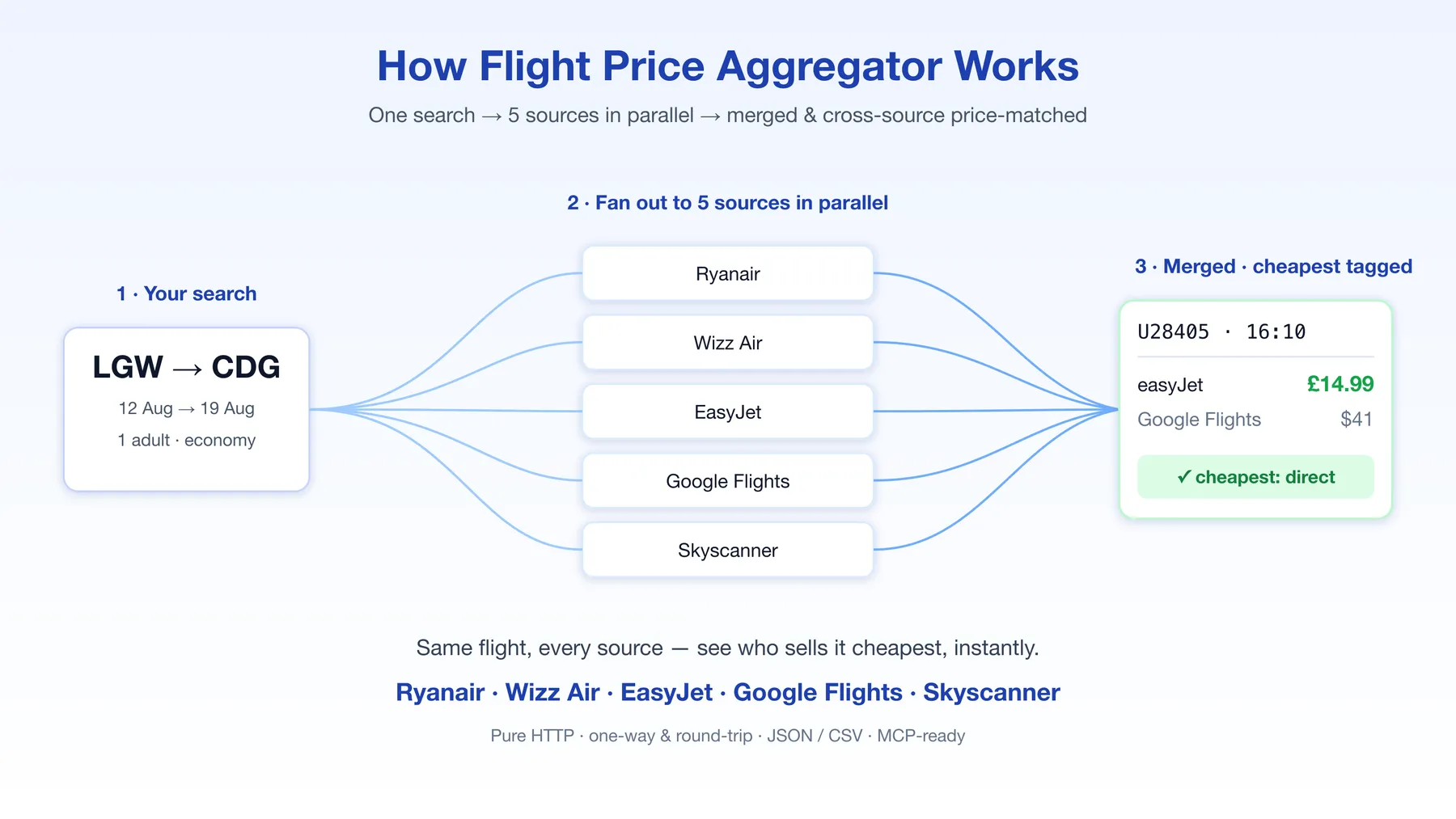
Compare flight prices across Google Flights, Skyscanner, Kiwi, Ryanair, Wizz Air and EasyJet in a single call — or batch up to 50 routes in one run. One search fans out to all six sources in parallel, merges the results by flight identity, and cross-source price-matches — so for every flight you instantly see which source sells it cheapest.
Why this actor
Most flight scrapers give you one source's view. Low-cost carriers are almost always cheaper booked direct than through a metasearch aggregator — but you only know that if you can see both prices side by side. This actor does exactly that:
- Direct LCC fares from Ryanair, Wizz Air and EasyJet — the real, bookable price, not a marked-up resale.
- Broad coverage from Google Flights, Skyscanner and Kiwi — every airline on the route, including the legacy carriers the LCCs don't show.
- One merged view — the same physical flight from multiple sources collapses into a single row with a per-source price map (
prices), the list of sources that returned it (sourcesFound), and the cheapest seller tagged (cheapestSource). - Batch mode — pass a
routesarray and monitor a whole route portfolio in one run instead of scheduling N separate actors. - Result filters —
directOnly,maxStops,maxDurationMinutesapplied server-side, so your downstream code gets exactly the flights you care about.
The payoff is concrete: on a typical London→Paris search the same EasyJet flight comes back at £14.99 direct vs $41 via Google Flights — and the actor tags the direct fare as cheapest automatically.
Use cases
- Fare-alert products — batch your subscribers' routes into one scheduled run, push a notification whenever the cheapest price drops below a threshold. Per-source price, cheapest seller and booking URL are already in the payload.
- Price comparison / meta-search tools — power a "compare all sources" feature without integrating six APIs and managing six sets of blocks.
- Deal hunting at scale — 50 routes per run × nonstop-only filter = a clean daily feed of direct-flight deals.
- Market & pricing research — see how direct LCC pricing compares to aggregator pricing at scale, with aligned timestamps across sources in one run.
- AI agents — pair with the companion MCP server to give an assistant a
search_flightstool.
Input
| Field | Required | Description |
|---|---|---|
origin | ✅* | Origin — city name (London) or airport IATA code (LGW) |
destination | ✅* | Destination — city name or IATA code |
departDate | ✅* | Outbound date YYYY-MM-DD |
returnDate | Return date YYYY-MM-DD (omit for one-way) | |
routes | Batch mode: array of {origin, destination, departDate?, returnDate?} — up to 50 routes in one run. Per-route dates fall back to the top-level dates. When set, top-level origin/destination are ignored. | |
adults / children | Passenger counts (defaults 1 / 0) | |
currency | Preferred display currency, ISO 4217 (default USD) | |
cabinClass | ECONOMY / PREMIUM_ECONOMY / BUSINESS / FIRST | |
directOnly | true = only nonstop flights | |
maxStops | Only flights with at most this many stops | |
maxDurationMinutes | Only flights up to this total duration (e.g. 300 = 5 h) | |
sources | Subset of the six sources; omit to query all | |
maxPerSource | Cap on offers per source before merging (default 10) |
* Either set origin + destination + departDate at the top level, or provide them per route in routes.
Single route
Batch mode — one run, many routes
Output
One row per merged offer:
| Field | Meaning |
|---|---|
prices | Every source's price for this exact flight, keyed by source |
sourcesFound | Which sources returned this flight |
cheapestSource | The source selling it cheapest |
isCheapest | true on the single cheapest offer per direction |
stops / durationMinutes | Stop count and total duration (filterable via input) |
Export as JSON, CSV, Excel or XML from the run page, or pull via the Apify API.
Code examples
curl
Python (apify-client)
Node.js (apify-client)
How it compares
| Feature | This actor | Single-source scraper (Google Flights only) | Other multi-source scraper | Browser-based scraper |
|---|---|---|---|---|
| Sources per run | 6 (Google Flights, Skyscanner, Kiwi, Ryanair, Wizz Air, EasyJet) | 1 | 5–7 | 1–2 |
| Routes per run | Up to 50 (batch mode) | 1 | 1 | 1 |
| Per-source price map + cheapest seller | Yes | No | Yes | No |
| Direct-only / max-stops / max-duration filters | Yes, server-side | Rare | No (post-process yourself) | Rare |
| City-name input (auto-resolves to IATA) | Yes | IATA only | IATA only | Varies |
| Children in passenger count | Yes | Varies | Adults only | Varies |
| Scraping engine | Raw HTTP | Raw HTTP | Raw HTTP | Headless browser |
| Companion MCP server for AI agents | Yes | Rare | Varies | Rare |
The honest take: if you only need one source's view of one route, a single-source scraper is fine. If you monitor multiple routes, want the bookable direct LCC fare next to the metasearch price, or need filtered results without post-processing, this is the one to pick.
Notes & FAQ
- Which routes do the LCCs cover? Ryanair, Wizz Air and EasyJet only return flights on their own (mostly European) routes. For a route they don't fly they simply return nothing — Google Flights, Skyscanner and Kiwi still cover it. A source with no data for a route never fails the run.
- How do the filters treat price-only rows? Some sources (e.g. Skyscanner calendar prices) return a price without stop/duration data. Whenever
directOnly,maxStopsormaxDurationMinutesis set, those price-only rows are excluded — an "unknown stops" row surviving a nonstop filter would be misleading. - Currencies. Sources that accept a currency use yours; a couple price in the departure-country currency, so cross-currency comparison is best-effort. Each row carries its own
currency. - Skyscanner rows. Skyscanner returns one combined round-trip price rather than a per-leg fare, so its rows are marked as price-only and kept out of the per-flight cross-source match (to avoid comparing a round-trip total against a one-way fare).
- Past dates. A route with a past
departDateis skipped with an explicitPAST_DATErow in the dataset (instead of silently returning nothing); the remaining routes still run. - Proxies. Residential proxy is recommended (and the default) for the broadest, most stable coverage.
- How often should I run it for fare monitoring? Once or twice a day covers most routes; hourly for hot routes. More often than every 15 minutes rarely surfaces new prices.
⚠️ Disclaimer
This actor collects only publicly available flight pricing and schedule information. It does not access any private, authenticated, or personal data. You are responsible for ensuring your use complies with the applicable websites' terms and with all relevant laws (including data-protection regulations). Prices and availability are provided as-is and change constantly — always confirm the final price on the airline's or seller's own site before booking.
SEO Keywords
flight price comparison API, cheap flights scraper, multi-source flight scraper, Ryanair scraper, Wizz Air scraper, EasyJet scraper, Google Flights API, Skyscanner scraper, Kiwi flights API, flight fare aggregator, airfare comparison, low-cost carrier prices, flight deals API, metasearch flights, batch flight search, direct flights filter, one-way and round-trip fares, flight price monitoring, fare alert API, travel data API, MCP flight search


![Ryanair Flights Scraper [$0.5/1k 💙 ] avatar](https://images.apifyusercontent.com/A1L7NNEBTmYUexX2c6u4BJ2qRobmqyondBkhs0yFNfI/rs:fill:76:76/cb:1/aHR0cHM6Ly9hcGlmeS1pbWFnZS11cGxvYWRzLXByb2QuczMudXMtZWFzdC0xLmFtYXpvbmF3cy5jb20vSXhINGNZdGNYb3hEWE85OFEtYWN0b3ItQnh5dUl6ZmtnY042NUdQM3YtSjhFSElGaW1CWS1yeWFuYWlyLWxvZ28ucG5n.webp)


