

Flight Price Aggregator API 💰 — 7 Sources, One Query
Pricing
from $2.50 / 1,000 flight offers
Flight Price Aggregator API 💰 — 7 Sources, One Query
Compare flight prices across Google Flights, Skyscanner, Kiwi, Ryanair, Wizz Air, EasyJet & Norwegian in one call — or batch 50 routes per run. Merges the same flight across sources and converts every currency to yours, so the cheapest tag is real. Optional per-route savings summary. JSON/CSV.
Pricing
from $2.50 / 1,000 flight offers
Rating
5.0
(1)
Developer

Muhamed Didovic
Maintained by CommunityActor stats
0
Bookmarked
99
Total users
25
Monthly active users
4 days ago
Last modified
Security
Limited permissionsShare
Flight Price Aggregator API — 7 Sources, One Query 💰
⭐ Useful? Leave a review — it takes 10 seconds and is the single biggest thing that helps other travel developers find this aggregator.
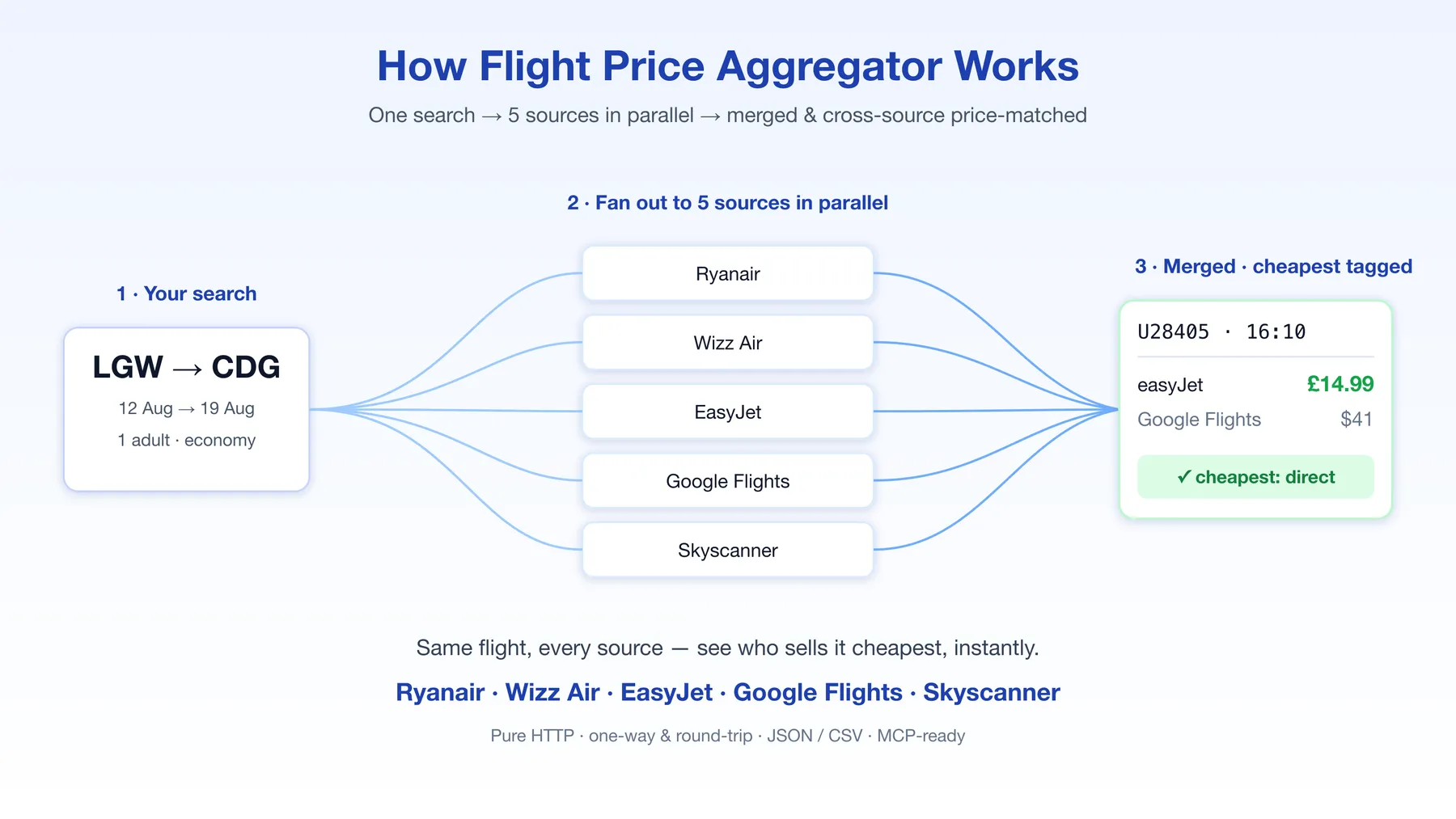
Compare flight prices across Google Flights, Skyscanner, Kiwi, Ryanair, Wizz Air, EasyJet and Norwegian in a single call — or batch up to 50 routes in one run. One search fans out to all seven sources in parallel, merges the results by flight identity, and cross-source price-matches — so for every flight you instantly see which source sells it cheapest.
Why this actor
Most flight scrapers give you one source's view. Low-cost carriers are almost always cheaper booked direct than through a metasearch aggregator — but you only know that if you can see both prices side by side. This actor does exactly that:
- Direct LCC fares from Ryanair, Wizz Air, EasyJet and Norwegian — the real, bookable price, not a marked-up resale.
- Broad coverage from Google Flights, Skyscanner and Kiwi — every airline on the route, including the legacy carriers the LCCs don't show.
- One merged view — the same physical flight from multiple sources collapses into a single row with a per-source price map (
prices), the list of sources that returned it (sourcesFound), and the cheapest seller tagged (cheapestSource). - Batch mode — pass a
routesarray and monitor a whole route portfolio in one run instead of scheduling N separate actors. - Result filters —
directOnly,maxStops,maxDurationMinutesapplied server-side, so your downstream code gets exactly the flights you care about.
The payoff is concrete: on a London→Paris search for 20 Sep 2026, easyJet flight U28411 came back at $31.37 from Skyscanner and $49 from Kiwi — the same seat, a 36% spread, and the actor tags the cheaper one automatically. Sources that price in their own currency are converted before anything is ranked, so the cheapest tag reflects the actual cheaper fare, not the smaller number.
Use cases
- Fare-alert products — batch your subscribers' routes into one scheduled run, push a notification whenever the cheapest price drops below a threshold. Per-source price, cheapest seller and booking URL are already in the payload.
- Price comparison / meta-search tools — power a "compare all sources" feature without integrating seven APIs and managing seven sets of blocks.
- Deal hunting at scale — 50 routes per run × nonstop-only filter = a clean daily feed of direct-flight deals.
- Market & pricing research — see how direct LCC pricing compares to aggregator pricing at scale, with aligned timestamps across sources in one run.
- AI agents — pair with the companion MCP server to give an assistant a
search_flightstool.
Input
| Field | Required | Description |
|---|---|---|
origin | ✅* | Origin — city name (London) or airport IATA code (LGW) |
destination | ✅* | Destination — city name or IATA code |
departDate | ✅* | Outbound date YYYY-MM-DD |
returnDate | Return date YYYY-MM-DD (omit for one-way) | |
routes | Batch mode: array of {origin, destination, departDate?, returnDate?} — up to 50 routes in one run. Per-route dates fall back to the top-level dates. When set, top-level origin/destination are ignored. | |
adults / children | Passenger counts (defaults 1 / 0) | |
currency | Preferred display currency, ISO 4217 (default USD) | |
cabinClass | ECONOMY / PREMIUM_ECONOMY / BUSINESS / FIRST | |
directOnly | true = only nonstop flights | |
maxStops | Only flights with at most this many stops | |
maxDurationMinutes | Only flights up to this total duration (e.g. 300 = 5 h) | |
sources | Subset of the seven sources; omit to query all | |
maxPerSource | Cap on offers per source before merging (default 10) | |
maxConnectionsPerSource | How many connecting itineraries each source may return, per direction, airport pair and date (default 3). Every one is a separate row. Nonstop flights are not capped — see Connections and row counts | |
includeRouteSummary | true = also emit one cross-source comparison row per route (cheapest source per direction, the spread, every source's price) into a separate dataset — see Route summary | |
routeSummaryDatasetName | Where those summary rows go (default route-summaries). Named datasets append across runs, so a scheduled watch builds price history in one place | |
proxyConfiguration | Proxy settings; residential is the default and recommended |
* Either set origin + destination + departDate at the top level, or provide them per route in routes.
Single route
Batch mode — one run, many routes
Output
One row per merged offer:
| Field | Meaning |
|---|---|
price / currency | What the source quotes — the amount you pay at that seller's checkout |
priceNormalized / normalizedCurrency | The same fare restated in your requested currency, so it can be compared with the other sources |
fxRate | Reference rate used for that conversion (1 = no conversion) |
prices | Every source's price for this exact flight, keyed by source, as each one quoted it |
pricesCurrency | The currency of each entry in prices — they can differ between sources |
pricesNormalized | The same map in normalizedCurrency — the one that is safe to compare |
sourcesFound | Which sources returned this flight |
cheapestSource | The source selling it cheapest (ranked on pricesNormalized) |
isCheapest | true on the single cheapest offer per direction (ranked on priceNormalized) |
stops / durationMinutes | Stop count and total duration (filterable via input) |
Export as JSON, CSV, Excel or XML from the run page, or pull via the Apify API.
Connections and row counts
A nonstop flight has a single flight number, so the same flight found by several sources merges
into one row with a prices map — that cross-source comparison is what this actor is for.
A connection is priced as a whole trip and has no single flight number, so it cannot be matched
that way. Each connecting itinerary is returned as its own row, with its own departure and arrival
times, stop count and booking link. maxConnectionsPerSource decides how many each source may
return, per direction, per airport pair, per date — 3 by default, cheapest first. Set it to 1 for
only the cheapest connection per source, or raise it toward maxPerSource for the full set. Each row
returned is one billed dataset item, so this setting is also what governs the size of a run's bill.
Two things this setting does not cover:
- The per-date cheapest fares from easyJet, Wizz Air and Norwegian. Those sources quote one price per date rather than per flight, so they already return at most one row per airport pair and no cap value changes that. On a multi-airport city easyJet returns one row per airport it actually serves — searching London Heathrow returns Gatwick, Luton, Stansted and Southend, each with its own fare and its own booking link.
- Nonstop flights, which merge across sources on their flight number and are never capped.
When a source returns the same journey more than once (Skyscanner reports one itinerary across its Best, Cheapest and Fastest lists), those collapse into a single row carrying the lowest of the quoted prices, so you are not charged twice for one flight.
One over-count is worth knowing about: a connection that a source reports with a flight number
merges across sources, while the same journey reported without one cannot, so a single itinerary
can occasionally appear as two rows from two different sources. Enable includeRouteSummary and read
crossSourceShapeMatches on the summary row to see how many rows that affected in a given run.
Route summary (optional)
Set includeRouteSummary: true to also get one comparison row per route — the answer to "which source is cheapest, and by how much" without reading every offer yourself:
These rows go to a separate named dataset (route-summaries by default, or whatever you set in routeSummaryDatasetName) — not the main one — so your flight rows keep a single clean shape for CSV export. Named datasets append across runs, so a scheduled fare watch accumulates readable price history in one place.
spread is what you save by booking the cheapest source instead of the dearest, in your requested currency. priceComparable tells you whether every priced source could be converted; when it is false, fx.unconvertible and sourcesNotComparable name exactly which quotes were left out of the ranking rather than guessed at.
The last five fields are this route's row ledger. rowsPushed is how many rows the route actually
returned and billed; rowsCapped is how many more were found but held back by
maxConnectionsPerSource; rowsOverBudget is how many the run's Maximum charge per run cut off.
connectionCap records the setting in force, and crossSourceShapeMatches counts rows describing a
journey another source also returned under a flight number — a known over-count, reported rather than
removed. Together they account for every offer found: rowsPushed + rowsCapped + rowsOverBudget
equals offersAfterFilters.
Code examples
curl
Python (apify-client)
Node.js (apify-client)
How it compares
| Feature | This actor | Single-source scraper (Google Flights only) | Other multi-source scraper | Browser-based scraper |
|---|---|---|---|---|
| Sources per run | 7 (Google Flights, Skyscanner, Kiwi, Ryanair, Wizz Air, EasyJet, Norwegian) | 1 | 5–7 | 1–2 |
| Routes per run | Up to 50 (batch mode) | 1 | 1 | 1 |
| Per-source price map + cheapest seller | Yes | No | Yes | No |
| Direct-only / max-stops / max-duration filters | Yes, server-side | Rare | No (post-process yourself) | Rare |
| City-name input (auto-resolves to IATA) | Yes | IATA only | IATA only | Varies |
| Children in passenger count | Yes | Varies | Adults only | Varies |
| Scraping engine | Raw HTTP | Raw HTTP | Raw HTTP | Headless browser |
| Companion MCP server for AI agents | Yes | Rare | Varies | Rare |
The honest take: if you only need one source's view of one route, a single-source scraper is fine. If you monitor multiple routes, want the bookable direct LCC fare next to the metasearch price, or need filtered results without post-processing, this is the one to pick.
Notes & FAQ
- Which routes do the LCCs cover? Ryanair, Wizz Air, EasyJet and Norwegian only return flights on their own (mostly European) routes. For a route they don't fly they simply return nothing — Google Flights, Skyscanner and Kiwi still cover it. A source with no data for a route never fails the run.
- Why does a row come back from a different airport than I asked for? Because the low-cost carriers don't fly to every airport a city name resolves to.
Londonresolves to Heathrow, and Wizz Air, easyJet and Norwegian serve none of it — so each one searches its own London-wide code instead (Gatwick, Luton, Stansted, Southend) rather than reporting nothing. Rows then carry the airport actually flown: you may ask forLHRand getLTN, and thebookingUrlpoints at that airport's fare. Norwegian's calendar prices a whole city rather than one airport, so its rows carry the metro codeLON. The run log names every substitution it makes. Airports genuinely outside a carrier's network — Zurich on Wizz Air, Frankfurt on Norwegian — return no offers from that source instead of failing it. - How do the filters treat calendar rows? A filter needs to know what a row actually is, so
directOnly,maxStopsandmaxDurationMinuteskeep only rows carrying a real departure time — Google Flights, Ryanair, Skyscanner and Kiwi, connections included. SetmaxStops: 2and you get Skyscanner and Kiwi connections scored on their true stop count and gate-to-gate duration. Wizz Air, Norwegian and easyJet rows come from per-day low-fare calendars (one cheapest price for the date, no flight times), so they cannot answer a stop or duration question and those sources are skipped for the whole run while any of these filters is set — an "unknown stops" row surviving a nonstop filter would be misleading. Note that a connection is still markeddetail: "price"because its all-in trip total must not price-match another source's single-flight fare; that tag is about merging, not about filtering. - Currencies. Most sources are queried in your currency directly. Wizz Air always prices in the departure market's currency instead (a Milan departure comes back in EUR, a Geneva one in CHF) and offers no way to ask for another. Those rows keep the price the airline actually quotes in
price/currency, and every row also carriespriceNormalizedin your requested currency, converted at the ECB's daily reference rate — that is the figure the cheapest tag, the row order and the route summary's spread are computed from, so a £12.99 fare never beats a $15 one just because the number is smaller. The ECB doesn't publish every currency Wizz Air quotes in (its Tirana, Belgrade, Skopje, Sarajevo, Kutaisi, Chisinau, Kyiv and Abu Dhabi markets bill in ALL, RSD, MKD, BAM, GEL, MDL, UAH and AED), so those are converted from a backup feed instead; the route summary'sfx.rateSourcesandfx.supplementedsay exactly which rate priced the route. Anything neither feed covers is still returned with its real price, just left out of the cheapest comparison rather than guessed at. Reference rates rank offers; they are not the rate your bank will settle at. - Skyscanner rows. Skyscanner is searched one direction at a time, so its prices are true one-way fares directly comparable with every other source, and its direct flights carry a flight number that cross-source price-matches against Google Flights and the airlines' own fares. Connections are priced as a whole trip, so they are marked price-only and stay out of the per-flight match.
- Past dates. A missing or past
departDateis bumped to ~30 days out automatically (the run log names the date searched), so a stale saved input still returns bookable fares. A stalereturnDatekeeps the original trip length; an inconsistent one falls back to a one-way search. - Proxies. Residential proxy is recommended (and the default) for the broadest, most stable coverage.
- How often should I run it for fare monitoring? Once or twice a day covers most routes; hourly for hot routes. More often than every 15 minutes rarely surfaces new prices.
🤖 For AI Agents & LLM Apps
Compact reference for AI agents calling this actor via the Apify MCP server or the Apify API (actor: memo23/flights-aggregator-scraper).
Purpose: Fan out one flight search to 7 sources (Google Flights, Skyscanner, Kiwi, Ryanair, Wizz Air, EasyJet, Norwegian), merge by flight identity, and tag the cheapest seller per flight.
Minimal input:
Batch mode (overrides top-level origin/destination): { "routes": [{"origin":"LHR","destination":"BCN"},{"origin":"LHR","destination":"MAD"}], "departDate": "2026-08-12" }
Output: one row per merged offer — source, direction, origin, destination, date, price, currency, priceNormalized, normalizedCurrency, fxRate, carrier, flightNumber, departTime, arriveTime, stops, durationMinutes, prices {source: price}, pricesCurrency {source: currency}, pricesNormalized {source: price}, sourcesFound, cheapestSource, isCheapest.
Compare on priceNormalized (all rows share normalizedCurrency), not on price — sources quote in different currencies and price is deliberately left as each source quoted it.
Behaviors an agent should know:
- No maxItems field. Two settings govern volume:
maxPerSource(default 10, max 100) caps what each source is asked for, andmaxConnectionsPerSource(default 3) caps how many connecting itineraries each source may return per direction, airport pair and date. Connections cannot price-match across sources, so each is its own billed row — this is the setting that decides a run's row count. Nonstop flights merge across sources and are never capped. Row count scales with sources × routes. routes(array, max 50) is batch mode; when set the top-levelorigin/destinationare ignored.- The four LCC sources (Ryanair, Wizz Air, EasyJet, Norwegian) only return their own mostly-European routes; a source with no data never fails the run.
- A row's
origin/destinationmay differ from the airport you asked for: the LCCs don't serve every airport a city resolves to (London→ Heathrow, which none of them fly), so they search that city's other airports and return the one actually flown — ask forLHR, getLTN. Match rows on the city, not on the requested code. Norwegian prices a whole city, so its rows carry the metro codeLON. - The summary row also carries a billing ledger —
rowsPushed,rowsCapped,rowsOverBudget,connectionCap,crossSourceShapeMatches— so an agent can reconcile a run's billed rows without diffing datasets. includeRouteSummary: trueadds one comparison row per route — cheapest source and price per direction, thespreadagainst the dearest source, andpricesBySource— written to a separate dataset (routeSummaryDatasetName, defaultroute-summaries), not the main one. Read it when you want the verdict rather than the offers.directOnly/maxStops/maxDurationMinutesfilter server-side on rows that carry a real departure time (Google Flights, Ryanair, Skyscanner, Kiwi — connections included, scored on their true stop count). The low-fare-calendar sources (Wizz Air, Norwegian, easyJet) publish no flight times and are skipped for the run while any of these filters is set.- A missing or past
departDateis bumped to ~30 days out automatically; a stalereturnDatekeeps the trip length or falls back to one-way. No date input is required for a valid search. - Pay-per-event billing — an actor-start fee, a route-search fee for every origin-to-destination search (charged once per route, whether or not it returns offers), a per-result fee on every row returned, and a route-summary fee charged only when
includeRouteSummaryis enabled. Row count is therefore the main driver of a run's cost, andmaxConnectionsPerSourceis the setting that governs it. Current rates are on the Pricing tab of the actor page, which is the only place they are authoritative. - Maximum charge per run works as a hard cost ceiling: the actor stops cleanly at the cap and pushes a
MAX_CHARGE_REACHEDrow telling you how many routes were left unsearched. Long batches that would hit the run timeout stop early the same way (TIME_BUDGET_EXHAUSTEDrow) instead of timing out mid-route.
⚠️ Disclaimer
This actor collects only publicly available flight pricing and schedule information. It does not access any private, authenticated, or personal data. You are responsible for ensuring your use complies with the applicable websites' terms and with all relevant laws (including data-protection regulations). Prices and availability are provided as-is and change constantly — always confirm the final price on the airline's or seller's own site before booking.
SEO Keywords
flight price comparison API, cheap flights scraper, multi-source flight scraper, Ryanair scraper, Wizz Air scraper, EasyJet scraper, Google Flights API, Skyscanner scraper, Kiwi flights API, Norwegian air scraper, flight fare aggregator, airfare comparison, low-cost carrier prices, flight deals API, metasearch flights, batch flight search, direct flights filter, one-way and round-trip fares, flight price monitoring, fare alert API, travel data API, MCP flight search


![Collecting Cars [$3💰] | 33k SOLD prices + live bids avatar](https://images.apifyusercontent.com/Hbn_LDWbVTHAyPL8k_edq8GAZOEin7g5i4_bFf2WimM/rs:fill:76:76/cb:1/aHR0cHM6Ly9hcGlmeS1pbWFnZS11cGxvYWRzLXByb2QuczMudXMtZWFzdC0xLmFtYXpvbmF3cy5jb20vbmduOHZSRVNUa3NleVdFNnAtYWN0b3ItRm1EYVRESkEyWGNYU0s4N24tVkJhU3V5RENuYi1Db2xsZWN0aW5nX0NhcnMud2VicA.webp)
![ForRentUniversity.com [$1.25💰] Scraper · Emails avatar](https://images.apifyusercontent.com/knob38rf08RjbTFOtyPTLKbUpJqNv69gLvD9GZvNHdY/rs:fill:76:76/cb:1/aHR0cHM6Ly9hcGlmeS1pbWFnZS11cGxvYWRzLXByb2QuczMudXMtZWFzdC0xLmFtYXpvbmF3cy5jb20vbmduOHZSRVNUa3NleVdFNnAtYWN0b3Itb2ZkQkJZZ0QzMndpZHZSemotT25mdk55NHJTQS1mcnUuanBlZw.webp)

![Car & Classic [$1💰] | Full 46k catalogue | Beats 10k cap avatar](https://images.apifyusercontent.com/yR5ZcWq7huml1KRn39casUADIIm6kQumb9tA8E00od4/rs:fill:76:76/cb:1/aHR0cHM6Ly9hcGlmeS1pbWFnZS11cGxvYWRzLXByb2QuczMudXMtZWFzdC0xLmFtYXpvbmF3cy5jb20vbmduOHZSRVNUa3NleVdFNnAtYWN0b3ItbmRLcGNQOFNyWFNueW5Na3IteGE3RlJRTHRTVy1jYXJfYW5kX2NsYXNzaWMuanBlZw.webp)


