

Gab Scraper: Profiles, Posts & Replies from Gab.com
Pricing
from $1.50 / 1,000 post or replies
Gab Scraper: Profiles, Posts & Replies from Gab.com
Gab.com scraper with no login: account profiles (followers, posts, verified, Pro, join date), each account's latest posts, single posts by link and up to 40 replies a post, with likes, reposts, media and links. $1.50 per 1,000 posts and replies, $8 per 1,000 profiles.
Pricing
from $1.50 / 1,000 post or replies
Rating
0.0
(0)
Developer

Muhamed Didovic
Maintained by CommunityActor stats
0
Bookmarked
2
Total users
1
Monthly active users
2 days ago
Last modified
Categories
Share
Scrape Gab.com without a login: account profiles (followers, following, post count, verified and Pro flags, join date), each account's latest posts, any post by its link, and the replies under it. Every post comes with text, likes, reposts, reply count, media links, and the links, mentions and hashtags found in the text. $1.50 per 1,000 posts and replies.
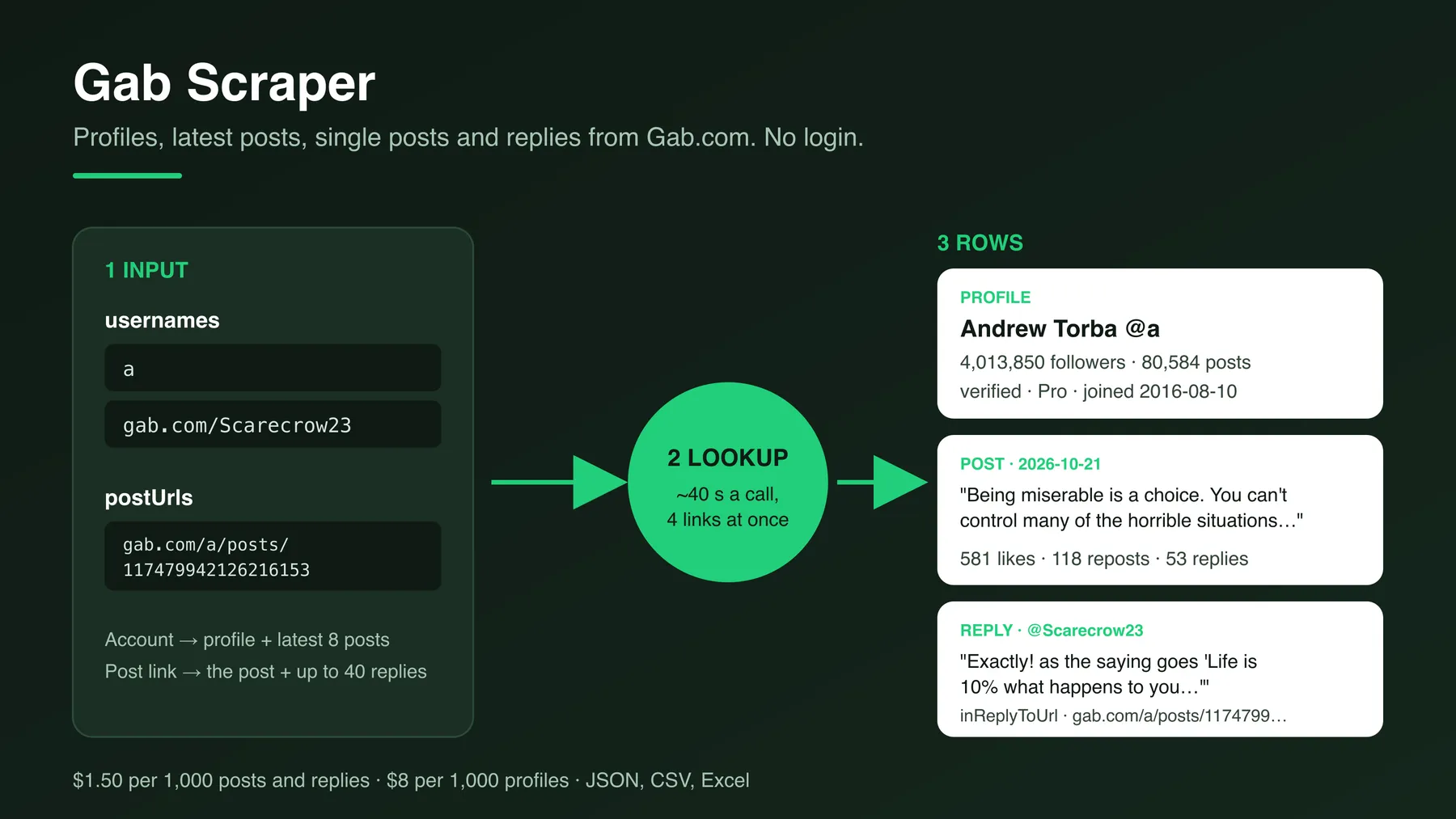
| Input | Rows |
|---|---|
| Username or profile link | One profile row, plus the account's latest posts (up to 8) as post rows |
| Post link | One post row for the post itself, plus up to 40 reply rows |
Why Use This Scraper?
- Profiles, feeds and threads in one actor. Put accounts and post links in the same run; each row says what it is in
type. - Links put back together. Gab cuts long links into pieces when it shows them; this actor joins them again and lists them in
links, withmentionsandhashtagsbeside them. - Cheaper per post. $0.0015 per post or reply, against $0.002 to $0.005 in other Gab actors.
- You only pay for rows. Accounts that do not exist and posts that are gone cost nothing beyond the run start.
Use Cases
- OSINT and research: follow what known accounts post and who answers them.
- Brand and narrative monitoring: collect the replies under a post that is spreading.
- Audience checks: compare accounts by followers, post count and join date.
- Archiving: keep a dated copy of posts with their counts and media links.
How It Works
- Usernames and post links are read four at a time. Each lookup takes about 40 seconds.
- For an account, the profile and the latest posts are fetched together.
- For a post link, the post comes first. It shows how many replies there are; if there are 5 or more, the replies are fetched next.
- Every row is charged as it is delivered, and the run stops cleanly at your spending limit or
maxItems.
Input Configuration
| Field | Type | Description |
|---|---|---|
usernames | array | Account names (a, @GabNews) or profile links. Post links here are handled as post links. |
includeProfiles | boolean | Profile row for each account. Default on. |
includePosts | boolean | Latest posts of each account. Default on. |
maxPostsPerUser | integer | 5 to 100, default 8. The data source returns up to 8 today. |
postUrls | array | Links like https://gab.com/a/posts/117479942126216153. |
includePostDetails | boolean | A row for the linked post itself. Default on. |
includeReplies | boolean | Replies under the linked post. Default on. |
maxRepliesPerPost | integer | 5 to 100, default 40. The data source returns up to 40 today. |
maxItems | integer | Cap on all rows. Default 1,000; free-plan runs return up to 100. |
Example input
Profiles and latest posts of three accounts:
Replies only, for two posts:
Output Samples
A profile:
A post from an account's feed:
A reply:
Key Output Fields
| Field | Meaning |
|---|---|
type | profile, post or reply |
sourceType | Where a post came from: user-posts (an account's feed), post-link or replies |
likeCount, repostCount, replyCount | Counts at the time of the run |
links, mentions, hashtags | Found in the post text; links are rejoined |
mediaUrls | Image and video links attached to the post |
inReplyToUrl | For replies: the post link you gave |
createdAt | When the post was made, or when the account joined (ISO 8601, UTC) |
FAQ
How many posts do I get per account?
The latest 8. The data source returns no more than 8 an account and has no way to page further back, so older posts are not reachable through this actor. For older posts, put their links in postUrls.
How many replies do I get per post?
Up to 40, including replies to replies. A post with 53 replies returned 40 in our tests. Posts showing fewer than 5 replies are not looked up for replies, so you are not charged for a lookup that returns almost nothing; turn includePostDetails off if you want the replies of every post regardless.
Why do some profiles have no follower or post counts?
Some older accounts (for example gab, GabNews, realdonaldtrump) come back with name, bio and avatar only. Those rows are billed as a basic profile ($0.003), not at the full profile price.
Can I search Gab by keyword or hashtag? No. This actor works from usernames and post links.
Do I need a Gab account or cookies? No.
Pricing
| Event | When | Price |
|---|---|---|
| Actor start | Once per run (per GB of memory, 256 MB default) | $0.005 |
| Post | Each post from an account's feed, and each reply | $0.0015 |
| Profile | Each account profile with counts | $0.008 |
| Basic profile | An older account the source returns with name, bio and avatar only, no counts | $0.003 |
| Post by link | Each post looked up by its own link | $0.008 |
Example: profiles and latest posts of 50 accounts cost 50 × $0.008 + 400 × $0.0015 + $0.005 = $1.005. The replies of 20 busy posts cost 20 × $0.008 + 800 × $0.0015 + $0.005 = $1.365.
Support
Found a bug or need a field? Open an issue on the actor's Issues tab and include the run link.
⚠️ Disclaimer
This actor reads public Gab pages only. It is not affiliated with or endorsed by Gab AI Inc. You are responsible for using the data in line with Gab's terms and the laws that apply to you, including data protection rules for personal data. Post texts and media belong to their authors.
SEO Keywords
Gab scraper, Gab.com scraper, Gab posts scraper, Gab profile scraper, Gab replies, Gab followers, Gab OSINT, Gab data export, alt-tech social media scraper, Gab API alternative, social media monitoring, Gab account posts


![Tiktok Profile and Posts/Videos Extractor/Scraper [NO COOKIES] avatar](https://images.apifyusercontent.com/YnCzkNIHvYMscfEoXqa70Rt0WaBypjmHpr4-a-773KI/rs:fill:76:76/cb:1/aHR0cHM6Ly9hcGlmeS1pbWFnZS11cGxvYWRzLXByb2QuczMudXMtZWFzdC0xLmFtYXpvbmF3cy5jb20vdnVpYlIxd2hDRG02SGl3Y1EvRWRZM0JXNGRYQmxobUVpSHgtdGlrdG9rLnBuZw.webp)


