
![Google Ads Transparency Leads Scraper [Download assets] avatar](https://images.apifyusercontent.com/NOlaLstfDGqsCjtDBuyDqpvJOfUSAjchpzsFQytQTa0/rs:fill:250:250/cb:1/aHR0cHM6Ly9hcGlmeS1pbWFnZS11cGxvYWRzLXByb2QuczMudXMtZWFzdC0xLmFtYXpvbmF3cy5jb20vbmduOHZSRVNUa3NleVdFNnAtYWN0b3ItVlFPdTJHT0hiZVJBb09TR2ktQWdPbEpSajBFVi1Hb29nbGVfQWRzX2xvZ28uc3ZnLnBuZw.webp)
Google Ads Transparency Leads Scraper [Download assets]
Pricing
from $2.00 / 1,000 ads
Google Ads Transparency Leads Scraper [Download assets]
Google Ads Transparency Center scraper: every ad an advertiser ran, by region, format and date, with variations, landing domains and previews. Ads $2/1,000. Optional asset download saves images, videos and previews to your key-value store at $0.003 per file, with a size cap.
Pricing
from $2.00 / 1,000 ads
Rating
5.0
(6)
Developer

Muhamed Didovic
Maintained by CommunityActor stats
19
Bookmarked
446
Total users
139
Monthly active users
3 days ago
Last modified
Categories
Share
Google Ads Transparency Center Scraper
Every ad an advertiser runs on Google, by domain or advertiser ID, with the ad copy, dates, regions and variations on one row.
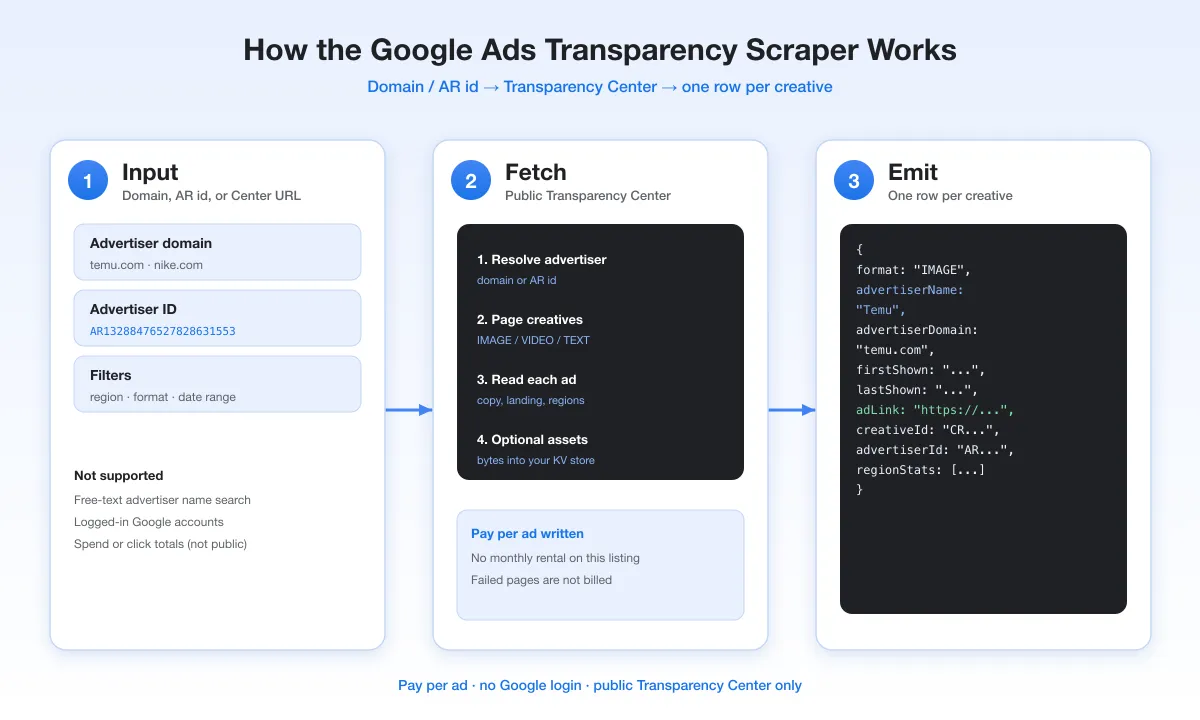
Give it nike.com or an AR… advertiser ID. You get one dataset row per ad: format, first and last shown dates, headline, description, display URL, landing domain, the regions it served in with impression ranges, and every creative variation with its image, video or YouTube link.
Why Use This Scraper?
- The copy is on the row.
headline,description,callToActionanddisplayUrlare top-level columns, so a CSV export is readable without openingvariations[]. - Format matches Google.
formatis the label the Transparency Center itself uses (TEXT, IMAGE, VIDEO), including for text ads Google archives as images. - Dates you can sort on.
firstShown,lastShownandnumServedDayson every row, plus first/last dates per region. - Several advertisers per run.
domainsandadvertiserIdstake lists, so one run can cover a whole competitor set. - Scheduled watching.
onlyNewAdsreturns only ads you have not received before. - Optional asset download. Image and video files can be copied into your own key-value store, so they outlive Google's expiring links.
Overview
The Google Ads Transparency Center lists the ads verified advertisers run on Search, YouTube, Display, Shopping, Maps and Play. This actor reads the same public data the site shows and writes it as structured rows.
It is built for competitor research, brand monitoring, agency audits and anyone who needs ad history in a spreadsheet or database rather than in a browser tab.
Supported Inputs
Advertiser domain or ID
| Input | Example | What you get |
|---|---|---|
| Domain | nike.com | Ads Google associates with that domain |
| Advertiser ID | AR16735076323512287233 | Every ad from that advertiser account |
| Batch | domains: ["nike.com", "adidas.com"], advertiserIds: [...] | All of the above in one run |
Transparency Center URLs (startUrls)
Paste URLs straight from the site when you already have them:
Unsupported inputs
- Brand names. The Transparency Center has no name search. A single word such as
nikeis tried asnike.comand every row is markeddomainWasGuessed: true; a multi-word name such asNike Incis rejected with an explanation in the log. - Ad performance data. Google does not publish spend, clicks or conversions for commercial ads, so neither does this actor.
Use Cases
| Who | What they do with it |
|---|---|
| Performance marketers | See which headlines and offers competitors keep running, and for how long |
| Agencies | Audit a prospect's live ads before a pitch |
| Brand and legal teams | Find ads that use a brand name or domain |
| Researchers and journalists | Build an archive of an advertiser's ads across regions |
| Product teams | Feed ad history into a dashboard, BI tool or LLM pipeline |
How It Works
- Each domain or advertiser ID becomes a Transparency Center search with your region, format, platform and date filters.
- The search results give the list of creatives, with Google's format label and first/last shown dates.
- For each creative the actor loads its detail record: variations, regions, impression ranges and targeting.
- Each variation's preview is read for the ad copy, display URL, images and video links.
- One row per creative is written to the dataset, up to
maxItems.
Input Configuration
| Field | Type | Default | What it does |
|---|---|---|---|
searchQuery | string | — | One advertiser domain (nike.com) or advertiser ID (AR…) |
domains | array | — | More advertiser domains in the same run |
advertiserIds | array | — | More AR… advertiser IDs in the same run |
region | string | anywhere | Country the ads were shown in, e.g. US, DE |
format | string | ALL | ALL, TEXT, IMAGE or VIDEO |
platform | string | ALL | ALL, SEARCH, YOUTUBE, MAPS, PLAY or SHOPPING |
dateFrom / dateTo | string | — | Only ads shown within these dates |
startUrls | array | — | Transparency Center URLs; when set they replace the fields above |
onlyNewAds | boolean | false | Skip ads already delivered to your account on earlier runs |
monitorStateName | string | — | Keeps separate "seen" lists for separate watches |
advertiserCheck | boolean | false | For an AR… query, check the advertiser exists before scraping |
maxItems | integer | 100 | Hard cap on ads written in this run |
downloadAssets | boolean | false | Copy each variation's image and video files into your key-value store |
downloadPreviews | boolean | false | Copy each row's preview image into your key-value store |
maxAssetSizeKb | integer | 10240 | Skip files larger than this when downloading |
minDelay / maxDelay | integer | 5 / 10 | Seconds between Transparency Center requests |
minConcurrency / maxConcurrency | integer | 1 / 10 | Requests processed in parallel |
maxRequestRetries | integer | 100 | Retries per failed request |
proxy | object | — | Leave empty; the actor brings its own proxy. Your own proxy URLs are used if you set them |
Common scenarios
One competitor, US text ads only
A competitor set in one run
Weekly watch for new ads only
Keep copies of the creatives
On the free Apify plan a run is capped at 60 ads and the first start URL.
Output Overview
One row per ad creative. Main groups of fields:
- Identity:
advertiserId,creativeId,adUrl,advertiserName,advertiserLegalName,advertiserCountry - Classification and dates:
format,firstShown,lastShown,numServedDays - Ad copy:
headline,longHeadline,description,callToAction,displayUrl - Destination:
landingDomain,landingDomainSource,landingUrls - Media:
previewUrl, and per variationimage,videoUrl,youtubeUrl,thumbnailUrl,logoUrl - Reach:
creativeRegions,regionStats[]with impression ranges and per-surface stats,targeting - Detail:
variations[],extractionStatus
Output Samples
A text ad from a live run (trimmed: variations and regionStats shortened to one entry):
Image and video ads have the same shape. Video variations add videoUrl, youtubeVideoId, youtubeUrl and thumbnailUrl; display ads that expose a click-through URL fill landingUrls and set landingDomainSource to landing_url.
Key Output Fields
Ad
| Field | Description |
|---|---|
format | TEXT, IMAGE or VIDEO, as Google classifies the ad. Variations carry the same label unless they hold a video |
firstShown / lastShown | When the ad was first and last shown (ISO 8601) |
numServedDays | Days between firstShown and lastShown |
headline / longHeadline | Ad headline as rendered |
description | Ad body copy. Never the display URL; that goes to displayUrl |
displayUrl | The URL shown in the ad, e.g. nike.com |
callToAction | Button label such as "Learn more", where the ad has one |
previewUrl | Google's archived preview image of the ad |
Destination
| Field | Description |
|---|---|
landingUrls | Click-through URLs found in the ad previews |
landingDomain | Domain the ad sends people to |
landingDomainSource | landing_url when taken from a click-through URL, display_url when taken from the display URL (Google requires the two domains to match) |
Reach
| Field | Description |
|---|---|
creativeRegions | Countries the ad served in |
regionStats[] | Per country: first/last shown, impression range (lowerBound/upperBound), per-surface stats (Google Search, YouTube, Shopping, Maps, Play) |
targeting | Which targeting categories (demographics, geography, contextual) the advertiser used, where Google discloses it |
Variations
Each entry in variations[] is one rendering of the ad: headline, description, visibleUrl, callToAction, advertiserName, image, logoUrl, videoUrl, youtubeVideoId, youtubeUrl, thumbnailUrl, destinationUrl, format, destinationStatus, and googleTemplateData with the raw template payload when Google provides one.
With downloadAssets on, image and videoUrl point to your key-value store and the Google URLs move to originalImage and originalVideoUrl. With downloadPreviews on, the same happens for previewUrl / originalPreviewUrl.
FAQ
Can I search by brand name?
No. The Transparency Center only searches by advertiser domain or advertiser ID. A single word is tried as <word>.com and the rows say so (domainWasGuessed, queriedDomain); a multi-word name is rejected.
Why do text ads have an image in previewUrl?
Google archives text ads as rendered images. The ad is still a text ad, so format stays TEXT, and the copy is in headline, description and displayUrl.
Why is headline sometimes <dynamically generated based on landing page content>?
That is a Dynamic Search Ad. Google writes the headline from the landing page at serving time and shows that placeholder in the Transparency Center.
Why is landingDomain empty on some rows?
Some ads come back from Google only as archived images, with no text or click-through URL to read. Those rows keep landingDomain null rather than guess.
Are impressions always available?
No. Google publishes impression ranges mainly for ads shown in the EU and for political ads. Elsewhere impressions is null.
How do I only get ads I have not seen before?
Set onlyNewAds: true. The first run returns everything and records it; later runs return only new creatives. Use monitorStateName to keep separate watches apart.
What does asset download do?
downloadAssets and downloadPreviews copy the image and video files into your run's key-value store and point the row at those copies. They are off by default. Storage counts against your Apify account.
Can it read private or logged-in data?
No. It reads only the public Transparency Center.
How fast is it?
Requests are spaced by minDelay/maxDelay seconds to stay within the site's limits. Expect a few hundred ads in several minutes; set maxItems to what you need.
Support
Found a bug or need a field? Open an issue on this actor's Issues tab or email muhamed.didovic@gmail.com.
Additional Services
Need a custom export, scheduled monitoring or another site scraped? Email muhamed.didovic@gmail.com.
Explore More Scrapers
More scrapers at apify.com/memo23.
🤖 For AI Agents & LLM Apps
Compact reference for agents calling this actor through the Apify MCP server or the Apify API (memo23/google-ad-transparency-scraper-cheerio or memo23/google-ads-transparency-scraper-ppe; same code).
Purpose: ads from Google's Ads Transparency Center for an advertiser domain or AR… ID, one row per creative with copy, dates, regions and variations.
Minimal input:
Output: one row per ad: advertiserId, creativeId, adUrl, advertiserName, advertiserLegalName, advertiserCountry, format (TEXT/IMAGE/VIDEO), firstShown, lastShown, numServedDays, previewUrl, headline, longHeadline, description, displayUrl, callToAction, landingDomain, landingDomainSource, landingUrls, creativeRegions, regionStats [{regionCode, regionName, firstShown, lastShown, impressions {lowerBound, upperBound}, surfaceServingStats}], targeting, variations [{headline, description, visibleUrl, image, videoUrl, youtubeUrl, destinationUrl, format}], extractionStatus.
Behaviors an agent should know:
searchQuerytakes a domain orAR…ID only; there is no name search.domains/advertiserIdsadd more in one run.startUrls, when set, replaces the query, region, format, platform and date fields.- Always set
maxItems(default 100); a large advertiser has thousands of ads. Free-plan runs are capped at 60. onlyNewAds+monitorStateNamereturn only creatives not delivered before to this account.- Billing is per ad written.
downloadAssets/downloadPreviewsare optional; the listing's pricing page shows whether file downloads are billed. landingDomaincomes from a click-through URL when one exists, otherwise from the display URL (landingDomainSourcesays which).
⚠️ Disclaimer
This Actor is an independent tool and is not affiliated with, endorsed by, or sponsored by Google LLC or any of its subsidiaries. All trademarks mentioned, including Google and the Google Ads Transparency Center, are the property of their respective owners.
The scraper accesses only the publicly available Google Ads Transparency Center — no authenticated endpoints, paid features, or content behind a Google login wall. Users are responsible for ensuring their use complies with Google's Terms of Service, applicable data-protection law (GDPR, CCPA, etc.), and any contractual obligations of their own organization.
SEO Keywords
google ads transparency scraper, scrape google ads transparency center, ads transparency center API, google ads scraper, Apify google ads scraper, competitor ads scraper, advertiser ads export, ad creative scraper, text ad scraper, image ad scraper, video ad scraper, youtube ads data, competitor ad intelligence, ad copy research, brand monitoring ads, ad archive data, advertiser domain lookup, marketing intelligence data, PPC competitor research, google ads library


