

Instagram Stories & Highlights Scraper · Download · No Login
Pricing
from $7.00 / 1,000 account scrapeds
Instagram Stories & Highlights Scraper · Download · No Login
Instagram Stories & Highlights Scraper — pull active stories and permanent highlights from any public account. Image & video URLs, media type, timestamps, music, and highlight titles. Optional permanent file download. No login, no cookies. Stories, highlights, or both. JSON/CSV/Excel.
Pricing
from $7.00 / 1,000 account scrapeds
Rating
5.0
(1)
Developer

Muhamed Didovic
Maintained by CommunityActor stats
0
Bookmarked
598
Total users
292
Monthly active users
12 hours ago
Last modified
Categories
Share
Instagram Stories & Highlights Scraper

Scrape the active stories and permanent highlights of any public Instagram account — no login, no cookies, zero risk to your own account. Paste one or more usernames and get back every story and highlight item with direct image and video URLs, media type, timestamps, expiry, music, and highlight titles. Optionally download the media files to permanent storage so they never expire. Export as JSON, CSV, or Excel.
| Input | What you get |
|---|---|
A single username (e.g. nike) | Its active stories and/or highlight items, per dataToScrape |
| Multiple usernames | All of them in one run, each row tagged by sourceUsername and type |
Profile URL (https://www.instagram.com/nike) | Same as a username — URLs are accepted too |
Pure HTTP. No browser, no CAPTCHA solver, no cookies, no third-party bypass service.
Why Use This Scraper?
- Zero account risk — you never hand over Instagram cookies or log in, so your account can't be flagged, throttled, or banned.
- Stories and highlights in one Actor — collect active 24-hour stories, permanent highlight trays, or both, selected per run. Most competitors split these across separate actors.
- Direct media URLs + optional download — every item includes the image URL and, for videos, the playable video URL. Instagram's own URLs expire after a few hours; flip on
downloadMediato save the files permanently and get a non-expiringdownloadUrl. - Retrieve expired stories (opt-in) — every run adds what it scrapes to a permanent archive. Turn on
includeHistoricalto also return items captured on earlier runs that a live scrape can no longer see — stories that have since expired or been deleted — each with permanent (non-expiring) media. This is data no live-only scraper can give you; coverage grows the more an account is run. - Multiple profiles per run — pass a whole list of usernames; every row is tagged with its source account and list type.
- Fast — pure HTTP, no browser, no CAPTCHA solver.
How It Works
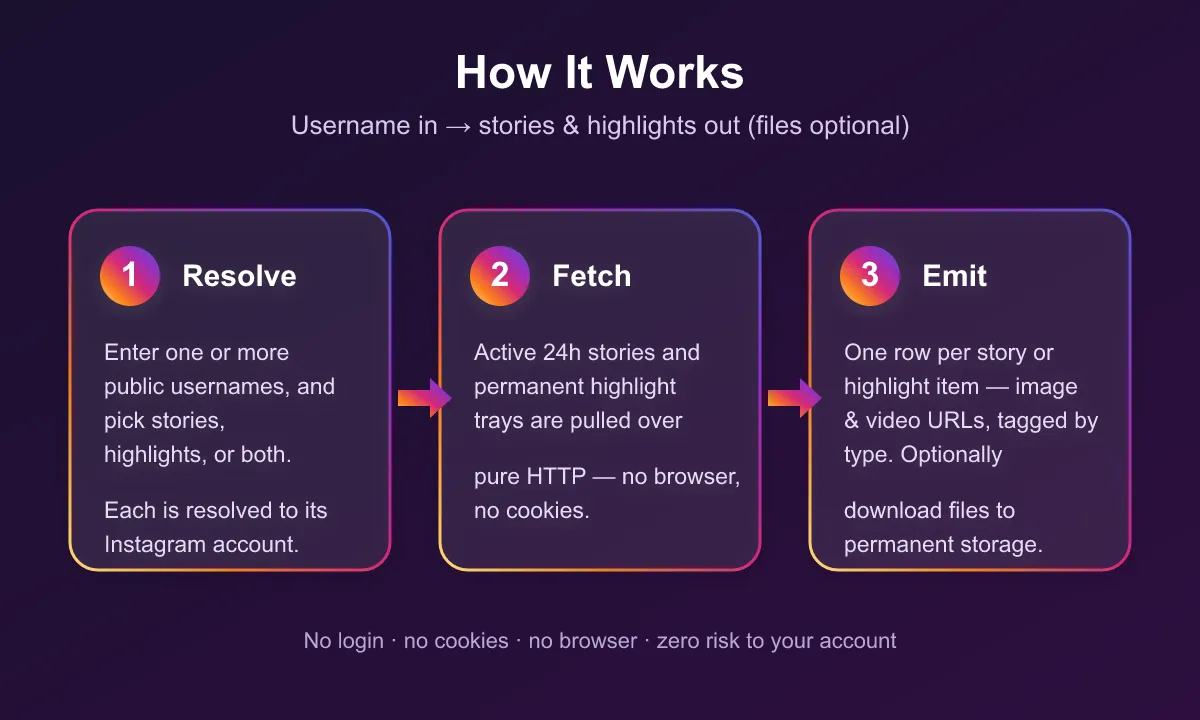
- Resolve — each input username (or profile URL) is looked up to its Instagram account, and you choose stories, highlights, or both.
- Fetch — active 24-hour stories and permanent highlight trays are pulled page by page over pure HTTP — no browser, no cookies.
- Emit — every story or highlight item is pushed to the dataset as its own row, tagged with
sourceUsernameandtype. WithdownloadMediaon, each file is also saved to permanent storage and itsdownloadUrlis added to the row.
Supported Inputs
- Handles are accepted with or without the leading
@, and full profile URLs work too (https://www.instagram.com/nike,instagram.com/nike/, mobilem.instagram.com). - Not supported: private accounts (their stories/highlights aren't public — the Actor returns an error item), hashtags, post/reel URLs.
Use Cases
| Audience | How they use it |
|---|---|
| Social media managers | Archive a brand's own stories and highlights before they expire |
| Competitive analysts | Track what competitors post to stories and how they organize highlights |
| Content researchers | Collect story/highlight media for trend and creative analysis |
| Marketers | Pull highlight covers and media for campaign audits |
Input
| Field | Type | Required | Notes |
|---|---|---|---|
usernames | array of strings | Yes | Public usernames or profile URLs, with or without @. |
dataToScrape | string | No | Dropdown: stories, highlights, or both. Default: stories. |
downloadMedia | boolean | No | Save each image/video to permanent storage and add a non-expiring downloadUrl. Default: false. |
includeHistorical | boolean | No | Also return archived items captured on earlier runs — including expired or deleted stories a live scrape can't see — tagged source:"archive". Paying accounts only. Default: false. |
maxHighlightsPerUser | integer | No | Cap how many highlight trays to expand per account. Omit for all. |
Example input
Output Schema
One dataset row per story or highlight item. Runs stream to the default dataset, exportable as JSON, CSV, Excel, or via the API.
When includeHistorical is on, archived items carry three extra fields: source: "archive", firstSeenAt, and lastSeenAt (ISO timestamps for when the item was first and last captured), and a permanent downloadUrl. Live items have no source field.
Pricing
Pay-per-event — you're charged only for what you actually collect. No subscription, no per-run start fee. Rates decrease with your Apify plan tier (Free → Gold+ shown below).
| Event | When it's charged | Rate (Free → Gold+) |
|---|---|---|
| Account scraped | Once per public account processed | $0.010 → $0.007 |
| Highlight tray | Once per highlight tray expanded (returns all its items) | $0.0040 → $0.0028 |
| Media downloaded | Once per file saved, only when downloadMedia is on | $0.0020 → $0.0014 |
| Historical story/highlight | Once per archived (expired/deleted) item returned, only with includeHistorical | $0.0040 → $0.0028 |
Private, missing, or invalid accounts return an error item and are not charged. Live story and highlight items themselves are free — you pay per account and per highlight tray (above); the historical charge applies only to archived items delivered via includeHistorical.
Free Apify plan
On the free Apify plan, the first 3 story or highlight items of each run come back in full, so you can check the data. After that, rows keep the account, item type, highlight id and title, media id, shortcode, media type, timestamps, dimensions, video duration and music, while the media links (imageUrl, videoUrl, downloadUrl) are hidden and storyCommentCount is rounded to its order of magnitude. A freePlanNote field marks those rows. Any paid Apify plan returns every field in full.
What Makes This Richer Than the Competition
| Capability | Typical competitor | This Actor |
|---|---|---|
| Stories and highlights | Split across two actors | One actor, one run |
| Login / cookies required | Often | Never |
| Media file download | Rental-only or missing | Opt-in, pay-per-file, permanent |
| Video duration / audio / music | Rare | Included |
| Private-account handling | Fails the run | Clean error item, run succeeds |
FAQ
Do I need to provide my Instagram cookies or log in? No. This Actor never asks for cookies, passwords, or a session.
Does it work on private accounts? Only public accounts. A private account's stories and highlights aren't public, so the Actor emits an error item for it and continues with your other usernames.
How fresh are stories?
Active stories are fetched live at run time. They expire 24 hours after posting — the expiringAt field tells you when.
The image/video URLs stopped working — why?
Instagram's own CDN URLs expire after a few hours. Enable downloadMedia to save the files to permanent storage and use the non-expiring downloadUrl instead.
Can I get highlights instead of stories?
Yes — set dataToScrape to stories, highlights, or both. Every row carries a type field.
Can I retrieve stories that already expired?
Yes, if they were captured on an earlier run. Every run adds what it scrapes to a permanent archive; turn on includeHistorical to also return archived items — including expired or deleted stories — each with permanent media and tagged source:"archive". It's a premium, paying-only option priced per archived item, and coverage depends on what's already in the archive, so it pays to run an account regularly.
Notes & Limitations
- Active stories are only available while live (24 hours after posting). An account with no active stories returns zero story rows — this is normal, not an error.
downloadMediaadds run time and a small per-file charge; leave it off if the (temporary) URLs are enough.- Highlight trays can contain many items; use
maxHighlightsPerUserto cap cost on accounts with lots of highlights. includeHistoricalreturns only items already in the archive (captured on earlier runs). A never-before-scraped account has no history yet and returns nothing extra — run accounts regularly to build their archive.
🤖 For AI Agents & LLM Apps
Purpose: Return the active stories and/or permanent highlights of public Instagram accounts, with direct media URLs and optional permanent file download.
Minimal tested input:
Optional flags: downloadMedia: true adds a permanent downloadUrl per item. includeHistorical: true (paying accounts) also returns archived items captured on earlier runs — including expired/deleted stories — tagged source:"archive" with firstSeenAt/lastSeenAt.
Output: array of flat objects, one per media item. Fields: sourceUsername, type (story/highlight), highlightId, highlightTitle, mediaPk, shortCode, mediaType (photo/video), takenAt, expiringAt, imageUrl, videoUrl, width, height, videoDuration, hasAudio, musicTitle, musicArtist, storyCommentCount, downloadUrl. Archived rows (with includeHistorical) add source: "archive", firstSeenAt, lastSeenAt.
Behavior & billing: Pay-per-event, tiered by Apify plan — account-scraped ($0.010→$0.007), highlight-tray ($0.0040→$0.0028), media-downloaded ($0.0020→$0.0014, only with downloadMedia:true), historical-item ($0.0040→$0.0028, only for archived rows via includeHistorical). Live story/highlight items are free output. Private/missing/invalid accounts yield one error item ({sourceUsername, error, message}) and are not charged. No login or cookies required.
Support
Found a bug or need a field added? Open an issue on the Actor's Issues tab in Apify Console, or email muhamed.didovic@gmail.com.
⚠️ Disclaimer
This Actor scrapes only publicly available data and does not log into any Instagram account. Use it in compliance with Instagram's Terms of Use, applicable laws, and data-protection regulations (such as GDPR and CCPA). You are responsible for how you collect and use the data, including obtaining any consent required for personal data. This tool is intended for lawful purposes such as analytics, research, and archiving of public content.
SEO Keywords
instagram stories scraper, instagram highlights scraper, download instagram stories, instagram story downloader, instagram highlights downloader, scrape instagram stories, instagram story archive, instagram highlight export, instagram story video download, instagram media downloader, instagram story url, no login instagram scraper, no cookies instagram scraper, instagram stories api, instagram highlights api, apify instagram scraper


![Car & Classic [$1💰] | Full 46k catalogue | Beats 10k cap avatar](https://images.apifyusercontent.com/yR5ZcWq7huml1KRn39casUADIIm6kQumb9tA8E00od4/rs:fill:76:76/cb:1/aHR0cHM6Ly9hcGlmeS1pbWFnZS11cGxvYWRzLXByb2QuczMudXMtZWFzdC0xLmFtYXpvbmF3cy5jb20vbmduOHZSRVNUa3NleVdFNnAtYWN0b3ItbmRLcGNQOFNyWFNueW5Na3IteGE3RlJRTHRTVy1jYXJfYW5kX2NsYXNzaWMuanBlZw.webp)


