

JD.com Price Scraper 京东 — SKU Prices, Stock & Variants
Pricing
from $4.00 / 1,000 skus
JD.com Price Scraper 京东 — SKU Prices, Stock & Variants
JD.com (京东 / Jingdong) price scraper with no login: paste SKU ids, product links or keywords and get every variant with its real CNY price (not the masked ¥1??9), stock, delivery promise, promo tags, subsidy flags, shop and brand. Add product details for gallery, model and warranty.
Pricing
from $4.00 / 1,000 skus
Rating
0.0
(0)
Developer

Muhamed Didovic
Maintained by CommunityActor stats
0
Bookmarked
2
Total users
1
Monthly active users
a day ago
Last modified
Categories
Share
Get the real price of every variant of a JD.com (京东 / Jingdong) product: each color, storage size, bundle and pack, with its own CNY price, stock state, delivery promise and subsidy flags. Paste SKU ids, product links or keywords. No JD account, no cookies, no proxy setup.
Signed-out, JD shows prices on product pages masked as ¥1??9. This actor returns the full number for every SKU.
Why use this JD.com scraper?
- Real prices, not
¥1??9. Every row has the numeric CNY price for that exact SKU. - Every variant in one run. One product link returns all its SKUs (up to 100), each with its own price, stock and properties (
外观: 曜金黑【512GB】). - Stock and delivery.
inStock,stockState, stock count when JD shows it, and the delivery promise text (预计明天发货,后天送达). - Subsidy and presale flags. Government subsidy (国补), presale, purchase limits.
- Shop and brand. Shop id, name and link, the JD self-run (自营) flag, and the brand.
- Barcodes. EAN/UPC codes per SKU, cleaned of JD's placeholder zeros.
- Optional product details. Image gallery, model, category, warranty and place of origin.
- Free search suggestions. The related searches JD shows for each keyword (
手机→苹果17pro max,红米k90), to find the terms buyers type.
Overview
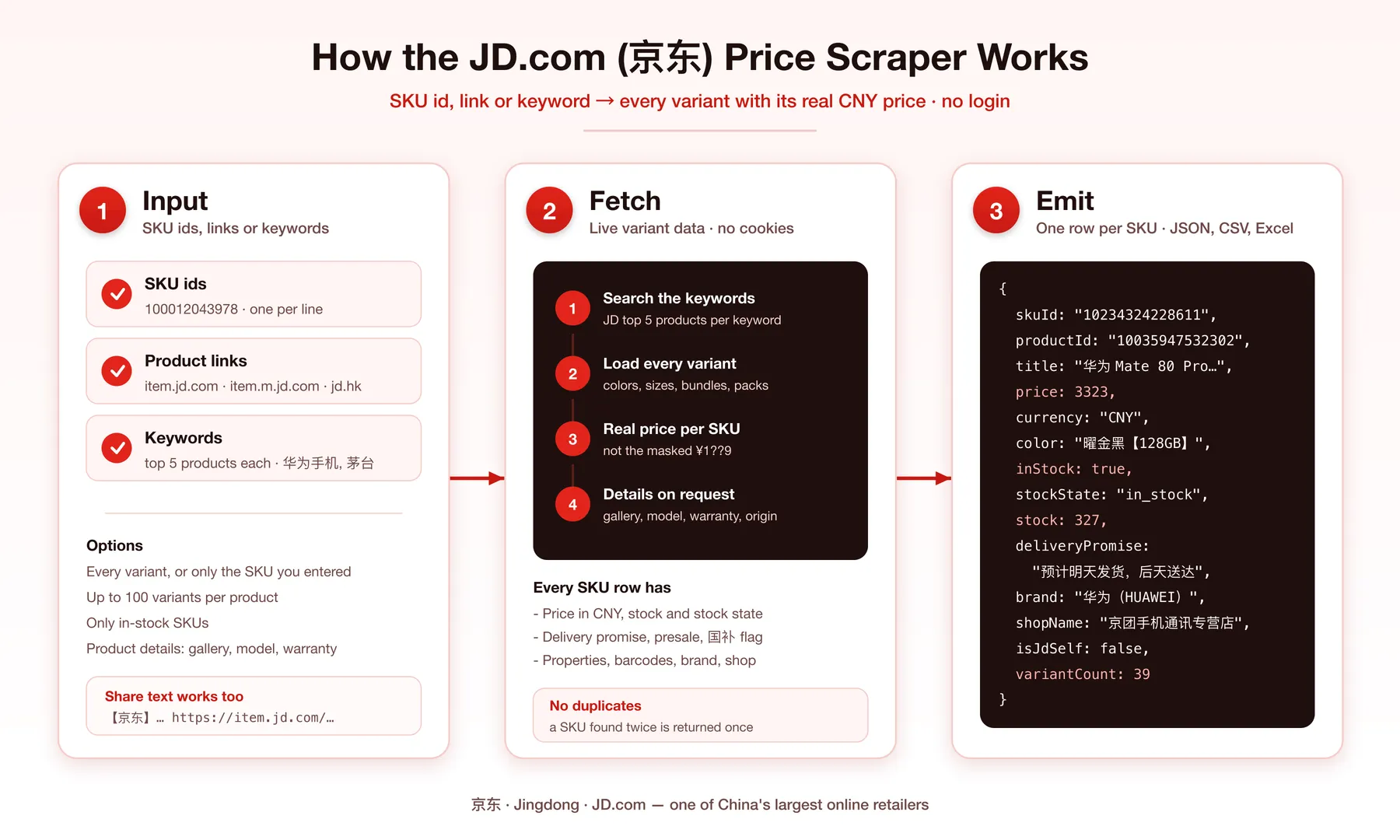
The actor takes JD SKU ids, product links or keywords. For each product it fetches the full variant list, then writes one dataset row per SKU. Keywords return JD's top 5 products for that search, and each of those is expanded into its variants the same way.
Supported inputs
| Input | Example |
|---|---|
| SKU id | 100012043978 |
| PC product link | https://item.jd.com/100012043978.html |
| Mobile product link | https://item.m.jd.com/product/100012043978.html?from=share |
| WeChat product link | https://wqitem.jd.com/item/view?sku=100012043978 |
| JD Global (京东国际) link | https://npcitem.jd.hk/100009475513.html |
| Share text with a link inside | 【京东】茅台飞天 https://item.jd.com/100012043978.html |
| Keyword | 华为手机, 蓝牙耳机, 茅台 |
Short links (3.cn/…, u.jd.com/…) only resolve in a browser. Open them and paste the item.jd.com link.
Use cases
- Price monitoring. Schedule a run over your SKU list and track price changes per variant.
- Cross-border and dropshipping research. Compare JD prices for the exact variant you sell.
- Brand protection. See which shops sell your products on JD and at what price.
- Catalog matching. Match JD SKUs to your catalog by barcode.
- Stock tracking. Watch when a variant goes out of stock or into presale.
- Subsidy tracking. See which SKUs carry the 国补 government-subsidy flag.
How it works
- You enter SKU ids, product links or keywords.
- Keywords are searched first; each returns JD's top 5 products.
- For each product, the actor fetches every variant with its live price and stock. The SKU you entered always comes first.
- With product details on, it adds the product page fields once per product.
- Each SKU becomes one row. SKUs that appear under several inputs are returned once.
Input configuration
| Field | Type | Default | What it does |
|---|---|---|---|
products | list | — | SKU ids or product links, one per line |
keywords | list | — | Search terms; top 5 products each |
searchKeywords | boolean | true | OFF: keywords only feed suggestions, nothing is searched or charged |
includeSuggestions | boolean | false | Save JD's related searches per keyword to the SUGGESTIONS record (free) |
allVariants | boolean | true | ON: every variant. OFF: only the SKU you entered |
maxVariantsPerProduct | integer | 100 | Cap on variants per product (max 100) |
includeProductDetails | boolean | false | Add gallery, model, category, warranty, origin |
onlyInStock | boolean | false | Drop SKUs that cannot be ordered now |
maxItems | integer | 1000 | Cap on rows for the run (free plan: 100) |
Example input:
To refresh prices on a known SKU list cheaply, set allVariants to false: one row per SKU you entered.
Output overview
One row per SKU. Rows from the same product share productId. sourceInput says which id, link or keyword produced the row, and keyword rows also carry searchKeyword and searchRank (1-5).
Output sample
A real row from keyword 蓝牙耳机 with product details on:
Without product details, rows stop at searchRank and detailLevel is sku.
Search suggestions
With includeSuggestions on, the run's key-value store gets a SUGGESTIONS record, one entry per keyword (real output for 茅台):
Suggestions are not dataset rows and are not charged. They cover the first 100 keywords of a run. To get only suggestions, turn searchKeywords off.
Key output fields
| Field | Meaning |
|---|---|
skuId | JD SKU id (one color/size/bundle) |
productId | Product group id shared by all variants. Not a SKU; it cannot be used as input |
isRequestedSku | true on the SKU you entered or the one search returned |
price | Live CNY price of this SKU, as shown signed-out in JD's default delivery region |
inStock | Can be ordered now. Presale and reservation SKUs are false |
stockState | JD's stock state code (in_stock, out_of_stock, …) |
stock | Stock count when JD shows one; null means not shown, not zero |
deliveryPromise | JD's delivery text for the default region |
properties | Sale properties of this SKU, name → value, as JD writes them |
isGovernmentSubsidy | JD flags the SKU for the 国补 subsidy. The flag alone does not say whether price already includes it |
barcodes | EAN/UPC codes for the SKU |
variantCount | How many SKUs the product has. Larger than the rows returned means maxVariantsPerProduct cut it |
FAQ
Why are the prices different from what I see in the JD app? Prices are JD's signed-out prices for its default delivery region. Member prices (PLUS), coupons applied at checkout and region-specific prices can differ.
Why did a product return fewer variants than variantCount?
JD's variant list does not always load in full. The actor asks a second time when a product comes back empty or short, and keeps the longer answer. If a run still shows fewer rows than variantCount, run that product again or pass the missing SKU ids directly.
Why is stock often null?
JD only shows a count for some SKUs. inStock and stockState are always filled.
Can I get more than 5 products per keyword?
Not today: keyword search returns JD's top 5 products. Use more specific keywords (华为 Mate 80, 华为 nova 16), or paste SKU ids and links, which have no such limit.
Do you return reviews or a shop's full catalog? Not yet.
Why do isBillionSubsidy and promoTags come back empty?
They are filled only when JD tags the SKU. Most SKUs carry no tag.
Where are the search suggestions?
In the run's key-value store, record SUGGESTIONS (Storage tab → Key-value store), not in the dataset. JD usually returns 10 per keyword.
English keywords? They work, but JD titles are in Chinese, so Chinese keywords match better.
Support
Found a problem or need a field? Open an issue on the actor's Issues tab and include the run id.
Additional services
Need a custom JD dataset, a scheduled price feed, or another Chinese marketplace? Reach out through the Issues tab.
Explore more scrapers
🤖 For AI agents & LLM apps
Call this actor through the Apify API or the Apify MCP server. Minimal input: {"products": ["<sku id or item.jd.com link>"]}. Each output row is one SKU with a numeric price in CNY, so variants compare without text parsing. Use allVariants: false when you only need the price of the SKUs you passed. productId groups variants of the same product.
⚠️ Disclaimer
This actor is not affiliated with, endorsed by, or connected to JD.com, Inc. or any of its subsidiaries. It collects publicly visible product information. You are responsible for using the data in line with JD.com's terms, applicable laws, and data-protection rules in your jurisdiction.
SEO Keywords
JD.com scraper, JD price scraper, Jingdong scraper, 京东爬虫, 京东价格, 京东商品数据, JD SKU scraper, JD.com product prices, JD stock tracker, China e-commerce prices, JD price monitoring, JD variants, JD barcode lookup, Chinese marketplace scraper, JD.com API alternative


