
![Meetup [$0.5💰] Events · Groups · Members · RSVP · Topics avatar](https://images.apifyusercontent.com/7TeA3Np7i5CN3s1zI8IrKVs_s7VliaXvZ71rW4GzpDQ/rs:fill:250:250/cb:1/aHR0cHM6Ly9hcGlmeS1pbWFnZS11cGxvYWRzLXByb2QuczMudXMtZWFzdC0xLmFtYXpvbmF3cy5jb20vbmduOHZSRVNUa3NleVdFNnAtYWN0b3ItRXYyemxJWWVkRjkwcE5qUEctdUptNVBNVnUzSy1NZWV0dXBfTG9nby5wbmc.webp)
Meetup [$0.5💰] Events · Groups · Members · RSVP · Topics
Pricing
from $0.50 / 1,000 results
Meetup [$0.5💰] Events · Groups · Members · RSVP · Topics
Scrape Meetup events with the host group behind each — name, date, online/in-person, venue + geo, fee, RSVP/going count, and the group's member count, location & topics. Optionally enrich each group with a business contact email (billed per email found). One row per event. JSON/CSV.
Pricing
from $0.50 / 1,000 results
Rating
0.0
(0)
Developer

Muhamed Didovic
Maintained by CommunityActor stats
0
Bookmarked
24
Total users
7
Monthly active users
3 days ago
Last modified
Categories
Share
Meetup Scraper
Turn Meetup into structured event + community data. Scrape events from any Meetup find, group, or event URL — title, full description, date/time with timezone, online vs in-person, venue + real lat/long, fee, RSVP / going count, and the host group (name, member count, location, topic category, topics). Optionally enrich each host group with a business contact email (opt-in, billed only per email found). One row per event, JSON or CSV out, billed per result.
How it works
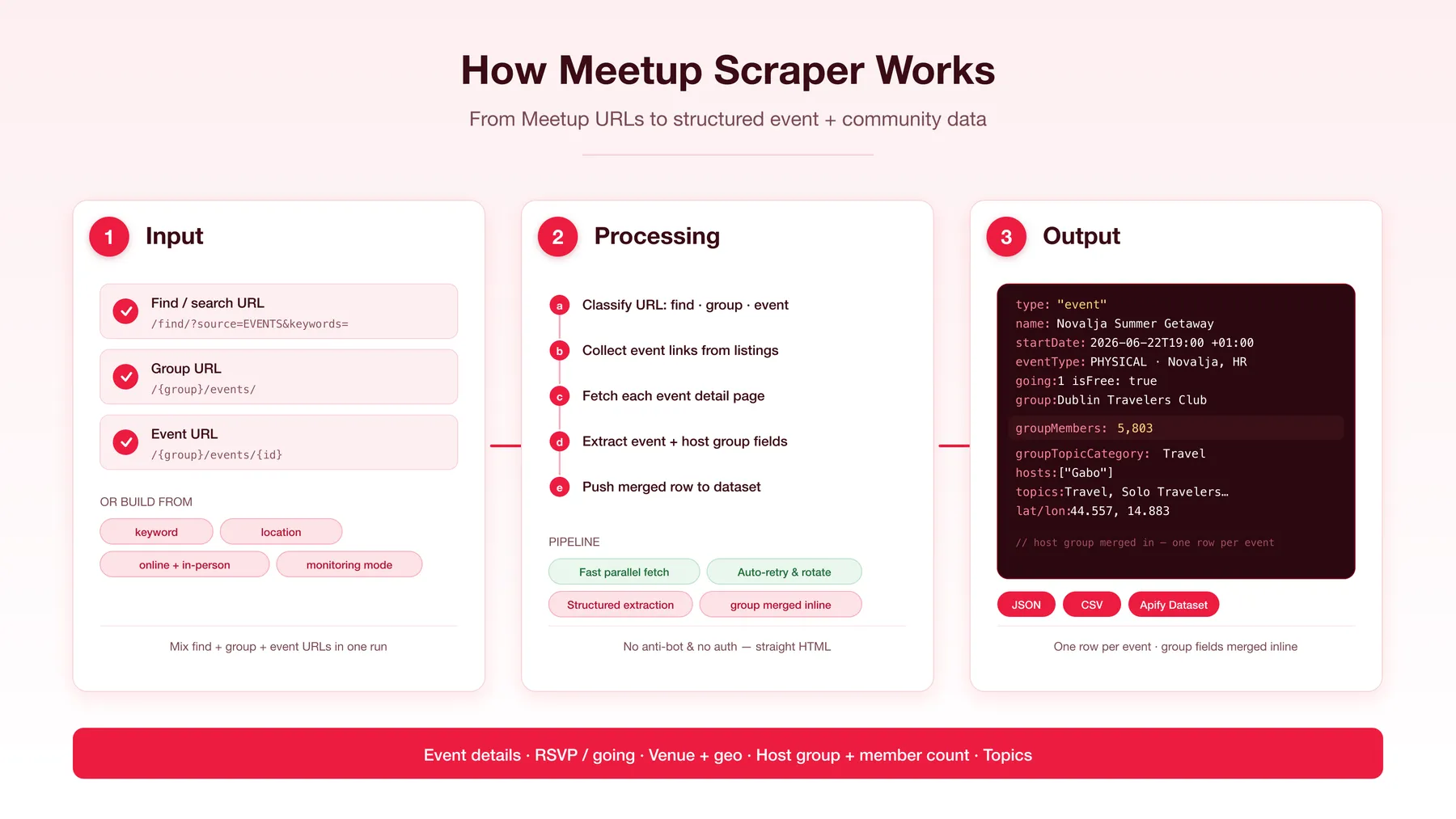
✨ Why use this scraper?
Building an events feed? Mapping active communities by topic and size? Tracking which groups are growing and what they're hosting? This actor pulls the full event and the group behind it in a single row.
- 🎯 Three starting points. Paste a Meetup find/search URL (
/find/?source=EVENTS&keywords=...), a group URL (/{group}/or/{group}/events/), or a direct event URL (/{group}/events/{id}) — all classified automatically. Or just set keyword + location and let the actor build the search. - 👥 Group + member intelligence. Every event row carries its host group's name, member count, city/country, topic category, and topics — perfect for finding active communities by size and subject.
- ✅ RSVP / attendance signal.
going(confirmed RSVPs) andwaitlistcounts show real traction per event. - 📧 Optional email lead-gen. Flip on
enrichEmailsto discover a business contact email for each host group (from its name) — addscontactEmail+contactWebsite. Experimental; billed only per email actually found, never for misses. - 📍 Online vs in-person, with geo. In-person events include venue name, city, country, and real
latitude/longitude; online events are flaggedisOnline: true. - 💸 Fee captured.
isFreeplusfeeAmount/feeCurrencywhen an event charges. - 🔁 Monitoring mode. Run on a schedule and get only NEW events each time — the actor keeps a private per-user record of what it already delivered.
- 🧰 No anti-bot, no auth. Reliable, fast parallel fetching — the event data is read straight from the page.
- 📤 Clean exports. One row per event with the group merged inline — no duplicate rows. JSON + CSV.
🎯 Use cases
| Team | What they build |
|---|---|
| Event aggregators / city guides | Fresh event feeds by topic + location, with group, venue, date, and RSVP counts |
| Developer relations / community teams | Find active groups by topic and member size to partner with or sponsor |
| Market & community research | Map a topic's community footprint — group sizes, cadence, attendance |
| Sponsorship / BD | Target groups above a member threshold in a category or city |
| Competitive intelligence | Track a community's events, growth, and topics over time |
| Data journalists / researchers | Datasets on local meetup activity, attendance, and community trends |
📥 Supported inputs
Pass any mix of URLs in startUrls — each is classified automatically. Leave startUrls empty to build a find search from the convenience fields.
| URL pattern | Behaviour |
|---|---|
https://www.meetup.com/find/?source=EVENTS&keywords=... | Find / search — collects the events listed on the page |
https://www.meetup.com/{group}/ or /{group}/events/ | Group — collects that group's events |
https://www.meetup.com/{group}/events/{id} | Event detail — routed straight to the parser |
| keyword + location | The actor builds https://www.meetup.com/find/?source=EVENTS&keywords={keyword}&location={location} |
Easiest workflow: run a search on meetup.com in your browser, copy the URL from the address bar, paste it into startUrls.
Not supported: authenticated/member-only data, hosts outside meetup.com.
Note on volume: Meetup's find page uses infinite-scroll (cursor) pagination rather than numbered pages, so each find URL yields the events present on it. For breadth, pass several find/group URLs (different keywords, locations, or groups) in one run.
🔄 How it works
- Classify each
startUrlas a find, group, or event URL (or build a find URL fromkeyword+location). - Collect event links (
/{group}/events/{id}) from each find/group page. - Fetch each event detail page in parallel via a global sliding window.
- Extract the event's structured data straight from the page — venue, group, hosts, and topics all included, with no separate group fetch.
- Push one row per event to the dataset.
⚙️ Input parameters
| Parameter | Type | Default | Description |
|---|---|---|---|
startUrls | array | ["https://www.meetup.com/find/?source=EVENTS&keywords=technology"] | Meetup find, group, and/or event URLs. Mix freely. |
keyword | string | — | Keyword for the built find search. Used only when startUrls is empty. |
location | string | — | Meetup location token (e.g. us--ny--New_York). Used only when startUrls is empty. |
monitoringMode | boolean | false | Only return events not delivered to you on a previous run. The first run seeds the baseline. |
resetMonitoringState | boolean | false | One-shot: clear the saved "events seen" record at run start. |
enrichEmails | boolean | false | Experimental — billed per email found. Discover a business contact email for each host group (from its name). Adds contactEmail, contactWebsite, and a detailed emailEnrichment object. Only charged when an email is returned, never for misses. |
maxItems | integer | 1000 | Hard cap on events collected (controls billing). |
maxConcurrency / minConcurrency | integer | 10 / 1 | Parallel HTTP request limits. |
proxy | object | Apify residential | Apify proxy configuration. Meetup has no aggressive anti-bot. |
📊 Output overview
Each scraped event is one single dataset row of type: "event", with its host group merged inline — no separate group rows, so the dataset row count equals the event count exactly.
📦 Output sample
One row per event:
🗂 Key output fields
| Group | Fields |
|---|---|
| Identifiers | type, eventId, eventUrl, scrapedAt |
| Event | name, description, status, eventType, isOnline, image |
| Schedule | startDate, endDate (ISO with offset) |
| Attendance / tickets | going (confirmed RSVPs), waitlist, maxTickets, guestsAllowed, isFree, feeAmount, feeCurrency |
| Venue | venueName, venueAddress, venueCity, venueState, venueCountry, latitude, longitude (null for online events) |
| Host group | groupName, groupUrlname, groupUrl, groupCity, groupState, groupCountry, groupMembers, groupTopicCategory, groupIsPrivate, groupIsProNetwork |
| People / topics | hosts[] (host names), topics[] |
Contact (only when enrichEmails: true) | contactEmail, contactWebsite, emailEnrichment (full discovery detail) |
❓ FAQ
Which Meetup URLs are supported?
Find/search URLs (/find/?source=EVENTS&keywords=...), group URLs (/{group}/, /{group}/events/), and event URLs (/{group}/events/{id}). You can also skip URLs and set keyword + location.
Why don't I get hundreds of events from one find URL? Meetup's find page uses cursor (infinite-scroll) pagination, not numbered pages, so each find URL returns the events present on it. For more, pass multiple find/group URLs (different keywords, locations, or specific groups) in one run.
Why are venue/geo fields null for some events?
Those are online events (isOnline: true) — there's no physical venue.
Can I get contact emails for the host groups?
Optionally, yes. Meetup itself doesn't expose organizer contact details, but with enrichEmails: true the actor discovers a business contact email for each host group from its name (experimental). It adds contactEmail, contactWebsite, and an emailEnrichment detail object, and is billed only per email actually found — never for misses. Leave it off (the default) for pure event/community data.
How does monitoring mode work?
With monitoringMode: true, events whose ID was already delivered to you are skipped (no fetch, no charge). The first run seeds your baseline; later runs return only new events.
Can I scrape private or member-only data? No. The scraper accesses only publicly available event and group pages — no logged-in content, no attendee personal data.
💬 Support
- For issues or feature requests, please use the Issues tab on the actor's Apify Console page.
- Author's website: https://muhamed-didovic.github.io/
- Email: muhamed.didovic@gmail.com
🛠 Additional services
- Custom output shape, extra fields, or one-off datasets: muhamed.didovic@gmail.com
- Need a similar scraper for other event sites (Eventbrite, Lu.ma, etc.)? Drop an email.
- For API access (no Apify fee, just a usage fee for the API): muhamed.didovic@gmail.com
🔎 Explore more scrapers
If this Meetup Scraper was useful, see other scrapers and actors at memo23's Apify profile — covering events, job boards, real estate, social media, and more.
🤖 For AI Agents & LLM Apps
Compact reference for AI agents calling this actor via the Apify MCP server or the Apify API (actor: memo23/meetup-scraper).
Purpose: Scrape Meetup events from any find/search, group, or event URL — one flat row per event with the host group merged inline (name, member count, location, topics, RSVP count).
Minimal input:
Instead of startUrls, leave it empty and pass keyword (e.g. "technology") + location (e.g. "us--ny--New_York") to build a find search.
Output: one row per event — type, eventId, eventUrl, name, description, status, eventType, isOnline, startDate, endDate, image, going, waitlist, maxTickets, guestsAllowed, isFree, feeAmount, feeCurrency, venueName, venueCity, venueCountry, latitude, longitude, groupName, groupUrlname, groupUrl, groupCity, groupCountry, groupMembers, groupTopicCategory, groupIsPrivate, hosts[], topics[], scrapedAt, plus contactEmail / contactWebsite / emailEnrichment when enrichEmails: true.
Behaviors an agent should know:
startUrls(find, group, event URLs, auto-classified) take priority; leave empty to usekeyword+location.- Always set
maxItems— default cap is 1000. Meetup find pages use cursor pagination, so one find URL yields only the events present on it; pass several URLs for breadth. monitoringModereturns only events not delivered on a previous run (private per-user state);resetMonitoringStateclears that record at run start.enrichEmailsis opt-in and experimental;qualifyByPaymentrequires it and adds no extra charge.- Billed per result; email enrichment is charged only per email actually found, never for misses.
⚠️ Disclaimer
This Actor is an independent tool and is not affiliated with, endorsed by, or sponsored by Meetup, Meetup.com, or any of their subsidiaries or affiliates. All trademarks mentioned are the property of their respective owners.
The scraper accesses only publicly available event and group pages on meetup.com — no authenticated endpoints, member-only features, or attendee personal data. Users are responsible for ensuring their use complies with Meetup's Terms of Service, applicable data-protection law (GDPR, CCPA, etc.), and any contractual obligations of their own organisation.
SEO Keywords
meetup scraper, scrape meetup, meetup api, meetup.com scraper, apify meetup, meetup events scraper, meetup events data, meetup group scraper, meetup group members, meetup rsvp data, meetup attendance scraper, scrape events by city, event data api, meetup community data, meetup topic scraper, developer community scraper, tech meetup data, meetup group size, local events feed, meetup monitoring, meetup organizer emails, meetup group contact email, meetup lead generation, eventbrite alternative scraper, luma events scraper


![Collecting Cars [$3💰] | 33k SOLD prices + live bids avatar](https://images.apifyusercontent.com/Hbn_LDWbVTHAyPL8k_edq8GAZOEin7g5i4_bFf2WimM/rs:fill:76:76/cb:1/aHR0cHM6Ly9hcGlmeS1pbWFnZS11cGxvYWRzLXByb2QuczMudXMtZWFzdC0xLmFtYXpvbmF3cy5jb20vbmduOHZSRVNUa3NleVdFNnAtYWN0b3ItRm1EYVRESkEyWGNYU0s4N24tVkJhU3V5RENuYi1Db2xsZWN0aW5nX0NhcnMud2VicA.webp)

