

OfferUp Scraper — Listings, Sellers & Vehicle VINs
Pricing
from $2.00 / 1,000 listings
OfferUp Scraper — Listings, Sellers & Vehicle VINs
Scrape OfferUp listings — by search keyword or pasted item URL. One row per listing: title, price, condition, location, photos, category, seller profile (rating, items sold, join date) and vehicle attributes (make, model, year, mileage, VIN). Optional full-item enrichment. JSON/CSV out.
Pricing
from $2.00 / 1,000 listings
Rating
5.0
(2)
Developer

Muhamed Didovic
Maintained by CommunityActor stats
0
Bookmarked
28
Total users
5
Monthly active users
3 days ago
Last modified
Categories
Share
OfferUp Marketplace Scraper
Turn any OfferUp search into clean, structured marketplace data. Scrape by search keyword (iphone 15, honda civic, dining table), or paste search URLs and item URLs — and get one flat row per listing with title, price, condition, location, photos, category, the full seller profile, and — for cars — full vehicle attributes including the VIN.
Built for resale and arbitrage sourcing, used-car and dealer intelligence, price monitoring, and marketplace research across the US.
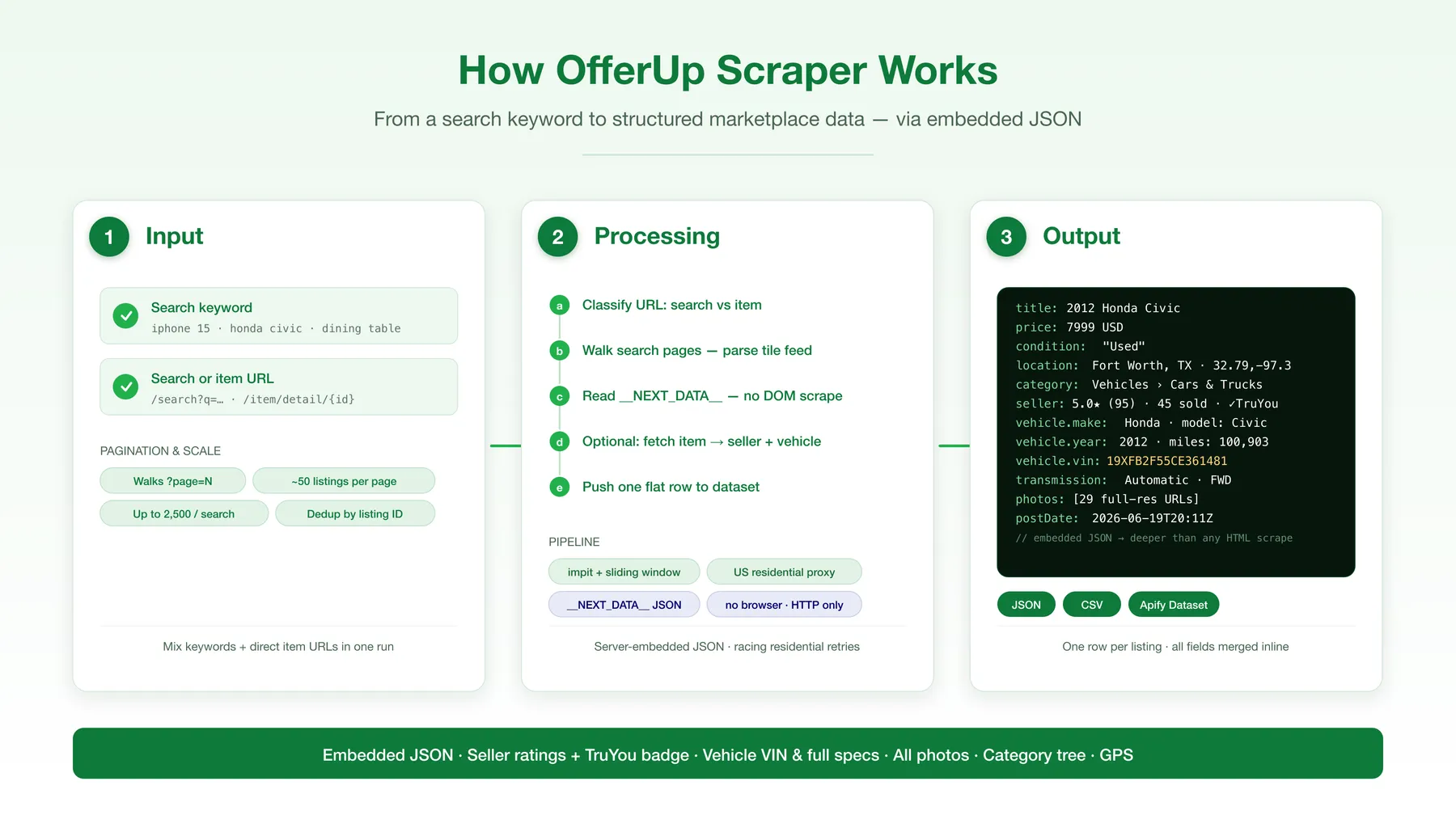
How it works
✨ Why use this scraper?
- Deeper rows than any other OfferUp scraper — not just title/price/image. Every enriched row carries the full description, all photos, the category tree, GPS coordinates, post date, shipping/pickup options, and the complete seller profile (rating, review count, items sold, join date, business & TruYou-verified flags, public phone number when shown).
- Vehicle VIN + full specs — for autos listings you get make, model, year, trim, mileage, VIN, transmission, drivetrain, fuel type, title status and MPG — decoded straight from OfferUp's own data. Perfect for used-car dealers, VIN checks and market pricing.
- Two ways in — search by keyword, or paste search/item URLs. Mix them in one run.
- Fast mode or deep mode — leave Scrape full item pages off for quick title/price/condition/location/image rows; turn it on to add everything above. You choose cost vs depth.
- Beats the block — OfferUp serves datacenter scrapers a 403; this actor routes every request through US residential IPs with a real browser fingerprint and racing retries, so you get the real page.
- Structured, not scraped — reads OfferUp's own embedded
__NEXT_DATA__JSON rather than fragile HTML selectors, so the output stays reliable. - JSON, CSV, Excel or API — pipe straight into your sheet, CRM or pipeline. Billed per listing.
🎯 Use cases
| You are a… | Use it to… |
|---|---|
| Reseller / flipper | Source underpriced listings by keyword and location, with condition, price and seller quality |
| Used-car dealer / analyst | Pull local vehicle inventory with VIN, mileage, title status and price for market analysis |
| Price-monitoring / arbitrage | Track asking prices for a product across a metro over time |
| Marketplace / SaaS builder | Seed a second-hand catalog dataset with structured, deduplicated rows |
| Lead-gen | Find active business sellers (electronics stores, dealers) with ratings and public phone numbers |
| Market researcher | Measure supply, price distribution and category mix in a local marketplace |
📥 Supported inputs
| Input | Example | What it does |
|---|---|---|
| Search keyword | iphone 15, honda civic, sectional sofa | Builds & paginates that OfferUp search feed |
| Search URL | https://offerup.com/search?q=iphone | Paginates that search |
| Item URL | https://offerup.com/item/detail/{id} | Scrapes that single listing in full detail |
Not supported: buyer/message data, offers, and anything behind a login. The actor reads only public OfferUp search and item pages.
Note on location. OfferUp determines each search's region from the request IP, not from a URL parameter — there is no reliable ZIP/city filter on the web layer. This actor uses US residential exits, so results are localized to the exit region. To target a specific metro, run with your own city-level US residential proxy.
⚙️ How it works
- Classify every input — keywords become search URLs; pasted URLs are sorted into search / item.
- Unlock each page with a real browser TLS fingerprint over a US residential IP (racing a small batch of fresh sessions), so the real page is returned instead of a 403.
- Parse the embedded
__NEXT_DATA__JSON — the search feed's listing tiles, and each item page's full listing object. - Enrich (optional) — for each listing, fetch its item page to add description, all photos, category, seller profile, shipping and vehicle attributes.
- Push one flat, deduplicated row per listing to the dataset.
🔧 Input configuration
| Field | Type | Default | Description |
|---|---|---|---|
searchQueries | array | ["iphone"] | Keywords to search OfferUp for. Each is paginated. |
startUrls | array | [] | OfferUp search and/or item URLs. Auto-classified. |
scrapeDetails | boolean | false | Fetch each listing's full item page (description, photos, category, seller, shipping, vehicle). |
maxItems | integer | 1000 | Hard cap on rows for the whole run. |
maxItemsPerSearch | integer | 1000 | Cap per keyword / search URL. |
maxConcurrency | integer | 6 | Parallel requests (keep moderate). |
maxRequestRetries | integer | 20 | Retry budget per request; each retry rotates to a fresh residential IP. |
proxy | object | built-in | Optional override — the actor ships with US residential proxy at no extra cost. |
📤 Output overview
One row per listing. In fast mode you get the search-tile fields; with Scrape full item pages on (or when you paste an item URL) every row is fully enriched.
Fast mode (search tile): listingId, title, price, condition/conditionText, locationName, primaryImage, flags, url.
Deep mode adds: description, all photos, category (L1/L2/L3), latitude/longitude, postDate, quantity, seller (rating, review count, items sold, join date, business/dealer/TruYou flags, phone, website, avatar), fulfillment (pickup/shipping), and vehicle (make, model, year, trim, mileage, VIN, transmission, drivetrain, fuel, title status, MPG) for autos.
🧾 Output samples
A car listing (deep mode):
An electronics listing (deep mode):
🔑 Key output fields
| Field | Description |
|---|---|
listingId | OfferUp listing UUID (stable dedup key) |
title / price / currency | Listing title, numeric price, always USD |
conditionText | Item condition (New, Used, …) |
locationName / latitude / longitude | Listing location + GPS |
category | Category path — l1Name › l2Name › l3Name |
photos | Array of full-resolution image URLs |
postDate | When the listing was posted (ISO) |
seller | Full seller profile: rating, review count, items sold, join date, business/dealer/TruYou flags, phone, website |
fulfillment | Local pickup / shipping options |
vehicle | Autos only: make, model, year, trim, mileage, VIN, transmission, drivetrain, fuel, title status, MPG |
url | Canonical item-detail URL |
❓ FAQ
Can I target a specific ZIP or city? OfferUp resolves a search's location from the request IP, not the URL — so there's no reliable ZIP filter on the web layer. Results reflect the US residential exit region. For a specific metro, supply your own city-level US residential proxy in the proxy field.
What's the difference between fast and deep mode? Fast mode (default) returns the search-tile fields (title, price, condition, location, image, URL) — cheap and quick. Deep mode (Scrape full item pages) fetches each listing's item page to add description, all photos, category, seller profile, shipping and vehicle attributes — richer rows, ~2× the requests.
Do I get the seller's phone number? When the seller has enabled a public/click-to-call number on their listing, yes. Many private sellers don't publish one, in which case phoneNumber is null.
Does it work for cars? Yes — autos listings return a full vehicle object with VIN, mileage, make/model/year, transmission, drivetrain, fuel type, title status and MPG.
Is a proxy included? Yes. The actor ships with US residential proxy — required because OfferUp blocks datacenter IPs. You can override it with your own US proxies.
How many results per search? OfferUp returns ~50 listings per page, up to ~50 pages — about 2,500 per keyword. Use several keywords to go wider.
🛟 Support
Found a bug or need a field added? Open an issue on the actor's Issues tab in the Apify Console and we'll take a look.
🚀 Additional services
Need a different marketplace, site, or a custom schema? We build and maintain scrapers across classifieds, real estate, jobs and e-commerce.
🔎 Explore more scrapers
- Craigslist Scraper
- Facebook Marketplace Scraper
- Kleinanzeigen Scraper
- eBay Search Scraper
🤖 For AI Agents & LLM Apps
Compact reference for AI agents calling this actor via the Apify MCP server or the Apify API (actor: memo23/offerup-marketplace-scraper).
Purpose: Scrape OfferUp US marketplace listings into one flat row each — title, price, condition, location, photos, category, full seller profile, and for autos a full vehicle object including the VIN.
Minimal input:
Instead of searchQueries you can pass startUrls with OfferUp search or item URLs — auto-classified; the two modes can be mixed in one run.
Output: one row per listing. Fast mode: listingId, title, price, currency, condition, conditionText, locationName, primaryImage, flags, url. Deep mode adds description, photos, category {l1Name, l2Name, l3Name}, latitude, longitude, postDate, quantity, seller {name, ratingAverage, ratingCount, itemsSold, dateJoined, isBusinessAccount, isAutosDealer, isTruyouVerified, phoneNumber, website, avatar}, fulfillment, and vehicle {make, model, year, trim, miles, vin, transmission, driveTrain, fuelType, titleStatus, cityMpg, highwayMpg} (autos only; null otherwise).
Behaviors an agent should know:
- Always set
maxItems(global run cap) and, per feed,maxItemsPerSearch. OfferUp returns ~50 listings/page up to ~50 pages (~2,500 per keyword); use several keywords to go wider. scrapeDetails: true(deep mode) fetches each item page for description, photos, category, seller, shipping and vehicle attributes at ~2× the requests; fast mode returns only search-tile fields.- Location is resolved from the request IP, not a URL/ZIP parameter. The actor ships with US residential proxy at no extra cost; to target a specific metro, supply your own city-level US residential proxy in
proxy. - Billed per listing row.
price/currencyis alwaysUSD.seller.phoneNumberis present only when the seller publishes a public number, elsenull. - Public search and item pages only — no buyer/message data, offers, or login-gated content.
⚠️ Disclaimer
This actor scrapes only publicly available listing data from OfferUp. It does not access private messages, buyer data, or any content behind a login, and it does not collect personal data beyond the public seller information OfferUp itself displays on a listing. You are responsible for using the scraped data in compliance with OfferUp's Terms of Service, applicable laws (including data-protection and consumer-protection laws), and any restrictions on automated access. Use the output lawfully and ethically.
🔍 SEO Keywords
OfferUp scraper, OfferUp API, OfferUp data extractor, scrape OfferUp listings, OfferUp marketplace scraper, OfferUp price scraper, OfferUp seller scraper, OfferUp car scraper, OfferUp VIN scraper, used car scraper, OfferUp search scraper, classifieds scraper, second-hand marketplace data, OfferUp listing export, OfferUp JSON, resale sourcing data.
![PistonHeads.com [$1💰] | Full 208k catalogue | Real pagination avatar](https://images.apifyusercontent.com/N5yGW7wlseLIwvxB9V1DcTJVHEdFqV2MhaITdnhRlFM/rs:fill:76:76/cb:1/aHR0cHM6Ly9hcGlmeS1pbWFnZS11cGxvYWRzLXByb2QuczMudXMtZWFzdC0xLmFtYXpvbmF3cy5jb20vbmduOHZSRVNUa3NleVdFNnAtYWN0b3IteEpXSmV2d2I5dVBrZDdwU08tOHRWc0xnWEUzZi1waXN0b25oZWFkcy5wbmc.webp)


![Car & Classic [$1💰] | Full 46k catalogue | Beats 10k cap avatar](https://images.apifyusercontent.com/yR5ZcWq7huml1KRn39casUADIIm6kQumb9tA8E00od4/rs:fill:76:76/cb:1/aHR0cHM6Ly9hcGlmeS1pbWFnZS11cGxvYWRzLXByb2QuczMudXMtZWFzdC0xLmFtYXpvbmF3cy5jb20vbmduOHZSRVNUa3NleVdFNnAtYWN0b3ItbmRLcGNQOFNyWFNueW5Na3IteGE3RlJRTHRTVy1jYXJfYW5kX2NsYXNzaWMuanBlZw.webp)


