
PDF Text Extractor — Markdown, OCR & Metadata
Pricing
from $5.00 / 1,000 pdf processeds
PDF Text Extractor — Markdown, OCR & Metadata
Turn any PDF URL into clean data: full text, LLM-ready Markdown, per-page content, and metadata. Reads scanned PDFs via OCR (23 languages), supports page ranges, and processes files in parallel. Export JSON, CSV, or Excel. Ideal for RAG pipelines, invoices, and research.
Pricing
from $5.00 / 1,000 pdf processeds
Rating
5.0
(2)
Developer

Muhamed Didovic
Maintained by CommunityActor stats
0
Bookmarked
454
Total users
182
Monthly active users
2 days ago
Last modified
Categories
Share
PDF Text Extractor — Markdown, OCR & Metadata 📄
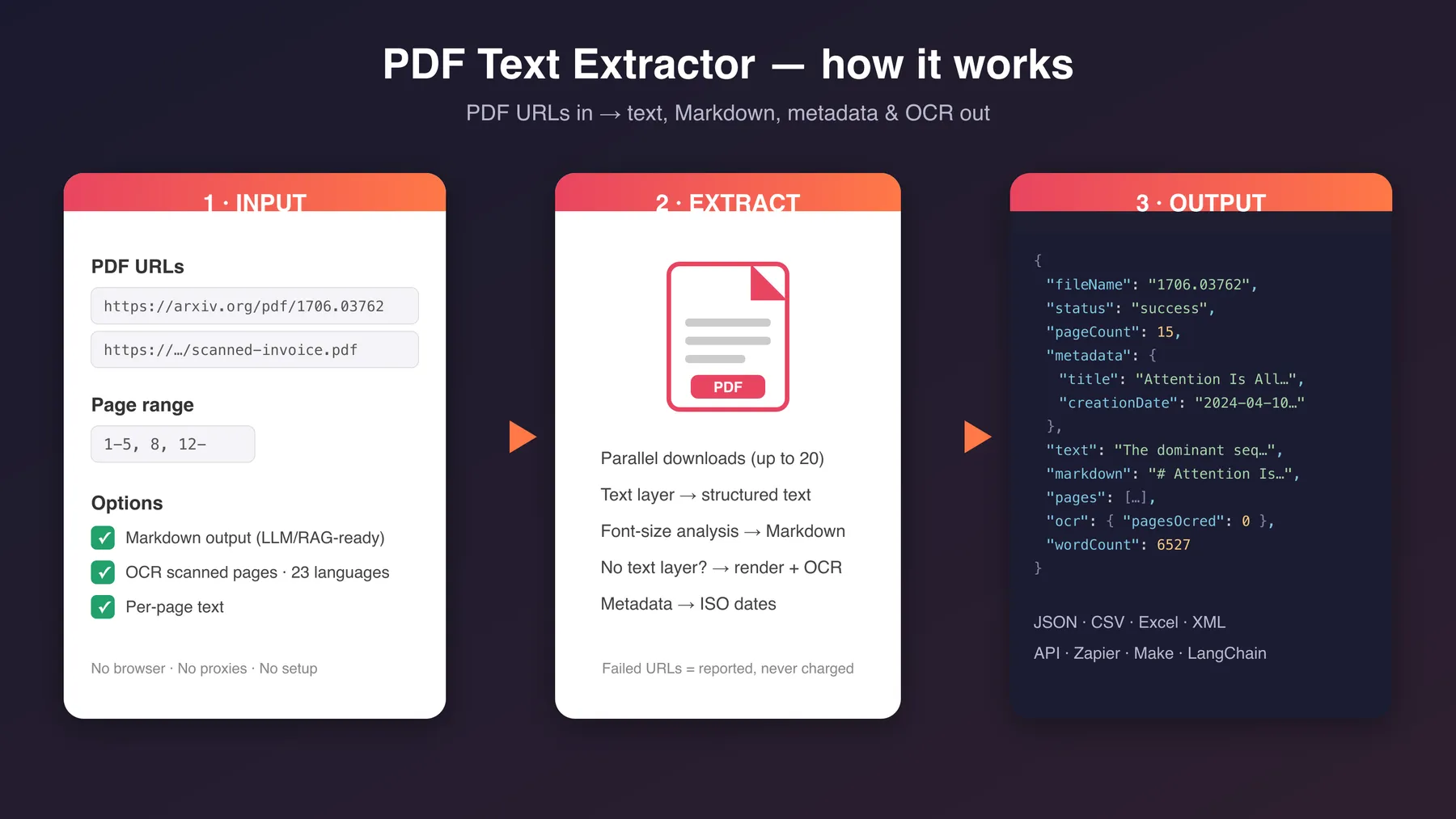
Turn any PDF URL into clean, structured data: full text, LLM-ready Markdown, per-page content, and document metadata — with an OCR fallback that reads scanned, image-only PDFs. No browser, no proxies, no setup. Paste URLs, get JSON, CSV, or Excel.
Why use PDF Text Extractor?
- 🧾 Markdown output built for LLMs and RAG — headings, paragraphs, and bullet lists are reconstructed from the PDF layout, so you can feed documents straight into embeddings, vector stores, or prompts without cleanup.
- 🔍 OCR for scanned documents — pages with no text layer (scans, faxes, image-only invoices) are rendered and OCRed automatically in 23 languages. Only the pages that need it are OCRed, and only those are billed.
- 📑 Page ranges — extract just
1-5, 8, 12-instead of paying to process a 400-page manual you need 3 pages from. - 🗂️ Rich metadata — title, author, subject, keywords, creator, producer, creation and modification dates (normalized to ISO 8601).
- 📎 Three input modes — URLs, direct file upload, or base64 (for API calls). The only extractor in the niche that also opens password-protected PDFs (
pdfPasswordinput). - 🌐 Proxy fallback — downloads go direct first; if a host blocks the direct request (401/403/407/429), it auto-retries through a proxy. Bytes pulled through the proxy are billed per MB so large proxied files are priced fairly.
- ⚡ Fast and parallel — processes up to 20 PDFs concurrently; a typical text PDF takes under a second.
- 💰 Pay per PDF, not per compute unit — transparent pay-per-event pricing; failed downloads are never charged.
What data can you extract?
| Field | Description |
|---|---|
text | Complete plain text of the document (or selected page range) |
markdown | Markdown rendition with reconstructed headings, paragraphs, and lists |
pages | Optional per-page array: page number, text, and whether OCR was used |
metadata | Title, author, subject, keywords, creator, producer, creation/modification dates |
pageCount / extractedPageCount | Total pages vs. pages actually extracted |
charCount / wordCount | Size of the extracted text |
ocr | Whether OCR ran, how many pages were OCRed, and the language used |
status / error | success, partial (some pages extracted before a deadline or abort cut the file short), or failed with the exact reason (HTTP error, not a PDF, too large, timeout) |
Use cases
- RAG pipelines & AI agents — convert reports, papers, and manuals into Markdown chunks for vector search.
- Invoice & document processing — pull text out of supplier invoices, including scanned ones, for downstream parsing.
- Research & academia — batch-extract text from arXiv papers, theses, and journal PDFs.
- Legal & compliance — make contract archives and court filings searchable.
- Data pipelines — feed the dataset into Zapier, Make, LangChain, LlamaIndex, or your own code via the Apify API.
How to extract text from PDF files
- Provide PDFs any way you like: paste direct URLs, upload a file from your computer, or pass base64 data via the API.
- (Optional) Set a page range, a password for protected files, toggle Markdown / per-page text, or enable OCR for scanned documents.
- Run the Actor and download results as JSON, CSV, Excel, or XML — or fetch them via API.
Example input
Input parameters
| Parameter | Type | Default | Description |
|---|---|---|---|
urls | array | — | Direct URLs to PDF files; redirects are followed |
pdfFile | file | — | Upload a single PDF directly in Apify Console |
base64Pdfs | array | — | Base64 PDFs: plain strings or {"filename", "data"} objects (for API calls) |
pdfPassword | string (secret) | — | Password for opening protected PDFs |
pageRange | string | all pages | e.g. 1-5, 8, 12- (12- = page 12 to the end) |
includeFullText | boolean | true | Include complete plain text |
includeMarkdown | boolean | true | Include the Markdown rendition |
includePerPageText | boolean | false | Include the per-page pages array |
ocrScannedPages | boolean | false | OCR pages that have no text layer |
ocrLanguage | string | eng | OCR language (23 supported, incl. deu, fra, spa, jpn, chi_sim) |
ocrMaxPagesPerPdf | integer | 100 | Max pages sent to OCR per PDF; beyond it the result is flagged ocr.capped |
maxConcurrency | integer | 5 | PDFs processed in parallel (1–20) |
timeoutPerPdfSecs | integer | 150 | Download timeout per PDF |
maxPdfSizeMb | integer | 100 | Larger PDFs are skipped as failed rows |
proxyConfiguration | object | auto | Proxy used as a fallback when a direct download is blocked or fails; bytes pulled through it are billed per MB |
At least one of urls, pdfFile, or base64Pdfs is required; all sources are processed together in one run.
Output example
Tips for best results
- URLs must point at the PDF file itself, not a viewer page around it. If the link opens a browser preview, look for the direct
.pdfdownload URL. - Turn OCR on only when you expect scanned pages — it is slower and billed per OCR page. Text-layer pages are never OCRed.
- For very large PDFs, use
pageRangeand disableincludePerPageTextto keep dataset rows small. - A document whose output is larger than one dataset item allows (about 8 MB of text) comes back as several rows that share a
documentIdand carrypartandpartCount. Jointext(andmarkdown) across the parts inpartorder, with no separator, to get the whole document; concatenatepagesthe same way. The document is still charged once. - The Markdown structure is heuristic (PDFs carry no real semantics): headings are detected from font sizes. It is tuned for reports, papers, and invoices; heavily designed layouts may come out flatter.
FAQ
Can it read scanned PDFs?
Yes — enable ocrScannedPages. Pages without a usable text layer are rendered and OCRed (Tesseract engine, 23 languages). Pages that already have text are never OCRed, so mixed documents are handled efficiently. OCR is capped at ocrMaxPagesPerPdf pages per document (default 100, raisable to 1000) to keep runs fast and costs predictable.
Does it handle password-protected PDFs?
Yes — set the pdfPassword input and protected documents are decrypted and processed like any other. Without the password (or with a wrong one), the file is reported as a failed row with a clear message.
Can I upload local files?
Yes — use the Upload a PDF file field in Apify Console, or pass base64Pdfs when calling via API. URLs, uploads, and base64 items can all be mixed in a single run.
A host keeps rejecting the download (403) — what can I do?
Usually nothing — downloads go direct first, and a blocked direct request (401/403/407/429) is automatically retried through a proxy. Set proxyConfiguration to choose which proxy that fallback uses (Apify Proxy by default). Bytes downloaded through the proxy are billed per MB, so a few large proxied files are charged fairly instead of eating the flat per-PDF fee.
Does it extract tables or images? Tables come out as text lines (not structured cells) and images are not extracted. If you need structured table extraction, contact us — see Support below.
What happens when a URL fails?
You still get a dataset row with status: "failed" and the exact error. Failed PDFs are not charged. If a document is cut short mid-extraction (deadline or abort), the row comes back as status: "partial" with every page extracted so far — only OCR pages actually recovered are charged, and the flat per-PDF fee is waived.
Use with AI agents via MCP
This Actor works out of the box with AI agents through the Apify MCP server — let Claude, Cursor, or any MCP-capable agent read PDFs for you.
Claude Code:
Claude Desktop / Cursor / VS Code — add to your MCP config:
Example prompts:
"Extract the text from https://example.com/report.pdf and summarize the key findings."
"Get pages 1–10 of this PDF as Markdown and list every dollar amount mentioned."
Support & feedback
Found a bug or missing a feature? Open an issue on the Actor's Issues tab in Apify Console — issues are typically answered within 24 hours. For custom extraction logic (structured tables, specific invoice formats, private storage integrations), reach out via the contact form on my profile.
Explore more scrapers
Check out my other Actors: apify.com/memo23 — 270+ scrapers for jobs, real estate, social media, e-commerce, and lead generation.
🤖 For AI Agents & LLM Apps
Compact reference for AI agents calling this actor via the Apify MCP server or the Apify API (actor: memo23/pdf-text-extractor).
Purpose: Turn PDFs (via URL, upload, or base64) into full text, LLM-ready Markdown, per-page content, and metadata — with automatic OCR for scanned, image-only pages in 23 languages.
Minimal input:
For API calls without a URL, pass PDFs as base64 instead: "base64Pdfs": [{ "filename": "doc.pdf", "data": "…" }]. Add "ocrScannedPages": true for scanned documents.
Output: one row per PDF — url, fileName, status, pageCount, extractedPageCount, metadata {title, author, subject, keywords, creator, producer, creationDate, modificationDate}, text, markdown, pages[] {page, text, ocr}, ocr {enabled, pagesOcred, language}, charCount, wordCount, processedAt, error. Oversized documents split into rows with documentId, part, partCount (join text in part order).
Behaviors an agent should know:
- Supply at least one of
urls,pdfFile, orbase64Pdfs; all three sources are mixable in one run. - Crawler-style
startUrls(objects with aurlkey) and a singleurlstring are accepted as aliases forurls, so integrations that auto-map those conventions work unchanged. urlsmust point at the raw PDF file, not a viewer page; redirects are followed. UsepageRange(e.g."1-5, 8, 12-") to process only the pages you need.- OCR is off by default — set
ocrScannedPages: true; only pages lacking a text layer are OCRed (capped atocrMaxPagesPerPdf, default 100), and only those are billed. pdfPasswordopens protected PDFs; a wrong/missing password returns astatus: "failed"row.- Failed or blocked downloads return
status: "failed"and are never charged the per-PDF fee; a cut-short document returnsstatus: "partial"with the flat per-PDF fee waived. Downloads that fall back to the proxy are billed per MB pulled through it (proxy-mb). - Pay-per-event: a flat fee per successfully processed PDF, a per-page charge for OCR, and a per-MB charge for bytes downloaded through the proxy — see the Pricing tab on the actor page for current rates.
⚠️ Disclaimer
This Actor processes PDF files that you provide via publicly accessible URLs. You are responsible for ensuring you have the right to download and process those files, and for complying with the terms of service of the sites hosting them, as well as any applicable copyright and data-protection laws. The Actor does not bypass authentication, paywalls, or DRM.
SEO Keywords
pdf text extractor, extract text from pdf, pdf to text api, pdf to markdown converter, pdf ocr api, scanned pdf to text, pdf parser api, pdf metadata extractor, pdf data extraction, batch pdf text extraction, pdf to json, pdf for rag, llm pdf ingestion, pdf text scraper, convert pdf to markdown online, ocr scanned documents api, password protected pdf text extraction, upload pdf extract text, base64 pdf to text, pdf mcp ai agent


![ForRentUniversity.com [$1.25💰] Scraper · Emails avatar](https://images.apifyusercontent.com/knob38rf08RjbTFOtyPTLKbUpJqNv69gLvD9GZvNHdY/rs:fill:76:76/cb:1/aHR0cHM6Ly9hcGlmeS1pbWFnZS11cGxvYWRzLXByb2QuczMudXMtZWFzdC0xLmFtYXpvbmF3cy5jb20vbmduOHZSRVNUa3NleVdFNnAtYWN0b3Itb2ZkQkJZZ0QzMndpZHZSemotT25mdk55NHJTQS1mcnUuanBlZw.webp)


![Collecting Cars [$3💰] | 33k SOLD prices + live bids avatar](https://images.apifyusercontent.com/Hbn_LDWbVTHAyPL8k_edq8GAZOEin7g5i4_bFf2WimM/rs:fill:76:76/cb:1/aHR0cHM6Ly9hcGlmeS1pbWFnZS11cGxvYWRzLXByb2QuczMudXMtZWFzdC0xLmFtYXpvbmF3cy5jb20vbmduOHZSRVNUa3NleVdFNnAtYWN0b3ItRm1EYVRESkEyWGNYU0s4N24tVkJhU3V5RENuYi1Db2xsZWN0aW5nX0NhcnMud2VicA.webp)
![Car & Classic [$1💰] | Full 46k catalogue | Beats 10k cap avatar](https://images.apifyusercontent.com/yR5ZcWq7huml1KRn39casUADIIm6kQumb9tA8E00od4/rs:fill:76:76/cb:1/aHR0cHM6Ly9hcGlmeS1pbWFnZS11cGxvYWRzLXByb2QuczMudXMtZWFzdC0xLmFtYXpvbmF3cy5jb20vbmduOHZSRVNUa3NleVdFNnAtYWN0b3ItbmRLcGNQOFNyWFNueW5Na3IteGE3RlJRTHRTVy1jYXJfYW5kX2NsYXNzaWMuanBlZw.webp)


