

PeopleFinders Scraper - Phones, Addresses & Relatives
Pricing
from $1.50 / 1,000 person founds
PeopleFinders Scraper - Phones, Addresses & Relatives
Search PeopleFinders.com by name, city and state, or paste its links. Get one row per US person: age, birth month, recent phones labeled cell or landline, every listed email, current and past addresses with years lived, relatives and associates with ages, and other names. 1,000 names a run.
Pricing
from $1.50 / 1,000 person founds
Rating
0.0
(0)
Developer

Muhamed Didovic
Maintained by CommunityActor stats
0
Bookmarked
2
Total users
2
Monthly active users
2 days ago
Last modified
Categories
Features
Share
Turn names into US person records from PeopleFinders.com. Each row is one person with age and birth month, recent phone numbers labeled cell, landline or other (current and previous), every email address, the current address with years lived, recent past addresses, the cities they lived in, relatives and associates with ages, other names and linked companies.
Why Use This Scraper?
- ✅ Name search in any US city or state, or nationwide, with up to 100 people per search
- ✅ Phones by line type: often 5 to 12 recent numbers per person, each marked cell, landline or other, current or previous
- ✅ Emails in plain text: every email the person page lists, often 5 to 20 per person
- ✅ Address history: current address with ZIP and years lived, recent past addresses, and the cities the person lived in
- ✅ People network: relatives and associates with ages
- ✅ Only people from your place: the people PeopleFinders adds from other cities are left out and not charged (switchable)
- ✅ Batch searches: up to 1,000 names in one run, with a per-search cap
- ✅ Spreadsheet columns: optional Email-1 to Email-5 and Phone-1 to Phone-5 columns for CSV and Excel
- ✅ No setup: no login, no account and no API key needed
Overview
PeopleFinders Scraper is for skip tracers, real-estate investors, collections teams, recruiters and researchers who need structured US people data from PeopleFinders.com without copying it by hand.
You search by first and last name, optionally with a city and state, or paste PeopleFinders links. The output is one row per person. With Full person records on (the default) every person's page is opened and read. Turn it off for fast rows from the results page with name, age, one phone, emails, addresses, cities lived in, relatives and other names.
PeopleFinders lists people under a searched city even when none of their addresses is there. With Only people from that place on (the default), those people are left out before anything is opened or charged.
Supported Inputs
Searches
| Search | Fields | Example |
|---|---|---|
| Name in a city | firstName, lastName, city, state | John Smith, Dallas, TX |
| Name in a whole state | firstName, lastName, state | John Smith, TX |
| Name anywhere in the US | firstName, lastName | Mary Johnson |
A city only narrows the search together with a state. PeopleFinders offers phone, email and address lookups only in its paid report, so this actor runs name searches and links.
PeopleFinders links
Paste links into Links instead of filling the fields:
Name result pages (with or without ?startpage=) and person pages (/name/<name>/g<number>) work. Other links are skipped with a note in the log.
Field names from other people-search tools
Inputs written for other skip-trace tools work as they are: name ("Jane Doe" or "Jane Doe; Austin, TX 78701") runs a name search in that place, and max_results sets the people per search. Phone, email and street-address lookups in that format are skipped with a note, since PeopleFinders keeps them in its paid report.
Use Cases
- Skip tracing: find current phones and emails for property owners, debtors or missing contacts
- Lead enrichment: add phones, emails and address history to a list of names
- Real-estate outreach: reach owners and past residents in a city
- Identity checks: compare age, birth month, address history, relatives and other names against what you were told
- Reconnecting: find old friends, classmates or relatives by name and place
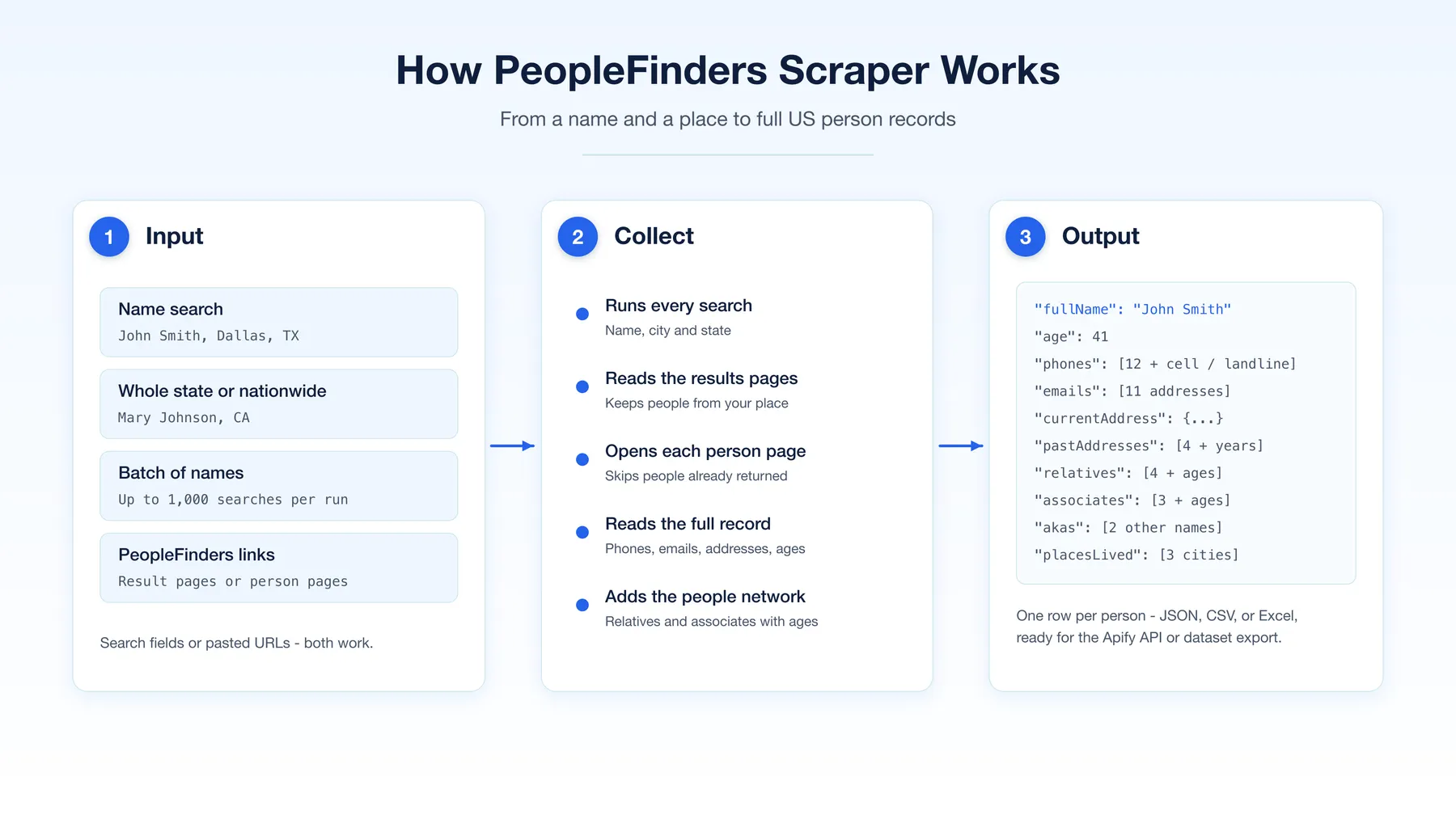
How It Works
- You give one search, a list of searches, or PeopleFinders links.
- The actor reads the results pages for each search, 10 people a page, until your limits are reached.
- With full records on, it opens each person's page and reads phones, emails, addresses, relatives, associates and other names.
- Each person is written as one dataset row. A person found by two searches is returned once.
Input Configuration
| Field | Type | Default | What it does |
|---|---|---|---|
firstName, lastName | string | John, Smith (prefill) | Name to look up |
city, state | string | Dallas, TX (prefill) | Narrow the search |
searches | array | Many searches in one run, each with the fields above | |
maxItemsPerSearch | integer | 3 with several searches | Most people kept per search (person links are one person each and do not count) |
startUrls | array | PeopleFinders links; replaces the searches | |
openProfiles | boolean | true | Full person records (off = results-page rows) |
matchLocation | boolean | true | Leave out people with no address in the searched city or state |
flattenedOutput | boolean | false | Adds Email-1 / Phone-1 style columns |
maxItems | integer | 10 | Most people per run (3,000 cap; 25 on the free plan) |
maxConcurrency | integer | 5 | Pages loaded at the same time |
Common scenarios
One person in one city:
A batch of names, two people each:
Output Overview
One row per person. Nested fields keep the full detail; turn on Spreadsheet columns for flat columns as well. Export as JSON, CSV, Excel or through the Apify API.
Output Samples
A full record, trimmed:
Key Output Fields
Identity
fullName, firstName, middleName, lastName, age, bornMonthYear, birthYear, akas, matchedAlias, matchType, personId, profileUrl
Phones
phones[] with number, type (cell, landline, other) and isCurrent; primaryPhone
Emails
emails[], currentEmail
Addresses
currentAddress (street, city, state, zip, yearsLived), pastAddresses[], placesLived[]
People network
relatives[] and associates[], each with name and age
Other
employers[], recordCounts (how many phones, emails, addresses, relatives and associates PeopleFinders holds in total)
Run fields
detailsFetched (true for a full record), source, searchedAt, query (the search that found the person)
FAQ
What do I get on the free Apify plan?
Free-plan runs use the first search and return up to 25 people from the results pages (name, age, cities lived in, other names and relatives), with phone numbers, emails, streets and relative names partly hidden. Any paid Apify plan returns full records.
What does a full record cost compared with a results-page row?
Every row is one dataset item. A row whose person page was read is also counted as a full-record event. Turn Full person records off to get results-page rows only.
Why does a person show fewer phones than recordCounts says?
The person page shows the most recent phones, addresses, relatives and associates, and keeps the full history for PeopleFinders' paid report. The row has everything the page shows; recordCounts tells you how much more exists.
Why is the current address in another city than the one I searched?
The results page lists a person under the address they had in the place you searched; the person page shows where they live now. The address in your city is kept in pastAddresses.
Why were some people left out?
PeopleFinders adds people with no address in the searched city or state to its results. They are left out and not charged. Turn off Only people from that place to get them.
How many people can one search return?
PeopleFinders shows up to 10 pages of 10 people for a search. For more, split the search by state or city.
Can I search by phone number, email or address?
No. PeopleFinders offers those lookups only in its paid report, and this actor reads what the site shows publicly.
What if a person's page does not load?
The actor retries it. If it still does not load, the person is returned with the results-page data, detailsFetched: false and a detailsNote.
Support
Found a bug or need a field that is missing? Open an issue on the actor's Issues tab and include the run link.
Additional Services
Need a custom people-search pipeline, a different source, or data delivered to your CRM? Get in touch through the Issues tab.
Explore More Scrapers
- FastPeopleSearch Scraper: phones, emails and addresses from FastPeopleSearch.com
- AdvancedBackgroundChecks Scraper: name, reverse phone and reverse address lookups
- TruePeopleSearch People Search Scraper: US people records from TruePeopleSearch.com
🤖 For AI Agents & LLM Apps
This actor works as a tool for agents and MCP clients.
- Input:
{ "firstName": "...", "lastName": "...", "city": "...", "state": "XX", "maxItems": 5 } - Output: one JSON object per person; read
phones[].number,emails,currentAddress.fullAddressandrelatives[].name - Tips: keep
maxItemssmall for interactive use; checkdetailsFetchedbefore relying on the full phone list
⚠️ Disclaimer
This actor collects data that PeopleFinders.com shows publicly. It is not affiliated with or endorsed by PeopleFinders. You are responsible for how you use the data: comply with the site's terms, the FCRA, TCPA, DPPA, GDPR, CCPA and every other law that applies to you. Do not use this data to decide on credit, insurance, employment, housing or tenancy, or for any purpose covered by the FCRA. Do not use it to stalk, harass or harm anyone.
SEO Keywords
peoplefinders scraper, peoplefinders.com scraper, people finders api, people search scraper, find phone number by name, find email by name, skip tracing tool, us people search api, address history lookup, relatives lookup, skip trace scraper, people finder api, background check data, public records search


