

Sephora Scraper: Products, Prices, Shades & Reviews
Pricing
from $2.00 / 1,000 products
Sephora Scraper: Products, Prices, Shades & Reviews
Scrape Sephora products by search term, brand, category, product id or link: price, sale price, rating, review count, shades, bestseller and new flags, delivery options. Add every shade's price and stock, ingredients, attributes, barcodes and customer reviews.
Pricing
from $2.00 / 1,000 products
Rating
0.0
(0)
Developer

Muhamed Didovic
Maintained by CommunityActor stats
0
Bookmarked
2
Total users
1
Monthly active users
2 days ago
Last modified
Categories
Features
Share
Sephora products as clean rows, down to every shade. Search sephora.com by term, brand or category and get each product's price range, sale price, rating, review count, shade count, bestseller and new flags, and delivery options. Turn on full details for every shade's own price and stock, the ingredient list, attributes such as finish and skin type, barcodes and all images. Add customer reviews as their own rows.
Why Use This Scraper?
- Every shade priced. Each shade or size comes with its own SKU, price, sale price, in-stock and low-stock flags and swatch.
- Brand filter that forgives spelling. "lancome" finds Lancôme; accents and case do not matter.
- Formulas, not only prices. Ingredients, how to use, highlights (clean, vegan, fragrance-free) and attributes (coverage, finish, skin type, concerns).
- Barcodes. The product's EAN and UPC codes, for matching with other retailers.
- Reviews with context. Rating, title, text, date, helpful votes, photos and the reviewer's skin tone, skin type and eye and hair colour.
- No duplicates. A product found by two inputs is delivered once, and a review shared by a mini and a full size is delivered once.
Overview
This actor is for beauty brands tracking their prices and shelf presence on Sephora, retailers and price-comparison sites matching products by barcode, market researchers studying ingredients, shades and launches, and analysts reading customer reviews by skin type.
You give it search terms, links or product ids. It returns one row per product in Sephora's order, with full details and reviews when asked for. The dataset exports as JSON, CSV, Excel or through the API, and a RUN_SUMMARY record lists what each input delivered.
Supported Inputs
| What you give | What you get |
|---|---|
A search term, e.g. mascara, vitamin c serum, dior lipstick | Sephora's results in order, 60 per page |
A search link, e.g. https://www.sephora.com/search?keyword=mascara | The same |
A brand link, e.g. https://www.sephora.com/brand/rare-beauty | That brand's products |
A category link, e.g. https://www.sephora.com/shop/mascara | Results for the category's name |
A product link or id, e.g. P427418 | That product with full details |
Use Cases
- Price monitoring: daily prices and sale prices for a brand, a category or a list of products.
- Shade and stock tracking: which shades are in stock, low or sold out.
- Product matching: EAN and UPC codes to join Sephora with other stores.
- Ingredient research: ingredient lists and claims across a category.
- Review analysis: ratings and review text by skin type and tone.
- Launch tracking: new, limited-edition and Sephora-exclusive products as they appear.
How It Works
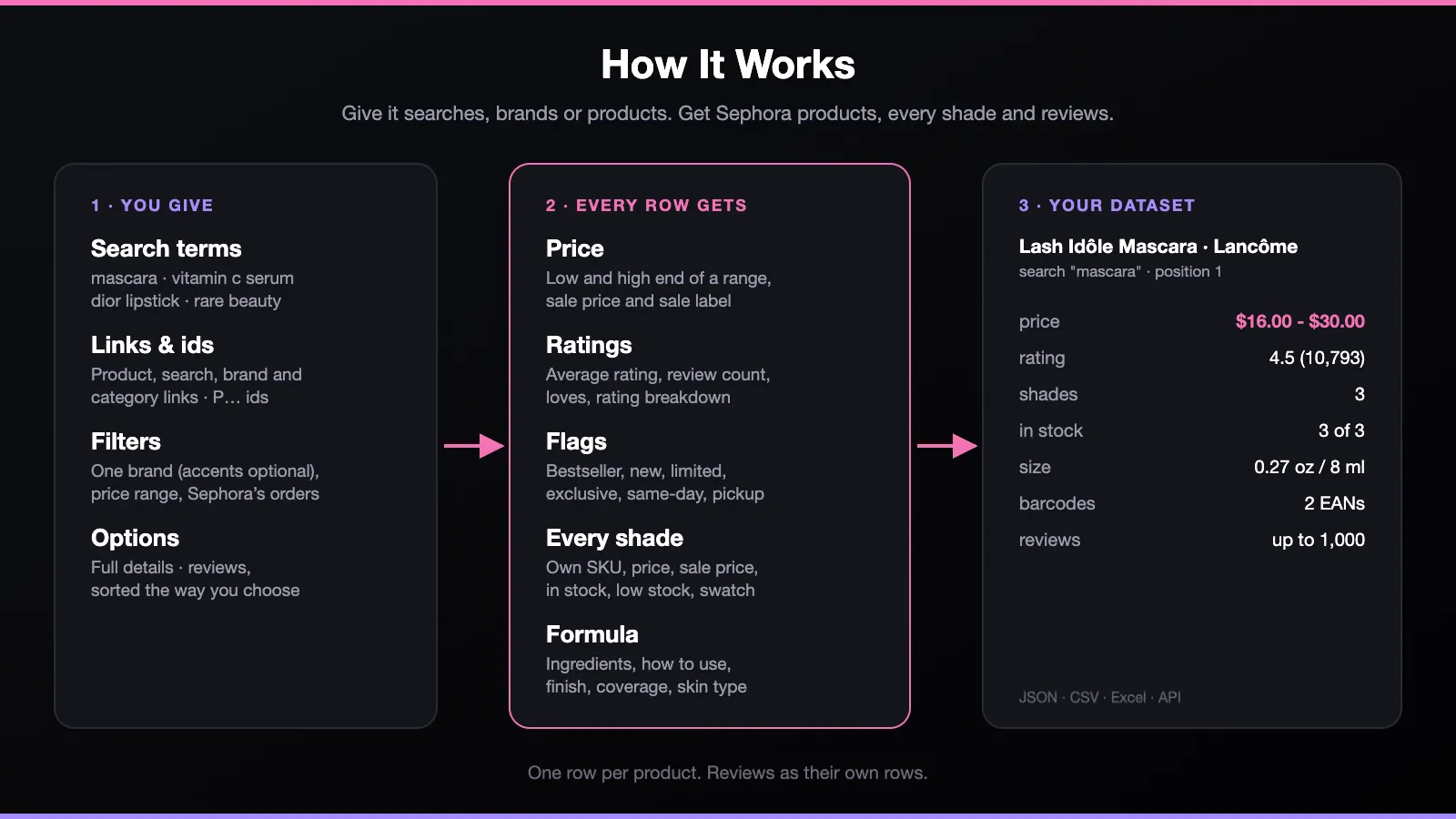
- Add search terms, links or product ids.
- Each search is read in Sephora's order, 60 products per page, up to your limit.
- Full details are added when you turn them on, with reviews when asked.
- Products and reviews become rows, duplicates dropped.
- Export the dataset as JSON, CSV or Excel, or read it through the API.
Input Configuration
| Field | Type | Default | Description |
|---|---|---|---|
searchTerms | array | none | What a shopper would type on sephora.com. |
startUrls | array | none | Product, search, brand or category links. |
productIds | array | none | P… ids, each with full details. |
brand | string | none | Keep only this brand (accents and case ignored). |
minPrice, maxPrice | integer | none | Sephora's own price filter, in USD. |
sortBy | string | relevance | Relevance, top rated, price either way, or new. |
maxProductsPerSearch | integer | 60 | Upper limit per search, up to 1,000. |
includeDetails | boolean | false | Every shade, ingredients, attributes, barcodes, images. |
includeReviews | boolean | false | Reviews as separate rows. |
maxReviewsPerProduct | integer | 20 | Up to 1,000. |
reviewsSortBy | string | most_helpful | Most helpful, newest, oldest, highest or lowest rated. |
One brand's mascaras, with every shade
A product with its 200 newest reviews
Output Overview
Product rows (recordType: product): productId, skuId, name, brand, imageUrl, price, priceMax, priceText, salePrice, currency, onSale, saleLabel, rating, reviewCount, shadeCount, bestseller, isNew, limitedEdition, limitedTimeOffer, sephoraExclusive, onlineOnly, appExclusive, sponsored, shipsToHome, sameDayDelivery, nextDayDelivery, storePickup, url, searchInput, position, scrapedAt.
With full details: headline, quickLook, description, category, categoryPath, brandId, brandUrl, lovesCount, size, attributes, highlights, ingredients, howToUse, warnings, inStock, lowStock, shadesInStock, priceMin, priceMaxAll, returnable, freeShippingNote, ratingDistribution, recommendedCount, eans, upcs, images, shades (each with skuId, shade, size, price, salePrice, onSale, inStock, lowStock, swatchUrl, imageUrl, url).
Review rows (recordType: review): reviewId, productId, productName, brand, rating, title, text, recommended, submittedAt, reviewer, reviewerProfile, verifiedPurchase, receivedFree, helpfulVotes, unhelpfulVotes, photos.
Output Samples
Key Output Fields
price,priceMax,salePrice,onSale: what the product costs now; a range when shades are priced differently.shades: each shade or size with its own SKU, price and stock.ingredients,attributes,highlights: what is in it and what it claims.eans,upcs: barcodes to match with other stores.rating,reviewCount,ratingDistribution,lovesCount: how shoppers rate it.
FAQ
Which country? sephora.com, the United States, in US dollars.
Does a category link give the exact category page?
A category link is searched by its name, so …/shop/mascara returns Sephora's results for "mascara". Brand links keep only that brand's products.
Why does a search always return something? Sephora's search never answers with nothing; an unusual term still returns loosely related products. Check the rows, or use the brand filter to keep only the brand you want.
How many reviews per product? Up to 1,000. Some products have more than 17,000 on Sephora.
What does the free Apify plan get? Up to 20 rows from the first input per run. Any paid Apify plan removes the limit.
How much does it cost? $0.01 per run start, $0.002 per product ($2.00 per 1,000), $0.003 more per product with full details ($3.00 per 1,000) and $0.0005 per review ($0.50 per 1,000). 100 products cost $0.21, or $0.51 with full details. Duplicates and the run summary are never charged. Set "Max cost per run" in the run options and the run stops by itself at that amount.
Support
Found a bug or missing a field? Open an issue on the actor's Issues tab with your run link and input.
Additional Services
Need a scheduled price feed for a brand, or a custom export? Ask on the Issues tab; tailored work is available.
Explore More Scrapers
- Costco Scraper: prices, savings and stock from Costco.
- Aldi Scraper: Aldi products and prices in four countries.
Full list at apify.com/memo23.
🤖 For AI Agents & LLM Apps
Compact reference for agents calling this actor through the Apify MCP server or the Apify API (actor: memo23/sephora-scraper).
Purpose: Sephora (US) products by search term, brand, category or product id, with optional full details (every shade, ingredients, barcodes) and reviews.
Minimal input:
Output: product rows (productId, skuId, name, brand, price, priceMax, salePrice, rating, reviewCount, shadeCount, flags, url); with includeDetails: shades[], ingredients, attributes, highlights, eans, upcs, images; review rows when includeReviews is on. Every row has recordType.
Behaviors an agent should know:
maxProductsPerSearchbounds each search and so the cost.brandmatches without accents or case; Sephora's own search never returns nothing.- Billing: $0.01 per run start, one
productcharge per product ($0.002), oneproduct-detailscharge per product with details ($0.003), onereviewcharge per review ($0.0005).
⚠️ Disclaimer
This Actor is an independent tool and is not affiliated with, endorsed by, or sponsored by Sephora. All trademarks mentioned are the property of their respective owners.
It returns publicly available product information and public reviews. It does not access accounts or content behind a login. Users are responsible for making sure their use complies with Sephora's terms, applicable data-protection law (GDPR and similar) and their own contractual obligations.
SEO Keywords
sephora scraper, sephora api, sephora product data, sephora price tracker, sephora reviews scraper, sephora ingredients, sephora shades, beauty product scraper, cosmetics price monitoring, makeup product data, skincare product scraper, sephora barcode ean, sephora export to csv


