
Shopify Store Finder — Emails, Phones & Payments | $3/1K
Pricing
from $2.99 / 1,000 store scrapeds
Shopify Store Finder — Emails, Phones & Payments | $3/1K
Find Shopify stores by keyword or category — no store URL needed. Emails, phones, addresses, ratings, socials, sample product. Optional enrichment finds inboxes the marketplace hides and flags the payment stack (Stripe, PayPal, Adyen +10). Every lead scored 0–100. $3 per 1,000 stores.
Pricing
from $2.99 / 1,000 store scrapeds
Rating
0.0
(0)
Developer

Muhamed Didovic
Maintained by CommunityActor stats
0
Bookmarked
47
Total users
8
Monthly active users
15 hours ago
Last modified
Categories
Share
Shopify Store Leads Scraper — Emails, Payment Stack & Lead Scoring
Discover Shopify stores by product keyword or category and pull back structured store leads — website, emails, phone numbers, business address, star rating, social profiles and a sample product — with no store URL needed.
Three things set it apart from a plain marketplace scrape: optional enrichment visits each store's own website and reads its contact / about / impressum pages for inboxes the marketplace never lists, payment-stack detection tells you which processor each store actually runs — so you can filter a list down to merchants that demonstrably take money online — and every row ships with a 0–100 lead score so a thousand-store export arrives already ranked.
Built for B2B outreach, supplier sourcing, agency prospecting and e-commerce market research.
Why use this Shopify Store Leads Scraper?
- No store URLs required — search by what stores sell ("organic coffee", "serum", "yoga mat") or browse a whole category. The scraper finds the stores for you.
- Payment-stack qualification — flags whether a store exposes a real checkout and which processor runs it, across 13 gateways (Stripe, Shopify Payments, PayPal, Paddle, Square, Braintree, Adyen, Mollie, Chargebee, Recurly, FastSpring, Lemon Squeezy, WooCommerce), each with a high / medium / low confidence rating. A dead storefront and a merchant doing real volume look identical in a marketplace listing — this is what separates them.
- Optional email enrichment — turn it on and the actor visits each store's own website and reads its contact / about / impressum pages to find emails, phones and socials the marketplace does not expose. This is the difference between a website and an actual address to email.
- Built-in lead scoring, with a quality floor — every row carries a
leadScorefrom 0 to 100 plusleadScoreSignals, the list of exactly which signals earned it. Sort by score, or set Minimum lead score and the actor drops weak leads before they ever reach your dataset — so you ask for "stores worth calling", not "stores". Computed from data already on the row: always on, costs nothing, adds no run time. - Real contact leads — emails, phones, and Facebook / Instagram / Pinterest / YouTube / TikTok / Twitter / LinkedIn profiles, plus the store's own website and
.myshopify.comdomain. - Ratings & social proof — average product rating, total ratings and total reviews for every store, so you can prioritise established merchants.
- Location & price filters — target a country or region, or filter by the store's sample-product price and on-sale status.
- One row per store, billed per store — clean, deduplicated output. Export to JSON, CSV, Excel or HTML, or pull it over the API.
What does the Shopify Store Leads Scraper do?
It works from the Shop by Shopify store directory (shop.com, formerly shop.app) — around 1.5 million real Shopify merchants — finding the stores that sell what you asked for, then enriching each one with contact and profile data.
- 🔍 Search by keyword — find stores that sell a specific product. Plain nouns work best: "coffee" reaches thousands of merchants, "single origin ethiopian coffee" far fewer.
- 📂 Browse by category — 14 top-level categories (Beauty, Electronics, Home, Food & drinks, Pet supplies…), each used as a broad search term of its own.
- 🗂️ Or take the directory as it comes — leave the keyword and category empty and the actor works through the store directory in order, for building a bulk list rather than a targeted one.
- 🌍 Filter by location — a single country (US, GB, DE…) or a named region (Europe, North America, English-speaking, UK & Ireland, Nordics, Oceania, Worldwide).
- 📧 Extract contacts — emails, phones and seven social networks straight from the marketplace, merged with anything found on the store's own site when enrichment is on.
- ⭐ Ratings & reviews — average rating, total ratings, total review count.
- 🛍️ Sample product — a representative product per store (title, price, currency, on-sale flag) when discovered via category / price search.
- 🎯 Lead score — a 0–100 grade per store, built from the contact and quality signals already on the row: email on the store's own domain, business vs free mailbox, phone, website, rating of 4+, socials, and a complete address.
leadScoreSignalslists which ones fired, so the number is always explainable. - 💳 Payment detection (optional) — scans the store's own site for checkout and gateway signals and returns
takesPayments, the list of detectedprocessors, and aconfidencegrade. High means a named processor or an exposed live Stripe publishable key (public by design — it confirms a real, active Stripe account); medium means an e-commerce platform; low means a generic cart only. Runs during enrichment, so it costs no extra requests.
Supported inputs
| Input | What it does |
|---|---|
| Search query | Product keyword to find stores that sell it. Optional if a category is set. |
| Category | One of 14 product categories, used as a broad search term. A query wins when both are set. |
| Store location | Restrict to a country or a named region. |
| Min / Max price | Keep stores whose sample product falls in a price band. |
| On sale only | Keep stores whose sample product is currently discounted. |
| Max stores | Cap on unique stores returned (one billable row each). |
| Enrich with store website emails | Fetch each store's own site for extra emails / phones / socials. |
| Detect payment stack | During enrichment, flag the store's payment / checkout processor. |
| Minimum lead score | Keep only stores scoring at or above this (0–100). Empty = keep every store. |
Both are optional. With neither, the actor walks the store directory in order instead of targeting a niche.
Using Minimum lead score together with enrichment? The score is computed from the enriched row, so enrichment has to run before the actor knows whether a store clears your bar. Stores dropped below the threshold are never billed as results — but any email enrichment already performed on them is. If you want the cheapest possible run, filter on score with enrichment off, or raise the threshold gradually rather than starting high.
Use cases
B2B lead generation — Build targeted prospect lists of Shopify store owners by niche and location, with direct contact details for cold outreach. Turn on enrichment to get real inboxes, not just homepages.
Supplier & wholesale discovery — Find every store selling a given product across the Shopify ecosystem, compare ratings and price points, and shortlist suppliers or partners.
Agency prospecting — Discover stores in a vertical and build outreach lists for design, marketing, fulfilment, CRO or Shopify-app services. Payment detection tells you which ones already sell online.
Market & competitor research — Map how many stores operate in a category, where they're based, and how they're rated — a fast read on any niche's competitive landscape.
CRM enrichment — Feed a keyword or category and export straight to CSV / Excel to append emails, phones and socials onto an existing account list.
How it works
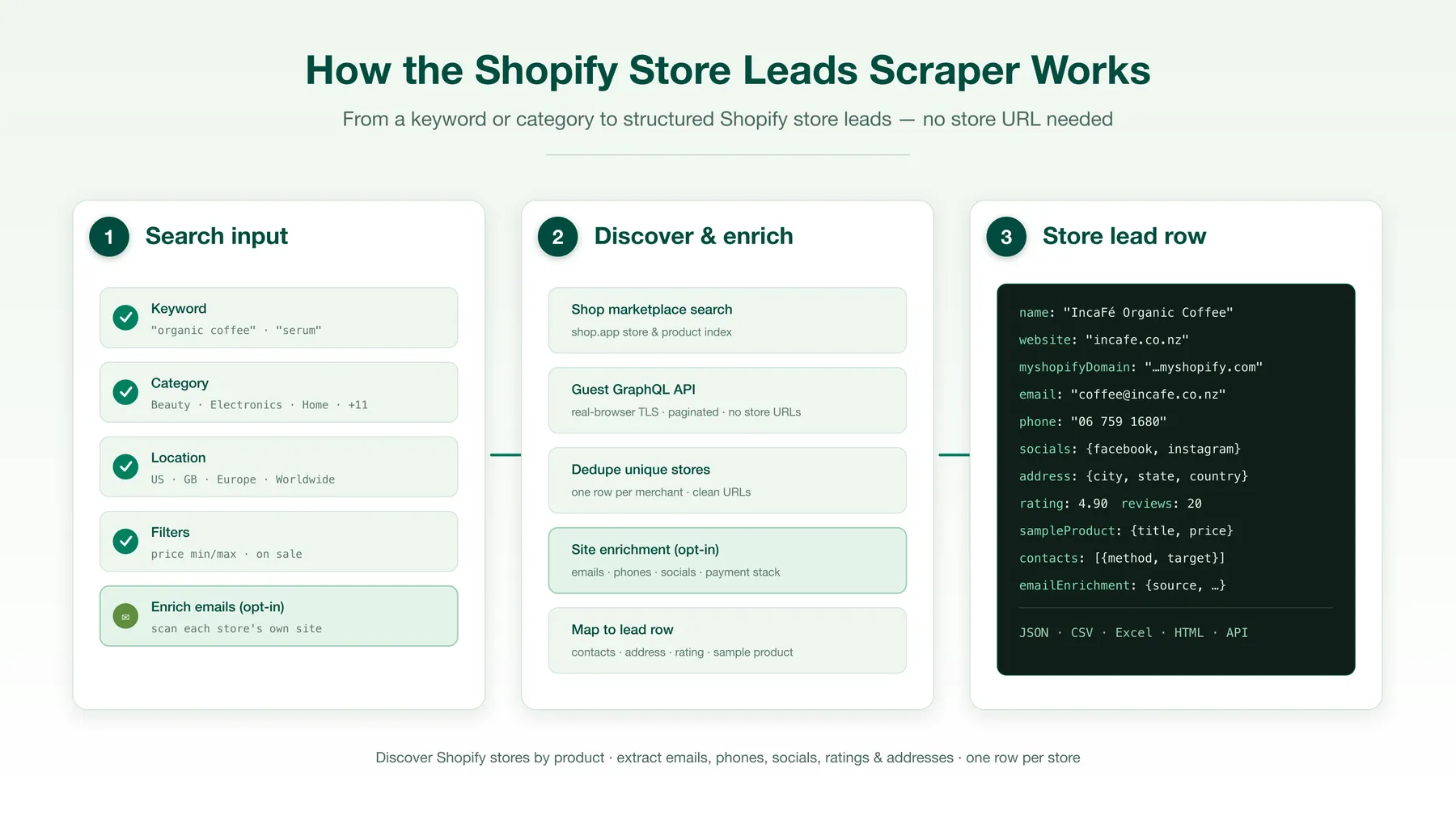
- You enter a product keyword, a category, or both — plus any location / price filters.
- The actor matches your keyword against the names Shopify merchants give their own product collections, across Shop's public store directory, and keeps the stores behind the matches. With no keyword it reads the directory in order instead.
- Each unique store is mapped to a clean lead row — website (tracking parameters stripped),
.myshopify.comdomain, emails, phones, socials, address, rating and reviews. - If email enrichment is on, the store's own website is fetched and its contact / about pages are scanned for additional emails, phones and social links, which are merged into the row.
- The finished row is scored 0–100 from the signals it ended up with, and the signals that fired are attached alongside the number.
- If you set a minimum lead score, anything below the bar is dropped here — before it is written or billed as a result.
- Each surviving store is written to the dataset as one row, ready to export or pull over the API.
Input configuration
Run it from the Apify Console UI, or via the API / SDK. Example input:
That last line is the "only leads worth calling" setting: enrichment finds the inboxes, the score grades what it found, and anything under 60 never reaches your dataset.
Category browse with a price floor:
Output overview
Every store is one dataset row. Below is a real, lightly-trimmed example (enrichEmails: true):
Download as JSON, CSV, Excel or HTML from the dataset tab, or fetch via the API.
Key output fields
| Field | Type | Description |
|---|---|---|
id | string | Shop marketplace store id |
shopifyId | string | Underlying Shopify shop id |
name | string | Store name |
website | string | Store's own website (tracking params stripped) |
myshopifyDomain | string | store.myshopify.com domain |
shopUrl | string | Shop marketplace profile URL |
email / emails | string / array | Primary email and all emails found |
phone / phones | string / array | Primary phone and all phones found |
socials | object | Facebook, Instagram, Pinterest, YouTube, TikTok, Twitter, LinkedIn |
address | object | address1/2, city, state, stateCode, country, postalCode, company, formatted[] |
rating | number | Average product rating (out of 5) |
totalRatings | number | Number of ratings |
totalReviews | number | Number of written reviews |
sampleProduct | object | Representative product (title, price, currency, originalPrice, onSale). url is present only when the store profile exposes one |
contacts | array | Every contact method as { method, target } |
emailEnrichment | object | Present when enrichment is on — website, emails, phones, socials, source, confidence, payment |
leadScore | number | 0–100 quality grade for the store as an outreach lead. Always present |
leadScoreSignals | array | Which signals earned the score, e.g. emailDomainMatch, phonePresent, addressComplete |
scrapedAt | string | ISO timestamp |
FAQ
Do I need a store URL? No. You search by keyword or category; the scraper discovers the stores.
Where does the data come from? The public Shop by Shopify store directory (shop.com, formerly shop.app) — the sitemaps Shopify publishes for crawling, plus each store's own public profile page. Nothing gated, nothing behind a login.
Why is email empty for some stores? Not every store publishes an email on the marketplace. Turn on Enrich with store website emails to fetch the store's own site and find one — it's best-effort and skews toward stores that run a full website. phone and address are likewise present only when the store exposes them.
How is leadScore calculated? It sums the outreach signals present on the finished row: an email on the store's own domain (25 points) is the heaviest, then phone (12), any social profile (10), any email at all (8), website (8), rating of 4+ (8), complete street address (8) and a business rather than free mailbox (6). leadScoreSignals names every one that fired, so any score can be traced back to its parts. It reads only data already on the row, so it costs no extra requests and never slows a run.
Why doesn't any store score 100? Three of the scorer's signals — long description, listing images and structured attributes — describe fields Shop doesn't publish for stores, so a perfect Shopify store row tops out at 85. Treat the score as a ranking tool within a run, not an absolute grade. Scores are directly comparable between runs of this actor.
What does minLeadScore do, and what should I set it to? It drops any store scoring below the bar before it is written or billed, so you can ask for "only leads worth calling" instead of filtering a spreadsheet afterwards. With enrichment on, 60 is a good starting bar — it demands a real email plus a couple of supporting signals. Two cautions the run log will also tell you: a store with no email caps at 46, so a bar above that with enrichment off will reject nearly everything; and a store dropped by the filter may still have been enriched, because the score is computed from the enriched row. Note also that Max stores caps how many stores are examined, not how many survive the filter — a run with a high bar returns fewer rows than the cap.
Should I turn on enrichment before trusting the scores? For outreach, yes. The three email signals are 39 of the 100 points, and the marketplace publishes an email for only a minority of stores — so with enrichment off, most rows land in the 8–46 band regardless of how good the store is, and the ranking mostly reflects who listed an email publicly. With enrichment on, the score separates stores by contactability, which is what you actually want to sort by. The run log warns you when scoring is running without enrichment.
Why is the sample-product currency sometimes different from the store's country? Marketplace prices are returned in the currency inferred for the run's location, so amounts and currency codes can vary between rows. Treat sampleProduct.price as an indicative figure, not a billing-exact quote.
How does the location filter behave for stores with no address? Stores that publish no country are kept rather than dropped, so you don't lose leads to missing metadata. Stores that do publish a country are filtered strictly.
Can I get more stores per run? Yes — raise Max stores. A broad keyword like "coffee" or "jewelry" reaches a couple of thousand stores; a narrow phrase reaches fewer exact matches, because every word has to appear in a merchant's own collection name. When the exact matches fall short of Max stores, the run tops up with stores whose collection names hold only some of the words (the most words first), and marks every row with matchType = exact or partial so you can tell them apart.
Why does the run examine more stores than it returns? Location, price and on-sale are judged on each store's profile, which has to be fetched first. The actor therefore collects more candidates than you asked for and stops once enough have cleared your filters — the run log reports how many were examined, filtered out and kept.
Is this affiliated with Shopify? No. It reads publicly available marketplace data and is not endorsed by or affiliated with Shopify Inc.
Support
Found a bug or need a field added? Open an issue on the actor's Issues tab in the Apify Console and it'll be looked at.
Additional services
Turn on email enrichment to convert store websites into real, mailable contacts — the single biggest lift for outbound campaigns. Pair with payment detection to prioritise stores that already transact online, then sort the export by leadScore to work the strongest leads first.
Explore more scrapers
This actor pairs well with product-level and storefront scrapers for building a full e-commerce dataset — discover the stores here, then drill into their catalogs.
🤖 For AI Agents & LLM Apps
This actor is a clean tool call for agentic workflows — deterministic JSON in, structured leads out.
⚠️ Disclaimer
This actor extracts only publicly available information from the Shop by Shopify marketplace and public store websites. It does not access private, gated, or authenticated data, and it is not affiliated with, endorsed by, or sponsored by Shopify Inc. or Shop. Use the data in compliance with the Shopify and Shop terms of service, applicable data-protection laws (including GDPR/CCPA where relevant), and anti-spam regulations (such as CAN-SPAM and GDPR) when contacting the businesses you discover. You are responsible for how you use the exported data.
SEO Keywords
Shopify store scraper, Shopify leads scraper, Shopify store leads, Shopify email scraper, Shopify store finder, Shop app scraper, shop.app scraper, Shopify store directory, ecommerce leads scraper, Shopify merchant list, Shopify store emails, Shopify B2B leads, DTC brand discovery, Shopify prospecting, find Shopify stores by product, Shopify store contacts, Shopify store database, ecommerce email finder, Shopify niche research, Shopify supplier discovery, Shopify lead scoring, scored ecommerce leads, ranked Shopify leads, lead quality score, B2B lead scoring.


![Collecting Cars [$3💰] | 33k SOLD prices + live bids avatar](https://images.apifyusercontent.com/Hbn_LDWbVTHAyPL8k_edq8GAZOEin7g5i4_bFf2WimM/rs:fill:76:76/cb:1/aHR0cHM6Ly9hcGlmeS1pbWFnZS11cGxvYWRzLXByb2QuczMudXMtZWFzdC0xLmFtYXpvbmF3cy5jb20vbmduOHZSRVNUa3NleVdFNnAtYWN0b3ItRm1EYVRESkEyWGNYU0s4N24tVkJhU3V5RENuYi1Db2xsZWN0aW5nX0NhcnMud2VicA.webp)
![Car & Classic [$1💰] | Full 46k catalogue | Beats 10k cap avatar](https://images.apifyusercontent.com/yR5ZcWq7huml1KRn39casUADIIm6kQumb9tA8E00od4/rs:fill:76:76/cb:1/aHR0cHM6Ly9hcGlmeS1pbWFnZS11cGxvYWRzLXByb2QuczMudXMtZWFzdC0xLmFtYXpvbmF3cy5jb20vbmduOHZSRVNUa3NleVdFNnAtYWN0b3ItbmRLcGNQOFNyWFNueW5Na3IteGE3RlJRTHRTVy1jYXJfYW5kX2NsYXNzaWMuanBlZw.webp)
![Homes.com Scraper: For Sale, Rent, Sold & Agents [$1.50/1k] avatar](https://images.apifyusercontent.com/IMlm-kEKFo4UFICrhVtLFhOsFbhjGapGXUbdZuPDrQU/rs:fill:76:76/cb:1/aHR0cHM6Ly9hcGlmeS1pbWFnZS11cGxvYWRzLXByb2QuczMudXMtZWFzdC0xLmFtYXpvbmF3cy5jb20vbmduOHZSRVNUa3NleVdFNnAtYWN0b3ItelJVTUFGMmJhZWlLeGh6SUEtWlhCWUdnZnBuUi00NDI4MzlfbG9nb19ob21lcy1jb20ucG5n.webp)
![Autotrader.com.au [$1💰] Australia Search & Details Scraper🇦🇺 avatar](https://images.apifyusercontent.com/pCkelbtHnioCVauMT6DM9tGYD81m-FmuhD-rXFDHMC4/rs:fill:76:76/cb:1/aHR0cHM6Ly9hcGlmeS1pbWFnZS11cGxvYWRzLXByb2QuczMudXMtZWFzdC0xLmFtYXpvbmF3cy5jb20vbmduOHZSRVNUa3NleVdFNnAtYWN0b3ItYWFINGlJOWIwc2dNNkNWeVMtanhmc2ZZeEVBWi1hdXRvdHJhZGVyLWF1cy5wbmc.webp)


