

Threads Scraper — Posts, Replies & Profiles, No Login
Pricing
from $2.50 / 1,000 post scrapeds
Threads Scraper — Posts, Replies & Profiles, No Login
Threads Scraper: posts, replies and profiles from threads.com, no login or cookies. No 25-post cap: it pages through whole accounts. Usernames, post URLs, keywords or hashtags in; flat rows out with text, like/reply/repost/quote counts, media and timestamps. JSON, CSV, Excel.
Pricing
from $2.50 / 1,000 post scrapeds
Rating
5.0
(1)
Developer

Muhamed Didovic
Maintained by CommunityActor stats
1
Bookmarked
147
Total users
44
Monthly active users
10 hours ago
Last modified
Categories
Share
Threads Scraper — Search, Posts & Profiles

Search Threads by keyword or hashtag, or scrape a whole account — without a login, cookies, or an account. Paste handles, post URLs, search URLs or tags. Each row: text, like/reply/repost counts, media, timestamps and author. JSON, CSV or Excel.
Why use this scraper
- No login, no cookies. Pure HTTP against Threads' public endpoints — nothing to configure, no session to babysit.
- Whole-account in one run, no 25-post cap. Point it at any set of usernames and pull their posts or replies together. The actor follows Threads' own "load more" cursor, so you get as far back as you ask for: 200 posts from @zuck reach back to August 2023. Many Threads scrapers stop at the first 25.
- Find posts without knowing the author. Search any keyword or hashtag and get matching posts from across Threads — brand monitoring and social listening, not just known handles.
- Paste any Threads URL. One
startUrlsbox accepts profiles, posts,/search?q=…and/tag/…and routes each automatically. - Drop zero-engagement filler.
minLikes/minRepliesfilter keyword search before billing. - Structured output. One row per post with a stable schema — ready for analysis, monitoring, or feeding an AI agent.
- Post-level detail. Paste a Threads post URL to pull the post and its whole reply thread.
- Filter by date. Set a publication window and posts outside it are dropped before they reach your dataset, so you are never charged for rows you asked not to receive.
- It tells you when it fails. See below — this is the part that actually costs people money.
You are not billed for empty runs
A Threads endpoint does not break loudly. When Meta gates one, it answers with a well-formed, completely empty payload — so a scraper built on it keeps reporting success while returning nothing, and keeps charging for it. That is not hypothetical: it is the single most common complaint on competing Threads actors, up to and including public requests for refunds after a hundred-plus consecutive billed runs produced no data.
This actor treats that as a failure:
- Every target returning nothing fails the run. You get a
FAILEDstatus and a message naming the cause, instead of a green run with an empty dataset. - Partial failures are reported. If 3 of 10 targets come back empty, the run still succeeds — you keep the rows you got — but the status message says
7/10 targetsso a slowly rotting endpoint is visible long before it dies completely. - Date-filtered rows are never charged. Filtering happens before billing, and the run tells you how many posts the window excluded.
- Your cost cap is honoured cleanly. At
maxTotalChargeUsdthe run stops and finishes normally with the rows you paid for, rather than overrunning into a killed run. - A short timeout doesn't kill the run. About 30 seconds before the run's timeout the actor stops starting new targets, finishes, and says so in the status message, so you keep a clean SUCCEEDED run with the rows it got.
- Login-walled profiles are reported, not failed. Some accounts are visible only to logged-in users. A run made only of those ends SUCCEEDED with a status message naming them, because nothing is broken.
- No padding. Threads' post pages embed a "more like this" carousel of unrelated posts. Those are excluded by design — they would inflate your dataset and your bill. Rows are also deduplicated by post ID.
Coming from another Threads scraper?
These are the things users most often ask for on other Threads actors. This actor already returns all of them:
| What people ask for elsewhere | Field here | Notes |
|---|---|---|
| More than 25 posts per account | maxItems | Pages through the whole profile, newest first, until your cap |
| A stable numeric user ID | userId | Populated on every row, not just some |
| Real reply / repost / quote counts | replyCount, repostCount, quoteCount | Actual values, not zeros |
| Reshare counts | reshareCount | Where Threads exposes it |
| A working "is this a reply" flag | isReply | Verified against Threads' own flag across live posts |
| A direct link to each post | url | Built on every row |
| Top vs Recent search ranking | searchSortType | Both supported |
| Date / datetime filtering | postedAfter, postedBefore | Applied before billing |
| Sortable timestamps | publishedAt, takenAtTimestamp | ISO 8601 and epoch seconds |
View counts are not available. Threads does not expose them to logged-out requests — the field simply is not in the response. Any actor that promises view counts without a logged-in session cannot be reading them from Threads. We would rather tell you that than ship a column of nulls.
What it does
| Input | Mode | You get |
|---|---|---|
| Usernames | Posts | Each user's Threads posts, as many as maxItems allows (no 25-post cap) |
| Usernames | Replies | Each user's replies, paged the same way |
| Usernames | Profile info | Full name, follower count, bio, verification, profile picture |
| Usernames | Reposts | The threads each user reposted, with who reposted them and when, plus one summary row per user with the repost count |
| Post URLs | (automatic) | The post, plus its full reply thread unless you turn replies off |
| Search keywords | (automatic) | Posts mentioning each term, from any author |
| Hashtags | (automatic) | Posts under each tag |
| Profile search keywords | (automatic) | Accounts matching each keyword: username, full name, verification, avatar |
How it works
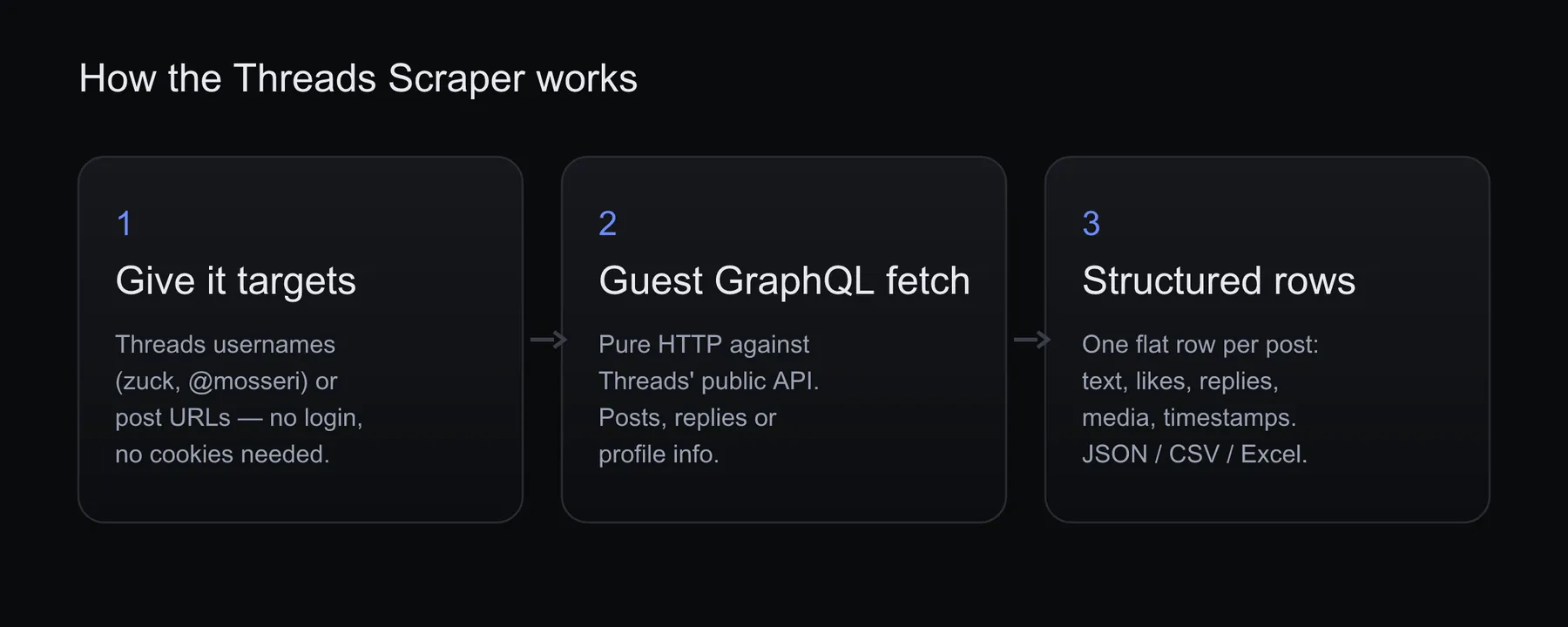
You give it Threads usernames, post URLs, keywords or hashtags. For a user's posts and replies, the actor bootstraps a public guest token from Threads' own web app (no account, no cookies) and calls Threads' public GraphQL API over plain HTTP — the same endpoint the website uses. For post URLs, keyword searches and hashtag feeds it reads the server-rendered page directly, which needs no API token at all. Each target is normalized to a flat schema and streamed to your dataset. No browser, no third-party unblock service.
Input
| Field | Type | Description |
|---|---|---|
usernames | array | Threads handles, @handles, or profile URLs. Each is scraped per mode. |
mode | select | posts (default), replies, reposts or profile. Applies to usernames only. |
postUrls | array | Threads post URLs (https://www.threads.com/@user/post/CODE). threads.net links work too. |
includeReplies | boolean | For post URLs: true (default) returns the post plus every reply in its conversation; false returns just the post you asked for. See the note below. |
searchQueries | array | Keywords or phrases to search for — returns matching posts from any author. |
hashtags | array | Hashtag feeds to pull, with or without the leading #. |
profileSearchQueries | array | Keywords for finding accounts, 10 accounts per keyword. |
searchSortType | select | For keyword searches: top (default) or recent. Hashtag feeds are unaffected. |
postedAfter | string | Keep only posts published on or after this date. YYYY-MM-DD or a full ISO timestamp. |
postedBefore | string | Keep only posts published on or before this date. A bare YYYY-MM-DD includes the whole day. |
maxItems | integer | Max rows for each target (each username, post URL, search query and hashtag). For usernames the actor keeps paging until it reaches this number or the end of the profile. |
proxy | object | Datacenter (default) works and is fast; switch to Residential for very high volume. |
How many rows will a post URL return? With
includeReplieson (the default), one post URL returns the whole conversation — typically 5–30 rows, since active threads have many replies. If you only want the posts you pasted, setincludeRepliestofalseand you'll get exactly one row per URL.maxItemscaps the rows for each URL either way.
How far back does a username go? As far as
maxItemsreaches. Threads serves a profile 15 threads at a time and the actor keeps loading pages until the cap, the end of the profile, or the start of yourpostedAfterwindow, whichever comes first. WithpostedAfterset, it stops paging once a whole page is older than the window, so a narrow window costs a page or two, not the account's whole history.
Date filtering works on every input type — search, hashtags, profiles and post URLs alike. Posts Threads returns without a timestamp are kept rather than silently dropped, so a filtered run never quietly loses rows you can't account for. The run's status message reports how many posts the window excluded.
Example input
Keyword and hashtag discovery, no handle needed:
Just the posts you pasted, one row each:
Output
Each post row includes:
| Field | Description |
|---|---|
postId, code, url | Post identifiers + canonical Threads URL |
username, userId, userFullName, userIsVerified | Author |
text | Post text |
publishedAt, takenAtTimestamp | ISO timestamp + unix |
likeCount, replyCount, repostCount, quoteCount | Engagement — real counts, not placeholder zeros |
reshareCount | Reshares. Threads populates this on some posts only, so expect nulls |
isReply, replyToAuthor | Reply context |
mediaCount, mediaUrls | Attached images/videos |
linkPreviewUrl | Link preview target, if any |
hasAudio | Whether attached video carries audio |
scrapedFromMode | Which input produced the row: posts, replies, reposts, reposts-summary, thread, search, hashtag or profile-search |
searchQuery | The keyword or #hashtag that matched — on discovery rows only |
Rows from mode: "profile" are account records rather than posts, and carry username, userId, fullName, isVerified, followerCount, biography, profilePicUrl and profileUrl.
Sample output
Posts published in a given window only:
Pricing
Pay-per-result — you only pay for what you get. See the Pricing tab on the actor page for current rates.
| Event | When you're charged |
|---|---|
| Actor start | Once per run (platform floor) |
| Post scraped | Per row returned in the output. That includes account rows from profile search, and in Reposts mode one summary row per username (repostsFound), also when that user has reposted nothing |
FAQ
Do I need a Threads or Instagram account? No. It only reads what Threads serves publicly to logged-out visitors — no login, no cookies.
Can I scrape a single post and its replies? Yes — put its URL in postUrls. By default you get the post and every reply in its thread; set includeReplies to false for just the post itself.
Why did 20 post URLs return 200+ rows? Because each URL brings back its whole conversation. Threads posts often have dozens of replies. Set includeReplies to false for one row per URL, or lower maxItems to cap the rows each URL can return.
Can I find posts without knowing who wrote them? Yes — use searchQueries for keywords or hashtags for tag feeds. Neither needs a handle.
A post URL returned nothing. Why? The post was deleted, made private, or its author's account was removed. The run's status message reports how many targets came back empty. Threads also serves a gated version of some post pages to certain IPs, so the actor retries on a fresh address before concluding a post is gone.
Can I get view counts? No, and neither can any logged-out scraper. Threads does not include a view count in the data it serves to guests — the field is absent from the response, not zeroed. Every other engagement metric (likes, replies, reposts, quotes, reshares) is returned.
Can I filter by date? Yes — postedAfter and postedBefore accept YYYY-MM-DD or a full ISO timestamp, and work with every input type. Posts outside the window are dropped before billing, so they cost nothing.
I set a date range and got zero rows. Is it broken? Almost certainly not. The status message tells you how many posts were excluded by the window; if that number is large, widen the range. A genuinely broken endpoint fails the run instead of returning an empty dataset.
Which pricing model? Pay per result — you only pay for rows returned. See the Pricing tab.
Support
Found a bug or want a new field/mode? Open an issue on the actor's Issues tab.
🤖 For AI Agents & LLM Apps
Compact reference for AI agents calling this actor via the Apify MCP server or the Apify API (actor: memo23/threads-scraper).
Purpose: Scrape Threads (threads.com) — user posts, replies, profiles, single post threads, keyword searches, and hashtag feeds — with no login or cookies, returning flat post rows.
Minimal input:
For keyword/hashtag discovery with no handle: { "searchQueries": ["climate change"], "hashtags": ["coffee"], "searchSortType": "recent", "maxItems": 20 }.
Output: one row per post with postId, code, url, username, userId, userFullName, userIsVerified, text, publishedAt, takenAtTimestamp, likeCount, replyCount, repostCount, quoteCount, reshareCount, isReply, replyToAuthor, mediaCount, mediaUrls[], linkPreviewUrl, hasAudio, scrapedFromMode, searchQuery. mode: "reposts" returns the original posts with repostedBy and repostedAt, plus one reposts-summary row per username. profileSearchQueries rows are accounts (username, userId, fullName, isVerified, profilePicUrl, profileUrl, searchQuery, searchRank). mode: "profile" rows are account records (username, userId, fullName, isVerified, followerCount, biography, profilePicUrl, profileUrl).
Behaviors an agent should know:
- Always set
maxItems. It applies to each target separately, so 3 usernames withmaxItems: 50can return up to 150 rows. A post URL withincludeReplieson (default) returns the whole conversation (typically 5–30 rows per URL); setincludeReplies: falsefor one row per URL. usernamesare scraped permode(posts/replies/profile);searchQueriesandhashtagsneed no handle.searchSortTypeistoporrecent.- Every target that returns nothing fails the run (guards against empty-but-billed runs); partial emptiness is reported in the status message.
postedAfter/postedBefore(YYYY-MM-DD or ISO) filter before billing, so excluded posts cost nothing.- View counts are not available to logged-out requests and are never returned.
- Pay-per-result: charged once per run at actor start, then per post row returned; date-filtered and empty results are not charged.
⚠️ Disclaimer
This scraper only collects data that is publicly available on Threads without logging in. Use it in compliance with Threads' terms and applicable law (including data-protection rules such as GDPR). You are responsible for how you use the data.
SEO Keywords
threads scraper, scrape threads, threads.com scraper, threads.net scraper, threads api, scrape threads posts, threads post scraper, threads profile scraper, threads replies scraper, threads hashtag scraper, threads keyword search, threads social listening, brand monitoring threads, social media scraper, threads data export, threads content analysis, no-login threads scraper, Apify threads, threads json csv
![Car & Classic [$1💰] | Full 46k catalogue | Beats 10k cap avatar](https://images.apifyusercontent.com/yR5ZcWq7huml1KRn39casUADIIm6kQumb9tA8E00od4/rs:fill:76:76/cb:1/aHR0cHM6Ly9hcGlmeS1pbWFnZS11cGxvYWRzLXByb2QuczMudXMtZWFzdC0xLmFtYXpvbmF3cy5jb20vbmduOHZSRVNUa3NleVdFNnAtYWN0b3ItbmRLcGNQOFNyWFNueW5Na3IteGE3RlJRTHRTVy1jYXJfYW5kX2NsYXNzaWMuanBlZw.webp)

![PistonHeads.com [$1💰] | Full 208k catalogue | Real pagination avatar](https://images.apifyusercontent.com/N5yGW7wlseLIwvxB9V1DcTJVHEdFqV2MhaITdnhRlFM/rs:fill:76:76/cb:1/aHR0cHM6Ly9hcGlmeS1pbWFnZS11cGxvYWRzLXByb2QuczMudXMtZWFzdC0xLmFtYXpvbmF3cy5jb20vbmduOHZSRVNUa3NleVdFNnAtYWN0b3IteEpXSmV2d2I5dVBrZDdwU08tOHRWc0xnWEUzZi1waXN0b25oZWFkcy5wbmc.webp)

![Autotrader.com.au [$1💰] Australia Search & Details Scraper🇦🇺 avatar](https://images.apifyusercontent.com/pCkelbtHnioCVauMT6DM9tGYD81m-FmuhD-rXFDHMC4/rs:fill:76:76/cb:1/aHR0cHM6Ly9hcGlmeS1pbWFnZS11cGxvYWRzLXByb2QuczMudXMtZWFzdC0xLmFtYXpvbmF3cy5jb20vbmduOHZSRVNUa3NleVdFNnAtYWN0b3ItYWFINGlJOWIwc2dNNkNWeVMtanhmc2ZZeEVBWi1hdXRvdHJhZGVyLWF1cy5wbmc.webp)


