

TikTok Scraper: Profiles, Videos, Hashtags, Search & Comments
Pricing
from $2.00 / 1,000 result rows
TikTok Scraper: Profiles, Videos, Hashtags, Search & Comments
One actor for TikTok instead of seven. Pick a mode and pass a list: accounts and their posts, a single post in full detail, a hashtag's video feed, keyword search, a video's comments with replies, or account discovery by keyword. Video rows share one shape across every mode. No login, no cookies.
Pricing
from $2.00 / 1,000 result rows
Rating
4.4
(2)
Developer

Muhamed Didovic
Maintained by CommunityActor stats
1
Bookmarked
228
Total users
102
Monthly active users
a day ago
Last modified
Categories
Share

One actor for TikTok instead of seven. Pick a mode, pass a list, and the rows land in a single dataset you can sort.
Accounts and their posts, one post in full detail, a hashtag's video feed, keyword search, a video's comments with replies, or account discovery by keyword.
Why Use This Scraper
- Eight jobs, one actor and one input shape to learn
- A video row is the same row whether it came from a profile, a hashtag or a search
- Exact limits. Ask for 37 and you get 37, not the 50 a page happens to hold
- Duplicates removed by id, which matters because TikTok's cursors overlap
- A backup source takes over when the primary runs dry mid-keyword
- Partial beats dead. A run near its timeout returns what it has instead of failing
- No login, no cookies, no proxy configuration
Overview
This is for people who already work with TikTok data and are tired of wiring up a different actor, a different input shape and a different output schema for every question. Researchers, agencies, creator-marketing teams and anyone feeding a dashboard.
Every row carries rowType and source, so a mixed run stays parseable and you can branch without guessing where a row came from.
Output is a flat dataset you can export as JSON, CSV or Excel.
Supported Inputs
The input list means whatever the mode says it means.
| Mode | What to pass | Example |
|---|---|---|
profile | usernames or profile URLs | @gymshark |
videos | usernames or profile URLs | https://www.tiktok.com/@khaby.lame |
post | post URLs or bare IDs | 7660964717631999254 |
hashtag | hashtags or tag URLs | #coffee |
search | plain keywords | latte art |
comments | video URLs or bare IDs | https://www.tiktok.com/@gymshark/video/7660964717631999254 |
users | plain keywords | fitness coach |
reposts | usernames or profile URLs | @khaby.lame |
Short vm.tiktok.com and vt.tiktok.com share links are resolved for you in post and comments modes.
Unsupported inputs
- Live streams. Not covered by any mode.
- Private accounts. A public card is returned where one exists, but private posts are not public data and are reported as such.
- Anything behind a login. This actor never authenticates.
Use Cases
| Audience | What they use it for |
|---|---|
| Creator marketing | Find accounts by keyword, then pull their posts and engagement in the same run |
| Brand monitoring | Watch a hashtag feed and read what commenters actually say |
| Agencies | One input shape across every client request instead of seven actors to explain |
| Researchers | Keyword search with exact limits, so a sample size is a sample size |
| Dashboards | One row shape means one schema to maintain downstream |
How It Works
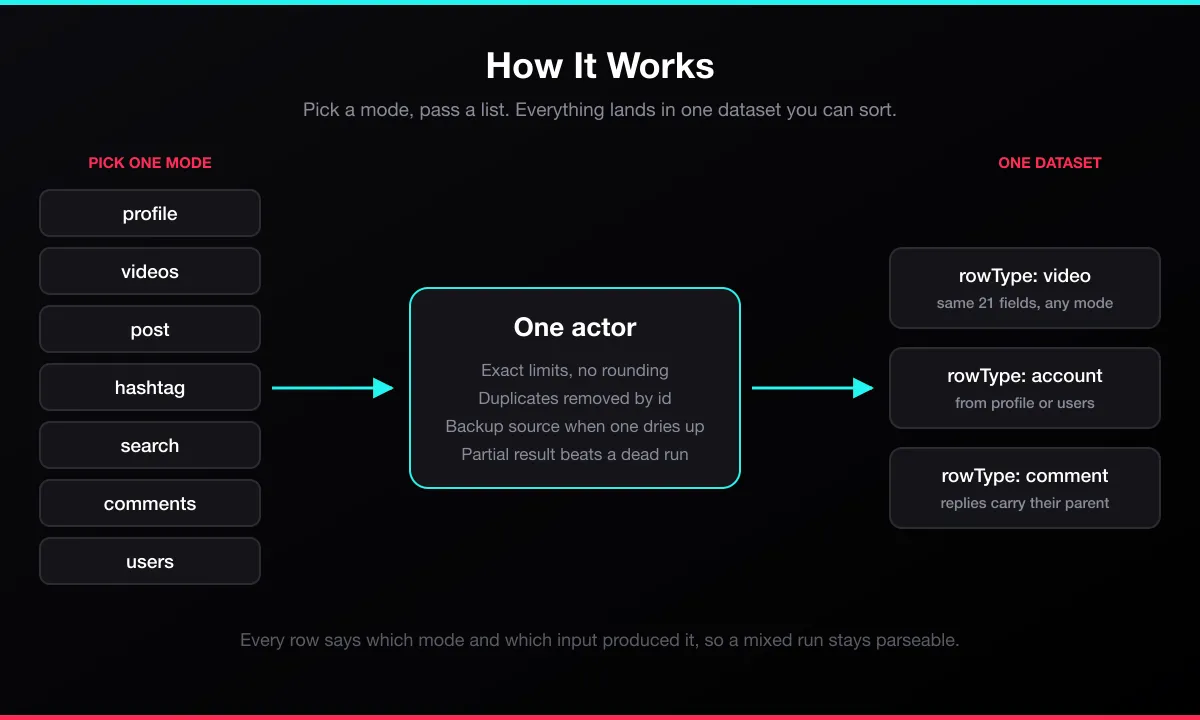
- You pick a mode and pass a list of things to scrape.
- The actor reads each entry, resolving share links and profile URLs as needed.
- Results are collected page by page, deduplicated by id, and stopped at exactly the count you asked for.
- If the primary source runs dry mid-keyword, a second source continues rather than reporting a thin result as the whole of TikTok.
- Rows are written with
rowTypeandsourceattached, so a mixed run stays sortable.
Input Configuration
| Field | Type | Default | Applies to |
|---|---|---|---|
mode | string | profile | required |
input | array | required | all modes |
maxResults | integer | 100 | hashtag, search, users, comments |
includeVideos | boolean | false | profile |
maxVideosPerProfile | integer | 100 | profile, videos |
includeLikedVideos | boolean | false | profile |
maxLikedVideosPerProfile | integer | 30 | profile |
strictHashtagMatch | boolean | false | hashtag |
minFollowers | integer | 0 | users |
maxFollowers | integer | none | users |
verifiedOnly | boolean | false | users |
exactVideoCounts | boolean | false | users |
includeReplies | boolean | false | comments |
maxRepliesPerComment | integer | 50 | comments |
includeMediaUrls | boolean | true | post |
includeAuthorStats | boolean | true | post |
includeHashtagsMentions | boolean | true | post |
Example: an account and its recent posts
Example: the videos an account has liked
Example: what a hashtag is actually tagged with
Example: mid-tier creators in a niche
Example: what an account reposted
Output Overview
Row types, told apart by rowType.
video comes from profile, videos, hashtag and search. The same 21 core fields in every case, even though those modes read two different TikTok payloads behind the scenes. Hashtag rows carry a few extra fields the web feed provides.
likedVideo comes from profile mode with includeLikedVideos on. It has exactly the fields of a video row. source is the account that liked the video and authorUsername is the account that posted it.
repostedVideo comes from reposts mode. It has exactly the fields of a video row. source and repostedBy are the account that reposted the video and authorUsername is the account that posted it. An account with no public reposts returns a free error row saying so.
account comes from profile and users.
comment comes from comments mode. Replies carry isReply: true and the parentCommentId they belong to.
post is its own richer type, from post mode only: slideshow images, repost count, ad and AI-generated flags, duet and stitch settings, media URLs.
Output Sample
A video row, from a search run on "latte art":
An account row, from users:
Key Output Fields
Every row: rowType, source, scrapedAt
Video: postId, postUrl, caption, createdAt, durationSeconds, isPinned, playCount, likeCount, commentCount, shareCount, saveCount, authorId, authorUsername, authorNickname, authorFollowerCount, musicId, musicTitle, coverUrl
Account: username, nickname, userId, secUid, profileUrl, bio, isVerified, followerCount, followingCount, likeCount, videoCount, region, plus likedVideosVisible in profile mode when includeLikedVideos is on, and videoCountSource (search or profile) in users mode
Comment: commentId, text, likeCount, replyCount, isReply, parentCommentId, commenterUsername, commenterVerified, isPinnedByAuthor, isLikedByAuthor
Post: everything a video row has, plus postType, repostCount, isAd, isAigc, duetEnabled, stitchEnabled, hashtags, mentions, videoUrl, imageUrls
Free Apify plan
On the free Apify plan, a run covers one target and up to 20 rows, and the first 3 rows of each kind (profiles, videos, liked videos, posts, accounts, comments) come back in full, so you can check the data. After that, rows keep what identifies them (IDs, usernames, nicknames, profile and post URLs, dates, durations, flags and music), while captions, bios and comment text are cut to their first 3 characters, cover, avatar, bio link and media download URLs are hidden, and play, like, comment, share, save, follower and following counts are rounded to their order of magnitude, and a freePlanNote field marks those rows. Any paid Apify plan returns every field in full. The exactVideoCounts option (users mode) is available on paid plans only; on a free run, account rows carry the video count from the search results.
FAQ
Why one actor instead of seven separate ones? Because one input shape and one output schema is less work than seven. The specialist actors remain published for anyone who prefers them.
Are video rows really the same across modes? Yes, and it took work. Profile, videos and search read TikTok's mobile payload while the hashtag feed reads its web payload, with different field names for the same things. Both are normalised to one shape here. Hashtag rows carry a few extra fields the web payload genuinely provides.
Why does a hashtag run return posts without that hashtag?
TikTok's hashtag feed is a related-content feed, not a tag index. On a live #coffee feed, 23 of 37 posts actually carried the tag. Set strictHashtagMatch to drop the rest.
Why do most accounts come back with likedVideosVisible: false?
Because TikTok hides liked videos by default, and most people never change that. In our tests 6 of 99 accounts showed them, and nothing on a profile predicts which ones will. So the Actor asks for each account and records the answer on its profile row instead of returning an error. A hidden list adds no rows and no charge. When the check itself fails, the field is empty rather than false.
I asked for 40 results and got 40. Is that normal? It is here. Limits are honoured exactly rather than rounded up to whatever a page holds.
Why is verificationSource on account rows?
Because account search is a weaker source for the verified badge than a profile lookup. The field tells you which one you are reading, so you know how much to trust it. Run profile mode when the badge has to be authoritative.
How accurate is videoCount in users mode?
Approximate by default, and videoCountSource: "search" says so. Search results carry their own video count, and in a check of 15 accounts 7 matched the profile, 7 were a little low (3,342 against 3,489) and one read 0 on an account with 48 videos. Turn on exactVideoCounts to look up each account's profile for its real count, about a second per account; those rows say profile. Profile counts are exact below 10,000 videos; above that TikTok itself rounds to the nearest hundred.
What happens if a run hits its time limit? It stops cleanly and returns what it collected, with a warning naming the count. A partial result beats a dead run.
Do I need a proxy or a TikTok account? No. No login, no cookies, no proxy configuration, and nothing to solve.
Support
Found a bug or missing a field? Open an issue on the actor's Issues tab.
Additional Services
Need a mode that is not here, a scheduled feed into your own warehouse, or a custom field set? Describe it on the Issues tab.
Explore More Scrapers
The specialist TikTok actors behind this bundle stay published, along with actors for TikTok Shop, Instagram, YouTube, LinkedIn and more. Browse the publisher profile.
🤖 For AI Agents & LLM Apps
Compact reference for AI agents calling this actor via the Apify MCP server or the Apify API (actor: memo23/tiktok-scraper).
Purpose: one TikTok actor with eight modes over accounts, posts, reposts, hashtags, keyword search, comments and account discovery.
Minimal input:
Output: one row per item, tagged by rowType — video, account, comment or post. Video rows: rowType, source, postId, postUrl, caption, createdAt, durationSeconds, isPinned, playCount, likeCount, commentCount, shareCount, saveCount, authorId, authorUsername, authorNickname, authorFollowerCount, musicId, musicTitle, coverUrl, scrapedAt.
Behaviors an agent should know:
modedecides whatinputmeans. Passing usernames with modesearchwill search for them as keywords.- Always set
maxResults(hashtag, search, users, comments) ormaxVideosPerProfile(profile, videos). Uncapped runs on a busy hashtag are large. - Limits are exact, so plan cost from the number you ask for.
- Branch on
rowType, not on the mode you requested:profilewithincludeVideosreturns bothprofileandvideorows, and withincludeLikedVideosalsolikedVideorows (same fields asvideo;sourceis the account that liked it). likedVideosVisibleon a profile row isfalsefor most accounts, because TikTok hides liked videos by default. Treatfalseas an answer, not a failure.- In users mode,
videoCountwithvideoCountSource: "search"is approximate and can read 0 on an account that has videos. SetexactVideoCounts: truewhen the count matters. - A target that cannot be delivered yields one row carrying
errorandmessage; the run still ends SUCCEEDED. Check forerrorbefore treating a row as data. - Billing: every delivered data row is charged. Error rows — a target that is private, deleted, or has nothing to return — are not charged, so a run that finds nothing costs nothing.
⚠️ Disclaimer
This Actor accesses publicly available data on TikTok for legitimate research and business-analysis purposes. It does not log in, bypass authentication, or access private content. Use of this Actor must comply with TikTok's Terms of Service and all applicable laws, including data-protection regulations (GDPR, CCPA, etc.). The authors are not responsible for any misuse. Users must:
- Respect rate limits and avoid overloading TikTok's infrastructure
- Not use scraped data to violate user privacy or platform terms
- Process any personal data only with a lawful basis and in compliance with their jurisdiction
- Not republish scraped content in violation of copyright
We do not store scraped data; the Actor returns it directly to your Apify dataset for your authorized use. TikTok is a trademark of ByteDance Ltd.; this Actor is not affiliated with or endorsed by TikTok or ByteDance.
SEO Keywords
tiktok scraper, tiktok api, tiktok profile scraper, tiktok liked videos scraper, tiktok video scraper, tiktok hashtag scraper, tiktok search scraper, tiktok comments scraper, tiktok user search, tiktok data extraction, tiktok analytics tool, tiktok creator discovery, tiktok engagement data, scrape tiktok without login, tiktok influencer research, social media scraper, tiktok content research, tiktok post metrics, tiktok bulk scraper, tiktok no proxy scraper, tiktok mcp server


![Car & Classic [$1💰] | Full 46k catalogue | Beats 10k cap avatar](https://images.apifyusercontent.com/yR5ZcWq7huml1KRn39casUADIIm6kQumb9tA8E00od4/rs:fill:76:76/cb:1/aHR0cHM6Ly9hcGlmeS1pbWFnZS11cGxvYWRzLXByb2QuczMudXMtZWFzdC0xLmFtYXpvbmF3cy5jb20vbmduOHZSRVNUa3NleVdFNnAtYWN0b3ItbmRLcGNQOFNyWFNueW5Na3IteGE3RlJRTHRTVy1jYXJfYW5kX2NsYXNzaWMuanBlZw.webp)
![ForRentUniversity.com [$1.25💰] Scraper · Emails avatar](https://images.apifyusercontent.com/knob38rf08RjbTFOtyPTLKbUpJqNv69gLvD9GZvNHdY/rs:fill:76:76/cb:1/aHR0cHM6Ly9hcGlmeS1pbWFnZS11cGxvYWRzLXByb2QuczMudXMtZWFzdC0xLmFtYXpvbmF3cy5jb20vbmduOHZSRVNUa3NleVdFNnAtYWN0b3Itb2ZkQkJZZ0QzMndpZHZSemotT25mdk55NHJTQS1mcnUuanBlZw.webp)
![Collecting Cars [$3💰] | 33k SOLD prices + live bids avatar](https://images.apifyusercontent.com/Hbn_LDWbVTHAyPL8k_edq8GAZOEin7g5i4_bFf2WimM/rs:fill:76:76/cb:1/aHR0cHM6Ly9hcGlmeS1pbWFnZS11cGxvYWRzLXByb2QuczMudXMtZWFzdC0xLmFtYXpvbmF3cy5jb20vbmduOHZSRVNUa3NleVdFNnAtYWN0b3ItRm1EYVRESkEyWGNYU0s4N24tVkJhU3V5RENuYi1Db2xsZWN0aW5nX0NhcnMud2VicA.webp)
![PistonHeads.com [$1💰] | Full 208k catalogue | Real pagination avatar](https://images.apifyusercontent.com/N5yGW7wlseLIwvxB9V1DcTJVHEdFqV2MhaITdnhRlFM/rs:fill:76:76/cb:1/aHR0cHM6Ly9hcGlmeS1pbWFnZS11cGxvYWRzLXByb2QuczMudXMtZWFzdC0xLmFtYXpvbmF3cy5jb20vbmduOHZSRVNUa3NleVdFNnAtYWN0b3IteEpXSmV2d2I5dVBrZDdwU08tOHRWc0xnWEUzZi1waXN0b25oZWFkcy5wbmc.webp)


