

Wallapop Scraper — Any City by Coordinates · GPS & Seller Data
Pricing
from $1.50 / 1,000 items
Wallapop Scraper — Any City by Coordinates · GPS & Seller Data
Scrape Wallapop second-hand listings by keyword around any location. One row per item: title, price, GPS, postal code, city/region, images, shipping and the full category taxonomy. Target any city by coordinates — no Spanish proxy needed. Optional seller profile + view counters.
Pricing
from $1.50 / 1,000 items
Rating
4.9
(2)
Developer

Muhamed Didovic
Maintained by CommunityActor stats
0
Bookmarked
23
Total users
3
Monthly active users
4 days ago
Last modified
Categories
Security
Limited permissionsShare
Wallapop Scraper
Turn any Wallapop search into clean, structured second-hand marketplace data. Search by keyword (iphone 15, bicicleta, sofá) around any location you choose, or paste search, category and item URLs — and get one flat row per item with title, price, GPS, postal code, city, region, images, shipping flags and the full category taxonomy.
Built for resale and arbitrage sourcing, price monitoring, and Spanish second-hand market research.
How it works
✨ Why use this scraper?
- You choose the location, not your IP — Wallapop is distance-based, and most scrapers return whatever region their proxy happens to sit in. This actor sends explicit coordinates, so you get Madrid results from anywhere. Pick from 12 preset Spanish cities, or supply exact latitude/longitude for any town.
- Postal-code precision — every row carries the item's postal code, city, region and province alongside GPS. That's real geographic granularity for local-market analysis, not a vague city label.
- Structured category attributes — deep mode returns Wallapop's own labelled attribute set:
Modelo,Marca,Capacidad de almacenamiento,Color,Estado. Typed fields, not text scraped out of a description. - Engagement signals — view counts, favourites and conversation counts per item show you what's actually in demand, not just what's listed.
- Fast — reads Wallapop's own JSON API rather than rendering pages. A few hundred items land in seconds.
- No Spanish or residential proxy needed — location comes from the coordinates you pass, so there's no premium-proxy surcharge buried in your bill.
- Fast mode or deep mode — feed rows already include price, description, GPS, postal code and taxonomy. Turn on deep mode for attributes, counters and seller id. You choose cost vs depth.
- JSON, CSV, Excel or API — pipe straight into your sheet, CRM or pipeline. Billed per item.
🎯 Use cases
| You are a… | Use it to… |
|---|---|
| Reseller / flipper | Source underpriced items in a chosen city, with condition and demand signals |
| Price-monitoring / repricing | Track asking prices for a product across Spanish metros over time |
| Arbitrage trader | Compare the same product between Madrid, Barcelona and Valencia in one run |
| Market researcher | Measure supply, price distribution and category mix by postal code |
| Marketplace / SaaS builder | Seed a second-hand catalog with structured, deduplicated rows |
| Demand analyst | Rank listings by views and favourites to see what actually moves |
📥 Supported inputs
| Input | Example | What it does |
|---|---|---|
| Keyword + cities | iphone 15 × ["madrid","barcelona"] | Searches that keyword around each city |
| Keyword + coordinates | iphone 15 + 40.4168 / -3.7038 | Searches around any exact point |
| Search URL | https://es.wallapop.com/search?keywords=iphone | Uses that URL's keywords and any filters on it |
| Category URL | https://es.wallapop.com/search?category_id=24200&order_by=newest | Browses a whole category, no keyword needed |
| Item URL | https://es.wallapop.com/item/{slug} | Scrapes that single item in full detail |
Not supported: private messages, buyer data, and anything behind a login. The actor reads only public Wallapop data.
Note on location. Wallapop ranks results by distance from a search origin. Supplying coordinates is what controls that origin — so results are centred on the city (or point) you pick, whatever network the run happens to use.
⚙️ How it works
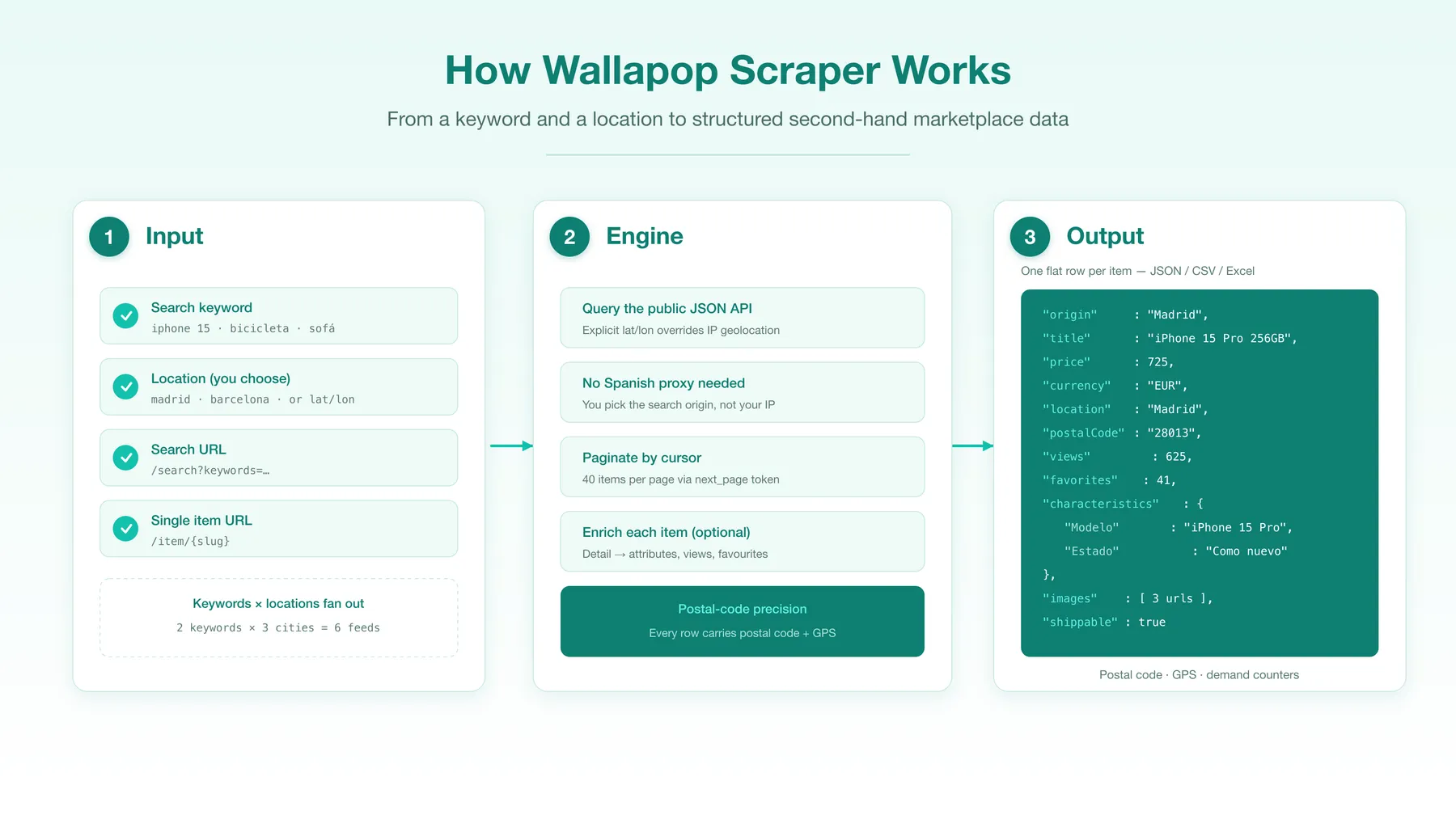
- Classify every input — keywords are expanded across the selected locations; pasted URLs are sorted into search / item, and a search URL keeps its own filters and coordinates.
- Query Wallapop's public JSON API with explicit
latitude/longitude, which overrides its IP-based geolocation. - Paginate with Wallapop's
next_pagecursor — 40 items per page. - Enrich (optional) — call each item's detail endpoint for attributes, view/favourite counters and seller id.
- Push one flat, deduplicated row per item to the dataset, tagged with the origin and keyword that found it.
🔧 Input configuration
| Field | Type | Default | Description |
|---|---|---|---|
searchQueries | array | ["iphone 15"] | Keywords to search. Each runs around every location. |
cities | array | ["madrid"] | Preset cities: madrid, barcelona, valencia, sevilla, zaragoza, malaga, bilbao, murcia, palma, las-palmas, alicante, cordoba. |
customLatitude / customLongitude | string | — | Exact origin, e.g. 40.4168 / -3.7038. Targets any town. |
startUrls | array | [] | Wallapop search, category and/or item URLs. Auto-classified. |
scrapeDetails | boolean | false | Fetch each item's detail (attributes, counters, seller id). |
maxItems | integer | 1000 | Hard cap on rows for the whole run. Clamped to 100 on the free Apify plan. |
maxItemsPerSearch | integer | 1000 | Cap per keyword-and-location feed. |
maxConcurrency | integer | 8 | Parallel detail requests. |
maxRequestRetries | integer | 6 | Retry budget per request. |
proxy | object | Apify datacenter | Optional. Residential/Spanish proxies are not required. |
📤 Output overview
One row per item, tagged with the searchOrigin and searchKeyword that produced it.
Fast mode (feed): itemId, title, description, price, currency, latitude/longitude, location (city, postal code, region, province), categoryPath, taxonomy, images, isReserved, isRefurbished, hasWarranty, isShippable, createdAt, url.
Deep mode adds: characteristics (labelled attributes), characteristicsText, counters (views, favourites, conversations), seller, hashtags, shareUrl.
🧾 Output samples
A phone listing (deep mode):
🔑 Key output fields
| Field | Description |
|---|---|
itemId | Wallapop item id (stable dedup key) |
title / description | Item title and full description |
price / currency | Numeric price and ISO currency |
location | City, postal code, region, province, country code |
latitude / longitude | Item GPS (Wallapop approximates these slightly for privacy) |
categoryPath / taxonomy | Category path and its structured levels |
images | Array of full-resolution image URLs |
isReserved / isRefurbished / hasWarranty | Item state flags |
isShippable / sellerAllowsShipping | Shipping availability |
createdAt / modifiedAt | When the item was listed and last updated (ISO) |
characteristics | Labelled category attributes (deep mode) |
counters | Views, favourites, conversations (deep mode) |
seller | Seller id and top-profile badge (deep mode) |
searchOrigin / searchKeyword | Which location and keyword produced the row |
❓ FAQ
Is there a limit on the free Apify plan? Yes. Runs from a free-plan account stop at 100 rows regardless of maxItems, and the run log says so before the crawl starts. It is a sample of the real output; any paid Apify plan removes the cap.
Can I scrape a whole category instead of a keyword? Yes. Set up the search on Wallapop with a category (and subcategory, sort order, distance or price range if you want them), then paste the URL from your browser into startUrls. Every filter on the URL is kept. If the URL carries latitude/longitude, the actor searches around that point; if not, it searches around each city in cities.
Can I search a specific city or town? Yes — that's the point of the location inputs. Pick from 12 preset Spanish cities, or pass exact coordinates for any town. Results are centred on that origin regardless of where the run executes.
Do I need a Spanish or residential proxy? No. Location is controlled by the coordinates you send, not by your IP, so the default Apify datacenter proxy is fine.
Does it return the seller's name or rating? No. Wallapop's public item payload identifies the seller only by id and a "top profile" badge — it does not expose a name, rating or join date there, so this actor does not claim to return them.
What's the difference between fast and deep mode? Fast mode returns feed rows, which already include price, description, GPS, postal code, region and category — cheap and quick. Deep mode adds labelled attributes, view/favourite counters and the seller id, at roughly 2× the requests.
How many results per search? Wallapop returns 40 items per page and pages via a cursor. The actor walks up to 100 pages per feed (~4,000 items). Use several keywords or cities to go wider.
Does it work outside Spain? Wallapop also operates in Italy and Portugal on the same API — pass those coordinates via the custom latitude/longitude fields.
🛟 Support
Found a bug or need a field added? Open an issue on the actor's Issues tab in the Apify Console and we'll take a look.
🚀 Additional services
Need a different marketplace, site, or a custom schema? We build and maintain scrapers across classifieds, real estate, jobs and e-commerce.
🔎 Explore more scrapers
- OLX Marketplace Scraper (7 countries)
- OfferUp Marketplace Scraper
- Kleinanzeigen Scraper
- Craigslist Scraper
- Facebook Marketplace Scraper
🤖 For AI Agents & LLM Apps
Compact reference for AI agents calling this actor via the Apify MCP server or the Apify API (actor: memo23/wallapop-scraper).
Purpose: Scrape Wallapop second-hand marketplace listings by keyword around any chosen location (coordinates, not IP), returning one flat row per item with price, GPS, postal code and category taxonomy.
Minimal input:
Alternatively, pass customLatitude/customLongitude (e.g. "40.4168"/"-3.7038", also targets Italy/Portugal) to set an exact origin, or paste search/category/item URLs in startUrls (auto-classified; a search URL such as /search?category_id=24200&order_by=newest&latitude=…&longitude=…&distance_in_km=30 keeps all its filters and coordinates) — all modes can be combined. cities presets: madrid, barcelona, valencia, sevilla, zaragoza, malaga, bilbao, murcia, palma, las-palmas, alicante, cordoba.
Output: one row per item — rowType, itemId, url, title, description, price, currency, location {city, postalCode, region, province, countryCode}, latitude, longitude, categoryPath, taxonomy, images, isReserved, isRefurbished, hasWarranty, isShippable, sellerAllowsShipping, createdAt, modifiedAt, searchOrigin, searchKeyword; deep mode adds characteristics, characteristicsText, counters {views, favorites, conversations}, seller {userId, isTopProfile}, hashtags, shareUrl.
Behaviors an agent should know:
- Each keyword in
searchQueriesis searched around every entry incitiesand every custom coordinate; results are centred on that origin regardless of run network. - Always set
maxItemsandmaxItemsPerSearch; uncapped, the actor walks up to 100 pages per feed (~4,000 items each). scrapeDetailsfalse (fast) returns feed fields; true (deep) adds characteristics, counters and seller id at roughly 2× the requests and a higher per-item detail billing rate.- Location is controlled by the coordinates sent, not the IP — no Spanish or residential proxy is required; the default datacenter proxy is fine.
- Rows are deduplicated by
itemIdand tagged with thesearchOriginandsearchKeywordthat produced them. - Only public listing data — no seller name/rating, private messages, buyer data, or login-gated content. Billed per item — see the Pricing tab on the actor page.
⚠️ Disclaimer
This actor scrapes only publicly available listing data from Wallapop. It does not access private messages, buyer data, or any content behind a login, and it does not collect personal data beyond the public item information Wallapop itself displays. You are responsible for using the scraped data in compliance with Wallapop's Terms of Service, applicable laws (including GDPR and other data-protection and consumer-protection laws), and any restrictions on automated access. Use the output lawfully and ethically.
🔍 SEO Keywords
Wallapop scraper, Wallapop API, Wallapop data extractor, scrape Wallapop listings, Wallapop price scraper, Wallapop Madrid scraper, Wallapop Barcelona scraper, Spanish classifieds scraper, second-hand marketplace data, Wallapop item export, Wallapop JSON, resale sourcing data Spain, Wallapop price monitoring, segunda mano scraper.


![Collecting Cars [$3💰] | 33k SOLD prices + live bids avatar](https://images.apifyusercontent.com/Hbn_LDWbVTHAyPL8k_edq8GAZOEin7g5i4_bFf2WimM/rs:fill:76:76/cb:1/aHR0cHM6Ly9hcGlmeS1pbWFnZS11cGxvYWRzLXByb2QuczMudXMtZWFzdC0xLmFtYXpvbmF3cy5jb20vbmduOHZSRVNUa3NleVdFNnAtYWN0b3ItRm1EYVRESkEyWGNYU0s4N24tVkJhU3V5RENuYi1Db2xsZWN0aW5nX0NhcnMud2VicA.webp)
![ForRentUniversity.com [$1.25💰] Scraper · Emails avatar](https://images.apifyusercontent.com/knob38rf08RjbTFOtyPTLKbUpJqNv69gLvD9GZvNHdY/rs:fill:76:76/cb:1/aHR0cHM6Ly9hcGlmeS1pbWFnZS11cGxvYWRzLXByb2QuczMudXMtZWFzdC0xLmFtYXpvbmF3cy5jb20vbmduOHZSRVNUa3NleVdFNnAtYWN0b3Itb2ZkQkJZZ0QzMndpZHZSemotT25mdk55NHJTQS1mcnUuanBlZw.webp)


![Autotrader.com.au [$1💰] Australia Search & Details Scraper🇦🇺 avatar](https://images.apifyusercontent.com/pCkelbtHnioCVauMT6DM9tGYD81m-FmuhD-rXFDHMC4/rs:fill:76:76/cb:1/aHR0cHM6Ly9hcGlmeS1pbWFnZS11cGxvYWRzLXByb2QuczMudXMtZWFzdC0xLmFtYXpvbmF3cy5jb20vbmduOHZSRVNUa3NleVdFNnAtYWN0b3ItYWFINGlJOWIwc2dNNkNWeVMtanhmc2ZZeEVBWi1hdXRvdHJhZGVyLWF1cy5wbmc.webp)

![Kijiji [Only $0.95💰] Search | Detail page(s) | Scraper avatar](https://images.apifyusercontent.com/o9T81yxx3AqlGnWhLlnU2dojhDIA9r8oYRqvGdx6rUE/rs:fill:76:76/cb:1/aHR0cHM6Ly9hcGlmeS1pbWFnZS11cGxvYWRzLXByb2QuczMudXMtZWFzdC0xLmFtYXpvbmF3cy5jb20vbmduOHZSRVNUa3NleVdFNnAtYWN0b3ItZzNyN3JPQmZZZXUzVW5wdlotSGNFb2ZvTlBmcS1raWppamktbG9nby1wbmdfc2Vla2xvZ28tMzI0NDY1LnBuZw.webp)

![PistonHeads.com [$1💰] | Full 208k catalogue | Real pagination avatar](https://images.apifyusercontent.com/N5yGW7wlseLIwvxB9V1DcTJVHEdFqV2MhaITdnhRlFM/rs:fill:76:76/cb:1/aHR0cHM6Ly9hcGlmeS1pbWFnZS11cGxvYWRzLXByb2QuczMudXMtZWFzdC0xLmFtYXpvbmF3cy5jb20vbmduOHZSRVNUa3NleVdFNnAtYWN0b3IteEpXSmV2d2I5dVBrZDdwU08tOHRWc0xnWEUzZi1waXN0b25oZWFkcy5wbmc.webp)