

Whop Content Rewards Scraper
Pricing
from $1.50 / 1,000 campaigns
Whop Content Rewards Scraper
Find Whop clipping campaigns that are actually paying. Each row carries CPM, budget left, daily burn, days of runway, payout per creator, 7-day momentum, and a 0-100 opportunity score so a parked budget does not rank like a live one. Full board or one campaign URL. JSON or CSV out.
Pricing
from $1.50 / 1,000 campaigns
Rating
0.0
(0)
Developer

Muhamed Didovic
Maintained by CommunityActor stats
0
Bookmarked
3
Total users
1
Monthly active users
16 hours ago
Last modified
Categories
Share
Pull the public Whop Content Rewards board into one row per campaign: the headline CPM, how much budget is left, how fast that budget is being paid out, and a 0-100 score you can sort.
A single run is enough for the burn rate. The actor derives daily burn, days of budget left, and payout per creator from the budget, the spend, and the listing date the board already publishes.
How it works
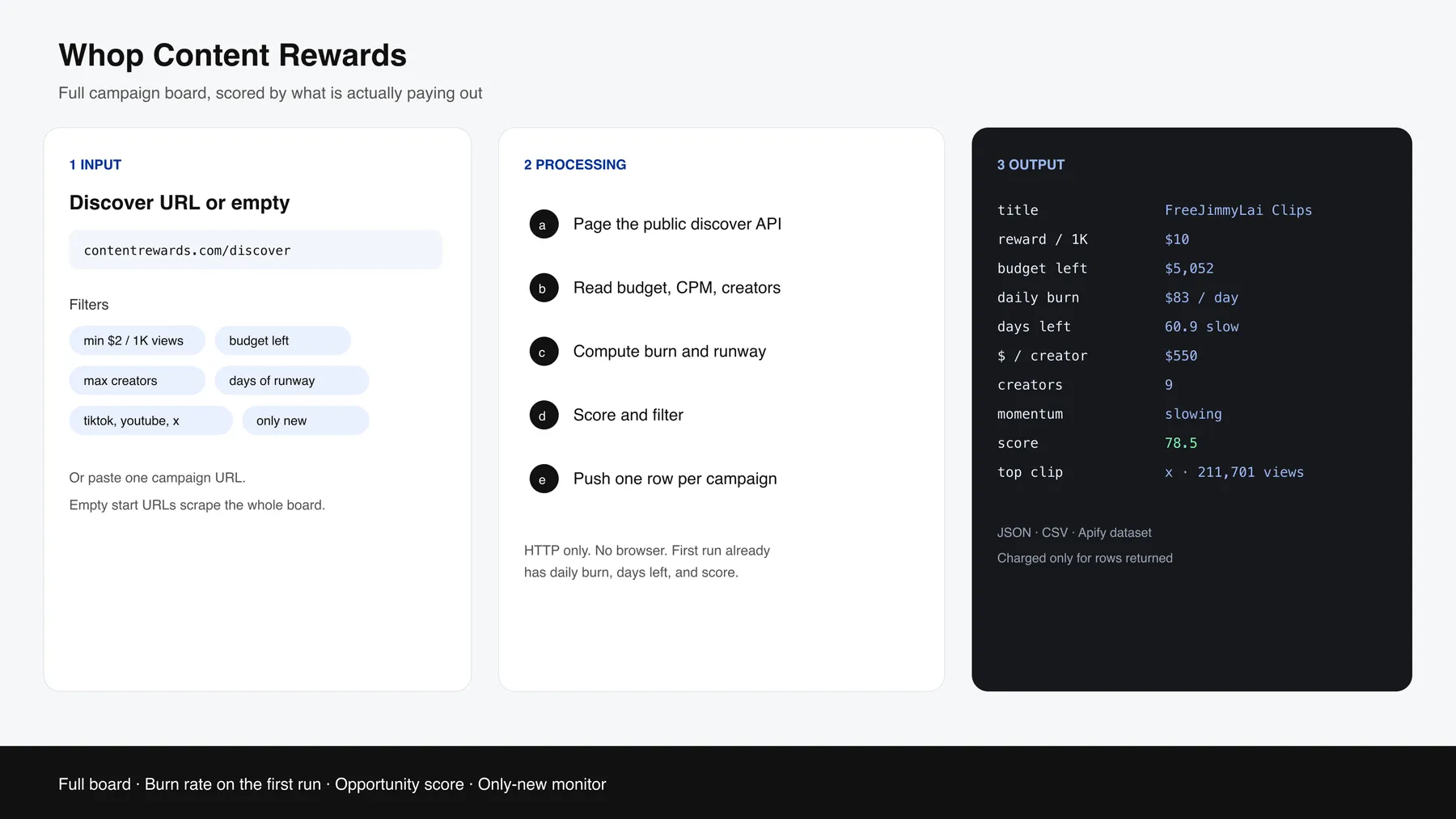
✨ Why use this scraper?
- The full public directory in one run, about 670 campaigns on 26 Sep 2026, past the ~50 cards the site shows at once.
- Daily burn, days of budget left, and payout per creator are computed on the first run.
- Opportunity score (0-100) ranks reward rate, budget left, competition, and runway together.
- 7-day view momentum and the current top clip come back on every row.
- Filters for CPM, budget left, creator count, runway, platform, category, and payout model. You are charged only for rows that pass.
onlyNewremembers campaigns in your account and charges later runs only for campaigns that were not seen before.
🎯 Use cases
| Who | What they get |
|---|---|
| Clippers and clipping agencies | Campaigns with a real burn rate, budget still left, and few creators |
| Brands running a campaign | CPM, budget, and burn compared with the rest of the live board |
| Analysts | A dated feed of launches, spend, and 7-day view momentum |
| Scheduled monitors | onlyNew plus a webhook, so a quiet hour costs the start fee and nothing else |
📥 Supported inputs
| Input | Example |
|---|---|
| Full board | Leave Start URLs empty, or paste https://contentrewards.com/discover |
| One campaign | https://contentrewards.com/discover/{campaign-id} or the raw campaign id |
| Whop campaign URL | A whop.com URL that contains the campaign id |
Not supported: logged-in creator balances, submission upload, or anything behind a Whop login. The actor reads the public board only.
🔄 How it works
- Page the public discover API (50 campaigns per page) until the board ends, or fetch the campaign ids you pasted.
- Convert cents to dollars and attach the listing date, platforms, payout rates, creator count, and view chart.
- Compute burn, days left, payout per creator, views still payable, effective CPM, 7-day momentum, and the opportunity score.
- Apply your filters and sort.
- If
onlyNewortrackTrendsis on, compare with the snapshot in the named storewhop-cr-seen-campaigns. - Push one dataset row per returned campaign.
⚙️ Input parameters
Grouped the way the input form shows them. Every number filter is off while empty; once set, a campaign that does not report that number is dropped.
| Field | Default | What it does |
|---|---|---|
| Where to look | ||
startUrls | discover URL | The whole board, or campaign links / UUIDs from contentrewards.com or whop.com |
searchText | empty | Words to find in the title, brand or description |
| Order and size | ||
sortBy | budgetLeft | What comes first: opportunity, budgetLeft, reward, payoutPerCreator, daysLeft, burn, fewestCreators, newest, progress |
maxItems | 1000 | Rows kept after sorting; the rest are not billed |
| Money | ||
minOpportunityScore | empty | Lowest 0-100 score to keep |
minRewardPerThousand | empty | Lowest pay per 1,000 views, in dollars |
minPayoutPerCreatorUsd | empty | Lowest spend-per-creator so far |
minBudgetLeftUsd | empty | Lowest unspent budget |
| Competition and runway | ||
maxCreators | empty | Most creators allowed on the campaign |
minEstimatedDaysLeft | empty | Shortest runway allowed at today's spend |
maxProgressPercentage | empty | Highest share of budget already used |
| Campaign type | ||
platforms | empty | tiktok, instagram, youtube, x, facebook |
payoutModels | empty | cpm, retainer, per-post |
contentTags | empty | clipping, or ugc for both face and faceless UGC |
categories | empty | Category names or slugs, e.g. Gaming, personal-brand |
status | active | active drops non-active campaigns; all keeps them |
| Age | ||
listedAfter | empty | YYYY-MM-DD; earlier listings are dropped |
maxAgeDays | empty | Listed within this many days |
| Between runs | ||
trackTrends | false | Adds change fields measured against the previous run |
onlyNew | false | Later runs return only campaigns no earlier run returned |
proxy | Apify datacenter | Switch to the residential group if a run comes back empty |
📊 Output overview
One dataset item per campaign. Money fields are US dollars. budgetSpentUsd is the board's spent figure, which can include amounts not yet paid. paidOutUsd is what creators have actually been paid, and effectiveRewardPerThousandViews is that payout divided by views. A headline CPM of $2 with an effective rate near $0 means most views are still pending or rejected.
opportunityScore is 35% reward rate (full marks at $5 per 1,000 views), 25% budget left (full marks at $25,000), 25% low competition (100 creators is about half marks; a campaign that has paid nobody is capped at half of that slice), and 15% runway (full marks from 3 to 60 days). Missing reward or budget produces a null score.
budgetPace is draining under 3 days, healthy from 3 to 60, slow from 60 to 180, and stalled when the budget is barely moving or nothing has been spent.
📦 Output sample
Real row from a run on 26 Sep 2026. paidOutUsd is 0 because the board had recorded spend that was not yet paid out.
🗂 Key output fields
| Group | Fields |
|---|---|
| Identity | id, title, brand, status, payoutModel, category, platforms, campaignUrl, whopUrl |
| Money | rewardPerThousandViews, totalBudgetUsd, budgetSpentUsd, budgetLeftUsd, paidOutUsd, progressPercentage |
| Burn | ageDays, dailyBurnUsd, estimatedDaysLeft, budgetPace, payoutPerCreatorUsd, viewsPerCreator, estimatedViewsRemaining |
| Proof | opportunityScore, effectiveRewardPerThousandViews, approvedSubmissions, viewsLast7d, viewsTrend7dPct, momentum |
| Winners | topEarners (top 3), topEarnerUsername, topEarnerUsd, topClipUrl, topClipViews, topClipPlatform, topClipUsername, referenceMaterials |
| Rates | payouts[], rateTiktokUsd, rateInstagramUsd, rateYoutubeUsd, rateXUsd, rateFacebookUsd |
Trends (trackTrends) | budgetLeftChangeUsd, observedBurnUsdPerDay, burnAcceleration, creatorsChange, hoursSinceLastRun, trendSignal |
trendSignal is accelerating when observed burn is at least 1.5 times the lifetime burn, slowing when it is half or less, crowding when creators joined and the budget did not move, stalled when the budget did not move, and steady otherwise. The first run is trendStatus: "baseline".
❓ FAQ
Do I need two runs to get the burn rate?
No. dailyBurnUsd, estimatedDaysLeft, and payoutPerCreatorUsd come from the listing date and the spend on that same run. trackTrends is the optional second-run comparison.
Why is estimatedDaysLeft null?
Nothing has been spent yet, so the burn rate is unknown.
Why is paidOutUsd zero when budgetSpentUsd is not?
The board splits "spent" from "paid out". Effective CPM uses paid out. A wide gap means views are still pending or were rejected.
Why is the opportunity score null? The campaign has no reward rate or no budget. The actor leaves the score null.
What does onlyNew charge?
The first run returns up to maxItems and stores only the campaigns it actually pushed. Later runs return ids that are not stored yet. Campaigns held back by maxItems stay unseen, so the next run can return them. A run with no new campaigns pushes no rows.
The run said the site is unavailable. The public board returned a server error after several retries. Wait 10 to 30 minutes and run again. Campaigns already collected in that run are kept if a later page fails.
💬 Support
Open a ticket on the Issues tab with the run id and the input you used.
🛠 Additional services
Need a schedule, a Slack or webhook push, or the same burn-rate fields on another clipping board? Say what the row should contain.
🔎 Explore more scrapers
- Whop Leaderboards Scraper for Whop discover products, plans, reviews, and leaderboard rank. That actor does not cover Content Rewards campaigns.
⚠️ Disclaimer
This Actor is an independent tool and is not affiliated with, endorsed by, or sponsored by Whop, Content Rewards, or any of their subsidiaries or affiliates. All trademarks mentioned are the property of their respective owners.
The scraper accesses only the public campaign directory. It does not log in, and it does not read private creator accounts. Users are responsible for making sure their use complies with Whop's and Content Rewards' terms, applicable data-protection law, and their own contracts.
SEO Keywords
whop content rewards scraper, scrape whop content rewards, whop clipping campaigns, content rewards api, whop cpm scraper, clipping campaign finder, whop budget scraper, content rewards burn rate, whop creator campaigns, ugc campaign scraper, whop campaign dataset, clipping agency data, whop reward per 1k views, contentrewards.com scraper, apify whop content rewards, whop campaign monitor, creator economy dataset, whop payout scraper


![Car & Classic [$1💰] | Full 46k catalogue | Beats 10k cap avatar](https://images.apifyusercontent.com/yR5ZcWq7huml1KRn39casUADIIm6kQumb9tA8E00od4/rs:fill:76:76/cb:1/aHR0cHM6Ly9hcGlmeS1pbWFnZS11cGxvYWRzLXByb2QuczMudXMtZWFzdC0xLmFtYXpvbmF3cy5jb20vbmduOHZSRVNUa3NleVdFNnAtYWN0b3ItbmRLcGNQOFNyWFNueW5Na3IteGE3RlJRTHRTVy1jYXJfYW5kX2NsYXNzaWMuanBlZw.webp)
![Collecting Cars [$3💰] | 33k SOLD prices + live bids avatar](https://images.apifyusercontent.com/Hbn_LDWbVTHAyPL8k_edq8GAZOEin7g5i4_bFf2WimM/rs:fill:76:76/cb:1/aHR0cHM6Ly9hcGlmeS1pbWFnZS11cGxvYWRzLXByb2QuczMudXMtZWFzdC0xLmFtYXpvbmF3cy5jb20vbmduOHZSRVNUa3NleVdFNnAtYWN0b3ItRm1EYVRESkEyWGNYU0s4N24tVkJhU3V5RENuYi1Db2xsZWN0aW5nX0NhcnMud2VicA.webp)
![PistonHeads.com [$1💰] | Full 208k catalogue | Real pagination avatar](https://images.apifyusercontent.com/N5yGW7wlseLIwvxB9V1DcTJVHEdFqV2MhaITdnhRlFM/rs:fill:76:76/cb:1/aHR0cHM6Ly9hcGlmeS1pbWFnZS11cGxvYWRzLXByb2QuczMudXMtZWFzdC0xLmFtYXpvbmF3cy5jb20vbmduOHZSRVNUa3NleVdFNnAtYWN0b3IteEpXSmV2d2I5dVBrZDdwU08tOHRWc0xnWEUzZi1waXN0b25oZWFkcy5wbmc.webp)


![ForRentUniversity.com [$1.25💰] Scraper · Emails avatar](https://images.apifyusercontent.com/knob38rf08RjbTFOtyPTLKbUpJqNv69gLvD9GZvNHdY/rs:fill:76:76/cb:1/aHR0cHM6Ly9hcGlmeS1pbWFnZS11cGxvYWRzLXByb2QuczMudXMtZWFzdC0xLmFtYXpvbmF3cy5jb20vbmduOHZSRVNUa3NleVdFNnAtYWN0b3Itb2ZkQkJZZ0QzMndpZHZSemotT25mdk55NHJTQS1mcnUuanBlZw.webp)

