

Greenhouse, Lever, Ashby & Workable Jobs Scraper & Monitor
Pricing
from $1.05 / 1,000 job records
Greenhouse, Lever, Ashby & Workable Jobs Scraper & Monitor
Job board scraper for Greenhouse, Lever, Ashby, Workable, Personio and Teamtailor: one schema from a company name, filters, posted salaries, and monitoring of new, updated and removed jobs. Public job feeds, no login. Not affiliated with Greenhouse, Lever, Ashby, Workable, Personio or Teamtailor.
Pricing
from $1.05 / 1,000 job records
Rating
0.0
(0)
Developer

Muhammet Mustafa Dincer
Maintained by CommunityActor stats
0
Bookmarked
2
Total users
1
Monthly active users
3 days ago
Last modified
Categories
Security
Limited permissionsShare
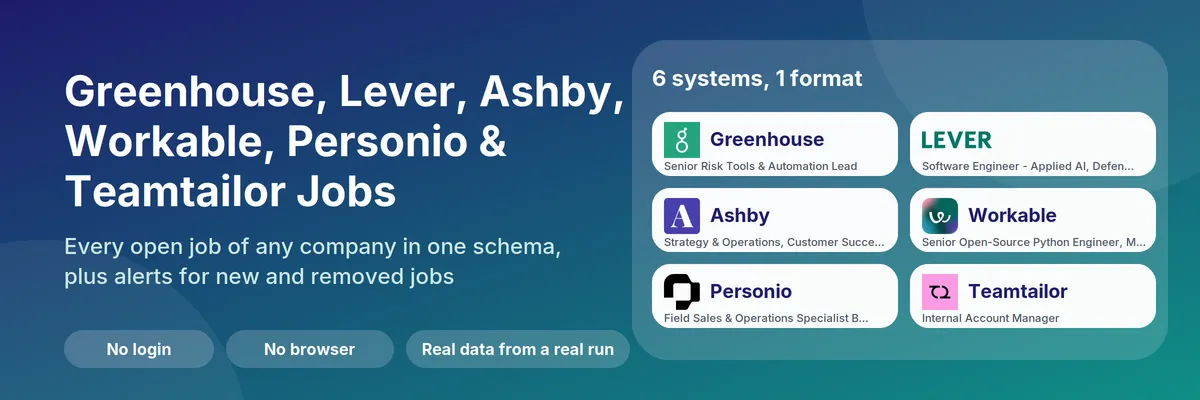
What is Greenhouse, Lever, Ashby, Workable, Personio & Teamtailor Jobs Scraper & Monitor?
Greenhouse, Lever, Ashby, Workable, Personio & Teamtailor Jobs Scraper & Monitor is an Apify Actor that reads the public job boards of companies and returns every open job in one clean format, no matter which hiring system the company uses. Type a company name such as airbnb, click Start, and the Actor finds the company's board on Greenhouse, Lever, Ashby, Workable, Personio or Teamtailor, downloads all open jobs and returns one row per job: title, department, team, locations, remote or hybrid, employment type, publish date, job and apply links, and the pay range when the employer posts one.
It is also a job change monitor. In Changes mode it compares each company with your previous run and returns only the new, updated and removed jobs. Put it on a schedule and you have a hiring tracker for competitors, target accounts, or a niche job board. It needs no login, no browser and no API key, because it reads the public job board APIs and feeds that these systems publish for company career pages.
Quick answer: when should you (or an AI agent) pick this Actor?
Pick this Actor when you know the company (or a list of companies) and want its open jobs as clean data, or you want to be told when a company opens or closes jobs. Typical goals: recruiting and sourcing, sales prospecting from hiring signals, salary benchmarking, competitor hiring tracking, feeding a job board or a spreadsheet, or giving an AI agent a reliable "what is company X hiring for" tool.
Pick something else when you want to search jobs by keyword across the whole internet without naming companies, you need LinkedIn, Indeed or Glassdoor listings, or the company uses another hiring system (for example Workday, SmartRecruiters or BambooHR). This Actor only reads boards on Greenhouse, Lever, Ashby, Workable, Personio and Teamtailor, and it does not return applicant data, recruiter contacts or emails.
Defaults that work: send {"companies": ["airbnb", "palantir", "ashby"]} to get the jobs of three companies, one on each of the first three systems. Add workable:huggingface, personio:helpling and teamtailor:dustin to read the other three. For alerts send {"companies": ["airbnb"], "mode": "changes"} and run it again later. The first Changes run saves a baseline and returns no job rows. Keep monitorName the same between runs, because runs with the same name compare against each other.
At a glance
| Does | Reads company job boards on Greenhouse, Lever, Ashby, Workable, Personio and Teamtailor, finds the right system from a company name, and returns every open job in one schema. A second mode returns only new, updated and removed jobs since the previous run |
| Input | companies (required, up to 300 names, domains or job board URLs). Optional: mode, ats, titleKeywords, excludeKeywords, departmentKeywords, locationKeywords, remoteOnly, postedWithinDays, includeDescription, maxJobsPerCompany, changeTypes, monitorName |
| Output | One row per job: company, ats, title, department, team, location, locations, isRemote, workplaceType, employmentType, postedAt, url, applyUrl, salaryMin, salaryMax, salaryCurrency, salarySummary. One summary row per company with job, remote and pay counts and jobs per department |
| Change types | NEW_JOB, UPDATED_JOB (title, location, department or pay changed), REMOVED_JOB (closed or filled) |
| Needs | No login, no API key, no browser. Apify Proxy is optional and normally not needed |
| Speed | A board with 700 jobs is read in a few seconds. A test run over six companies on six systems took under 7 seconds |
| Pricing | Pay per event. Free plan: $0.001 per run and $0.0015 per job in Jobs mode. In Changes mode $0.001 per company checked and $0.003 per detected change |
| Does not | Search across companies by keyword, read other hiring systems (Workday, SmartRecruiters, BambooHR and others), return applicants, recruiter contacts or emails, or guess pay when the employer does not publish it |
Key terms used in this README
- ATS (applicant tracking system): the software a company uses to publish jobs and collect applications. This Actor supports Greenhouse, Lever, Ashby, Workable, Personio and Teamtailor.
- Job board: the public list of a company's open jobs in its ATS, for example
jobs.lever.co/palantir. The part after the host (palantir) is the board name (also called slug or board token). - Job row: a dataset row with
recordType: "job". One open job, flat and self-contained. - Company row: a dataset row with
recordType: "company". One per company and run, with the system it was found on, the outcome and counts. - Baseline: the saved list of a company's jobs from the previous Changes run. The first run of a company only saves a baseline.
- Detected change: one new, updated or removed job found by comparing the board with the baseline. Each is one
changerow and one billable event. - Monitor: a named baseline set with
monitorName. Use one monitor per purpose, for examplecompetitorsandtarget-accounts.
Which hiring systems are supported?
| System | Board address looks like | Prefix | Pay | Posted date | Notes |
|---|---|---|---|---|---|
| Greenhouse | boards.greenhouse.io/<name>, job-boards.greenhouse.io/<name> | greenhouse: | From the pay block in the job text | Yes, plus updatedAt | Departments and offices |
| Lever | jobs.lever.co/<name>, jobs.eu.lever.co/<name> | lever: | Structured | Yes | US and EU regions tried automatically |
| Ashby | jobs.ashbyhq.com/<name> | ashby: | Structured | Yes | Remote and workplace type |
| Workable | apply.workable.com/<name>, <name>.workable.com | workable: | Not published in the feed | Yes (date only) | Several sites per job |
| Personio | <name>.jobs.personio.de, <name>.jobs.personio.com | personio: | Structured when the company fills it in | Yes | Both hosts tried; no remote flag |
| Teamtailor | <name>.teamtailor.com | teamtailor: | Not published in the feed | Yes | Workplace type remote, hybrid or onsite; read 100 jobs per request |
Not supported on purpose: SmartRecruiters and BambooHR (their terms or robots.txt forbid automated access), Recruitee (an access token per company becomes mandatory in 2027).
What can you use it for?
Recruiting and talent sourcing
Pull every open engineering, sales or design job of a list of companies into a sheet, filtered by title, department, location or remote. Use titleKeywords and locationKeywords to keep only the roles you recruit for, and postedWithinDays to see only fresh postings.
Sales prospecting from hiring signals
Companies that hire for a role often need the tools around it. A new batch of data engineer jobs can point to a data platform project, a wave of sales hires to a growth push. Monitor your target accounts in Changes mode and trigger outreach when NEW_JOB rows match your signal keywords. The company summary row also shows jobs per department, so you can see where a company is investing.
Competitor hiring tracking
Watch which teams a competitor grows and shrinks. NEW_JOB rows show new roles, REMOVED_JOB rows show roles that were closed or filled, and UPDATED_JOB rows show moved roles (for example a new location).
Salary benchmarking
Many boards publish pay ranges, and in some US states and EU countries employers have to. Rows carry salaryMin, salaryMax, salaryCurrency and salaryInterval when the board states a range, so you can compare ranges by role and company. Rows without a published range keep these fields empty; nothing is estimated.
Job boards and AI agents
Feed a niche job board or a newsletter with fresh jobs from the companies you choose, or give an AI agent a dependable tool for "what is this company hiring for". Because every row has the same fields on all six systems, the agent does not need to know which ATS a company uses.
How does it work?
- For every entry in
companiesthe Actor builds the likely board names (for exampleOpen AI, Inc.becomesopenaiandopen-ai). A job board URL or a prefix such aslever:palantirskips the guessing. - It asks the public job board API or feed of Greenhouse, Lever (including its EU region), Ashby, Workable, Personio (
.deand.comhosts) and Teamtailor, and reads the board with the most open jobs. If the same name exists on more than one system, the company row says so. Companies without a board get a company row that says so and are not charged. - All jobs are converted to the same fields. Department, team, locations, remote status, employment type and pay come from each system's own data.
- Your filters are applied and the newest jobs come first.
- In Jobs mode the rows are written. In Changes mode the list is compared with the saved baseline, the changes are written, and the new baseline is saved. If a run stops early (for example because of the spending limit), the old baseline is kept, so nothing is lost.
How to scrape the jobs of a company (step by step)
- Open the Actor and enter one or more companies in Companies, one per line: a name (
airbnb), a domain (airbnb.com) or a board URL (https://jobs.lever.co/palantir). - Keep Mode on
Jobs. Optionally add filters, for exampleengineerunder Job title contains orremoteunder Location contains. - Click Start. Open the Output tab to see the Jobs, Changes and Company summaries views, or download the dataset as JSON, CSV or Excel.
- If a company is reported as not found, open its board in your browser (company career pages usually link to
jobs.lever.co/<name>,boards.greenhouse.io/<name>,jobs.ashbyhq.com/<name>,apply.workable.com/<name>,<name>.jobs.personio.deor<name>.teamtailor.com) and use that name or URL.
How to monitor job changes (step by step)
- Set Mode to
Changesand choose a Monitor name, for examplecompetitors. - Run it once. Every company gets a baseline and you get only the company rows.
- Save the input as a task and add a schedule (for example daily at 07:00).
- From the second run on, you get one row per new, updated or removed job. Use Change types to report if you only want
NEW_JOB. - If you change the keyword, location or remote filters, the Actor saves a new baseline instead of reporting every job as new. Keep filters stable for a monitor.
Input
| Field | Type | Default | What it does |
|---|---|---|---|
companies | list of text | airbnb, palantir, ashby | Names, domains or job board URLs. Prefix with greenhouse:, lever:, ashby:, workable:, personio: or teamtailor: to pick the system. Up to 300 per run |
ats | choice | auto | auto asks all six systems and reads the board with the most open jobs. Pick one system to skip the search or to avoid mix-ups when two companies share a name |
mode | choice | jobs | jobs lists all current jobs. changes returns only changes since the last run |
maxJobsPerCompany | number | 1000 | Stops after this many jobs per company (newest first). Max 20,000 |
titleKeywords | list of text | none | Keep jobs whose title contains any of these words |
excludeKeywords | list of text | none | Drop jobs whose title contains any of these words |
departmentKeywords | list of text | none | Keep jobs whose department or team contains any of these words |
locationKeywords | list of text | none | Keep jobs with a location that contains any of these words |
remoteOnly | yes/no | no | Keep only remote jobs |
postedWithinDays | number | 0 | Jobs mode only: keep only jobs first published in the last N days (0 = no limit) |
includeDescription | yes/no | no | Add the full description as plain text to each job row |
changeTypes | list | all three | Changes mode: which changes become rows. Changes you leave out are not charged and are not reported later |
monitorName | text | default | Changes mode: name of the saved baseline |
requestsPerSecond | number | 2 | Request rate per system |
proxyConfiguration | proxy | off | Optional; normally not needed |
Output
Every run writes one dataset with three kinds of rows. Filter on recordType.
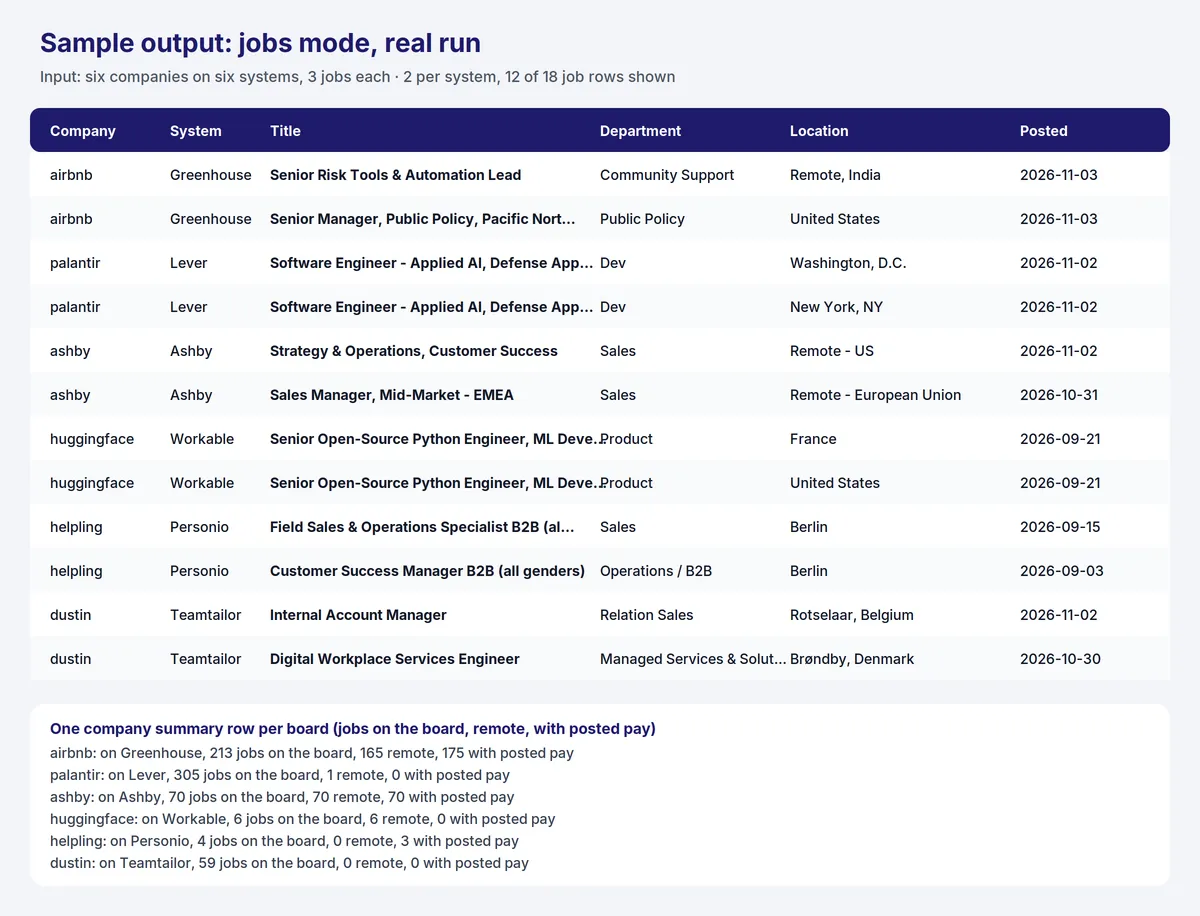
Job row (Jobs mode). Real row from a test run on an Ashby board (rows from the other five systems have the same fields):
Change row (Changes mode). This example is illustrative and shows the shape of an UPDATED_JOB row; the other change types have the same fields with empty previous* values:
Company row (every run). One per company. It includes status, ats, jobsOnBoard (all open jobs), jobsMatched (after your filters), jobsReported, remoteJobs, jobsWithSalary, departmentCounts (jobs per department) and locationCounts. Real values from a test run on an Ashby board: 70 jobs on the board, 70 remote, 70 with a published pay range, 28 in Customer Success, 23 in Engineering and 14 in Sales. In Changes mode it also has changesFound, changesReported and changeCounts. Companies that could not be read have a status such as not_found and a message that tells why.
Field notes:
postedAtis the first publish date (all six systems provide it; Workable gives a date without a time, Personio the creation time of the posting).updatedAtexists for Greenhouse only.isRemoteistruewhen the board marks the job as remote or the location says remote,falsefor on-site or hybrid, andnullwhen the board gives no hint.employmentTypeis normalized toFull-time,Part-time,Internship,ContractorTemporarywhere possible. Many Greenhouse boards do not set it, and Teamtailor feeds do not carry it. Personio addsWorking studentandFull-time or part-time.- Pay comes from structured fields on Lever, Ashby and Personio (when the company filled in the salary of the posting). Workable and Teamtailor feeds contain no pay, so those rows keep the pay fields empty. Greenhouse does not return pay as a field, so the Actor reads the "pay range" block that many Greenhouse job texts contain; for Greenhouse
salaryIntervalis set toyearonly when the amounts are clearly annual. - Location: Workable and Teamtailor list every site of a job;
locationis the first andlocationshas all of them. Personio gives the office and any additional offices. Teamtailor setsworkplaceTypetoremote,hybridoronsitefrom the job's remote status. descriptionis only present whenincludeDescriptionis on.
How much does it cost to scrape and monitor job boards?
You pay per event. The Free plan prices are below; paid Apify plans get lower prices per event.
| Event | When | Free plan price |
|---|---|---|
| Actor start | once per run | $0.001 |
| Job record | each job returned in Jobs mode | $0.0015 |
| Company check | each company checked in Changes mode | $0.001 |
| Job change | each new, updated or removed job in Changes mode | $0.003 |
Company rows, failed companies and companies without a board are free.
Examples
- 1,000 jobs in Jobs mode: $0.001 + 1,000 × $0.0015 = $1.50.
- All jobs of a company with 213 open jobs: about $0.32.
- Daily monitor of 100 companies with about 20 changes a day: 100 × $0.001 + 20 × $0.003 + $0.001 = $0.16 per run, about $5 per month. A day without changes costs only the company checks.
Set a maximum cost per run in the run options to cap spending; the Actor stops cleanly at the limit and tells you in the run summary. The platform's own compute cost for the Actor is small: in a test run, 588 jobs from three companies used about $0.0013 of compute.
Greenhouse, Lever, Ashby, Workable, Personio & Teamtailor Jobs Scraper & Monitor compared with other approaches
| This Actor | A scraper for one hiring system | Your own script | |
|---|---|---|---|
| Systems covered | Greenhouse, Lever, Ashby, Workable, Personio and Teamtailor in one run | One system per Actor | Whatever you write |
| Needs the board name | No: tries the company name, domain or URL on all six | Yes | Yes |
| Same fields on every system | Yes | Only within that system | You map the fields |
| Change tracking | Built in: new, updated and removed jobs, billed per change | Usually a full list each time, you diff it | You build and store the diff |
| Summary per company | Jobs, remote, pay counts and jobs per department | Not usually | You build it |
| Login or browser | No | Usually no | No |
| Maintenance | Handled by the Actor | Handled by the Actor | Yours |
The price per job is on the same level as other job board Actors in the Apify Store, most of which charge between $0.001 and $0.004 per job. The reason to choose this Actor is the combination of company-name lookup, one schema and change tracking, not the lowest possible price per row.
Tips for best results
- Use the board name from the board URL. If
acmeis not found, open the company's careers page, click a job and read the host:jobs.lever.co/acme-labsmeans useacme-labs. - Pick the system when you know it.
lever:palantirskips the search and avoids picking the wrong board when two companies share a name. - Start small. Use
maxJobsPerCompanyof 5 for a first test, then raise it. - Keep Changes filters stable. A new filter means a new baseline.
- Add keywords for signals. Filter
titleKeywordsto the roles that matter to you instead of reading everything. - Leave descriptions off unless you need them; rows get much larger with them.
Limits and good to know
- Only Greenhouse, Lever, Ashby, Workable, Personio and Teamtailor boards. Companies on other systems return
not_found. - Systems that are deliberately not included: SmartRecruiters (its public API forbids automated access in its
robots.txt), BambooHR (its terms forbid robots and spiders and it has no documented public job feed) and Recruitee (a per-company access token becomes mandatory in 2027). They can be added later if their terms change. - Workable and Teamtailor give the first publish date only; neither exposes pay. Personio feeds have no remote flag, so
isRemoteistrueonly when the office name says remote. - If a name exists on more than one system (for example a small namesake company), the board with the most open jobs is read and the company row names the other boards. Choose the system with
atsor a prefix to read another. A company that moved to a new system keeps its old, empty board for a while; the larger board wins. - Only jobs that the company publishes on its public board are returned. Internal or unlisted jobs are not visible.
- Pay is returned only if the employer publishes it on the posting. Some Greenhouse boards write pay in free text only; those rows have no pay fields.
- Removed jobs are detected by absence from the board. If a board is cut off by
maxJobsPerCompany, removed jobs are not reported for that run. postedWithinDaysworks in Jobs mode only. A moving date window would make old jobs look removed in Changes mode.- Dates are shown in UTC (ISO 8601).
Use it from AI agents, the API and code
Apify MCP server (ChatGPT, Claude, Cursor and other MCP clients). Connect https://mcp.apify.com, then follow these steps:
search-actorswith a short query such asGreenhouse Lever Ashby Workable jobs.fetch-actor-detailsformmdincer/ats-jobs-monitorto read the input schema.call-actorwith the input below and a spending cap incallOptions.get-dataset-itemswith the returned dataset ID.call-actorreturns the dataset ID, not the rows.
For monitoring, use "mode": "changes" with a fixed monitorName. The first call only saves a baseline, so tell the user that changes appear from the second call. This Actor uses limited permissions, so it is not blocked from the MCP server.
To give an MCP client this Actor as its own tool (no search step), connect https://mcp.apify.com?tools=mmdincer/ats-jobs-monitor.
JavaScript
Python
HTTP (one request, returns the rows)
The synchronous endpoint waits for the run to finish, so use it for a few companies. For many companies, start the run asynchronously and read the dataset when it ends.
Automation recipes
Slack or email alert through a webhook. In the Apify Console open Integrations (or Webhooks) and add a webhook on Run succeeded. In your handler fetch the run's dataset (the webhook payload contains the run, including defaultDatasetId) and keep the rows where recordType is change. Send one message per row, for example: NEW_JOB: {company} is hiring {title} ({location}) {url}.
Zapier. Create a Zap with Apify as the trigger for a finished Actor or task run, add an Apify step that fetches the run's dataset items, filter for recordType equal to change and changeType equal to NEW_JOB, then add a Slack, Gmail or Google Sheets step. See the Apify Zapier integration.
Make. Add the Apify module that runs an Actor (or watches for a finished run), then the module that gets dataset items, filter on recordType equal to change and route the bundles to your app. See the Apify Make integration.
Google Sheets or a database. Fetch the dataset as JSON or CSV with the API (/v2/datasets/{id}/items?format=csv) after each run and append the rows. The postedAt, department and salaryMin columns make filtering and pivot tables easy.
Scheduling. Save your input as a task (for example competitors, daily at 07:00) and add a schedule in the Apify Console. Keep the same monitorName so every run compares with the previous one.
Is it legal to scrape company job boards?
The Actor reads only the job postings that companies publish on purpose for everyone: it calls the public job board APIs and feeds of Greenhouse, Lever, Ashby, Workable, Personio and Teamtailor that these systems offer so that companies can show their jobs on their own career pages (for Workable, Personio and Teamtailor the vendors document these feeds in their help centers). It does not log in, does not use an account or API key, does not read applicant data and does not return recruiter or candidate personal data. Job postings can contain the name of a hiring manager or recruiter in the text; descriptions are off by default. You are responsible for using the results in line with the terms of the companies and systems involved and with the laws that apply to you, including data protection rules if you combine the data with personal data.
Trademarks. Not affiliated with Greenhouse, Lever, Ashby, Workable, Personio or Teamtailor. This Actor is an independent tool and is not endorsed or sponsored by Greenhouse Software, Lever (Employ Inc.), Ashby, Workable, Personio, Teamtailor or any company whose jobs it returns. Trademarks belong to their respective owners. The names and marks are used only to say which systems the Actor reads; the icon shows the marks for the same purpose.
FAQ
How do I get all open jobs of a company on Greenhouse, Lever, Ashby, Workable, Personio or Teamtailor?
Enter the company name, domain or job board URL in Companies and run the Actor in jobs mode. The Actor finds the board on one of the six systems (the one with the most open jobs) and returns every open job. Add maxJobsPerCompany to limit the size.
How do I find the board name of a company?
Open the company's careers page and click a job. If the address contains jobs.lever.co/<name>, boards.greenhouse.io/<name>, job-boards.greenhouse.io/<name>, jobs.ashbyhq.com/<name>, apply.workable.com/<name>, <name>.workable.com, <name>.jobs.personio.de (or .com) or <name>.teamtailor.com, then <name> is the board name. You can paste the whole URL into Companies.
Which hiring systems does it support?
Greenhouse, Lever (including the EU region), Ashby, Workable, Personio and Teamtailor. Other systems such as Workday, SmartRecruiters, BambooHR or Recruitee are not supported and return not_found. SmartRecruiters and BambooHR are left out on purpose because their terms do not allow automated access to their job data.
Can it tell me when a company posts a new job?
Yes. Use changes mode with a monitorName, run it once for the baseline and schedule it. From the second run, NEW_JOB rows list the new jobs, REMOVED_JOB rows the closed ones and UPDATED_JOB rows jobs whose title, location, department or pay changed.
Why did my first Changes run return no jobs?
The first run of a company saves a baseline and writes only the company row. Run it again later to get the changes. If you change filters, a new baseline is saved.
Does it return salaries?
Yes, when the employer publishes a pay range on the posting. Lever, Ashby and Personio provide structured pay data. Workable and Teamtailor feeds have no pay. For Greenhouse the Actor reads the pay range block in the job text when present. Jobs without a published range have empty pay fields. Nothing is estimated.
Does it return recruiter or hiring manager emails?
No. The Actor returns job data only: no emails, phone numbers, applicants or recruiter profiles.
How many companies and jobs can I read per run?
Up to 300 companies per run and up to 20,000 jobs per company. Large boards such as 900 jobs are read in a few seconds; Teamtailor boards are read 100 jobs per request.
How much does it cost to monitor 100 companies every day?
About $0.16 per run on the Free plan (100 company checks plus around 20 changes), roughly $5 per month. Days without changes cost only the company checks.
What happens if a company has no public board?
The company gets a row with status: "not_found" and a message that lists the names that were tried. It is not charged. If every company in the run fails, the run fails so that schedules show the problem.
Does it work with a company's own careers site?
If the careers site is powered by one of the six supported systems, yes: use the board name or the company domain. A custom careers page that is not backed by one of these systems cannot be read.
Does it work for companies in Europe?
Yes. Personio and Teamtailor are popular with companies in Germany and the Nordics, and Lever has an EU region that the Actor tries automatically. Job titles and locations come back in the language the company wrote them in.
Can I use it without writing code?
Yes. Use the Console form, then download the dataset as CSV or Excel, or connect it to Google Sheets, Slack, Zapier or Make with the recipes above.
What if I need another hiring system or more fields?
Open an issue on the Actor page with the company example and the data you need.


