
Autocomplete Keyword Scraper - Google, YouTube, Bing
Pricing
from $0.56 / 1,000 keyword suggestion rows
Autocomplete Keyword Scraper - Google, YouTube, Bing
Scrape keyword suggestions from Google, YouTube and Bing autocomplete for SEO research. Enter seed keywords, get deduplicated rows with engine, rank, intent and question flags. A-Z/0-9 expansion, 29 languages. No search volume. No login or browser. Not affiliated with Google, YouTube or Microsoft.
Pricing
from $0.56 / 1,000 keyword suggestion rows
Rating
0.0
(0)
Developer

Muhammet Mustafa Dincer
Maintained by CommunityActor stats
0
Bookmarked
2
Total users
1
Monthly active users
2 days ago
Last modified
Categories
Security
Limited permissionsShare
What is Autocomplete Keyword Scraper?
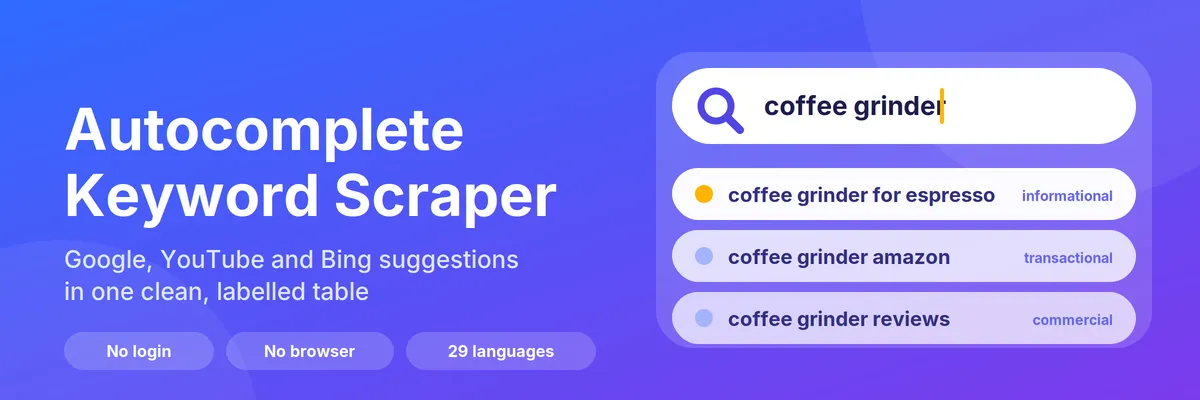
Autocomplete Keyword Scraper turns a few seed keywords into hundreds of keyword suggestions taken from the search boxes of Google, YouTube and Bing — in one run, without an API key, a login or a browser. Type your keywords, click Start, and get a clean table: every unique suggestion once, with the engines that returned it, its position, a rule-based search intent label and ready-to-filter flags.
It does not return search volume, CPC or keyword difficulty: autocomplete lists contain no such data. Use it to discover phrases, then size them with a volume tool if you need numbers.
Because it runs on the Apify platform, you also get API access, scheduling, webhooks and integrations (Google Sheets, Make, Zapier, n8n), and you can call it from AI agents through the Apify MCP server.
You may also know this kind of tool as a Google Suggest scraper, an autosuggest or query suggestion tool, or a keyword idea generator.
At a glance
| Does | Collects autocomplete suggestions for your seed keywords from Google, YouTube and Bing, deduplicates them and labels them |
| Input | keywords (required, up to 500 seed phrases). Optional: engines, country, language, expansion switches, maxResults |
| Output | One dataset row per unique suggestion: keyword, seed, engines, engineCount, position, intent, isQuestion, containsSeed, wordCount, country, language and more (see below) |
| Engines | Google, YouTube, Bing |
| Reach | 48 countries, 29 languages |
| Needs | No login, no API key, no browser. Apify Proxy is optional |
| Speed | The prefilled example (1 keyword, 100 rows) finishes in seconds |
| Pricing | Pay per event: a small start fee plus a price per result row. Cap a run with maxResults or the run's maximum charge |
| Does not | Search volume, CPC, difficulty, SERP results, rank tracking, People Also Ask, Google Trends, Amazon, TikTok or App Store suggestions |
When should you use this Actor?
Use it when you (or the AI agent you are building) need to:
- turn one or a few seed keywords into many long-tail keyword and question ideas;
- see what Google, YouTube and Bing each suggest for the same phrase, and which phrases they agree on;
- compare suggestions between countries or languages;
- get a clean, deduplicated, labelled table instead of raw suggestion lists.
Pick a different tool when you need search volume, CPC or difficulty numbers, the actual search results page, ranking positions of a website, or suggestions from shops, social networks or app stores. This Actor does none of those.
What can you do with it?
- SEO and content research: find long-tail keywords and questions people actually type (
expandAlphabet,expandQuestions). - Video SEO: see what YouTube suggests for a topic and which phrases Google and YouTube agree on.
- Local and international research: run the same keyword for 48 countries in 29 languages and compare what each market sees.
- Ad and product ideas: filter
intent = transactionalorcommercialto get purchase-style phrases.
Which search engines are supported?
| Engine | What you get | Notes |
|---|---|---|
| Google search box suggestions for your country and language | Marks suggestions that Google itself flags as a website (used for the navigational label) | |
| YouTube | YouTube search box suggestions | Useful for video topics and tutorials |
| Bing | Bing search box suggestions for the market built from your language and country | Often overlaps with Google; engineCount shows the overlap |
DuckDuckGo, Amazon and the App Store are not offered: their robots.txt files disallow these suggestion endpoints.
What data can you extract?
Each row is one unique keyword (or one keyword per engine, if you choose Per engine output).
| Field | Example | Meaning |
|---|---|---|
keyword | coffee grinder reviews | The suggestion, lower-cased, single spaces |
seed | coffee grinder | The keyword you entered |
engines / engineCount | ["google","youtube","bing"] / 3 | Which engines suggested it, and how many |
position / positions | 3 / {"google":14,"youtube":3,"bing":8} | Best rank per engine (1 = first suggestion) |
query / expansion | coffee grinder a / alphabet | The text sent to the engine and how it was built |
intent / intentSignals | commercial / ["reviews"] | Rule-based intent label and the words that triggered it |
isQuestion | false | Phrased as a question |
containsSeed | true | Every word of your keyword appears in the suggestion |
tokens / wordCount | ["coffee","grinder","reviews"] / 3 | Word split |
country / language | us / en | Locale used for the request |
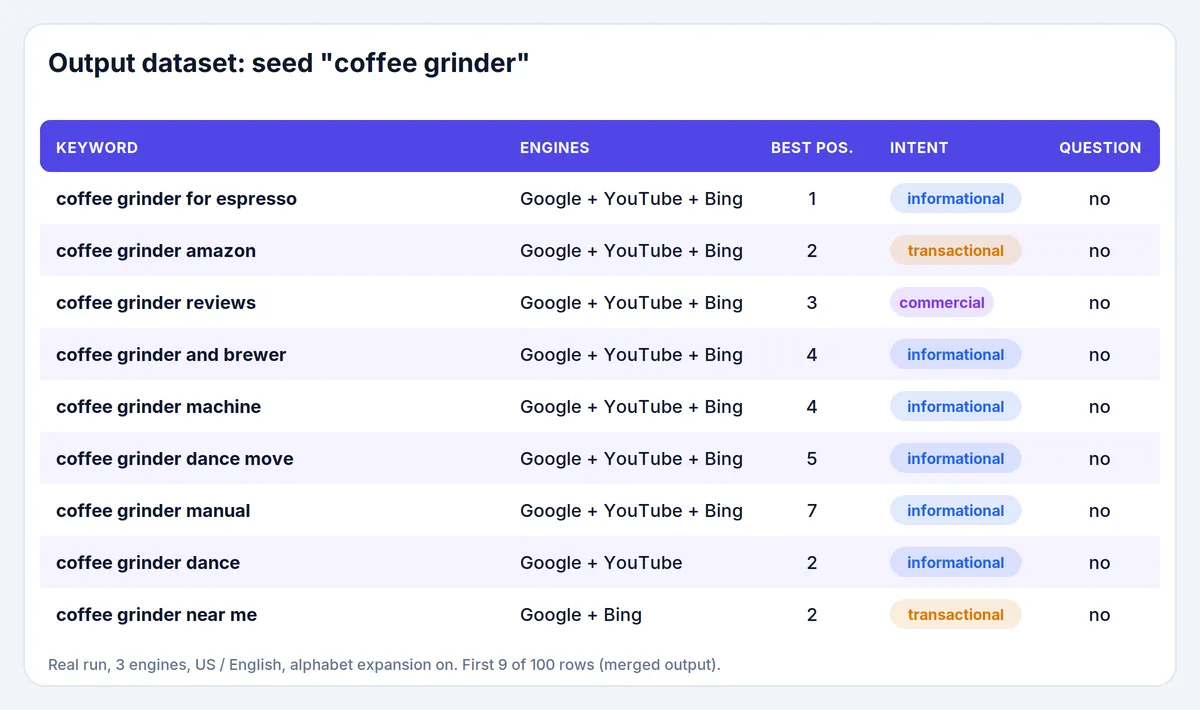
The table above is real output of one run: seed coffee grinder, Google + YouTube + Bing, US / English, a–z expansion on.
How to get keyword suggestions (step by step)
- Open the Actor and click Try for free.
- Enter one or more Keywords. A prefilled example is included.
- Pick the Engines, Country and Language.
- Switch on the Expansion options you want. The a–z expansion is what turns about 10 suggestions into hundreds.
- Set Max results (keep it low for your first run) and click Start.
- Download the dataset as JSON, CSV or Excel, or read it through the API. A short report with per-engine request counts is saved as
RUN_SUMMARY.
Input example
Output example
How are search intent labels decided?
Labels come from fixed word lists, not machine learning. A keyword gets the label of the first group that matches, in this order:
- navigational — login or sign-in words, "official site", a web address, or a suggestion that Google itself marks as a website.
- transactional — buy, order, price, cost, cheap, discount, coupon, deal, near me, shipping, rent, book, download, subscribe, free trial, and well-known shop names (Amazon, Walmart, eBay and a few others).
- commercial — best, top, review(s), vs, compare, alternative, recommended, worth it, pros and cons.
- informational — question words (how, what, why …), guide, tutorial, tips, meaning, examples and similar.
English lists always apply. German, Spanish, French, Italian, Portuguese, Dutch and Turkish have their own extra lists, used when you pick that language. If no word matches, the label is informational and intentSignals is empty. Many suggestions are plain product or brand phrases without any intent word, so filter on a non-empty intentSignals when you want only the labels that a rule actually triggered. Words can be ambiguous ("top gun" counts as commercial), so treat the label as a quick filter, not as ground truth.
How much does it cost to get keyword suggestions?
The Actor uses pay-per-event pricing: a small start fee plus a price per result row. Nothing else is billed to you for this Actor, and the price drops with your Apify plan.
| Event | FREE | BRONZE | SILVER | GOLD |
|---|---|---|---|---|
| Actor start | $0.002 | $0.002 | $0.002 | $0.002 |
| Result row | $0.0008 | $0.0007 | $0.00063 | $0.00056 |
Example: 1,000 keyword rows cost about $0.70 on the Bronze plan ($0.80 on the Free plan), plus the start fee. The prefilled example (100 rows) costs at most about $0.08 on the Free plan. The Apify Free plan includes $5 of monthly credit, which is enough for several thousand rows. In merged mode you pay for each unique keyword once, not once per engine. Use Max results and Max suggestions per engine to cap the cost of a run — the Actor also stops when the spending limit you set for the run is reached.
Tips for best results
- Start with the a–z expansion only, then add questions or prepositions for the keywords that matter.
- Use specific two- to four-word seeds. One very broad word returns a broad, noisy list; use
containsSeed = trueto drop loosely related suggestions. - Google and Bing suggestions often overlap, so
engineCountis a handy signal: phrases that several engines agree on are usually the safest long-tail picks. - Run the same seeds for several countries to compare markets.
- If one engine starts answering with HTTP 429, the Actor slows down by itself, retries, and finally switches that engine off for the rest of the run while the others continue. Lower Requests per second or turn on Apify Proxy for the next run.
Limits and good to know
- Suggestions only, no search volume. Autocomplete does not provide how often a phrase is searched, so this Actor cannot give volumes, CPC or difficulty.
- Suggestions are what each engine shows to an anonymous visitor at that moment. They change over time and by location, and they are not personalized.
- Intent labels are rule-based (see above). Question words for expansion exist for English, German, Spanish, French, Italian, Portuguese, Dutch and Turkish; other languages use English question words. The a–z expansion uses Latin letters.
- With a Max results limit, keywords are processed in the order you entered them and the run stops when the limit is reached.
- Skip suggestions already delivered (
onlyNew) remembers phrases this Actor already wrote for the same country, language and engines, and leaves them out of later runs. Those rows are not charged. The lists are still read. A run where every suggestion was already seen finishes successfully and says so, instead of failing as an empty result.
Use it from AI agents, the API and code
Apify MCP server (ChatGPT, Claude, Cursor and other MCP clients). Connect https://mcp.apify.com, search for this Actor with search-actors (for example google autocomplete keywords), read its input schema with fetch-actor-details, then run it with call-actor. Pass mmdincer/autocomplete-keyword-scraper as the Actor and keep the run small, for example maxResults 100 in the input and a spending cap in callOptions (maxTotalChargeUsd). call-actor returns the dataset ID, not the rows: read them with get-dataset-items. This Actor uses limited permissions, so it is not blocked from the MCP server.
Input an agent can send as is:
JavaScript
Python
HTTP (one request, returns the rows)
You can also schedule the Actor to track how suggestions change over time, and send the dataset to Google Sheets, Make, Zapier, n8n or your own webhook.
Is it legal to scrape autocomplete suggestions?
The Actor reads the publicly served suggestion lists that search boxes request while someone types. It does not log in and does not collect personal data. These suggestion endpoints are unofficial and undocumented: they are not an official API of Google, YouTube or Microsoft, they come with no service guarantee, their format can change without notice, and the providers can rate-limit or block automated requests. The terms of service of the search providers may restrict automated access, and you are responsible for using the results in line with them and with the laws that apply to you. This Actor is an independent tool and is not affiliated with, endorsed by or sponsored by Google, YouTube or Microsoft. All trademarks belong to their owners.
Trademarks. Not affiliated with, endorsed by, or sponsored by Google, YouTube or Microsoft. Trademarks belong to their respective owners. Google, YouTube and Bing names and logos are used only to say which search engines the Actor reads; the icon shows their marks for the same purpose.
FAQ
Does it need an API key, cookies or a login? No.
Is there an official Google autocomplete API? Google does not offer a documented one. This Actor reads the same public suggestion endpoints the search box uses; see "Is it legal to scrape autocomplete suggestions?" for the caveats.
Does it return search volume? No. Autocomplete has no volume data; see "Limits and good to know".
How many suggestions can I get per keyword? Each request returns up to about 10–15 suggestions. With the a–z expansion, a typical keyword gives a few hundred unique suggestions per engine; digits, questions and prepositions add more.
Why did I get fewer results than expected? The run stopped at Max results or Max suggestions per engine, the keyword is very narrow, or an engine was switched off after repeated failures. RUN_SUMMARY lists what happened per engine.
Which countries and languages are supported? 48 countries and 29 languages for the suggestion requests. Pick them in the input form.
Can I get suggestions in Turkish, German, Spanish or another language? Yes: set Country and Language. Question words and intent word lists exist for English, German, Spanish, French, Italian, Portuguese, Dutch and Turkish.
Can an AI agent use this Actor? Yes. It works through the Apify MCP server, the Apify API and the Apify clients; see "Use it from AI agents, the API and code". Keep maxResults low and set a maximum charge per run.
How do I report a problem or ask for a feature? Open an issue in the Issues tab and include a link to your run.


