

YouTube Transcript Scraper: Bulk, SRT, Channels, Playlists
Pricing
from $2.00 / 1,000 transcript delivereds
YouTube Transcript Scraper: Bulk, SRT, Channels, Playlists
Get YouTube transcripts and subtitles for videos, Shorts, playlists, channels and search results. Timestamps, plain text, SRT/VTT, RAG chunks, any language or free auto-translation. Videos without captions are free. No API key.
Pricing
from $2.00 / 1,000 transcript delivereds
Rating
0.0
(0)
Developer

Jason
Maintained by CommunityActor stats
0
Bookmarked
2
Total users
1
Monthly active users
a day ago
Last modified
Categories
Share
Get the transcript of any YouTube video, Short, playlist, channel or search result as clean JSON. No YouTube API key, no login, no cookies. Built for AI agents, RAG pipelines, content repurposing, research and SEO.
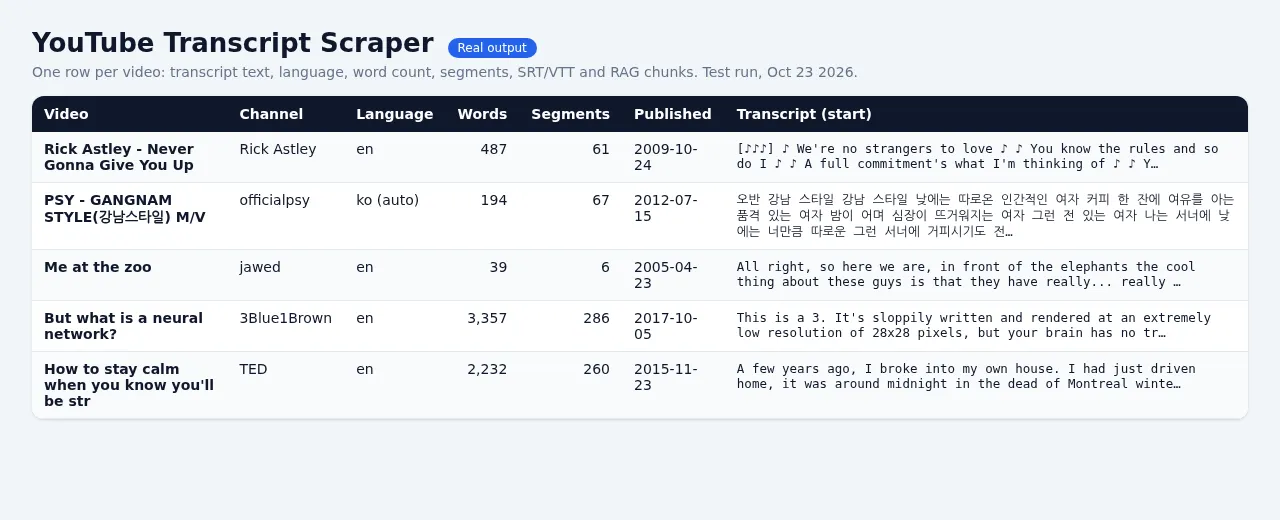
What you get
For every video one row with:
- Transcript text (
transcript), optional timestamped segments (segments: start, duration, text), optional SRT and WebVTT, optional RAG chunks (chunks: text with start/end seconds, sized to your setting). - Language details:
language,isAutoGenerated,isTranslated,availableLanguages, and anoteif your language was not available. - Metadata: title, channel, channelId, view count, duration, keywords, thumbnail, publish date, optional description.
- Honest status on every row:
ok,no_captions,unavailable,private,age_restricted,language_unavailable,invalid_url,blocked,skipped_time_limit,no_videos. Onlyokrows are charged.
Inputs you can mix freely
- Video links (
watch,youtu.be,shorts,embed,live) - Playlist links
- Channel links (
@handle,/channel/UC...,/c/,/user/) with a choice of Videos, Shorts or Past live streams tab, newest first - YouTube search queries (top videos of each query)
Set maxVideosPerSource (default 10) and maxVideos (global cap) so you only pay for what you want. Duplicate videos across sources are processed once.
Languages
languages: ordered preference list, e.g.["en","de"]. Human-made captions are preferred over automatic ones (switchable).translateTo: use the native caption in that language if the video has one, otherwise YouTube's own caption translation.anyLanguageFallback: if none of your languages exist, get whatever the video has, flagged in the row, instead of nothing.
Pricing (pay per event)
- $2.00 per 1,000 transcripts delivered (
transcript-fetched, $0.002 each) plus a $0.00005 start fee. - Free: videos without captions, private/removed/age-restricted videos, live recordings that are unavailable, invalid links, duplicates, and anything that fails.
- Your max charge per run is respected exactly: the Actor stops as soon as the next transcript would exceed it.
- Platform usage is included. You pay only the event prices above. Apify compute and the Residential proxy that YouTube requires are covered by the price; they are not billed to you on top.
Speed and reliability (measured on the Apify platform)
- 100 videos from a channel in 71 s on 256 MB, 99 delivered, 1 correctly reported as having no captions.
- Default input (one TED talk) finishes in about 5 to 10 s.
- Spot-check on Oct 23, 2026: the transcript of "Me at the zoo" (the first YouTube video) matched the caption text shown on YouTube's own page word for word, including the sound cue.
- A 10-video mixed run (a Short without captions, music videos, talks, a 50,000-word course, a removed video and a duplicate) delivered 8 transcripts, charged exactly 8, and returned the other rows as free rows with a status.
Limits you should know
- Only videos that have captions (manual or automatic) can be transcribed. This Actor reads YouTube's own captions; it does not run speech-to-text on audio.
- Private, age-restricted, members-only and region-locked videos return a free explanatory row.
- Very long videos (10+ hours) produce large rows; if the combined formats would exceed Apify's 9 MB item limit the heaviest extras are dropped and the row says so. Plain text is always kept.
- YouTube can change its internal API at any time. The Actor reports
blocked(free) instead of returning bad data when YouTube refuses. - Keep the default proxy setting (Apify Residential). With datacenter IPs or no proxy, YouTube refuses most requests from Apify servers (in our tests only 3 or 4 of 20 videos came back), and those rows are reported as free
blockedrows.
Example input
Example output (shortened)
Using it with AI agents and automation
Output is plain JSON, so it plugs into LangChain, LlamaIndex, n8n, Make, Zapier or the Apify MCP server. Use chunks for embeddings and segments when you need to link back to a timestamp (https://youtu.be/ID?t=SECONDS).
Legal
The Actor retrieves publicly available caption data that YouTube serves to any viewer. You are responsible for using transcripts in line with YouTube's Terms of Service, copyright law and privacy rules in your jurisdiction.


