

Whale Wallet Tracker: Solana & Ethereum Smart Money Signals
Pricing
from $1.00 / 1,000 results
Whale Wallet Tracker: Solana & Ethereum Smart Money Signals
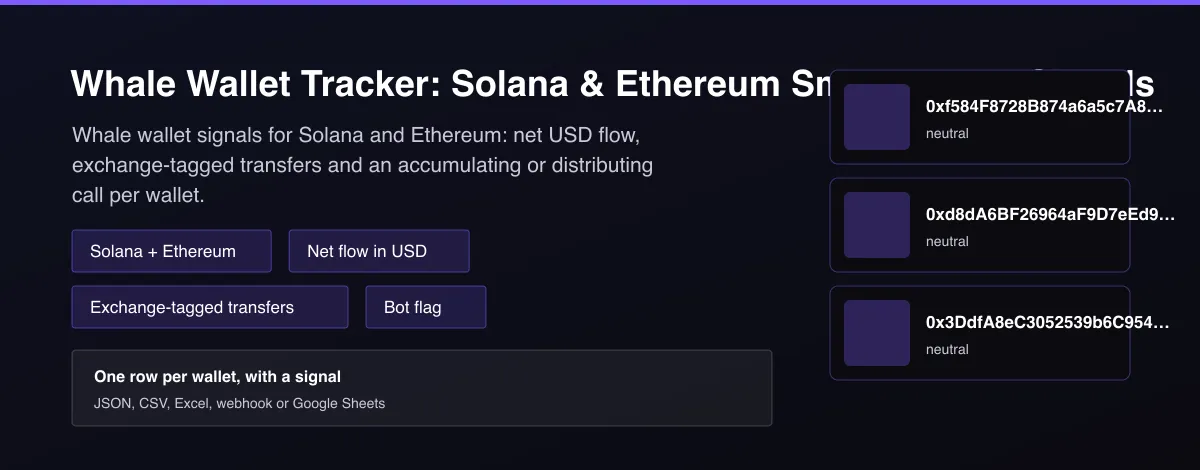
Track whale wallets on Solana and Ethereum. Get 24h net flow in USD, exchange-tagged transfers and an accumulating / distributing / neutral signal per wallet. Bots flagged. No API key needed.

What does Whale Wallet Tracker: Solana & Ethereum Smart Money Signals do?
Whale Wallet Tracker reads recent on-chain activity for Solana and Ethereum wallets and returns one row per wallet with the net flow in US dollars over your lookback window, the list of recent transfers above your size limit, and a signal of accumulating, distributing or neutral. Transfers with known exchange wallets are tagged, and wallets that trade like bots or market makers are flagged with likely_automated instead of getting a misleading signal. Enter your own wallet addresses, or leave the field empty to analyze wallets from public whale lists. Every wallet row also includes a plain-language summary and links to the block explorer, so results can be read without decoding addresses or transaction hashes.
Why use Whale Wallet Tracker: Solana & Ethereum Smart Money Signals?
- The signal is the product: a clear accumulating, distributing or neutral label, not a raw transaction dump.
- Thresholds are configurable, so you decide how large a net flow must be before it counts.
- Exchange wallets are tagged, so a deposit to a known exchange is not confused with a move to an unknown wallet.
- Bots and market makers are flagged automatically, which keeps noisy wallets out of your alerts.
- Works without an account or API key. An optional free Helius key raises the Solana rate limit.
What makes this different
Most wallet trackers return raw transactions or need a paid dashboard subscription. This Actor classifies each wallet's flow into a signal, tags exchange counterparties, and flags bot-like wallets, using free public chain data with the provider rate limits built in as the default pace.
Who can use the Whale Wallet Tracker and how?
- Copy traders: see what a wallet you follow just bought or sold, and whether it is accumulating or distributing, before you decide to copy it.
- Crypto traders and swing traders: watch whale flow into or out of exchanges as an early sentiment read; exchange-tagged transfers show sell pressure (to an exchange) versus accumulation (from an exchange).
- Alert and bot builders: schedule the Actor, compare the signal with the last run and send a Telegram, Discord or Slack message when it flips. The summary field is written for that.
- Research and quant teams: build datasets of wallet flow by hour or day for backtests, and use likely_automated to keep market makers and bots out of the sample.
- Journalists and analysts: check what a treasury, foundation or exchange wallet did in the last day and link to the transactions on the block explorer.
- Fund managers and DAO treasuries: monitor your own wallets or counterparties and export the result to Google Sheets or a data warehouse.
- Developers: call it from the Apify API, MCP or a webhook as a free wallet-flow endpoint instead of running your own indexer.
- Compliance and risk teams: flag large exchange deposits or withdrawals of a watched wallet with a clear timestamp and explorer link.
- Scheduled monitors: run hourly with delta mode on and get billed only when a wallet you watch actually moves.
How it works
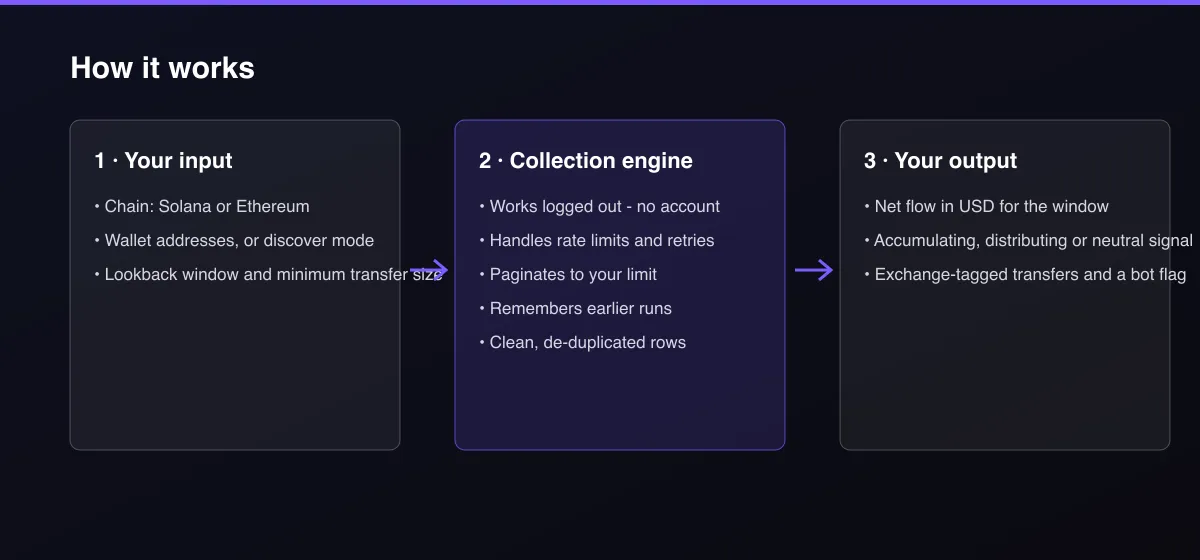
- Your input — choose a chain and enter wallet addresses or turn on discover mode.
- The Actor collects it — the Actor reads each wallet's recent transfers, prices them in US dollars and tags known exchanges.
- Your output — you get one row per wallet with net flow, transfers and the signal.
What data can you extract?
The dataset has 19 fields per row:
| Field | Type | Description |
|---|---|---|
chain | string | solana or ethereum. |
wallet_address | string | The analyzed wallet address. |
label | string | Name from public address lists or the explorer, for example an exchange or ENS name. |
explorer_url | string | Link to the wallet on Solscan (Solana) or Etherscan (Ethereum). |
summary | string | One plain-language sentence describing what the wallet did, ready for alerts and reports. |
recent_transactions | array | Transfers above the size limit: tx_hash, tx_url, timestamp, direction, token, amount_usd, counterparty and counterparty_label. |
net_flow_usd_24h | number | USD received minus USD sent over the lookback window. |
net_flow_excluding_stablecoins_usd | number | Same net flow with stablecoin transfers left out. |
signal | string | accumulating, distributing or neutral. |
likely_automated | boolean | True for bot-like or market-maker wallets. |
transaction_count | number | Successful transactions seen in the window. |
lookback_hours | number | Length of the lookback window in hours. |
exchange_sent_usd | number | USD sent to known exchange wallets. |
exchange_received_usd | number | USD received from known exchange wallets. |
data_notes | array | Plain-language notes about skipped or partial data. |
source | string | Data source used. |
scraped_at | string | Collection time (ISO 8601). |
actor_version | string | Output schema version. |
fetch_path | string | Which route served the row: explorer_api, public_rpc or helius_rpc. |
How to use Whale Wallet Tracker: Solana & Ethereum Smart Money Signals
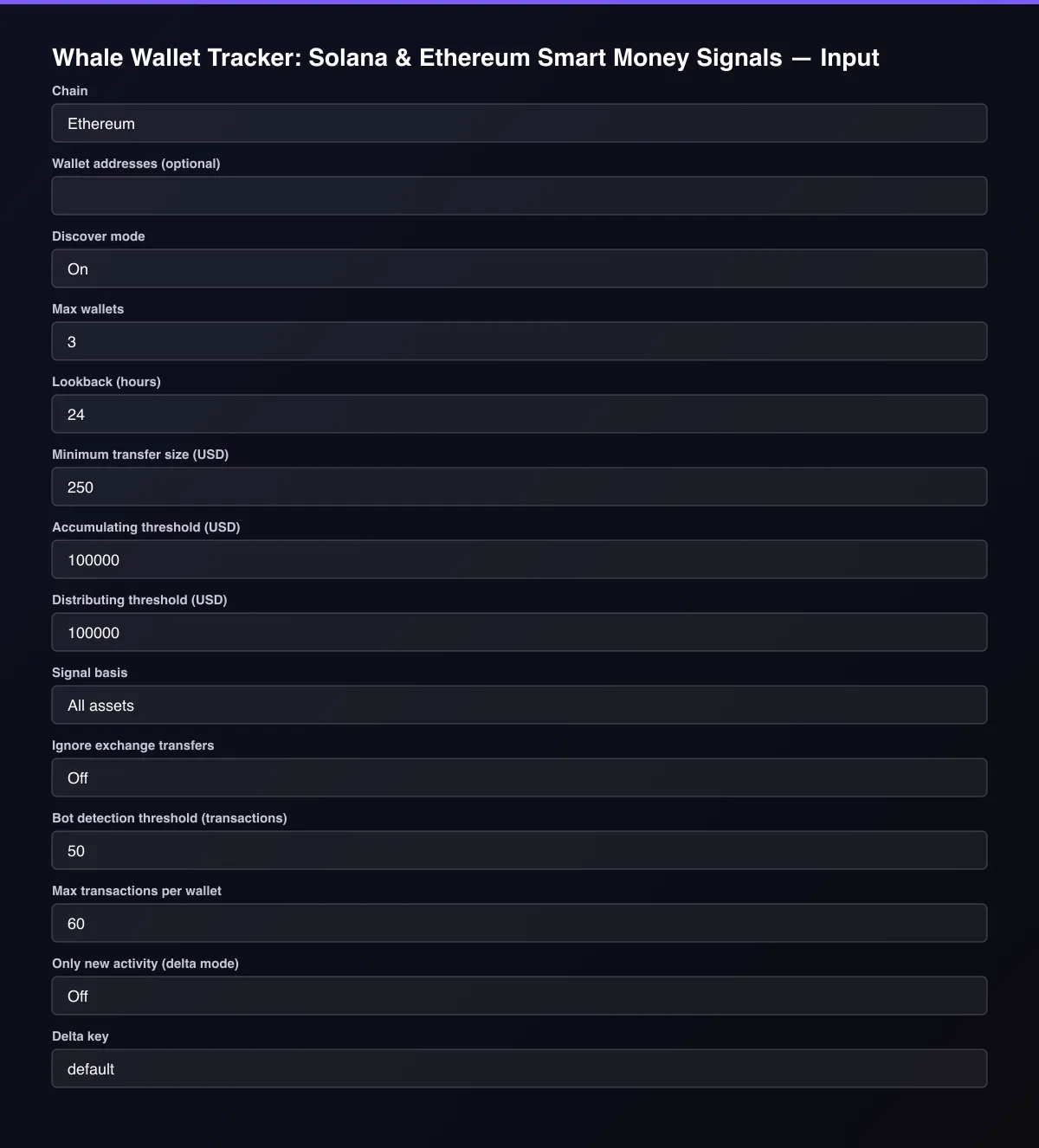
- Open the Actor and go to the Input tab.
- Choose a Chain, paste Wallet addresses (or leave them empty for discover mode), and set the Lookback window and Minimum transfer size.
- Optionally set filters and a Max results limit.
- Click Start. A default run finishes in under a minute.
- Open the Output tab, then download the dataset or connect it to your tools.
Input Parameters
| Parameter | Type | Required | Default | Description |
|---|---|---|---|---|
chain | string | No | "ethereum" | Which blockchain to read. |
walletAddresses | array | No | [] | Wallets to analyze, one address per line. Leave empty to use discover mode. |
discoverMode | boolean | No | true | When no wallet addresses are given, analyze wallets from public whale lists instead. Solana also adds the largest holders of big tokens when a Helius key is provided. |
maxWallets | integer | No | 3 | Maximum number of wallets to analyze in one run. Default is 3 for a quick test. |
lookbackHours | integer | No | 24 | How far back to read transfers. The net flow field covers this window. |
minTransactionUsd | number | No | 250 | Ignore transfers worth less than this many US dollars. |
accumulateThresholdUsd | number | No | 100000 | Net inflow at or above this value gives the signal "accumulating". |
distributeThresholdUsd | number | No | 100000 | Net outflow at or above this value gives the signal "distributing". |
signalBasis | string | No | "all_assets" | Which net flow the signal is derived from. Excluding stablecoins treats a swap from USDC into another token as buying. |
excludeExchangeTransfers | boolean | No | false | Leave transfers with known exchange wallets out of the net flow. They are still listed and tagged. |
automatedTxThreshold | integer | No | 50 | A wallet with at least this many transactions in the window is flagged likely_automated and gets a neutral signal. |
maxTransactionsPerWallet | integer | No | 60 | Most recent transactions read per wallet. Higher values are slower because data providers are rate limited. |
deltaMode | boolean | No | false | Return and bill only wallets whose newest transfer or signal changed since the last run with the same delta key. Ideal for scheduled monitoring. |
deltaStateKey | string | No | "default" | Name of the tracked stream. Use a different key per watchlist so their history stays separate. |
heliusApiKey | string | No | — | Optional free Helius key. It raises the Solana rate limit and enables top-holder discovery. |
proxyConfiguration | object | No | {"useApifyProxy":false} | Optional proxy. Public chain data normally works without one. |
Output Data
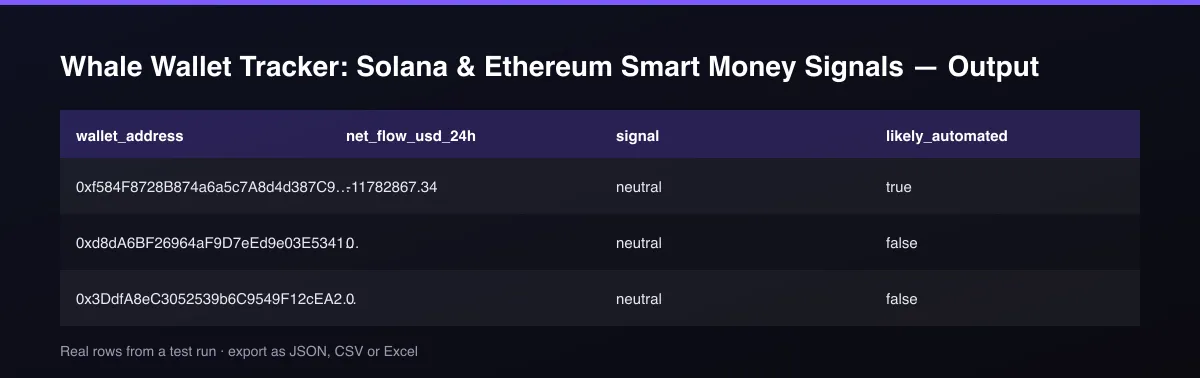
net_flow_usd_24h is USD received minus USD sent over the lookback window (the field name is fixed; the window is in lookback_hours). signal is accumulating when net flow reaches the accumulating threshold, distributing when it reaches the distributing threshold in the other direction, otherwise neutral. likely_automated is true for wallets with many transactions in the window. Fields that are unknown are null.
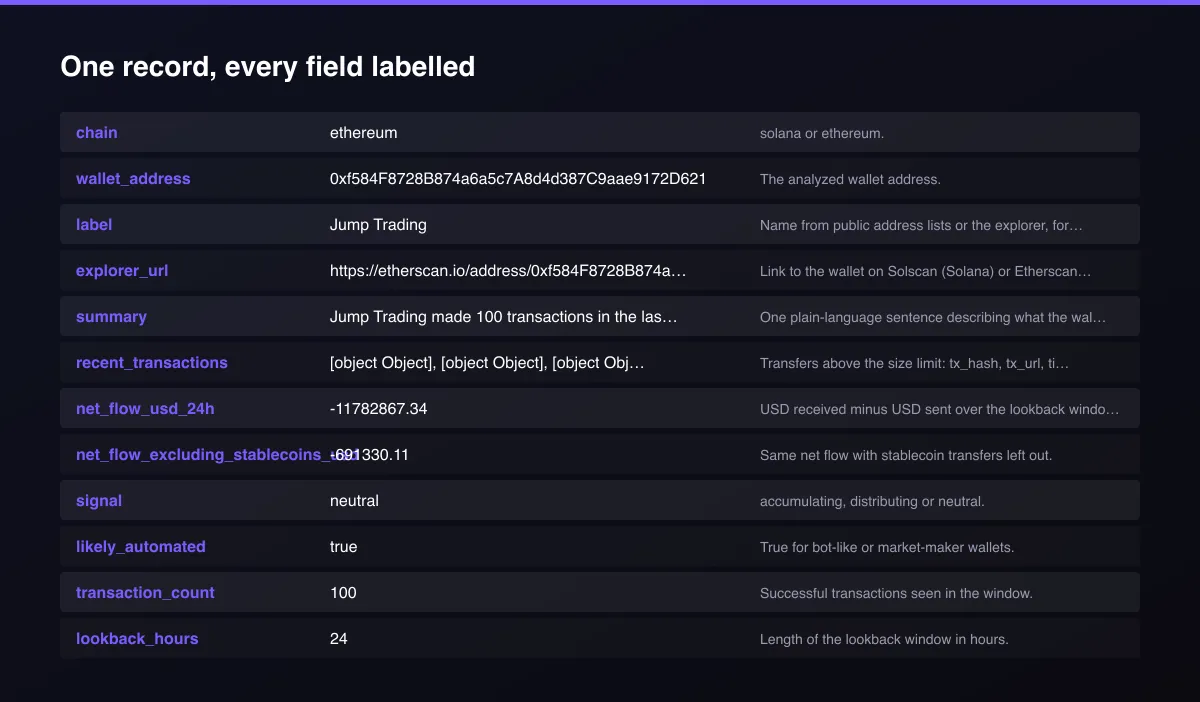
A real dataset item:
How to read and use the results
Each row is one wallet. Start with the plain-language summary and the signal, then open the explorer_url to verify.
- Read the summary. It says in one sentence what the wallet did in the lookback window, for example net received or net sent and how many transfers.
- Check the signal. `accumulating` means net inflow reached your threshold, `distributing` means net outflow reached it, `neutral` means neither (or the wallet is a bot).
- Look at exchange flow. `exchange_sent_usd` (to known exchanges) suggests selling pressure; `exchange_received_usd` (from exchanges) suggests buying or withdrawing to self-custody.
- Ignore bots. `likely_automated: true` means the wallet is too active to say anything about intent.
- Verify. Every transfer in `recent_transactions` has a `tx_url` and the wallet has an `explorer_url`, so nothing has to be taken on trust.
- Empty transfer list? That is not an error. `data_notes` says why, usually that all transfers were below the minimum size or the wallet was quiet. Lower Minimum transfer size or extend the Lookback.
Automate it: schedule the Actor, send the dataset to a webhook, and alert when `signal` changes between runs.
Usage Examples
Analyze specific Ethereum wallets
Discover mode on Ethereum
Solana exchange flows with a stricter signal
Only new activity on a watchlist
Tips for Best Results
- Set the minimum transfer size to filter out dust and spam tokens.
- Use 'Excluding stablecoins' as the signal basis to treat swaps out of USDC or USDT as buying.
- Schedule the Actor hourly or daily and alert on signal changes.
- Add a free Helius key for faster Solana runs.
- Default is 5 results for a fast test. Set the max to 0 to return everything available.
Reliability by mode
| Mode | Status | Needs login or key? | Notes |
|---|---|---|---|
| Ethereum, your own wallets | ✅ | No | Free public explorer; fast. |
| Ethereum, discover mode | ✅ | No | Uses public whale and exchange lists. |
| Solana, your own wallets | 🟡 | No (Helius key optional) | Public RPC is rate limited, so it is slower; a free Helius key speeds it up. |
| Solana, discover mode | 🟡 | Helius key for top holders | Without a key it returns exchange wallets from public lists. |
| Wallets with thousands of transactions | 🟡 | No | Flagged likely_automated; signal is neutral. |
✅ works as described, 🟡 works with caveats, ❌ not supported.
Only new records (delta mode)
Turn on Only new activity (delta mode) and give the stream a Delta key. On each scheduled run the Actor returns, and bills, only wallets whose newest transfer or signal changed since the last delivery of that key. Use one key per watchlist.
Known Limitations
- Transfers are priced at the current market price, not the price at the time of the transfer.
- Tokens without a market price are skipped and reported in data_notes.
- Public data providers are rate limited, so Solana runs are slow: a wallet with 60 transactions takes about a minute without a Helius key.
- Discover mode uses public whale and exchange lists. It ranks nothing by profit and does not prove a wallet is profitable.
- Without a Helius key, Solana discover mode returns exchange wallets because public endpoints block top-holder lookups.
- This is data, not financial advice.
Integrations
Run it from the Apify API, on a schedule, or from a webhook. Send results straight to Google Sheets, Make, Zapier, Slack or your own database with Apify's built-in integrations.
Export Formats
Download the dataset as JSON, CSV, Excel, XML, HTML table or RSS from the Output tab or the API.
Frequently Asked Questions
Does it need an API key?
No. It reads public chain data. An optional free Helius key makes Solana runs faster and enables top-holder discovery.
What does likely_automated mean?
The wallet made at least the configured number of transactions in the window (50 by default), which points to a bot or market maker. Its signal is set to neutral because net flow is not meaningful for it.
Which data sources does it use?
Ethereum: the public Blockscout explorer. Solana: the public Solana RPC or Helius, with prices from Jupiter. All are free public sources with published rate limits.
Are the thresholds configurable?
Yes. Accumulating and distributing thresholds default to 100,000 USD each and can be changed in the input.
Am I charged for failed results?
No. You are only charged for wallets that are written to the dataset.
How do I copy trade a whale wallet with this?
Add the wallet address, schedule the Actor (for example hourly), and read the summary and signal of each run. Use the transfer list with its explorer links to see what was bought or sold, and set a webhook to alert you when the signal changes. It is data for your own decisions, not financial advice.
Why is recent_transactions sometimes empty?
The wallet had no transfers above your minimum size in the window, or its tokens have no market price. data_notes and summary say which. Lower the minimum transfer size or use a longer lookback.
What is a whale wallet tracker?
A tool that watches the on-chain activity of very large wallets and reports what they move. This one returns net USD flow, exchange-tagged transfers and an accumulating, distributing or neutral signal per wallet for Solana and Ethereum.
Do I need an account or login?
No. The Actor reads public chain data and needs no account or API key.
Am I charged for failed runs or empty results?
You are only charged for results that are actually written to the dataset.
Can I run it on a schedule?
Yes. Create a Task with your input and add a schedule in Apify Console. With monitor mode on, each scheduled run returns only what changed since the previous one.
Changelog
- 2026-09-26: Added delta mode, per-chain event pricing, readable summary and explorer links, and the fetch_path provenance field.
- 2026-09-25: First release: Solana and Ethereum wallet signals with exchange tagging and bot detection.
Enterprise and custom work
Need higher volumes, a custom output schema, dedicated scheduling or a no-breaking-changes commitment for a production pipeline? Open an issue on the Actor page and describe your use case. Bulk terms and custom builds are available.
Support
Questions or a missing field? Open an issue from the Issues tab on this Actor's page and it will be looked at.
Legal / Responsible Use
This Actor reads public blockchain data. You are responsible for how you use the output. It is not financial advice and not affiliated with any exchange or data provider.


