

Zoning & Permit Risk Checker
Pricing
from $75.00 / 1,000 address report returneds
Zoning & Permit Risk Checker
Check building-permit activity and zoning near an address and get a plain-English development risk and opportunity summary, with a development-pressure rating and the notable nearby permits. Austin, Chicago, LA, SF.
Pricing
from $75.00 / 1,000 address report returneds
Rating
0.0
(0)
Developer

MrDoe
Maintained by CommunityActor stats
0
Bookmarked
2
Total users
1
Monthly active users
10 days ago
Last modified
Categories
Features
Share
What does Zoning & Permit Risk Checker do?
Zoning & Permit Risk Checker takes a street address in a supported city and returns a plain-English read on development risk and opportunity for that location. It geocodes the address, pulls the building permits filed within about 200 metres over recent years, picks up the zoning code where the permit records carry one, and produces a written assessment: how much building activity is happening nearby, a development-pressure rating, a list of specific risks to check, a list of upside signals, the most notable nearby permits, and an overall take. You give it a list of addresses and a city; it gives you one report per address you can drop into due diligence.
It is built for homebuyers, real estate investors, and agents who want a quick development read on a block before committing.
Why use Zoning & Permit Risk Checker?
- Block-level context - what is being built, demolished, or renovated right around the address.
- Risk and opportunity, spelled out - concrete items to check, not a raw permit table.
- Zoning where available - the zoning code carried on nearby permit records.
- Development-pressure rating - low, moderate, or high, so you can compare addresses fast.
- Clean, structured output - one row per address, consistent field names, coordinates included.
- Batch friendly - check a whole shortlist in one run.
What makes this different
Permit-data tools give you a list of records to sift through. This Actor does the interpretation: it reads the nearby permits, spots new construction, demolitions, large-valuation projects, and repeated repair permits, factors in the zoning code, and turns all of it into a short risk-and-opportunity brief with a development-pressure rating. The assessment uses a no-cost default model, so the per-result cost stays low.
How it works

- Your input - a list of street addresses and the city they are in.
- The Actor collects it - it geocodes each address, reads the building permits nearby, picks up the zoning code, and writes the assessment.
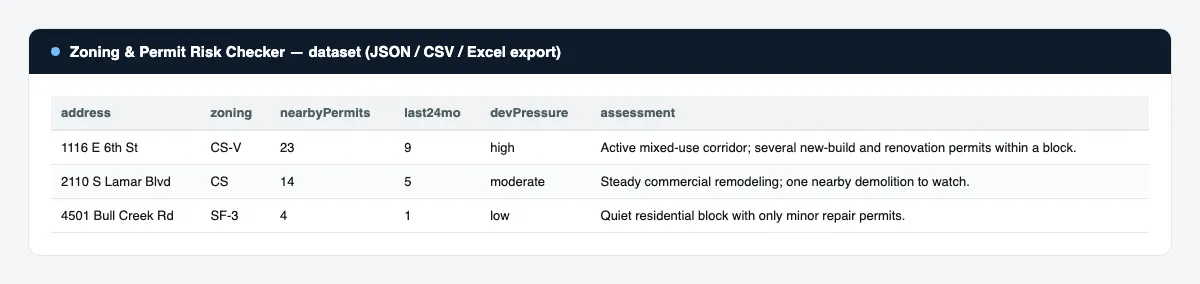
- Your output - a dataset with one report per address: zoning, nearby permit counts, a permit-by-year breakdown, risks, opportunities, notable permits, and an overall assessment. Export to JSON, CSV, or Excel.
What data can you extract?
| Field | Description |
|---|---|
address | The address you entered. |
city | The selected city. |
matchedAddress | The address as resolved by the geocoder. |
latitude / longitude | Resolved coordinates. |
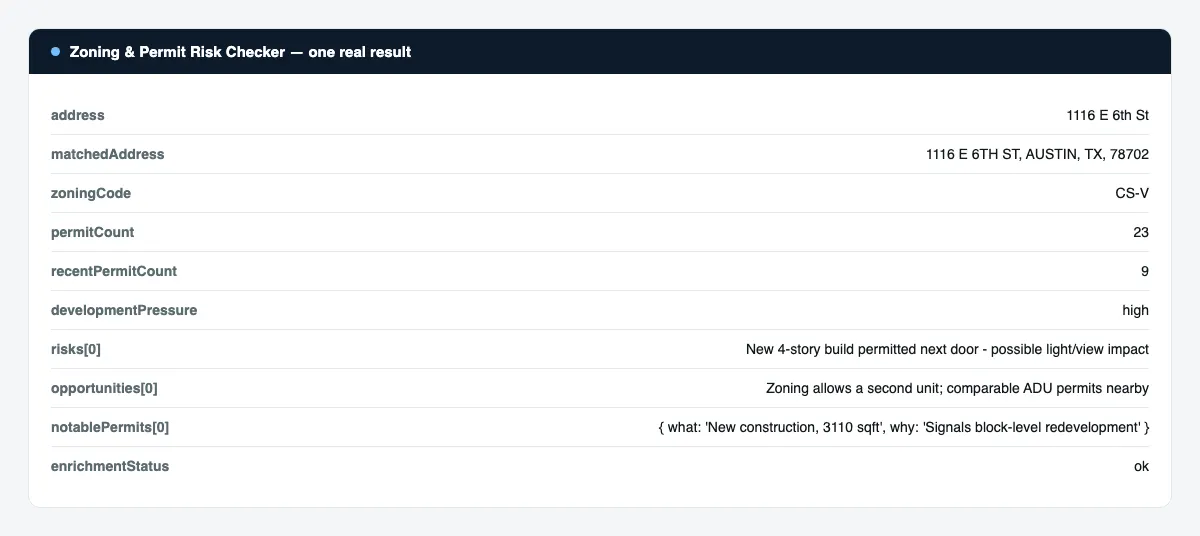
zoningCode | Zoning code found on nearby permit records, when present. |
permitCount | Number of nearby permits found. |
recentPermitCount | Nearby permits filed in the last 24 months. |
permitsByYear | { year, count } breakdown of nearby permits. |
recentPermits | Up to 25 nearby permits with type, work, status, cost, address, and date. |
developmentPressure | low, moderate, or high. |
zoningSummary | What the zoning code means in plain language, when known. |
permitActivitySummary | Summary of what is being built or changed nearby. |
risks | Specific things a buyer or owner should check. |
opportunities | Upside signals for the address. |
notablePermits | 2-5 of the most relevant nearby permits, each with a short "why". |
overallAssessment | The overall take on the address. |
enrichmentConfidence | Assessment confidence: high, medium, or low. |
enrichmentStatus | Whether the assessment was produced, and if not, why. |
scrapedAt | ISO timestamp of the run. |
How to use Zoning & Permit Risk Checker
- Open the Actor in the Apify Console.
- In Addresses, add one street address per line (for example
633 W 5th St). - Choose the City the addresses are in.
- Set Max addresses.
- Press Start.
- When the run finishes, open the Dataset tab and export to CSV, JSON, or Excel.
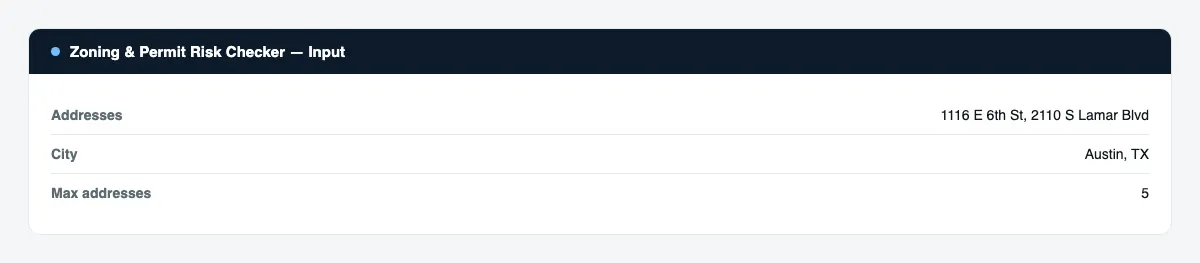
Input Parameters
| Parameter | Type | Required | Default | Description |
|---|---|---|---|---|
addresses | array | Yes | 633 W 5th St | One street address per line, in the selected city. |
city | string | Yes | losangeles | One of: austin, chicago, losangeles, sanfrancisco. |
maxItems | integer | No | 5 | Stop after this many address reports. |
openRouterApiKey | string (secret) | No | — | Optional key for the summary service. Without it, the location, nearby permits, and zoning are still returned. |
proxyConfiguration | object | Yes | Apify Proxy | Proxy settings. A proxy is required; the default uses Apify Proxy. |
Output Data
One dataset item per address. Real sample record (permit list trimmed for length):
Usage Examples
- Pre-offer due diligence - run your shortlist and compare
developmentPressureandrisksbefore choosing. - Neighbour watch - check an address you already own to see what has been permitted nearby.
- Investment screening - filter for
developmentPressure"high" in an improving area. - Renovation planning - read
zoningSummaryand comparable nearby permits before designing an addition.
Tips for Best Results
- Enter the address as it appears on mail (street number + street name); the geocoder is tolerant but a clean address matches best.
- Pick the correct city - the Actor only reads that city's permit records.
- Provide a summary service API key for the written assessment; the permit list and zoning work without one.
- A low
permitCountusually means a quiet block, not missing data.
Known Limitations
- Only cities with a public building-permit dataset are supported: Austin, Chicago, Los Angeles, and San Francisco.
- Coverage and field detail vary by city;
zoningCode,status, andestimatedCostare null when a city's dataset does not include them. - Permits are matched by proximity (about 200 metres), not by parcel; a very large nearby lot can pull in permits that face a different street.
- The zoning code is taken from nearby permit records and is a strong hint, not an official determination - confirm with the city for legal purposes.
- The assessment quality reflects the default no-cost model.
- Addresses the geocoder cannot resolve are returned with an
address-not-foundstatus.
Integrations
Connect the dataset to Google Sheets, Airtable, Make, Zapier, or n8n; call the Actor from the Apify API; trigger it with webhooks; or schedule recurring runs from the Apify Console.
Export Formats
JSON, CSV, Excel, and XML, from the Dataset tab or the Apify API.
Frequently Asked Questions
Do I need an account or login?
No. The Actor reads public geocoding and open building-permit data and never logs in anywhere.
Which cities are supported?
Austin, Chicago, Los Angeles, and San Francisco. Support depends on each city publishing a permit dataset.
How far around the address does it look?
About 200 metres. The count found is reported in permitCount.
Is the zoning code official?
No. It is the zoning code carried on nearby permit records - a reliable hint, but confirm with the city for any legal or financial decision.
Why does an address have no permits?
Because no permits were filed near it in the dataset's time range. That is usually a quiet block, not a data gap.
Am I charged for failed results?
You are charged for address reports written to the dataset, including addresses the geocoder could not resolve (which still produce a row).
How fresh is the data?
Permit records are read live at run time from each city's open-data portal.
Can it export to Google Sheets?
Yes. Connect the dataset to the Google Sheets integration or pull it from the API.
Does it handle duplicate addresses?
Yes. Addresses are de-duplicated; the same address is checked once.
Support
Questions and bug reports: use the Issues tab on the Actor's Console page. Include the input you ran and the run ID.
Legal / Responsible Use
You are responsible for complying with the data portals' terms of use and applicable law. This Actor reads public building-permit and geocoding data; the output is informational and is not a substitute for a title search, a survey, or an official zoning determination from the city.


