
Google Shopping Feed Validator & Change Monitor
Pricing
from $1.50 / daily monitoring of one feed
Google Shopping Feed Validator & Change Monitor
Checks every item in a Google Merchant Center product feed against the product data specification, then watches the feed on a schedule and reports what newly broke and what was fixed.
Pricing
from $1.50 / daily monitoring of one feed
Rating
0.0
(0)
Developer

Muhammad Zuhaib Zahid
Maintained by CommunityActor stats
0
Bookmarked
2
Total users
1
Monthly active users
a month ago
Last modified
Categories
Share
Point it at the product feed you already submit to Google Merchant Center. It checks every item against the product data specification, tells you exactly what is wrong and how to fix it, and then watches the feed on a schedule so you find out the day something breaks instead of the day sales drop.
The first audit of any feed is free and complete. Nothing is charged until you have seen the whole report.
Why this exists
Merchant Center tells you an item was disapproved after it has already stopped serving, and it tells
you in its own vocabulary. A feed export that starts writing 9,99 EUR instead of 9.99 EUR, or a
GTIN with one digit mistyped, can take out a whole category quietly.
This Actor reads the same feed Google reads, applies the same rules before Google does, and keeps yesterday's result so it can tell you what is NEW today.
What it checks
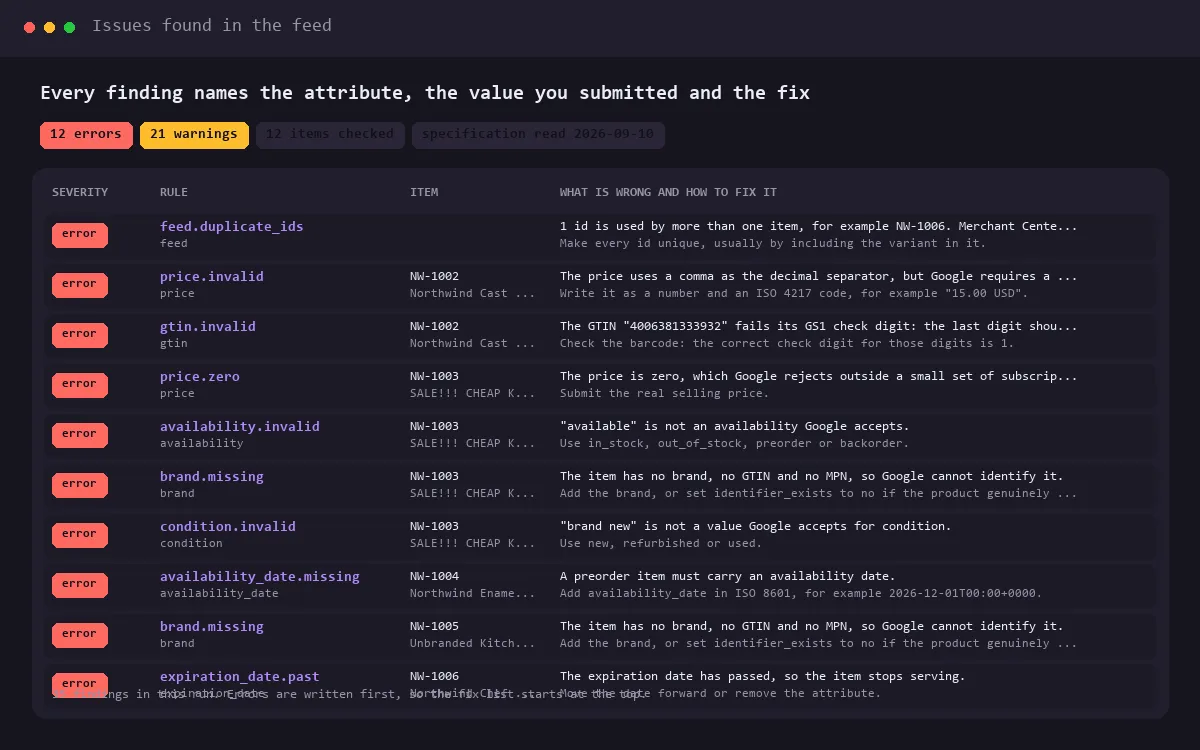
Every rule comes from the Merchant Center product data specification, read on 10 September 2026, and every finding names the attribute, the item, the value you submitted and the fix.
Identity and content. id present, unique across the feed and within 50 characters. Title present and within 150. Description present and within 5000. Promotional wording, block capitals and placeholder text in titles. HTML in descriptions.
Links and images. link and image_link present, absolute and correctly encoded. Unsupported image formats. Placeholder images. Additional images over the limit of ten. Image resolution measured from the real file: Google's minimum becomes 500 by 500 pixels for every category, and enforcement begins on 31 January 2027. This Actor reports undersized images as a warning now and switches them to errors on that date by itself.
Price. The exact grammar Google wants: a number, a space, an ISO 4217 code. The decimal comma that European exports produce. Currency symbols used instead of codes. Zero and negative prices. A sale price that is not lower than the price, or is in a different currency. Sale windows that are malformed or have already closed.
Availability. The four accepted values, a preorder without an availability date, an expiration date in the past or more than 30 days out.
Identifiers. GTIN length AND its GS1 check digit, so a mistyped barcode is caught before Google rejects it. MPN and brand limits. identifier_exists that contradicts the identifiers actually present. A missing brand is reported as an error only when nothing else identifies the product.
Categories, variants and apparel. google_product_category as a numeric id or a full path. product_type and item_group_id limits. age_group, gender, size, size_type, size_system, colour and material values and lengths.
Measures and structured values. unit_pricing_measure and unit_pricing_base_measure units. Product length, width, height and weight ranges. installment, subscription_cost, certification, and product highlight counts.
The 2026 additions. video_link, validated by Google since 14 April 2026 and serving since 30 June 2026, plus handling_cutoff_time and minimum_order_value.
The feed itself. Duplicate ids. A header row that repeats a column. Rows whose column count does not match the header, which is what an unescaped quote or delimiter does to a text feed. Mixed currencies. An empty feed. A URL that answers with something that is not a product feed at all.
What you get on every run
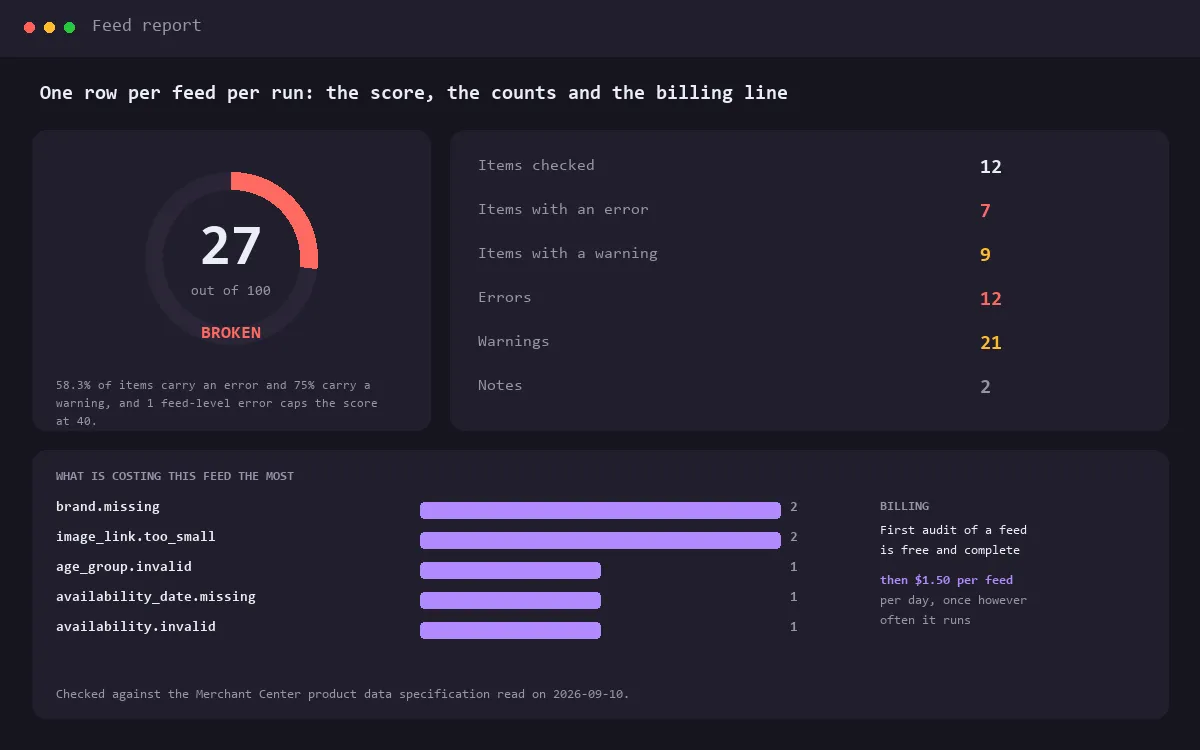
Three kinds of row, each with its own view in the dataset:
| View | One row per | Use it for |
|---|---|---|
| Issues | problem found | the fix list, sorted with errors first |
| Changes since the last run | thing that changed | what broke today, what got fixed, what was added or removed |
| Feed report | feed per run | the health score, the counts and the billing line |
The health score is one number you can put on a dashboard: start at 100, remove the share of items carrying an error, remove a fifth of the share carrying a warning, and cap it at 40 while any feed-level error stands.
Monitoring, not just checking
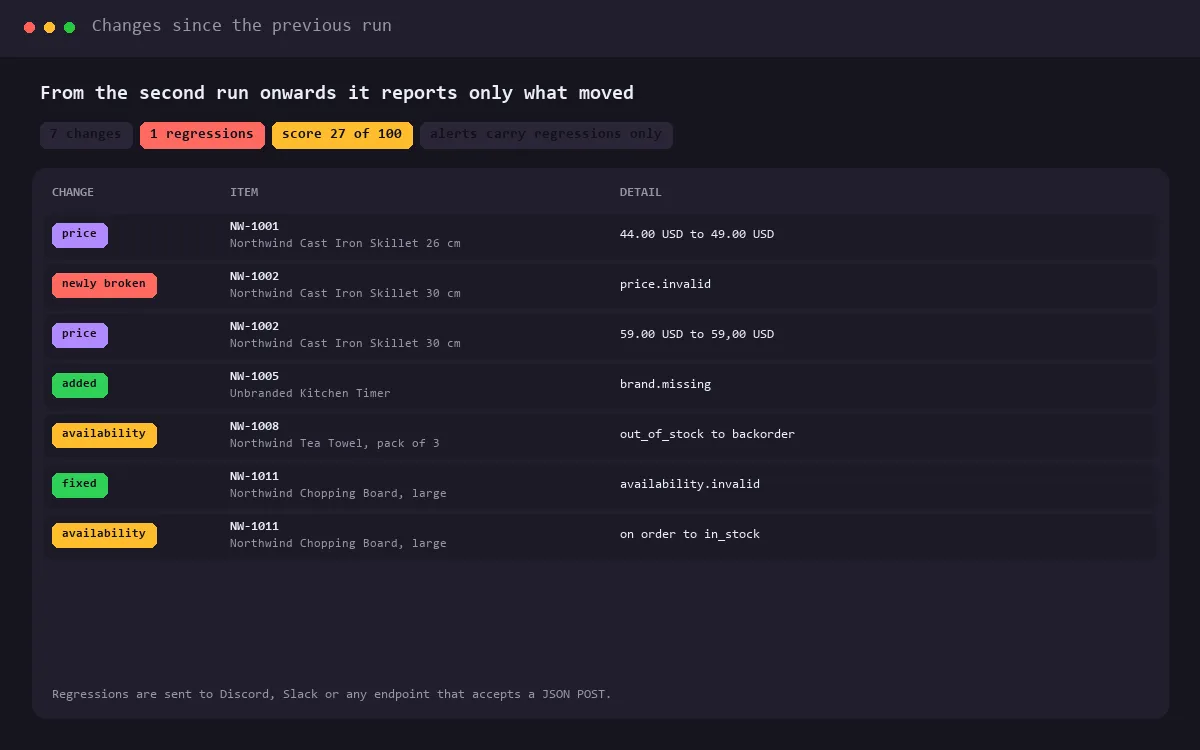
Put it on a daily schedule and from the second run onwards it reports the delta:
- items that newly broke, with the rules that broke;
- items that were fixed, so you can see a change land;
- items added and removed;
- price and availability moves;
- the feed shrinking against the previous run, which is what a broken export looks like before anyone notices;
- the health score falling.
Send those to Discord, Slack, or any endpoint that takes a JSON POST. Alerts carry regressions only by default, and a feed's first audit never alerts, so switching it on does not bury you.
Input
| Field | What it is |
|---|---|
| Product feed URLs | One per line. RSS 2.0 XML, Atom XML, and tab or comma separated text all work. |
| Extra request headers | Only if your feed sits behind Basic or bearer auth. Stored encrypted. |
| What to report | Errors only, errors and warnings (the default), or everything including notes. |
| Images to measure | How many product images to measure per feed. 25 by default, 0 to skip. |
| Webhook URL and format | Discord, Slack or generic JSON. |
| Limits | Items per feed, feed size, issue and change row caps, timeout. |
The default input points at a sample feed with deliberate mistakes in it, so you can press Start and see exactly what the output looks like before you point it at your own.
Pricing
| Event | Price | When |
|---|---|---|
| Daily monitoring of one feed | $1.50 | once per feed per day, and never on a feed's first audit |
| Actor start | platform rate | per run |
- The first audit of a feed is free and complete. Every issue, every fix, no charge.
- After that it is $1.50 per feed per day, charged once however many times you run it that day. A daily schedule is $45 a month per feed, which is less than the feed tools that do the same job, and running it hourly during a migration costs exactly the same.
- Each feed URL is charged separately, so an agency pays per client feed.
- Nothing is charged when a feed cannot be read, or when the URL turns out not to be a Merchant Center feed. If the charge cannot be made because of the maximum charge set on the run, you still get the full audit and the run says so.
Limits and honesty
- It checks what is IN the feed. Rules that depend on your Merchant Center account settings, your target country, or Google's own crawl of your landing pages are reported as warnings or notes rather than errors, because this Actor cannot see those and a false error is worse than no check.
- It is not affiliated with Google. It reads the public product data specification and applies it.
- Feeds are read, nothing is written anywhere except your own dataset and your own webhook.
- A feed larger than the size limit is truncated rather than crashing the run, and the report says so.
- Images are measured from the first bytes of each file, on a bounded sample per run, so image checking never becomes the expensive part of the run.
A good schedule
Daily, an hour after your feed export runs. That way the audit sees the feed Google will fetch, and a regression reaches your webhook the same morning it appears.