
Court Records Search — US Public Case Data API
Pricing
from $100.00 / 1,000 court case records
Court Records Search — US Public Case Data API
Search public court records across jurisdictions — case details, filings, parties & outcomes. PACER & CourtListener alternative for legal research, KYC, due diligence and compliance teams. Pay per search, no subscription. Official source. No API key. Pay per record.
Pricing
from $100.00 / 1,000 court case records
Rating
0.0
(0)
Developer

NexGenData
Maintained by CommunityActor stats
1
Bookmarked
61
Total users
6
Monthly active users
6 days ago
Last modified
Share
⚖️ Court Records Search — Public Case Data
Pull public U.S. court records — opinions and federal RECAP dockets together — from a single query, without a PACER login or per-page fee. Court Records Search runs your case-name, party, or keyword across CourtListener's opinions and RECAP archives in one pass, returning case name, court, filing date, docket number, nature of suit, judge, and a direct link. It is the broad on-ramp for KYC, background diligence, and compliance teams who need a fast public-record sweep before drilling into a specific opinion or docket.
📊 Sample Output
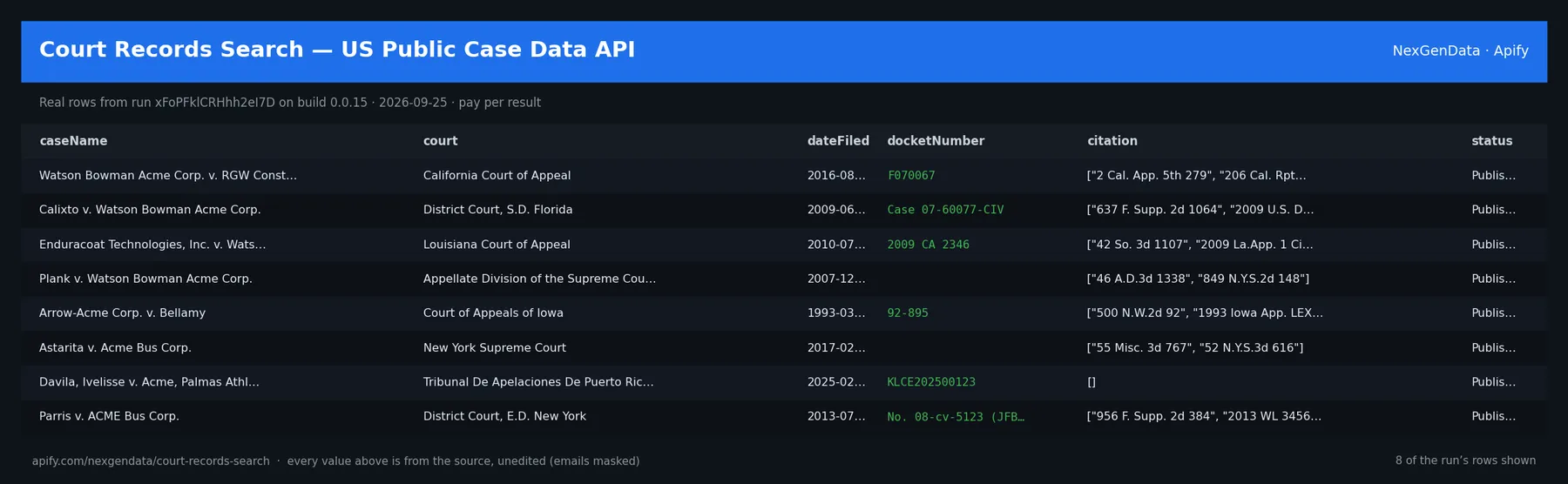
caseName | court | courtId | dateFiled | status | source |
|---|---|---|---|---|---|
| Watson Bowman Acme Corp. v. RGW Construction, Inc. | California Court of Appeal | calctapp | 2016-08-09 | Published | courtlistener.com |
| Calixto v. Watson Bowman Acme Corp. | District Court, S.D. Florida | flsd | 2009-06-02 | Published | courtlistener.com |
| Enduracoat Technologies, Inc. v. Watson Bowman Acme Corp. | Louisiana Court of Appeal | lactapp | 2010-07-08 | Published | courtlistener.com |
| Plank v. Watson Bowman Acme Corp. | Appellate Division of the Supreme Court of the State of New York | nyappdiv | 2007-12-21 | Published | courtlistener.com |
| Arrow-Acme Corp. v. Bellamy | Court of Appeals of Iowa | iowactapp | 1993-03-30 | Published | courtlistener.com |
| Astarita v. Acme Bus Corp. | New York Supreme Court | nysupct | 2017-02-14 | Published | courtlistener.com |
Real rows from run xFoPFklCRHhh2eI7D on build 0.0.15 (2026-09-25), unedited apart from masked emails/phones and shortened long text; fields the source does not publish are empty.
🧾 JSON sample record
One real record from run xFoPFklCRHhh2eI7D (emails/phones masked, long text shortened):
💰 Pricing
| Event | Price (USD) | When it is charged |
|---|---|---|
Actor Start (apify-actor-start) | $5e-05 | Charged when the Actor starts running. Number of events charged depends on Actor memory (one event per GB, minimum one event). |
Court case record (apify-default-dataset-item) | $0.1 | Single result in the default dataset. |
Pay-per-event: you pay only for what the run delivers. A run that delivers nothing bills no result events (only the actor-start event, when the actor defines one). Example: a run that delivers 100 results costs 100 × $0.1 = $10.00 plus the start fee.
🔗 Related Actors
More from the NexGenData US government, courts & regulators family:
- Colorado Business Entity Search — CO Registry Lookup API
- Connecticut Business Registry Search — CT Entity Data API
- Contractor License Leads — Licensed US Contractor Prospects API
- US Court Opinions & Case Law Search API
- CourtListener Federal Docket Scraper — RECAP API
- US Federal & State Judges Database API
46 more in this family on the NexGenData Store page.
What This Actor Does
Court Records Search queries the CourtListener API (/api/rest/v4/search/) across two record types in one run: court opinions (decisions) and federal RECAP dockets (the crowd-sourced mirror of PACER). You provide a search query and an optional court-type filter, and the actor returns normalized, structured JSON — no PACER account, no per-page charge, no scraping fragile HTML.
Pricing
$0.10 per result row delivered (Pay-Per-Event), plus $0.00005 per Actor start per GB of memory. Rows and charges are 1:1 and duplicate rows are removed before billing. A query that matches nothing returns 0 rows and charges nothing. If CourtListener blocks, rate-limits, or changes its response format, the run fails with a message naming the cause instead of finishing green and empty.
Input
| Field | Type | Description |
|---|---|---|
query | string | Search term — case name, party, or keyword (required). |
courtType | string | federal, state, or all (default all). See the note below. |
maxResults | integer | Maximum rows to return, and therefore the maximum billed (default 50). |
Note on courtType: federal restricts the opinion search to the Supreme Court and the federal circuits (scotus, ca1–ca11, cadc, cafc). state and all behave the same today — CourtListener's v4 search results carry no populated jurisdiction facet, so a state-only filter cannot be applied honestly at this layer. The run's status message says so on every state run.
Output
Each result is a flat JSON object. Opinion rows and docket rows share most fields; docket rows add assignedTo, referredTo, and cause. Every row carries recordType (opinion or docket).
Use Cases
- Conflicts & exposure checks — sweep opinions and dockets for a new client or adversary in one call.
- KYC / AML name screening — batch public-record checks during counterparty onboarding.
- Pre-deal diligence — map a target company's litigation footprint before a transaction.
- Litigation research on-ramp — a fast first pass before drilling into a specific opinion or docket.
Frequently Asked Questions
Is this a PACER alternative? It searches the free RECAP archive of PACER dockets plus CourtListener opinions; no PACER account is needed for covered records.
Does it cover state courts? Yes — state opinions are included in the default all sweep. There is no state-only filter (see the courtType note).
What does each result cost? $0.10 per delivered row; see the live Pricing tab for the current rate.
Why did my run fail? CourtListener rate-limits anonymous callers. The actor retries four times, honouring Retry-After, and only then fails — with a status message naming the cause. Nothing is charged on a failed run.
How is this different from your opinions / docket actors? This is the broad combined search. Use the specialist actors (opinions, RECAP dockets, oral arguments) for deeper single-type fields, or the Federal Litigation Intelligence actor for rolling new-filing monitoring.
Related Actors
- US Court Opinions & Case Law Search — federal & state opinions with citations and cite counts.
- RECAP Federal Court Docket Search — ad-hoc lookup of the free RECAP/PACER docket archive.
- Federal Litigation Intelligence — monitor NEW federal filings by topic, company, or firm.
- Legal & IP Intelligence MCP — MCP server bundling legal + IP tools for AI agents.
About NexGenData
NexGenData publishes buyer-intent actors covering U.S. public-records search, SEC filings, lead generation, competitive intelligence, and MCP servers for AI agents. All pay-per-result. Browse the full catalog at https://apify.com/nexgendata?fpr=2ayu9b
⭐ Found this useful?
If this Actor saved you time, a quick review on the Apify Store genuinely helps other teams discover it. Have a feature request or hit a problem? Open it from the Issues tab — we read every one.
![Propwire.com [From $1💰] Leads Scraper avatar](https://images.apifyusercontent.com/ZZSQ1ll9ImN8tFhsh9Ez_b0IpvwSdTF1eanxr1yCsvw/rs:fill:76:76/cb:1/aHR0cHM6Ly9hcGlmeS1pbWFnZS11cGxvYWRzLXByb2QuczMudXMtZWFzdC0xLmFtYXpvbmF3cy5jb20vbmduOHZSRVNUa3NleVdFNnAtYWN0b3ItVkVmYk5XR3RBZHc4Z2s0TG4tVWlsbEJBZWtPeC1wcm9wd2lyZS5qcGVn.webp)


