

Naver Trends News — Korea News Monitoring API
Pricing
from $25.00 / 1,000 trend records
Naver Trends News — Korea News Monitoring API
Monitor Naver (Korea) news trends and headlines. Clean JSON for PR, media-monitoring teams and AI agents.
Pricing
from $25.00 / 1,000 trend records
Rating
0.0
(0)
Developer

NexGenData
Maintained by CommunityActor stats
0
Bookmarked
2
Total users
1
Monthly active users
9 days ago
Last modified
Categories
Share
Naver Trends News
Monitor Naver (Korea) news trends and headlines. Built for PR, comms, media-monitoring teams and AI agents.
📊 Sample Output
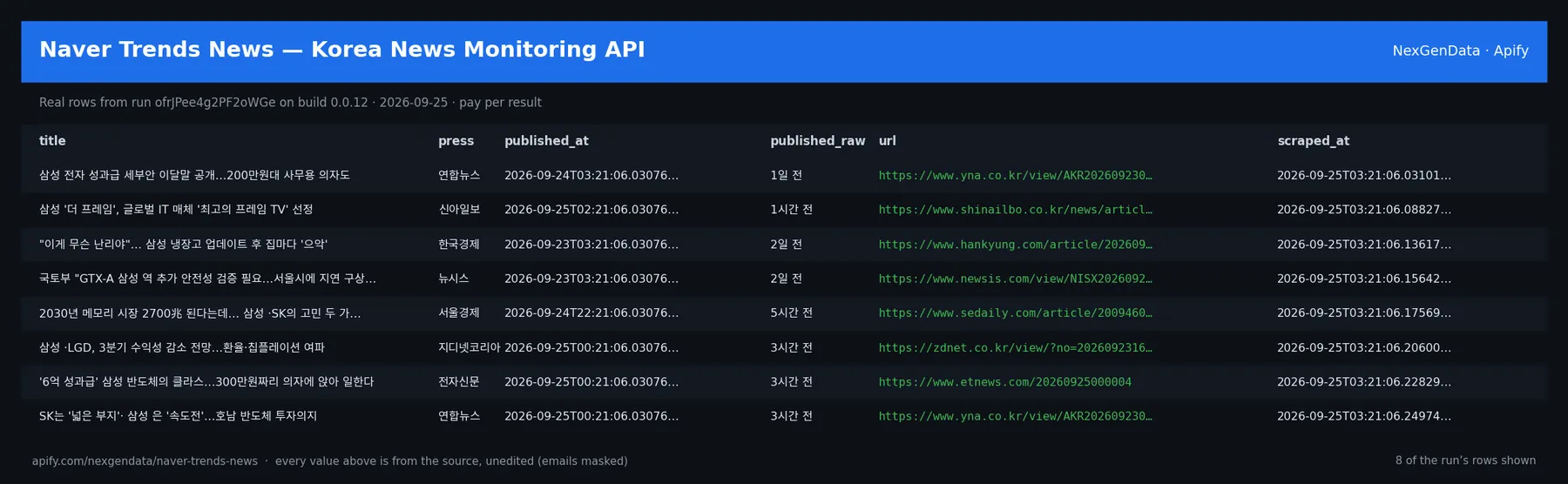
title | press | published_at | published_raw | url | scraped_at |
|---|---|---|---|---|---|
| 삼성 전자 성과급 세부안 이달말 공개…200만원대 사무용 의자도 | 연합뉴스 | 2026-09-24T03:21:06.030763+00:00 | 1일 전 | https://www.yna.co.kr/view/AKR20260923081400003?input=1195m | 2026-09-25T03:21:06.031019+00:00 |
| 삼성 '더 프레임', 글로벌 IT 매체 '최고의 프레임 TV' 선정 | 신아일보 | 2026-09-25T02:21:06.030763+00:00 | 1시간 전 | https://www.shinailbo.co.kr/news/articleView.html?idxno=5065758 | 2026-09-25T03:21:06.088274+00:00 |
| "이게 무슨 난리야"… 삼성 냉장고 업데이트 후 집마다 '으악' | 한국경제 | 2026-09-23T03:21:06.030763+00:00 | 2일 전 | https://www.hankyung.com/article/2026092326467 | 2026-09-25T03:21:06.136175+00:00 |
| 국토부 "GTX-A 삼성 역 추가 안전성 검증 필요…서울시에 지연 구상금 검... | 뉴시스 | 2026-09-23T03:21:06.030763+00:00 | 2일 전 | https://www.newsis.com/view/NISX20260923_0003802676 | 2026-09-25T03:21:06.156425+00:00 |
| 2030년 메모리 시장 2700兆 된다는데… 삼성 ·SK의 고민 두 가지 [갭 월드... | 서울경제 | 2026-09-24T22:21:06.030763+00:00 | 5시간 전 | https://www.sedaily.com/article/20094609?ref=naver | 2026-09-25T03:21:06.175690+00:00 |
| 삼성 ·LGD, 3분기 수익성 감소 전망…환율·칩플레이션 여파 | 지디넷코리아 | 2026-09-25T00:21:06.030763+00:00 | 3시간 전 | https://zdnet.co.kr/view/?no=20260923165035 | 2026-09-25T03:21:06.206008+00:00 |
Real rows from run ofrJPee4g2PF2oWGe on build 0.0.12 (2026-09-25), unedited apart from masked emails/phones and shortened long text; fields the source does not publish are empty.
🔧 Input reference
| Field | Type | Default | What it does |
|---|---|---|---|
mode | string (news, trends) | "news" | What to collect. 'news' = Naver news-search results for your keywords (default). 'trends' = Naver DataLab Shopping-Insight top trending shopping keywords per category. |
queries | array | ["삼성", "비트코인"] | Keywords to search Naver News for. Korean or English both work (e.g. 삼성, 비트코인, Samsung, Korea economy). One Naver search page is fetched per keyword. Required when mode = news. |
categories | array | ["50000000"] | DataLab shopping category IDs (cid) to pull trending keywords from. Defaults to 50000000 (All). Examples: 50000003 Beauty, 50000004 Digital/Appliances, 50000007 Food, 50000008 Liv… |
sort | string (relevance, date) | "relevance" | How Naver orders news results: 'relevance' (default) or 'date' (most recent first). |
maxItems | integer | 20 | Hard cap on the total number of dataset items (articles or trend keywords) across all queries/categories. 1-1000. |
proxyConfiguration | object | {"useApifyProxy": true} | Proxy used for requests. Korea generally allows datacenter, so the default Apify proxy is usually fine; residential is used as an automatic fallback. Recommended to leave the defa… |
notionConnector | string | Optional. Connect your Notion workspace and the results are also written as a Notion page in the same run — the Actor never sees your Notion credentials. Authorize a Notion MCP co… | |
notionParentId | string | Optional. The Notion page ID to create the page under. If blank, Notion creates a private page in your workspace. | |
supabaseConnector | string | Optional. Connect your own Supabase project and the results are also inserted into a table in the same run — the Actor never sees your Supabase credentials. Authorize a write-scop… | |
supabaseTable | string | "nexgendata_leads" | Target table in the public schema (created if missing). Default: nexgendata_leads. |
supabaseProjectId | string | Your Supabase project reference (e.g. abcdefghijklmnop). Required unless your connector URL is already project-scoped. Find it in your project URL: supabase.com/dashboard/project/… | |
deliveryDedup | boolean | true | When on (default), records already delivered in a previous run are not delivered again to the same destination — so scheduled runs only push new items. Turn off to deliver every r… |
🧾 JSON sample record
One real record from run ofrJPee4g2PF2oWGe (emails/phones masked, long text shortened):
💰 Pricing
| Event | Price (USD) | When it is charged |
|---|---|---|
Trend record (apify-default-dataset-item) | $0.025 | Charged per Naver news result or trend keyword extracted. |
Actor Start (apify-actor-start) | $0.005 | Charged when the Actor starts running. Number of events charged depends on Actor memory (one event per GB, minimum one event). |
Pay-per-event: you pay only for what the run delivers. A run that delivers nothing bills no result events (only the actor-start event, when the actor defines one). Example: a run that delivers 100 results costs 100 × $0.025 = $2.50 plus the start fee.
🔗 Related Actors
More from the NexGenData Korea & Japan family:
- Korea KRX Short Selling — 공매도 API
- Korea Upbit & Bithumb Crypto — 김치프리미엄 API
- KOSPI Korea Stock Screener — 한국 주식 Data API
- Niconico Video Search — ニコニコ動画 API
- Pixiv Tracker
- PR TIMES Scraper — Japan Press Releases · プレスリリース API
17 more in this family on the NexGenData Store page.
⏰ Run this as a Korea news watch (recommended)
Every monitoring actor is a subscription, not a one-shot lookup. Schedule a weekly sweep and catch new coverage as it lands:
Weekly cron (0 8 * * 1) turns this into an always-on Korea news watch.
📊 What you get
Clean JSON, one record per item.
mode: "news" — one record per article:
title— headlinepress— publisher (e.g. 연합뉴스, SBS)published_at— ISO 8601 UTC, normalised from Naver's Korean relative/absolute timepublished_raw— the original Naver time token (e.g.9시간 전)url— the publisher's own article URLnaver_url— then.news.naver.commirror permalink, where Naver exposes onesnippet— result snippetquery— the keyword this article matchedscraped_at— collection timestamp
mode: "trends" — one record per DataLab Shopping-Insight keyword:
keyword,rank,category,category_id,period,source
Pricing (Pay-Per-Event):
- Actor start: $0.005
- Per dataset item: $0.025 — about 40 items per $1
A 20-item two-keyword pull = $0.005 + (20 × $0.025) = $0.505. No monthly minimum, no seats, no overage bills.
If Naver refuses or challenges the request, the run fails with a status message naming the cause — you are not billed for a blocked run. If Naver answers and genuinely has no results for your keyword, the run succeeds with 0 items and says so, and nothing is charged.
🤖 Use with AI agents
Point Claude, the OpenAI Agents SDK, an n8n flow or any MCP-aware client at it and run Naver (Korea) news-trend monitoring on demand.
Sample agent prompt:
Agentic payments (x402): Supports agentic payment via x402 — agents can call this actor with USDC, no API key required.
No login, no Korean phone number, and no Naver Developers API key are required — the actor works entirely off Naver's public news search and DataLab Shopping-Insight endpoints.
🔗 Related news & media actors
Full media-monitoring stack — monitor every major wire: PR Newswire, Business Wire, GlobeNewswire, PRWeb, EIN Presswire, Brand Mention Monitor
News agent front door: News MCP
Data from public news, press-wire and media sources.
Japanese press releases → prtimes-japan-press-releases (PR TIMES wire monitor).


