
Wappalyzer Alternative — Tech Stack Detector & BuiltWith API
Pricing
$100.00 / 1,000 tech stack detections
Wappalyzer Alternative — Tech Stack Detector & BuiltWith API
Wappalyzer alternative and tech stack detector: point it at any website and get its technologies as clean JSON — CMS, analytics, ecommerce, JS frameworks, hosting, ad tech — grouped by category, with a tech-name list and count. BuiltWith API alternative. No API key. Pay per record.
Pricing
$100.00 / 1,000 tech stack detections
Rating
0.0
(0)
Developer

NexGenData
Maintained by CommunityActor stats
0
Bookmarked
1.5K
Total users
25
Monthly active users
a day ago
Last modified
Categories
Share
A Wappalyzer alternative and tech stack detector you can call as an API: give it website URLs, get back the technologies each site runs.
Point it at a domain, get the technology stack back. A curated catalog of 251 named technology fingerprints (CMS, analytics, frameworks, payment, hosting, ad-tech — the ones that matter for lead qualification and competitive research), each with the evidence that matched, a version where the site exposes one, and a confidence score. Bulk input, one row per domain analysed — built as a drop-in for teams whose Wappalyzer/BuiltWith plan lapsed.
Developer drop-in: a direct Wappalyzer/BuiltWith replacement for detecting a site's tech stack in code.
📊 Sample Output
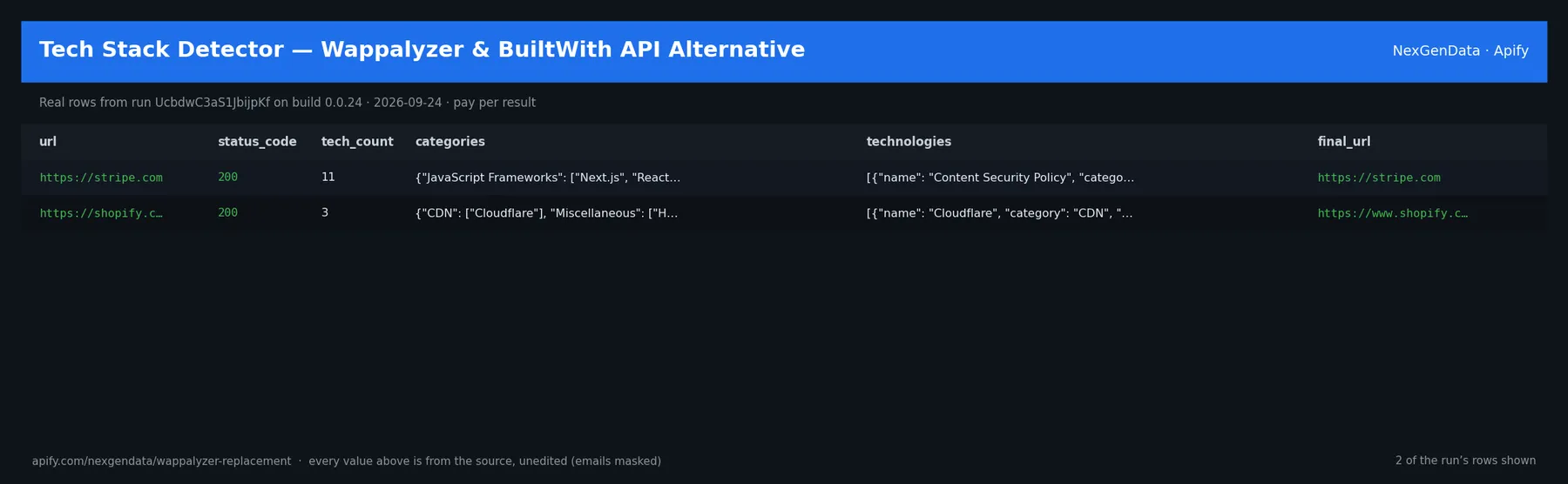
url | status_code | tech_count | final_url | tech_names | category_list |
|---|---|---|---|---|---|
| https://stripe.com | 200 | 11 | https://stripe.com | Content Security Policy, Google Analytics 4, HSTS, Next.js, Nginx, No… | JavaScript Frameworks, Web Servers, Analytics, Databases, Miscellaneo… |
| https://shopify.com | 200 | 3 | https://www.shopify.com/ | Cloudflare, HSTS, HTTP/3 | CDN, Miscellaneous, Security |
Real rows from run UcbdwC3aS1JbijpKf on build 0.0.24 (2026-09-24), unedited apart from masked emails/phones and shortened long text; fields the source does not publish are empty.
⚙️ Sample inputs
This is the Store example input — the same input Apify's automated check runs — so it is proven to return rows on the current build. Paste it into the input form, or send it through the API, CLI or a schedule:
🔧 Input reference
| Field | Type | Default | What it does |
|---|---|---|---|
urls | ['array', 'string'] | ["https://stripe.com", "https://shopify.com"] | One or more website URLs to detect tech stack on. Accepts bare hosts ('example.com') or full URLs ('https://example.com/path') — scheme is auto-added if missing. Also accepted und… |
categories_filter | array | [] | Optional: only return technologies whose category is in this list. Examples: 'CMS', 'Analytics', 'CDN', 'Ecommerce', 'JavaScript Frameworks', 'Payment Processors'. Leave empty to… |
include_confidence | boolean | true | When true, each detected technology includes a 0–100 confidence score. Header matches score 100, script-src matches 90, HTML-body matches 85, implied-only techs score 60. |
include_versions | boolean | true | When true, attempts to parse semantic version numbers out of matched headers, script URLs, and HTML. Example: '/react@18.2.0/' ⇒ version '18.2.0'. Version is null when no reliable… |
timeout_seconds | integer | 15 | Per-URL HTTP request timeout. Range 3–60. Increase for slow sites or if you are analyzing heavy pages that need longer download time. |
startUrls | array | [] | Alias of urls. Accepts plain URL strings or {url: ...} dict items. |
domains | array | [] | Alias of urls. Bare hostnames work too — scheme is auto-added. |
websites | array | [] | Alias of urls. |
targetUrls | array | [] | Alias of urls. |
url | string | "" | Alternative — a single URL when you only need one. Comma-separated values are auto-split. |
🧾 JSON sample record
One real record from run UcbdwC3aS1JbijpKf (emails/phones masked, long text shortened):
💰 Pricing
| Event | Price (USD) | When it is charged |
|---|---|---|
Tech stack detection (tech-detection) | $0.1 | Full tech stack detection (headers + HTML + script-src) for one domain |
Pay-per-event: you pay only for what the run delivers. A run that delivers nothing bills no result events (only the actor-start event, when the actor defines one). Example: a run that delivers 100 results costs 100 × $0.1 = $10.00 plus the start fee.
📊 What you get
Clean JSON output (9 fields):
url— Urlstatus_code— Status codetech_count— Tech countcategories— Categoriestechnologies— Technologiesscan_time_ms— Scan time msfinal_url— Final urltech_names— Tech names
Pricing: $0.1 per site (Pay-Per-Event) — about 10 per $1. Live prices are in the Pricing table below.
🤖 Use with AI agents
Point Claude, the OpenAI Agents SDK, an n8n flow or any MCP-aware client at it.
Sample agent prompt:
Agentic payments (x402): Supports agentic payment via x402 — call this actor with USDC, no API key required.
Run it on a schedule
A website's tech stack does not change often, so a monthly run over your domain list is enough for most lead qualification. Run it weekly if you are watching specific competitors for a switch, such as a new CMS, analytics tool or payment provider. Between runs the same sites come back with updated technologies, tech_names and tech_count, so you can spot tools that were added or removed. The actor has no built-in change-only mode, so compare runs by url to see what changed. Send each run's results onward with a webhook, Google Sheets, Zapier, Make or the Apify API.
Video guides from Apify: Schedule your Actor · Integrations
FAQ
Why use this instead of Wappalyzer or BuiltWith?
It is not connected to either product. It is a separate detector you can call in bulk without a subscription or a separate API key, and you pay per site analysed. You give it a list of URLs and get one clean JSON row per site, with technologies grouped by category, the evidence that matched, a version where the site exposes one, and a confidence score. It works from its own catalog of 251 named technologies, so it will not recognise every tool those products know.
What does a typical run cost?
You pay per result, not for run time: $0.10 for each row in the results, with no start fee. A run that returns 2 site detections costs about $0.20. Live prices are always shown in the Pricing tab.
How do I find out what CMS or framework a website uses?
Put the site in urls (a bare host such as example.com works). The result shows each technology under its category, such as CMS, JavaScript Frameworks or Analytics. To return only certain categories, list them in categories_filter, for example CMS and Ecommerce.
How does it detect technologies, and how sure is each match?
It checks the site's response headers, the HTML and the script URLs it loads. With include_confidence on, each technology gets a 0 to 100 score: header matches score 100, script matches 90, HTML matches 85, and technologies implied by another one (such as React implied by Next.js) score 60. Versions appear only when the site exposes them; otherwise version is empty.
Can I check tech stacks for a big list of websites at once?
Yes. Pass many URLs in urls and you get one row per site. Slow or heavy sites may need a longer timeout_seconds (range 3 to 60, default 15).
Does it show a site's tech history or who uses a given technology?
No. It reports what each site you give it runs at the time of the run. It does not search for all sites using a technology and does not keep a history; schedule it and keep each run's results if you want one.
Related actors
- Website Tech Stack Audit — Bulk BuiltWith Alternative API — a second tech-stack detector for bulk site audits.
- Shopify Store Detector — Tech, Theme & App Detection API — go deeper on sites that run Shopify.
- Company Enrichment API — Domain to Firmographics & Tech — add company details to the domains you scan.
- Company Email Finder — B2B Contact Discovery API — find published contact emails for qualified sites.
- Website Tech & Contact Audit — Tech Stack + Emails API — tech stack and contact emails in one pass.


