

AI Image Upscaler — Real-ESRGAN 2x, 3x, 4x
Pricing
from $33.50 / 1,000 upscale units
AI Image Upscaler — Real-ESRGAN 2x, 3x, 4x
Enlarge images 2×, 3× or 4× with open Real-ESRGAN AI models that add real detail: photos, product shots, old scans, anime and illustrations. JPEG, PNG, WebP in; PNG, JPEG or WebP out with transparency kept. Billed by image size. Part of NexGen Signal — data tools and official-source data products
Pricing
from $33.50 / 1,000 upscale units
Rating
0.0
(0)
Developer
NexGen Signal
Maintained by CommunityActor stats
0
Bookmarked
2
Total users
1
Monthly active users
3 days ago
Last modified
Categories
Share
🔍 AI Image Upscaler — Real-ESRGAN 2x, 3x, 4x
Give direct image links and get each image enlarged 2×, 3× or 4× by an AI model that adds real detail, instead of the blur you get from simply stretching pixels. Each row has the original and new sizes, the time it took and a download link to the upscaled file.
Three open Real-ESRGAN models run inside the actor: general (realesr-general-x4v3, fast, for photos and everyday images), photo (the original RealESRGAN_x4plus, the most detail, about 15 times slower) and anime (RealESRGAN_x4plus_anime_6B, for drawn art and illustrations). JPEG, PNG, WebP, GIF, BMP and TIFF go in; PNG, JPEG or WebP come out, with transparency kept in PNG and WebP, EXIF rotation applied, and the colour balance matched to the original so the model cannot tint it (colorFix, on by default).
Billing is by image size: one unit per started 250,000 pixels of the original (a 500 × 500 image is one unit), times 1 for the general model, 2 for anime and 4 for photo. Images that cannot be read, or are over your size limit, are not billed.
Who buys this and for what job
- E-commerce teams enlarging small supplier product photos for listings.
- Designers and marketers upscaling images for print, banners and slides.
- Archivists sharpening small scans and old photos.
- Developers and AI teams adding an upscale step to an image pipeline without a GPU or an outside API.
Buyers usually search for this as "AI image upscaler", "upscale image 4x" or "Real-ESRGAN".
📊 Sample Output
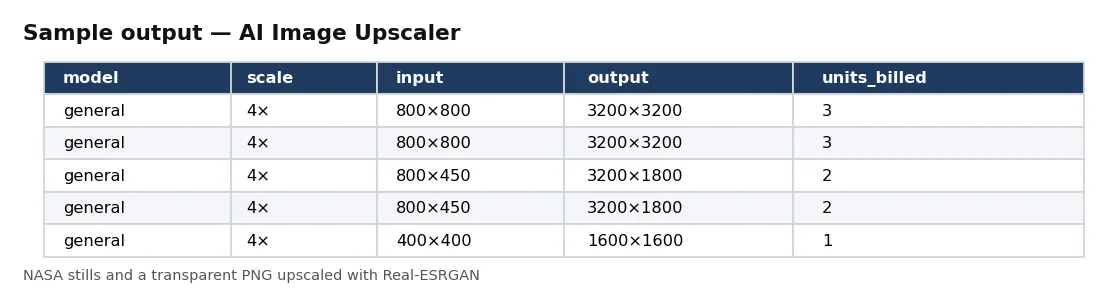
| model | scale | input | output | units_billed | processing_seconds |
|---|---|---|---|---|---|
| general | 4× | 800×800 | 3200×3200 | 3 | 19.1 |
| general | 4× | 800×800 | 3200×3200 | 3 | 23.3 |
| general | 4× | 800×450 | 3200×1800 | 2 | 12.4 |
| general | 4× | 800×450 | 3200×1800 | 2 | 13.5 |
| general | 4× | 400×400 | 1600×1600 | 1 | 5.7 |
| photo | 2× | 400×400 | 800×800 | 4 | 62.4 |
| anime | 4× | 250×187 | 1000×748 | 2 | 4.9 |
Rows from live run LlcXzl2AjWUktmyqb on Apify (NASA video stills with the general model, one with the photo model at 2×, and a transparent PNG with the anime model). Notice the photo-model row: four times the units for the same 400 × 400 image, and about ten times the processing time.
✅ What you get
Every field of each record:
record_id,image_url— id from the file, model, scale and format; the link you gave.model,scale— general, anime or photo; 2, 3 or 4.input_width,input_height,output_width,output_height— sizes before and after.input_format,output_format,input_bytes,output_bytes,has_alpha— formats, file sizes, and whether transparency was kept.color_shift_fixed— the largest colour shift corrected by colorFix (0 = none needed).units_billed,processing_seconds— units for this image and the time the model took.sha256,file_key,file_url— the upscaled file and its download link.upscaled_at— when it was upscaled (UTC).
⚙️ Sample inputs
One image (the Store example)
200 × 200 to 800 × 800 with the general model: 1 unit.
Most detail, 2×, as JPEG
400 × 400 to 800 × 800: 4 units.
Illustrations with transparency
Transparency kept: 2 units.
Input fields:
| Field | Meaning |
|---|---|
imageUrls | direct image links (up to 2,000). |
model | general (default), anime or photo. |
scale | 2, 3 or 4 (default 4). |
outputFormat, quality | png (default), jpg or webp; quality 1–100 for JPEG and WebP. |
colorFix | match the result's colours to the original (default on). |
maxInputMegapixels | skip images bigger than this (default 4, about 2000 × 2000; up to 16). |
maxImageMb | skip files bigger than this (default 30). |
maxImages | stop after this many images (default 100). Billing is per unit as described above. |
🧾 JSON sample record
🔧 How it works
The models run on CPU inside the actor with PyTorch; the image is cut into overlapping tiles so memory stays small, and the tiles are joined without seams. The models work at 4×; for 2× and 3× the 4× result is resized down with Lanczos, which keeps the added detail. Transparency is enlarged separately and put back. The weights are the files published in the Real-ESRGAN project (BSD-3-Clause), checked against their SHA-256 when the actor is built.
Before an image is processed, its units are checked against your maximum charge: an image that would go over is skipped and smaller ones can still follow.
Every run reads each host's robots.txt first: a path it disallows is skipped, listed in the run receipt and never charged. Only public internet addresses are fetched (no private, loopback or cloud-metadata addresses, checked again on every redirect). No logins, no CAPTCHA solving, no proxies.
Saved files go to the run's own key-value store. If your Apify account keeps storages private, add your API token to the link (?token=…) or open the store from the run in Apify Console.
The units for each image are charged when its row is delivered. The run receipt (RUN_RECEIPT) lists every link with its outcome, units and time, and the units billed and charged.
💰 Pricing example
Per unit delivered, no start fee, no monthly charge:
| Apify plan | Price per unit |
|---|---|
| Free | $0.05 |
| Bronze | $0.045 |
| Silver | $0.04 |
| Gold, Platinum, Diamond | $0.0335 |
- The Store example, one 200 × 200 image: 1 unit = $0.05 on the Free plan, $0.0335 on Gold.
- 100 product photos of 800 × 800 with the general model (3 units each): $15.00 on Free, $10.05 on Gold.
- One 1000 × 1000 photo with the photo model (4 × 4 units): $0.80 on Free, $0.54 on Gold.
Coverage and size. Proof runs on 17 Oct 2026: 15 NASA video stills (800 × 800, 800 × 450 and 400 × 400) upscaled 4× with the general model in about 3.7 minutes, about 23 seconds for each 800 × 800 image; a 400 × 400 image with the photo model in about 62 seconds. Runs use 8 GB of memory (two CPU cores) by default; more memory gives more cores and faster runs. AI upscaling invents plausible detail: it is right for looks, not for reading text or facts that are not in the original.
⚖️ Legal & ToS
Images belong to their owners. You choose the links. Make sure you have the right to download and use the content you point it at; the actor fetches only what you give it (and, where you turn it on, what those pages link to).
Every run reads each host's robots.txt first: a path it disallows is skipped, listed in the run receipt and never charged. Only public internet addresses are fetched (no private, loopback or cloud-metadata addresses, checked again on every redirect). No logins, no CAPTCHA solving, no proxies.
❓ FAQ
Is my image sent to another service? No. The models run inside the actor.
Which model should I use? General for most photos and screenshots; photo when you want the most detail and can wait; anime for drawings, cartoons and illustrations.
Can it upscale more than 4×? Not in one run. You can run the result through again.
🆘 Troubleshooting
- not processed: image is over maxInputMegapixels — Raise maxInputMegapixels (up to 16) or use a smaller copy.
- not processed: your maximum charge does not cover its N unit(s) — Raise your maximum charge, or use the general model.
- SOURCE UNAVAILABLE — None of your links could be reached after retries. Nothing was charged.
🔗 Related Actors
- Brand Logo & Favicon Lookup — a company's logo from its domain
- Website Performance Audit — Lighthouse scores and web vitals per page
- Website Contact Scraper — contact details from website lists
🏢 About NexGen Signal — data tools and official-source data products. Browse the catalog: apify.com/nexgensignal
⭐ Found this useful?
If this actor saved you time, a rating on its Apify Store page helps other buyers find it.
Part of NexGen Signal — data tools and official-source data products.


