

Video Frame Extractor — Video to Images, Scenes & Thumbnails
Pricing
from $33.50 / 1,000 frame extracteds
Video Frame Extractor — Video to Images, Scenes & Thumbnails
Turn video files into still images: auto storyboard, every N seconds, N evenly spaced, scene changes, keyframes or set times. Skips blank frames, makes contact sheets. MP4, MOV, WebM, MKV in; JPEG, PNG or WebP out. Part of NexGen Signal — data tools and official-source data products
Pricing
from $33.50 / 1,000 frame extracteds
Rating
0.0
(0)
Developer

NexGen Signal
Maintained by CommunityActor stats
0
Bookmarked
2
Total users
1
Monthly active users
13 days ago
Last modified
Categories
Share
🎞️ Video Frame Extractor — Video to Images, Scenes & Thumbnails
Give direct links to video files (MP4, MOV, WebM, MKV, AVI and more) and get still images taken from them, one row per frame with its time in the video, its size and a download link to the image.
Choose how frames are picked: an auto storyboard (the start, the strongest scene change in each part of the video, topped up with evenly spaced frames), every N seconds, a set number of evenly spaced frames, at every scene change (each new shot in an edited video), at every keyframe, or at times you list. Blank frames (fades, black intros) are skipped for the next frame with content. Limit it to part of the video, shrink frames to a maximum width or height, save them as JPEG, PNG or WebP, and get a free contact sheet (a grid of the frames with their timecodes) per video. Every row also carries the video's length, size, frame rate and codec.
The unit of output is one frame delivered. Videos that cannot be read, and links that are not videos, are not billed.
Who buys this and for what job
- AI and computer-vision teams turning video into image datasets or feeding frames to vision models.
- Video editors and marketers making thumbnails and storyboards.
- Archivists and researchers sampling long recordings shot by shot.
- Developers adding a frame-grab step to a video pipeline without running FFmpeg themselves.
Buyers usually search for this as "video frame extractor", "video to images" or "extract frames from video".
📊 Sample Output
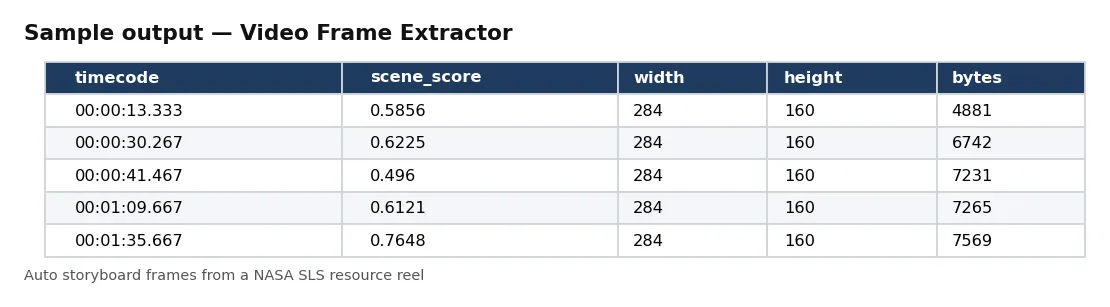
| timecode | scene_score | width | height | bytes |
|---|---|---|---|---|
| 00:00:00.000 | — | 284 | 160 | 5613 |
| 00:00:13.333 | 0.5856 | 284 | 160 | 4881 |
| 00:00:30.267 | 0.6225 | 284 | 160 | 6742 |
| 00:00:41.467 | 0.496 | 284 | 160 | 7231 |
| 00:01:09.667 | 0.6121 | 284 | 160 | 7265 |
| 00:01:35.667 | 0.7648 | 284 | 160 | 7569 |
| 00:01:52.800 | 0.6952 | 284 | 160 | 5686 |
Rows from live run 4Xraff0Efi2LUM3gZ on Apify (auto mode, 12 frames and a contact sheet from the 320 × 180 copy of a 3.5-minute NASA SLS resource reel, frames shrunk to 160 px high). Notice that the first frame has no scene score (the start is always included) and the cuts are spread across the whole reel, not bunched where the editing is fastest.
✅ What you get
Every field of each record:
record_id,video_url,frame_index— id from the link and time, the video link, and the frame's place in the plan.timestamp_seconds,timecode,mode,scene_score— when the frame is in the video, how it was chosen, and (auto and scene modes) how different it is from the frame before, 0 to 1.planned_timestamp_seconds— set when a blank frame was skipped: the time first planned.contact_sheet_url— the video's contact sheet (with contactSheet).width,height,format,bytes,sha256— the image.file_key,file_url— the saved image in the run's key-value store (empty when saveFrames is off).video_duration_seconds,video_width,video_height,video_fps,video_codec— the video itself.extracted_at— when the frame was taken (UTC).
⚙️ Sample inputs
Auto storyboard with a contact sheet (the Store example)
The 1969 Apollo 11 launch film: 10 frames that cover it, plus a grid image.
A frame every 10 seconds
9 frames from its 84 seconds.
Every scene change
One frame per new shot.
Five thumbnails from part of a video, as WebP
Evenly spaced between 20 s and 70 s.
Input fields:
| Field | Meaning |
|---|---|
videoUrls | direct video file links (up to 500). Not YouTube or social media pages. |
mode | auto, interval, count, scenes, keyframes or timestamps. |
intervalSeconds, frameCount, timestamps | the settings for those modes (timestamps as 12.5, 00:01:30 or 1m30s). |
skipBlankFrames, contactSheet | skip black or flat frames (default on); save a grid of the frames per video (default off). |
maxHeight | shrink to this height (0 = full size). |
sceneThreshold, sceneMinGapSeconds | scene mode: sensitivity (default 0.3) and the minimum gap between cuts (default 1 s). |
startSeconds, endSeconds | only take frames in this part of the video. |
imageFormat, quality, maxWidth | jpg, png or webp; quality 1–100; shrink to this width (0 = full size). |
saveFrames | store images with links (default on). |
maxFramesPerVideo, maxVideoMb | per-video limits (defaults 500 frames, 1,000 MB). |
maxFrames | stop after this many frames are delivered (default 1,000). Each delivered frame is billed. |
🧾 JSON sample record
🔧 How it works
Each video is downloaded once and read with FFmpeg. For 'every N seconds' and 'evenly spaced' modes all frames are written in one pass through the video (each frame is the source frame nearest its time, so within one source frame); for listed times each frame is taken with an accurate seek. Scene mode reads the whole video at low resolution, scores how much each frame differs from the one before, keeps cuts above your threshold (merging cuts closer than the minimum gap and keeping the strongest), then takes those frames at full size. Keyframe mode lists the video's keyframes. Frames are taken a few at a time in parallel and delivered in time order.
Every run reads each host's robots.txt first: a path it disallows is skipped, listed in the run receipt and never charged. Only public internet addresses are fetched (no private, loopback or cloud-metadata addresses, checked again on every redirect). No logins, no CAPTCHA solving, no proxies.
Saved files go to the run's own key-value store. If your Apify account keeps storages private, add your API token to the link (?token=…) or open the store from the run in Apify Console.
Delivery is pushed first and charged after. The run receipt (RUN_RECEIPT) lists each video with its length, size, frame rate, codec and frames delivered, and the delivered and charged counts.
💰 Pricing example
Per frame delivered, no start fee, no monthly charge:
| Apify plan | Price per frame |
|---|---|
| Free | $0.05 |
| Bronze | $0.045 |
| Silver | $0.04 |
| Gold, Platinum, Diamond | $0.0335 |
- 10 frames: $0.50 on the Free plan, $0.34 on Gold.
- 1,000 frames: $50.00 on the Free plan, $33.50 on Gold.
- 10,000 frames: $500.00 on the Free plan, $335.00 on Gold.
Coverage and size. Proof runs on 17 Oct 2026: 40 frames every 2 seconds from an 84-second NASA film in about 14 seconds (one FFmpeg pass); a 12-frame auto storyboard with contact sheet from a 3.5-minute NASA reel in about 7 seconds; 30 scene-change frames from the same reel in about 11 seconds. Runs use 4 GB of memory (one CPU core) by default; long videos in scene mode take longer, and more memory gives more cores.
⚖️ Legal & ToS
Videos belong to their owners. You choose the links. Make sure you have the right to download and use the content you point it at; the actor fetches only what you give it (and, where you turn it on, what those pages link to).
Every run reads each host's robots.txt first: a path it disallows is skipped, listed in the run receipt and never charged. Only public internet addresses are fetched (no private, loopback or cloud-metadata addresses, checked again on every redirect). No logins, no CAPTCHA solving, no proxies.
❓ FAQ
Can I give a YouTube link? No. Give a direct link to the video file.
Which formats work? Anything FFmpeg reads: MP4, MOV, M4V, WebM, MKV, AVI, MPEG-TS and more.
Are frames the same size as the video? Yes, unless you set maxWidth or maxHeight. Rotated phone videos come out upright.
Which mode for thumbnails? Auto: it covers the whole video with its strongest shots and skips black frames. Pick from the contact sheet.
🆘 Troubleshooting
- no video stream in this file — The link is an audio file.
- Fewer frames than planned — Times past the end of the video give no frame and are not billed; RUN_RECEIPT counts them.
- SOURCE UNAVAILABLE — None of your links could be reached after retries. Nothing was charged.
🔗 Related Actors
- Bilibili Video Scraper — video data by keyword or creator
- Brand Logo & Favicon Lookup — a company's logo from its domain
- Website Performance Audit — Lighthouse scores and web vitals per page
🏢 About NexGen Signal — data tools and official-source data products. Browse the catalog: apify.com/nexgensignal
⭐ Found this useful?
If this actor saved you time, a rating on its Apify Store page helps other buyers find it.
Part of NexGen Signal — data tools and official-source data products.


