
ASO Keyword Rank Scraper - App Store and Google Play
Pricing
from $8.00 / 1,000 keyword checks
ASO Keyword Rank Scraper - App Store and Google Play
Scrape App Store and Google Play keyword rankings for any app: position per keyword, per country, per store. Every run returns the current records as a dataset. Optional watch mode returns only what changed since your last run. Pay per result.
Pricing
from $8.00 / 1,000 keyword checks
Rating
0.0
(0)
Developer
NexGen Watch
Maintained by CommunityActor stats
0
Bookmarked
2
Total users
1
Monthly active users
15 days ago
Last modified
Categories
Share
📱 ASO Keyword Rank Scraper - App Store and Google Play
Scrape App Store and Google Play keyword rankings for any app: position per keyword, per country, per store. Run it once and you get the current records as a dataset — that is the default. Turn on watch mode and a scheduled run returns only what changed since the last run (see Optional: run it on a schedule).
ASO teams and app companies pay to track keyword position by term, store, and country — the recurring optimization input that tells you whether your ASO work is actually moving rankings.
Use cases by team
- ASO teams: Measure keyword rank weekly and prove which optimizations moved the needle.
- App marketers: Track branded and category terms across both stores in one run.
- Competitive intel: See where rivals rank for the keywords you care about.
- Leadership: Get a recurring, comparable ASO scorecard instead of ad-hoc spot checks.
Output is one None row per result; billing is pay-per-event, the value event being one keyword check (a $0.02 start fee per run, then $0.012 per keyword check). Source: itunes.apple.com, play.google.com.
No login, no API key and no CAPTCHA solving are involved: the source is read logged-out.
📊 Sample Output
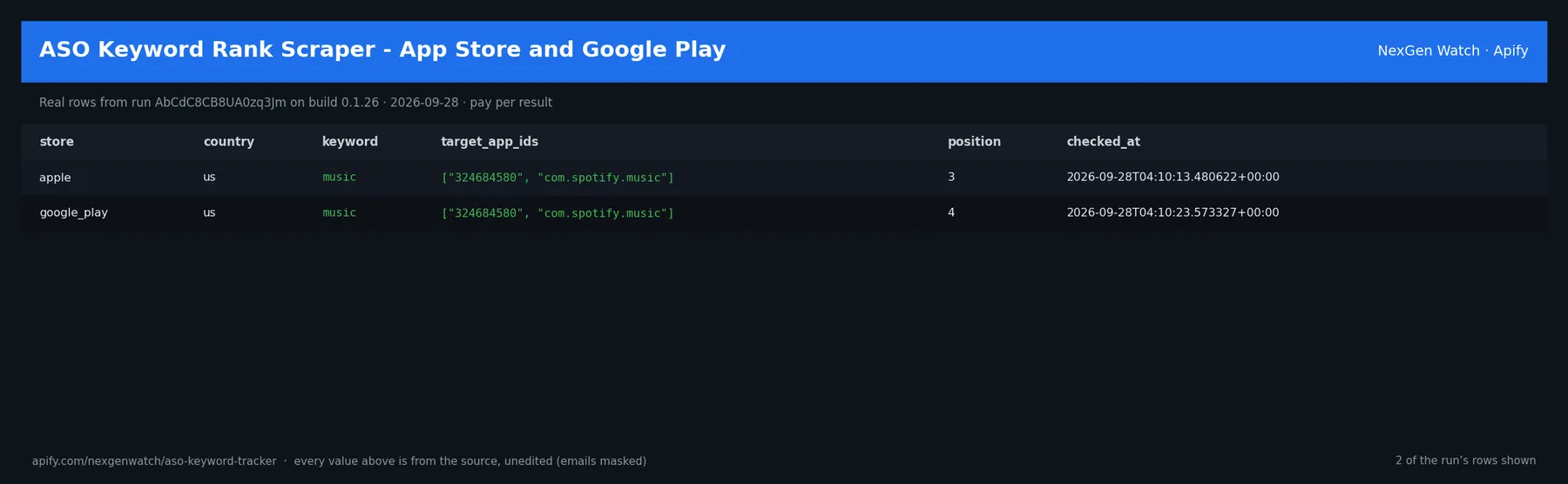
Real rows from run AbCdC8CB8UA0zq3Jm on build 0.1.26 (2026-09-28), the same input as the Quick start below — every value is as the source published it (emails masked, long text shortened):
| store | country | keyword | target_app_ids | position | checked_at |
|---|---|---|---|---|---|
| apple | us | music | ["324684580", "com.spotify.music"] | 3 | 2026-09-28T04:10:13.480622+00:00 |
| google_play | us | music | ["324684580", "com.spotify.music"] | 4 | 2026-09-28T04:10:23.573327+00:00 |
The run finished with the status message: SUCCEEDED: emitted 2 item(s)
✅ What you get
Each row is flat JSON with these fields (from the dataset schema and the sample run; a field the source does not publish for a given row is null):
store(string/null) — Output field: storecountry(string/null) — Output field: countrykeyword(string/null) — Output field: keywordtarget_app_ids(array/null) — Output field: target_app_idsposition(number/null) — Output field: positionsearch_depth(number/null) — Output field: search_depthmatched(boolean/null) — Output field: matchedchecked_at(string/null) — Output field: checked_atprevious_status(object/null) — Output field: previous_status
✅ What you get
✅ What you get
✅ What you get
What you get
- Keyword rank position for your target apps by term, store, and country
- Coverage of both Apple Search and the public Google Play search surface
- Explicit search depth and a
matchedflag so partial-coverage is never hidden - A 9-field record with
previous_statusfor movement tracking - Optional watch mode that emits only position changes on later runs
⚙️ Sample inputs
1. Quick start — the Store example (this is what the sample above came from)
The sample run charged exactly: 1 × $0.02 apify-actor-start + 2 × $0.012 keyword-check + 0 × $0.10 watch-check = $0.044 on the Free tier — every delivered row was billed.
2. Optional watch mode (changes only, for a schedule)
The first run seeds a private baseline and emits zero deltas; every later run emits one row per change, billed at $0.012 each.
🧾 JSON sample record
One real record from run AbCdC8CB8UA0zq3Jm, exactly as it lands in the dataset (emails masked, long text shortened):
🔧 How it works
Source. The actor reads itunes.apple.com, play.google.com — endpoints: https://itunes.apple.com/search, https://play.google.com/store/search. Public pages and feeds only; nothing behind a login.
Transport. Requests go through Apify residential proxy.
Watch semantics. Snapshot mode (watchMode: false) returns a preview. Watch mode keys every record on a source-native id, stores a private baseline in a named key-value store, and on each later run emits one delta row per change (new / changed / removed). A blocked fetch is never diffed, so a source outage cannot show up as a mass removal.
Terminal states. A run ends NORMAL, CAPPED (your cap was reached), PARTIAL (something was withheld and the message says what), GENUINE_EMPTY (the source was read and truly had nothing in scope) or BLOCKED (the source refused or changed shape — the run FAILS loud and bills nothing). A zero-row run is never reported as a silent success.
Charging. Each keyword check is charged at the moment it is pushed (keyword-check); a row that fails to charge is not delivered, so the dataset count always equals the charged count.
🔧 How it works
Transport. Requests go through Apify residential proxy.
🔧 How it works
Transport. Requests go through Apify residential proxy.
🔧 How it works
Transport. Requests go through Apify residential proxy.
How it works
Give it keywords and the target app IDs you care about. It checks each app's position in Apple Search and the public Google Play search surface, to an explicit search depth, and returns the rank with a matched flag. Public search surfaces only — no login or access-control defeating.
Compliance & honest limits
- Public search surfaces only — no login, CAPTCHA, paywall, or access-control defeating.
- Rank is measured to an explicit
search_depth; an app deeper than that returnsmatched: falserather than a guessed position. - A source-confirmed empty result is
SUCCEEDED-0: GENUINE_EMPTY; exhausted retries fail and truncated runs arePARTIAL.
About
Part of the NexGen Watch App Intelligence cluster — the recurring ASO scorecard that closes the loop with metadata and rankings. Questions or need a custom feed? Open an issue on the Actor page.
Preview vs Watch
- Preview (
watchMode: false, the default): every run returns the full current ranking for your keywords. Use it for a one-off snapshot or to see everything at once. Billed onekeyword-checkper delivered record; nowatch-check. - Watch (
watchMode: true): the first run seeds a baseline and emits 0 records (billed onlywatch-check); later runs emit only position changes, each carryingprevious_status. Billed onewatch-checkper run plus onekeyword-checkper changed record. A run with no changes emits 0 and charges nokeyword-check.
What is not done. No login, no cookie or CAPTCHA bypass, no private or personal-account data, no browser automation.
⏰ Optional: run it on a schedule
A single run returns the current records. If you also want to be told what changed over time, open the actor in Apify Console → Schedules → Create new, add this actor with input 3 above (watchMode: true) so each run returns only the changes, and pick a cadence:
- Daily —
0 7 * * *(07:00 UTC): catch changes within a day. - Weekly —
0 7 * * 1: a Monday digest.
Each run is independent; keep the same input on the schedule so the results stay comparable. Schedules can also POST results to a webhook (Console → Integrations).
⏰ Optional: run it on a schedule
A single run returns the current records. If you also want to be told what changed over time, open the actor in Apify Console → Schedules → Create new, add this actor with the watch-mode input above (watchMode: true) so each run returns only the changes, and pick a cadence:
💰 Pricing example
| Event | Free | Bronze | Silver | Gold |
|---|---|---|---|---|
Actor Start (apify-actor-start) | $0.02 | $0.02 | $0.02 | $0.02 |
Keyword check (keyword-check) | $0.012 | $0.0108 | $0.0096 | $0.008 |
Watch check (watch-check) | $0.10 | $0.09 | $0.08 | $0.067 |
Worked at the live Free-tier price (watch mode, one delta per change):
- 2 keyword checks: $0.02 start + 2 × $0.012 = $0.044
- 25 keyword checks: $0.02 start + 25 × $0.012 = $0.32
- 100 keyword checks: $0.02 start + 100 × $0.012 = $1.22
A run that delivers zero rows charges the $0.02 start fee only. A BLOCKED run (source refused) fails loud and charges no value event. The start fee is charged once per GB of run memory; the default run memory is 1024 MB.
Yield on the sample run: SUCCEEDED: emitted 2 item(s).
⚖️ Legal & ToS
This actor reads public, logged-out pages and feeds published by itunes.apple.com, play.google.com. It collects only what the source publishes to any visitor, identifies itself, and does not access accounts, private data or anything behind authentication. Use the output in line with the source's terms and your local law; the intended use is B2B research and monitoring.
❓ FAQ
Q: Do I need an API key or a login?
A: No. The source (itunes.apple.com, play.google.com) is read logged-out; the input schema has no key field and the actor carries no secrets.
Q: Why did my run return 0 rows?
A: Read the run's status message. GENUINE_EMPTY means the source was read and had nothing in scope for your input (in watch mode the first run always seeds the baseline and returns zero deltas); BLOCKED means the source refused and the run failed without billing a value event — retry later or narrow the input. A zero-row run bills the start fee only.
Q: What does watch mode remember between runs?
A: A private baseline of source-native record ids in a named key-value store. Each later run diffs the live source against it and emits only changes.
Q: How fresh is the data?
A: Every run reads the source live at run time; nothing is cached between runs except the watch baseline. Put it on a schedule for a continuous feed.
Q: What formats can I export?
A: The dataset downloads as JSON, CSV, Excel, XML or RSS from the run's Dataset tab or the Apify API, and any run can push to a webhook or integration.
Q: How is this different from the other app store intelligence actors?
A: Same output shape and billing model; this one covers itunes.apple.com, play.google.com. The siblings under Related Actors cover the other sources or slices — run several on one schedule for a combined feed.
Q: Are there rate limits?
A: The actor paces itself against the source; there is no per-buyer limit beyond your Apify plan's concurrency.
🆘 Troubleshooting
- Run FAILED with BLOCKED → the source refused the request or changed its page shape → nothing was billed beyond the start fee; retry after a while, and if it persists open an Issue with the run id.
- Fewer rows than expected → the source had fewer items in scope → widen the input.
- Input validation error on start → a field is outside the schema's allowed values → start from the Quick start block and change one field at a time.
- Run TIMED-OUT → a very wide request on a slow day → raise the run timeout in Run options or narrow the input; what was delivered before the timeout is still in the dataset.
- First watch run shows no deltas → expected: it seeds the baseline; changes appear from the second run.
🔗 Related Actors
- App Store Top Charts Scraper by Country — Scrape App Store top charts by country and category: rank, app, developer and rank movement. Every run returns the current records as a dataset. Opti…
- App Store & Google Play Metadata Scraper — One Schema — Scrape public Apple App Store and Google Play app metadata by app ID — title, developer, description, category, price, rating, rating count, version,…
- Google Play Reviews Scraper — Ratings, Text & Replies — Scrape Google Play reviews for any app by package ID or URL: rating, text, thumbs-up, version, date and the developer's reply. Filter by star rating,…
- Apple App Store Reviews Scraper — Ratings, Text & Dates — Scrape Apple App Store reviews for any app by ID or URL: rating, title, text, version, date and the developer's reply. Filter by star rating, review-…
- 🏢 About NexGen Watch — NexGen Watch is a catalog of more than 300 public data actors built on official sources, pay-per-result. Browse the catalog at apify.com/nexgenwatch.
⭐ Found this useful?
If this actor saved you a manual check, a quick review on the Apify Store helps other teams find it. Feature request or a source that changed? Open it from the Issues tab — every one is read.


