
CMS CLIA Laboratory Registry
Pricing
from $13.40 / 1,000 registry records
CMS CLIA Laboratory Registry
One clia_lab_record per CLIA-certified laboratory: CLIA number, facility name, full address, certification date, termination status, and lab classification, read from the official CMS dataset API (10-second crawl-delay honoured).
Pricing
from $13.40 / 1,000 registry records
Rating
0.0
(0)
Developer
NexGen Watch
Maintained by CommunityActor stats
0
Bookmarked
2
Total users
1
Monthly active users
6 days ago
Last modified
Categories
Share
🔔 CMS CLIA Laboratory Registry
One clia_lab_record per CLIA-certified laboratory: CLIA number, facility name, full address, certification date, termination status, and lab classification, read from the official CMS dataset API (10-second crawl-delay honoured).
One structured registry_record per record from the CMS Provider of Services File - Clinical Laboratories dataset (data.cms.gov data-api, ~681,000 rows). Public, logged-out, robots-honoured.
Output is one clia_lab_record row per result; billing is pay-per-event, the value event being one registry record (a $0.02 start fee per run, then $0.02 per registry record).
No login, no API key and no CAPTCHA solving are involved: the source is read logged-out with an identified contact User-Agent.
Who buys this
Buyers usually search for CLIA labs or CLIA laboratory database.
- Healthcare, education and food-industry vendors prospecting from CLIA labs.
- Analysts and researchers comparing providers with CLIA laboratory database.
- Compliance and quality teams checking a provider's official record.
📊 Sample Output
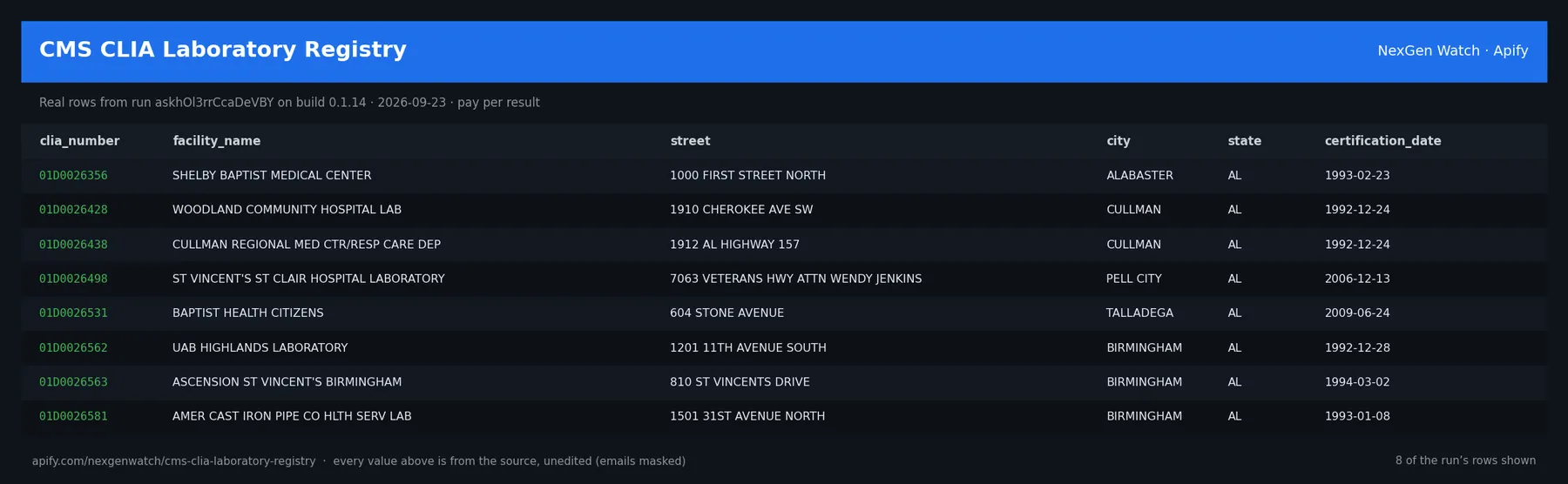
Real rows from run askhOl3rrCcaDeVBY on build 0.1.14 (2026-09-23), the same input as the Quick start below — every value is as the source published it (emails masked, long text shortened):
| clia_number | facility_name | street | city | state | certification_date |
|---|---|---|---|---|---|
| 01D0026356 | SHELBY BAPTIST MEDICAL CENTER | 1000 FIRST STREET NORTH | ALABASTER | AL | 1993-02-23 |
| 01D0026428 | WOODLAND COMMUNITY HOSPITAL LAB | 1910 CHEROKEE AVE SW | CULLMAN | AL | 1992-12-24 |
| 01D0026438 | CULLMAN REGIONAL MED CTR/RESP CARE DEP | 1912 AL HIGHWAY 157 | CULLMAN | AL | 1992-12-24 |
| 01D0026498 | ST VINCENT'S ST CLAIR HOSPITAL LABORATORY | 7063 VETERANS HWY ATTN WENDY JENKINS | PELL CITY | AL | 2006-12-13 |
| 01D0026531 | BAPTIST HEALTH CITIZENS | 604 STONE AVENUE | TALLADEGA | AL | 2009-06-24 |
| 01D0026562 | UAB HIGHLANDS LABORATORY | 1201 11TH AVENUE SOUTH | BIRMINGHAM | AL | 1992-12-28 |
| 01D0026563 | ASCENSION ST VINCENT'S BIRMINGHAM | 810 ST VINCENTS DRIVE | BIRMINGHAM | AL | 1994-03-02 |
| 01D0026581 | AMER CAST IRON PIPE CO HLTH SERV LAB | 1501 31ST AVENUE NORTH | BIRMINGHAM | AL | 1993-01-08 |
The run finished with the status message: CAPPED: delivered 50 of 51 unique rows (maxRecords=50). billable=50
✅ What you get
Each row is flat JSON with these fields (from the dataset schema and the sample run; a field the source does not publish for a given row is null):
record_type(string) — e.g.clia_lab_recordclia_number(string/null) — e.g.01D0026356facility_name(string/null) — e.g.SHELBY BAPTIST MEDICAL CENTERstreet(string/null) — e.g.1000 FIRST STREET NORTHcity(string/null) — e.g.ALABASTERstate(string/null) — e.g.ALzip(string/null) — e.g.35007certification_date(string/null) — e.g.1993-02-23termination_code(string/null) — e.g.00lab_classification_code(string/null) — e.g.00provider_category_code(string/null) — e.g.22source(string/null) — e.g.cms-clia-laboratory-registryrelease_date(string/null) — null in every sample rowsource_url(string/null) — e.g.https://data.cms.gov/data-api/v1/dataset/d3eb38ac-d8e9-40d3-b7b7-6205d3d1dc16/daobserved_at(string/null) — e.g.2026-09-23T16:25:41Zterminal(string/integer/null) — null in every sample rowreported_total(string/integer/null) — null in every sample rowraw_seen(string/integer/null) — null in every sample rowduplicates(string/integer/null) — null in every sample rowunique_found(string/integer/null) — null in every sample rowdelivered(string/integer/null) — null in every sample rowscope(string/integer/null) — null in every sample rownote(string/integer/null) — null in every sample row
✅ What you get
record_type(string) — e.g.clia_lab_recordclia_number(string/null) — e.g.01D0026356facility_name(string/null) — e.g.SHELBY BAPTIST MEDICAL CENTERstreet(string/null) — e.g.1000 FIRST STREET NORTHcity(string/null) — e.g.ALABASTERstate(string/null) — e.g.ALzip(string/null) — e.g.35007certification_date(string/null) — e.g.1993-02-23termination_code(string/null) — e.g.00lab_classification_code(string/null) — e.g.00provider_category_code(string/null) — e.g.22source(string/null) — e.g.cms-clia-laboratory-registryrelease_date(string/null) — null in every sample rowsource_url(string/null) — e.g.https://data.cms.gov/data-api/v1/dataset/d3eb38ac-d8e9-40d3-b7b7-6205d3d1dc16/daobserved_at(string/null) — e.g.2026-09-18T05:50:42Zterminal(string/integer/null) — null in every sample rowreported_total(string/integer/null) — null in every sample rowraw_seen(string/integer/null) — null in every sample rowduplicates(string/integer/null) — null in every sample rowunique_found(string/integer/null) — null in every sample rowdelivered(string/integer/null) — null in every sample rowscope(string/integer/null) — null in every sample rownote(string/integer/null) — null in every sample row
What you get
One registry_record per entity, deduplicated on the source-native id. Fields the source does not publish for a row are honest null. A run_receipt row carries the source URL, any reported total, and the delivered/duplicate counts.
⚙️ Sample inputs
1. Quick start — the Store example (this is what the sample above came from)
The sample run charged exactly: 1 × $0.02 apify-actor-start + 50 × $0.02 registry_record = $1.02 on the Free tier — every delivered row was billed.
If you leave maxRecords out, the run delivers at most 50 rows (the schema default); pass a number up to 1000000 for a bigger export. An explicit value is always honoured up to that maximum.
2. A smaller, narrowed run
Caps the run at 5 rows — about $0.12 on the Free tier ($0.02 start + 5 × $0.02).
3. A full-size run
Up to 5000 rows — about $100.02 on the Free tier ($0.02 start + 5000 × $0.02) if the source has that many; maxRecords goes up to 1000000.
4. A filtered run
CLIA laboratories in Washington whose name contains QUEST (the CMS data API filters before paging); the source applies this filter before paging and before the maxRecords cap, so a match deep in the dataset is found, the reconciled count is the matched count, and only delivered matches are billed. A confirmed no-match ends EMPTY_SELECTION with nothing charged.
🧾 JSON sample record
One real record from run askhOl3rrCcaDeVBY, exactly as it lands in the dataset (emails masked, long text shortened):
🔧 How it works
Transport. Plain HTTPS from the Apify platform, no proxy. robots.txt is read first and a disallowed path is never fetched. Every request carries an identified contact User-Agent. Pacing: CRAWL_DELAY=10.0.
Charging. Each registry record is charged at the moment it is pushed (registry_record); a row that fails to charge is not delivered, so the dataset count always equals the charged count.
🔧 How it works
How it behaves
The dataset is ~681,000 rows. Runs page size/offset and stream each page; the crawl-delay is honoured. Bound the run with maxRecords. maxRecords caps the count. Duplicates, outages, and schema drift charge nothing.
What is not done. No login, no cookie or CAPTCHA bypass, no private or personal-account data, no browser automation.
💰 Pricing example
| Event | Free | Bronze | Silver | Gold |
|---|---|---|---|---|
Actor Start (apify-actor-start) | $0.02 | $0.02 | $0.02 | $0.02 |
Registry Record (registry_record) | $0.02 | $0.018 | $0.016 | $0.0134 |
Worked at the live Free-tier price:
- 8 registry records: $0.02 start + 8 × $0.02 = $0.18
- 25 registry records: $0.02 start + 25 × $0.02 = $0.52
- 50 registry records: $0.02 start + 50 × $0.02 = $1.02
A run that delivers zero rows charges the $0.02 start fee only. A BLOCKED run (source refused) fails loud and charges no value event. The start fee is charged once per GB of run memory; the default run memory is 4096 MB.
Yield on the sample run: CAPPED: delivered 50 of 51 unique rows (maxRecords=50). billable=50. maxRecords is a hard ceiling on what is delivered and billed, never a target.
⚖️ Legal & ToS
This actor reads public data only. It collects only what the source publishes to any visitor, keeps to the source's robots rules (checked on every run), identifies itself with a contact User-Agent, and does not access accounts, private data or anything behind authentication. Use the output in line with the source's terms and your local law; the intended use is B2B research and monitoring.
❓ FAQ
Q: Do I need an API key or a login?
A: No. the input schema has no key field and the actor carries no secrets.
Q: Why did my run return 0 rows?
A: Read the run's status message. GENUINE_EMPTY means the source was read and had nothing in scope for your input; BLOCKED means the source refused and the run failed without billing a value event — retry later or narrow the input. A zero-row run bills the start fee only.
Q: How many rows can one run return?
A: Up to maxRecords (default 50). Raise the cap for a bigger run; you pay per delivered row.
Q: How fresh is the data?
A: Every run reads the source live at run time; nothing is cached between runs. Put it on a schedule for a continuous feed.
Q: What formats can I export?
A: The dataset downloads as JSON, CSV, Excel, XML or RSS from the run's Dataset tab or the Apify API, and any run can push to a webhook or integration.
Q: How is this different from the other NexGen Watch actors actors?
A: Same output shape and billing model; this one covers CMS CLIA Laboratory Registry. The siblings under Related Actors cover the other sources or slices — run several on one schedule for a combined feed.
Q: Are there rate limits?
A: The actor paces itself against the source (CRAWL_DELAY=10.0) and honours its robots rules; there is no per-buyer limit beyond your Apify plan's concurrency.
🆘 Troubleshooting
- Run FAILED with BLOCKED → the source refused the request or changed its page shape → nothing was billed beyond the start fee; retry after a while, and if it persists open an Issue with the run id.
- Status says CAPPED → your cap (
maxRecords) was reached → raise it for a bigger run. - Input validation error on start → a field is outside the schema's allowed values → start from the Quick start block and change one field at a time.
- Run TIMED-OUT → a very wide request on a slow day → raise the run timeout in Run options or narrow the input; what was delivered before the timeout is still in the dataset.
🔗 Related Actors
- Chicago Business Licenses — One record per Chicago business-licence record (type, status, dates, address, business activity, legal + DBA name) from the keyless Chicago Socrata r…
- Chicago Business Owners Register — One record per Chicago business owner/officer statutory-register row (account, DBA name, owner name parts, title) from the City's public Business Own…
- CMS Article Response-to-Comment Ledger — One structured record per filed public comment-and-response on a CMS Article — the article id and version, the response-to-comment number, the (HTML-…
- CMS Coverage Related-Document Graph — One structured edge per filed related-document link between coverage policies in the official CMS Medicare Coverage Database — the source policy (LCD…
- CMS Dialysis Facilities Scraper — A clean, structured roster of Medicare-certified dialysis facilities in the United States, sourced live from the official CMS provider-data API (http…
- CMS HCPCS Coverage Policy Index — One structured policy_code_link per HCPCS code ↔ coverage-policy relation — across BOTH Local Coverage Determinations and Articles in the official CM…
- 🏢 About NexGen Watch — NexGen Watch is a catalog of more than 300 public data actors built on official sources, pay-per-result. Browse the catalog at apify.com/nexgenwatch.
⭐ Found this useful?
If this actor saved you a manual check, a quick review on the Apify Store helps other teams find it. Feature request or a source that changed? Open it from the Issues tab — every one is read.


