

Bulk Phone Number Normalizer — E.164, Country, Line Type
Pricing
from $0.80 / 1,000 number checkeds
Bulk Phone Number Normalizer — E.164, Country, Line Type
Clean messy phone lists in seconds. Standardize to E.164, international and national formats, with country, line type, duplicates and Excel damage flagged. $0.80 per 1,000 numbers. Offline, instant.
Pricing
from $0.80 / 1,000 number checkeds
Rating
0.0
(0)
Developer

NEZU SAS
Maintained by CommunityActor stats
0
Bookmarked
2
Total users
1
Monthly active users
6 days ago
Last modified
Features
Share
Messy phone lists? Clean them in seconds. Paste your numbers (or point to a CSV) and get every one in a clean, importable format: E.164, international and national, plus its country and line type — with duplicates and spreadsheet damage flagged. No lookups, no scraping, no personal data collected by us (your numbers stay in your own Apify storage under your retention settings): pure, instant offline validation.
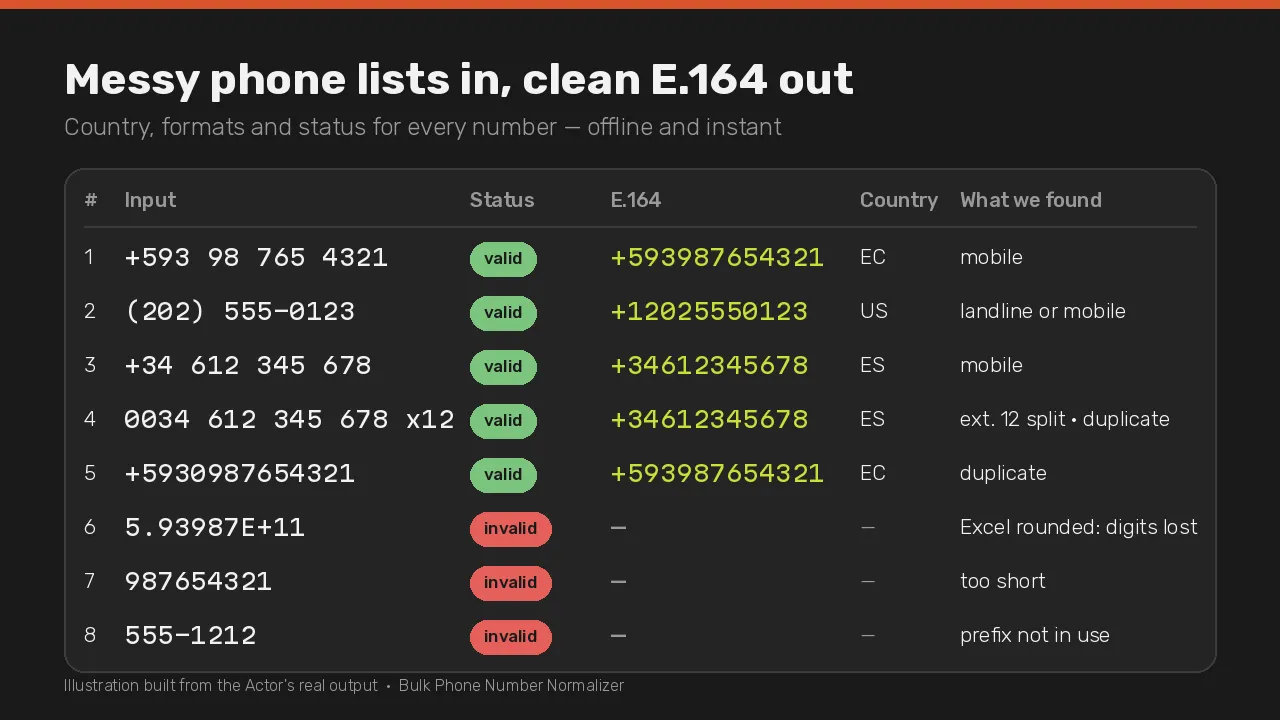
| What you have | What you get |
|---|---|
+593 98 765 4321 | +593987654321 ✅ mobile · Ecuador |
0034 612 345 678 x12 | +34612345678 ✅ mobile · Spain · extension 12 kept apart |
+5930987654321 (extra trunk zero) | +593987654321 ✅ normalized |
(202) 555-0123 with default country US | +12025550123 ✅ US number |
5.93987E+11 (rounded by Excel) | ❌ clearly flagged: the digits are gone, export the column as text |
987654321 with no country | ⚠️ missing_country_code — set a default country |
Why you'll like it
- ⏱️ Fast: about 100,000 numbers in 15 seconds in our tests. A typical list finishes in 2–3 seconds.
- 📞 Every format you need: E.164 (the one to store and import), international and national, RFC 3966.
- 🌍 Country and line type: mobile, fixed line, toll free, premium rate, VoIP and more, for numbers from around the world.
- 🧹 Understands messy input: spaces, dashes, dots, parentheses, a leading
00, extensions (x123,ext. 123), a stray trunk zero after the country code, and spreadsheet scientific notation. - 🔁 Finds duplicates even when the same number is written five different ways.
- 🧾 Ready to import: a
normalized_numbers.csvwith the final E.164 number for each row. The E.164 column starts with+: in Excel use Data › From Text/CSV and set the column to Text so it is not converted. - 🔒 Private by design: your numbers are processed inside the run. The only network access is downloading your CSV if you give a
fileUrl.
What it does for each number
- Cleans spaces, punctuation, quotes, trailing
.0and Excel scientific notation; splits extensions. - Parses it using your default country when the number has no country code.
- Validates length and the allocated numbering plan of the country.
- Formats it: E.164, international, national, RFC 3966.
- Describes it: country calling code, region code, line type, geographic location and time zones.
- Suggests fixes with an honest confidence level (a missing
+, an extra trunk zero). - Finds duplicates by the normalized number.
Perfect for
- 📇 Cleaning CRM and lead lists before import or outreach
- 🛒 Standardizing customer and supplier phone columns in store or ERP exports
- 📲 Preparing numbers in the international format that messaging and calling tools expect
- 🔗 Adding a phone check to any automation (Make, Zapier, n8n, Google Sheets, your own code)
Input
| Field | What it is |
|---|---|
numbers | List of phone numbers, exactly as they come from your sheet. |
defaultCountry | Two-letter country code for numbers without a country code (for example EC, US, ES, GB, MX). |
fileUrl | Optional public https URL of a CSV. The phone column is detected automatically (phone, tel, mobile, celular, whatsapp…). |
column | Optional exact header of the phone column. |
includeOriginalCarrier | Add the carrier that originally received the number range (see the note on portability below). |
includeSuggestions | Add the list of suggested fixes (default on). |
onlyProblems | Return only invalid, empty and duplicated numbers. |
maxNumbers | Safety limit (default 100,000, up to 1,000,000). |
Example:
Output
One dataset row per number, plus two records in the key-value store: SUMMARY (counts of valid, fixable, invalid, empty and duplicated numbers, by line type and country) and normalized_numbers.csv.
A row looks like this:
Main fields: status (valid, corrected, needs_review, invalid, empty), e164, international, national, countryCallingCode, regionCode, type, location, timezones, extension, issues, bestFix, suggestions, notes.
Use it from code
Every field is documented in the Actor's output schema, so AI agents (through the Apify API or MCP server) can use the results without guessing.
Pricing
Pay per event: $0.80 per 1,000 numbers checked ($0.0008 per number), plus a tiny start fee of $0.00005 per run (Apify covers the compute of the first 5 seconds).
- Empty rows (including
-,N/A,#N/A) are free. Every other number checked is charged, even whenonlyProblemshides the valid ones from the dataset. A run that stops at your maximum cost keeps only what was charged. The small start fee applies to every run. - 10,000 numbers = $8. 100 numbers = $0.08.
- You can set a maximum cost per run; the Actor stops cleanly when it is reached and marks the result as
partial.
FAQ
How do I convert phone numbers to E.164 in bulk? Paste them in numbers (or give a CSV in fileUrl) and set defaultCountry for numbers written without a country code. Every row comes back with its e164 value.
Does it tell me if a number is active or who owns it? No. It checks format, length and the numbering plan only. It never contacts operators or messaging apps.
Why is the carrier "original"? Carrier names come from the number-range allocation. Because of number portability, a number may have moved to another carrier, so treat it as a hint.
Excel changed my numbers to 5.9E+11. Can you recover them? If Excel kept all the digits, yes. If it rounded them, the digits are gone: export the column as text and run again.
Which countries are supported? All the countries and territories in the public numbering-plan data the Actor uses (more than 240 regions).
Is my data stored or sent anywhere? Numbers are processed inside the run. The only network access is downloading your CSV when you set fileUrl.
Limits
Format, length and numbering-plan validation only. Numbering plans change; the underlying open-source data is updated regularly and may lag behind very recent allocations.
Support
Found a bug or need another format? Open an issue on the Actor page: reports are answered quickly.


