

Company Job Changes Monitor for Greenhouse & Lever
Pricing
from $1.20 / 1,000 job changes
Company Job Changes Monitor for Greenhouse & Lever
Track open jobs at the companies you choose on Greenhouse and Lever. Each run flags every job as new, changed, unchanged or closed since your last run. Reads the companies' public job-board APIs at run time. Optional descriptions, salary where stated, JSON/CSV. From $2.00 per 1,000 jobs.
Pricing
from $1.20 / 1,000 job changes
Rating
0.0
(0)
Developer

Omar Shalaby
Maintained by CommunityActor stats
0
Bookmarked
2
Total users
1
Monthly active users
2 days ago
Last modified
Categories
Features
Share
Not affiliated with, endorsed or sponsored by Greenhouse, Lever or LinkedIn; names used only to describe compatibility.
Track new, changed and closed jobs at a list of companies. Company Job Changes Monitor is a job change monitor for Greenhouse and Lever boards and for LinkedIn company pages: give it the companies you choose, and each run tells you what changed since your last run.
| change | company | title | location | changedFields | url |
|---|---|---|---|---|---|
new | Example Co | Account Executive, Gulf | Dubai | https://boards.greenhouse.io/exampleco/jobs/100201 | |
changed | Example Co | Data Engineer | Berlin | ["location"] | https://boards.greenhouse.io/exampleco/jobs/100117 |
closed | Sample Works | Finance Analyst | https://jobs.lever.co/sampleworks/0a1b2c3d |
Sample data, not real postings.
It suits:
- recruiting and sourcing teams watching target companies;
- sales teams using new roles as a buying signal;
- job seekers tracking a shortlist of employers;
- niche job boards and newsletters;
- investors and analysts following hiring at a set of companies.
What does Company Job Changes Monitor do?
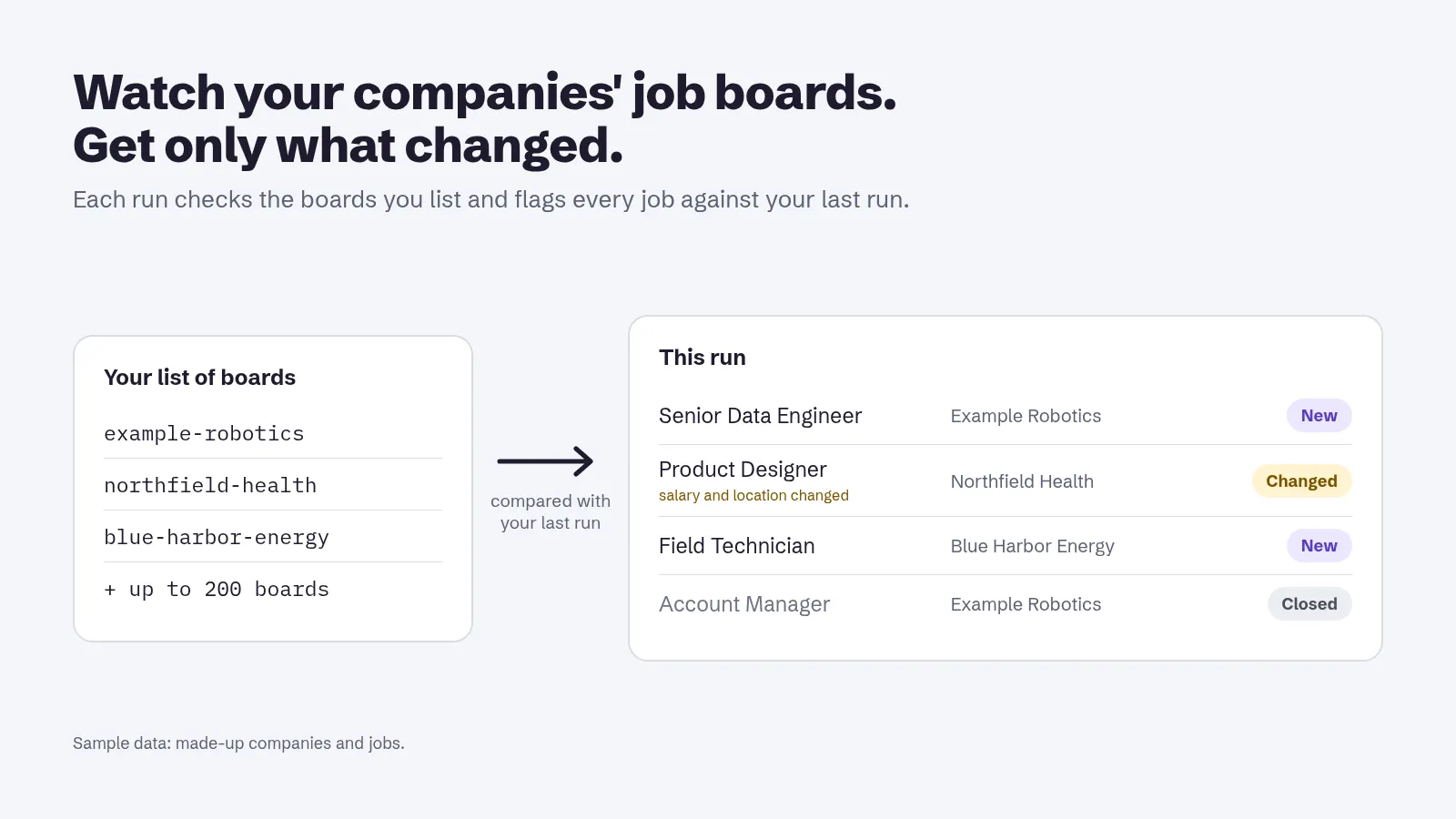
Company Job Changes Monitor watches the job boards of the companies you choose and tells you what changed since your last run. Give it a list of company boards hosted on Greenhouse or Lever, or LinkedIn company pages. Each run returns their open jobs, each one flagged new, changed or unchanged, plus the jobs that have closed.
- Reads the public job-board APIs of the companies you list, live at run time, with no login or browser. LinkedIn company jobs are read logged out through Apify residential proxy (see below).
- Compares each company's jobs with your previous run and flags every job as
new,changed(with the fields that changed),unchangedorclosed. - Returns title, location, department, team, workplace type, salary where the company states it, links and, if you want it, the job description.
- Removes email addresses and phone numbers from job text. Returns no recruiter or hiring-manager details.
- Reads only the companies you name. It is not a database of jobs and keeps no archive of other customers' searches.
Why use a job change monitor instead of a full job list every day?
A scheduled run that returns every open job every day buries the few that matter. This Actor keeps a small fingerprint of each job between runs, so you can return only what is new, changed or closed. After the first run, unchanged jobs are free: you pay for the jobs that are new, changed or closed, plus a small fee per board read.
Which companies can I track on Greenhouse and Lever boards?
Any company whose careers page runs on a Greenhouse or Lever job board. Add each one as a board URL or a short form:
| Board | URL form | Short form |
|---|---|---|
| Greenhouse | https://boards.greenhouse.io/examplecompany | greenhouse:examplecompany |
| Lever | https://jobs.lever.co/examplecompany | lever:examplecompany |
| Lever (EU) | https://jobs.eu.lever.co/examplecompany | lever-eu:examplecompany |
https://www.linkedin.com/company/examplecompany | linkedin:examplecompany |
Up to 200 companies per run. Other job-board systems are not supported yet.
Not affiliated with, endorsed or sponsored by Greenhouse or Lever; names used only to describe compatibility.
Track a company's job posts on LinkedIn
- Input: add a LinkedIn company page, for example
https://www.linkedin.com/company/<name>, to the boards list. - How jobs are matched: by LinkedIn company ID. The tool reads the company's public page once to learn its numeric company ID, then lists the jobs LinkedIn shows for that ID. As a check, it keeps only jobs whose company name matches the company's own name.
- What you get: title, location, posted date and the job link. For new jobs only, it also gets the description (with emails and phone numbers removed), employment type and job function. A LinkedIn job counts as changed when its title or location changes.
- People never: the tool reads job fields only. It never reads or returns poster, recruiter or hiring-team details, profiles or "people also viewed".
- How it reads LinkedIn: logged out, through Apify residential proxy chosen before the run, with at least 2.5 s between requests and a cap per run.
- If LinkedIn refuses: if LinkedIn shows a login page, a challenge or a refusal (HTTP 403, 429 or 999), the run stops all LinkedIn requests at once. Greenhouse and Lever boards are still read. LinkedIn companies not read are reported and not charged.
- Coverage: LinkedIn's public listing may not show every job a company has posted.
Hiring signals for sales target accounts
A new role at a target account is a buying signal: a first data hire, a new regional sales team, a security lead. Put your target accounts' job boards in one watch list, schedule a weekly run, and send the new and changed jobs to your CRM or a sheet. Turn off Include job descriptions to get metadata only: title, location, team, salary where stated, dates and links. The results describe jobs, not people: there are no recruiter or hiring-manager details to export.
Closed job postings since last run
When a job that was on a company's board at your last run is no longer listed, the Actor reports it as closed: the role was closed or removed. A closed job comes back once, with its title, link and dates, and is then dropped. A company whose board could not be read, or that has more jobs than your cap, never has its jobs marked closed in that run. If a board that had jobs at your last run suddenly lists none, that answer is treated as a failed read for up to 3 runs in a row (free, and listed in the run summary); only if it is still empty on the 4th run are its jobs reported closed.
What data do I get?
One row per job. Export as JSON, CSV, Excel or through the Apify API.
| Field | Meaning |
|---|---|
change | new, changed, unchanged or closed since your last run (untracked if tracking is off) |
changedFields | For changed jobs: which fields changed, e.g. ["location", "salary"] |
company, source, board | Who posted it and on which board |
jobId, title, url, applyUrl | The job and its public links |
location, allLocations, department, team, commitment, workplaceType, country | As the company lists them |
salary | Currency, interval, minimum and maximum, where the company states it (Lever boards) |
description | The job text as published, with emails and phone numbers replaced by [removed] |
firstSeenAt, lastSeenAt, fetchedAt | When this Actor first and last saw the job |
Each run also writes a summary to the OUTPUT record of its key-value store: per company, whether the board was read, the counts per flag, and any error.
What if nothing changed, or a board cannot be read?
- Nothing changed. When the boards were read and there is no new, changed or closed job to report, the run succeeds and writes one free row with
changeset tono-changes. Itstitlesays how many boards were read and how many jobs are unchanged. It is never charged. If you send rows to a sheet or a chat channel, filter outno-changesor use it as a sign that the check ran. - Some boards could not be read. A request that gets no answer, times out or meets a server error (HTTP 5xx) is retried once after a short pause; a refusal is never retried. The run succeeds with the boards it could read. The summary lists each board that failed, with the reason. No board fee is charged for a board that failed.
- The spending limit stopped the run. If your limit is reached before any job could be delivered, the run writes one free row with
changeset tospending-limit. Anything not delivered is reported on the next run. - No board could be read. The run ends as failed, and its status message gives the reason for each board, for example a board name that does not exist. No board or job fees are charged for that run. Check the board names and run it again.
How much does it cost?
This Actor uses pay-per-event pricing. You pay for:
| What | Price |
|---|---|
| Each new, changed or closed job | $2.00 per 1,000 jobs ($1.60 on Apify's Silver plan, $1.20 on Gold and above) |
| Each company board read | $0.20 per 1,000 boards (one per company per run) |
| Each LinkedIn company read | $30.00 per 1,000 LinkedIn companies (one per LinkedIn company per run, instead of the board fee) |
| Each run start | $0.05 per 1,000 runs (Apify's standard start fee) |
Unchanged jobs are free. The first run for a company counts every job as new, so it costs the most.
Example: you watch 20 companies with 4,000 open jobs between them. The first run costs about $8.00. On later runs unchanged jobs are free: if 100 jobs are new, changed or closed since the last run, that run costs about $0.20, plus $0.004 for reading the 20 boards.
You can set a spending limit on any run. The Actor stops cleanly when it reaches it, and anything it could not deliver is reported on the next run.
How to track jobs at a list of companies
- Add your companies to Company job boards.
- Leave Track changes between runs on and give the watch list a name if you keep more than one.
- Run it once. Every job comes back as
new. - Save the setup as a task and give it a schedule, for example every weekday morning.
- By default later runs return only new, changed and closed jobs. Set Which jobs to return to All open jobs if you want the full list each time.
- Send the results where you work through Apify's integrations: Google Sheets, Slack, Make, n8n, Zapier or a webhook.
How to schedule job tracking and send changes to Sheets or Slack
These short videos from Apify show how to schedule an Actor (1 min) and connect it to other apps (2 min).
Input example
The boards prefilled in the input form are public job boards chosen only as examples. Those companies have no connection with this Actor.
Output example
Sample data, not a real posting.
What is stored between runs?
With tracking on, the Actor keeps a key-value store named job-feed-state-<watch list name> in your Apify account. For each job it holds only the job ID, title, public link, a fingerprint of the tracked fields and the dates it was seen. It never stores descriptions or salary text. Closed jobs are removed after they are reported, and nothing is kept longer than 30 days without being seen again. Companies you remove from your list are removed from the store on the next run. You can delete the store at any time; the next run then starts fresh. Nothing is sent to the Actor's developer.
Is it legal to read public job postings?
This Actor reads job postings that companies publish on public job-board APIs, without a login and at no more than one request a second per service. It returns the text as published, with each company's name and link, and removes email addresses and phone numbers. You are responsible for how you use the results; by adding a company you confirm you may use its public postings for your purpose. Do not use the results to train AI models.
FAQ and support
How is this different from job databases? It reads only the companies you name, live at run time, and tells you what changed since your last run.
Why did a company return an error? The board name may be wrong, or the company may have moved to another system. The run summary shows the HTTP status. A failed company never has its jobs marked closed.
I am an employer and want my board excluded. Open an issue on this Actor's Issues tab. Excluded boards are skipped for every customer.
Something else? Use the Issues tab.
More from this developer
- AI Overview Brand Tracker: checks whether your brand is named in the AI Overview shown for the searches you list.
- Bulk Google Trends Scraper: Google Trends data for many keywords in one run.
- Subreddit Monitor: a daily digest of new posts and comments from the subreddits you pick, with no repeats between runs.
- Video Transcriber: turns public short videos into text with timestamps, in English, Arabic and other languages.
- Maps Business Listings: business listings from a map search, in English or Arabic, with a change monitor.
- Social Keyword Monitor: new public posts for your keywords since your last run.


