

Accela Citizen Access & EnerGov Permit Scraper (Any City)
Pricing
from $3.00 / 1,000 permit record scrapeds
Accela Citizen Access & EnerGov Permit Scraper (Any City)
Scrape building permits from US cities and counties on Accela Citizen Access or Tyler EnerGov Citizen Self Service portals: permit type, status, dates, valuation, address, contractor. Normalized JSON, daily new-permit monitor with webhooks. No login, no proxies. $0.003/permit.
Pricing
from $3.00 / 1,000 permit record scrapeds
Rating
0.0
(0)
Developer

Owlabee
Maintained by CommunityActor stats
0
Bookmarked
1
Total users
1
Monthly active users
4 days ago
Last modified
Categories
Features
Share
Accela Citizen Access permit scraper that also reads Tyler EnerGov Citizen Self Service portals: pick a US city or county portal and a date window and get one normalized JSON record per building permit (type, status, dates, valuation, address, contractor). Monitor mode returns only the permits not seen on the previous run, so a daily schedule plus a webhook is a new-permit feed. No login, no proxies.
What it does
Scrape building permits from US cities and counties that publish nothing on an open-data portal and run Accela Citizen Access (ACA) or Tyler EnerGov Citizen Self Service (CSS) instead. The Actor talks to the same public search the portal's web page uses (EnerGov's JSON search API, ACA's General Search page), paginates newest-first, and writes every permit in one normalized JSON schema: permit number, type and work class, status, applied / issued / finalized / expiration dates, address, parcel, valuation, contractor, owner and applicant. The schema is the same as our US Building Permits Scraper (26 open-data cities), so records from both Actors are interchangeable in one pipeline.
Built for contractor lead generation (roofing, solar, HVAC, pools, remodels) and for real-estate, proptech, property-data and catastrophe-modeling teams that work at portfolio level. Monitor mode flags only the permits not seen on the previous run, so a daily schedule plus a webhook is a new-permit feed for any of the 46 verified jurisdictions (21 EnerGov, 25 Accela) below. No login, no proxies, no CAPTCHA solving, no browser. Results are available as JSON, CSV, Excel, through the API, webhooks and MCP.
Roofing lead lists: most EnerGov and Accela portals file re-roofs under their own permit type ("Residential Reroof", "Roof Trade Permit", "Re-Roofs (BRR)"), so permitTypes: ["roof"] or ["reroof", "re-roof"] with Fetch permit details on returns the week's re-roof permits with contractor names; see the Hernando County and Tampa task examples.
Unofficial: not affiliated with Accela, Inc. or Tyler Technologies, Inc.
Why this Actor
| This Actor | Typical Accela scraper | Do it yourself | |
|---|---|---|---|
| Portal families covered | Accela Citizen Access and Tyler EnerGov Citizen Self Service in one input; the only Actor on the Store that reads EnerGov portals | Accela Citizen Access only | One client per vendor, and each EnerGov release differs |
| Jurisdictions | 46 verified portals (21 EnerGov, 25 Accela) with ids, date semantics and weekly volume listed below; all-latest group shortcuts, plus fixed all groups that keep a saved input's portals unchanged | You supply the agency code and find out whether it works | Reverse-engineering each portal, then keeping up with its updates |
| Modes | One-off export with date, type, keyword and valuation filters, and monitor mode that emits only permits not seen before, flagged isNew: true | Export with a date range; change tracking is sometimes a separate flag | Your own seen-set per portal |
| Output fields | One normalized record for both vendors, the same schema as our US Building Permits Scraper: permit number, type and work class, status, four dates, address, parcel, valuation, contractor and license, owner, applicant, source link; optional raw row | Grid columns, often without valuation or contractor unless a detail pass is on | Whatever you map per portal |
| Failure behavior | A portal that delivers nothing for 60 seconds is abandoned; it becomes one charged error item with a code (CAPTCHA, TIME_BUDGET, HTTP_503...) and the rest of the run continues | Often a failed or silently short run | Timeouts and retries are yours to write |
| Proxies or browsers needed | None: plain HTTP from datacenter IPs, no login, no CAPTCHA solving | Often a browser or proxies | None for the public pages |
| Pricing unit | Per permit, per detail record, per results page downloaded and per portal queried; every unit is a visible event | Per permit record | Your time plus compute |
| Agent / MCP ready | Yes: pay-per-event, limited permissions, pin link, prompts and a call example below | Sometimes | You write and host the tool definition |
- Accela and EnerGov together. A city on EnerGov and a county on Accela go in the same
jurisdictionslist and come back in one schema, so a lead list or a monitor does not care which vendor a portal runs. - A dead portal costs about a minute. Each portal has a time budget and a 60 second idle limit; a stalled or blocking portal is cut off, the permits already collected are kept, and the failure is one charged error item instead of an hour of compute.
- Honest work-based billing. Every results page downloaded counts, including pages whose rows are all filtered out, because the page is the work. The
SUMMARYrecord lists pages, requests, megabytes and charges per jurisdiction. - A feed, not just an export. Schedule monitor mode daily with a webhook and only new permits arrive; details are fetched, and charged, only for those.
- Checked every day. The quick-start input below is the Store's daily automated test against two live portals, so a portal change shows up the same day.
How to use
- Pick one or more Jurisdictions (or a group such as
all-latest) and the Issued within (days) window. - Optionally filter by Permit type keywords, Work description keyword or Minimum valuation, turn on Fetch permit details for contractor, owner, valuation and parcel, and set Max permits per jurisdiction together with the run's maximum cost.
- Click Start. For a feed, schedule the run daily with Only new permits since last run on and a Webhook URL; the first run is the baseline.
Quick start input
The same input the Store runs in its daily automated test, so it is cheap and always available; paste it into the JSON tab of the input form or send it as the body of an API or MCP call:
Ready-to-run inputs
Three inputs you can paste as they are; each validates against the input schema.
Weekly re-roof lead list for two Florida portals, with contractor names (Hernando County is EnerGov, Tampa is Accela; permit details on)
Daily monitor: new permits in three portals, POSTed to a webhook (schedule daily; the first run is the baseline)
Larger projects in Richmond and Riverside County over the last 30 days (valuation needs permit details on)
Input
| Field | Type | Required | Description |
|---|---|---|---|
jurisdictions | string[] | yes | Registry ids (table below), or a group: all-latest (every portal, 46 today; grows when portals are added), all-energov-latest, all-accela-latest, or the fixed first-release groups all (31 portals), all-energov (17) and all-accela (14), which never grow so a saved input keeps its portals and cost. Each portal queried is one portal-run event. |
issuedWithinDays | integer | no | Window in days (1–365, default 30). EnerGov filters on the issued date; ACA's General Search filters on the record (application) date, so on ACA this means "applied within". |
permitTypes | string[] | no | Case-insensitive words matched against the permit type and work class (roof, electrical, residential…). |
keyword | string | no | Case-insensitive text matched against the description (EnerGov applies it server-side, ACA client-side). |
minEstimatedCost | integer | no | Drop permits whose valuation is below this amount; permits with no valuation are kept. Valuation needs includeDetails. |
maxResultsPerJurisdiction | integer | no | Newest-first cap per jurisdiction (default 500). |
maxSecondsPerJurisdiction | integer | no | Time budget per portal, 60–3600 s (default 900). When it runs out the permits collected so far are saved and the portal is marked truncated in the summary. Independently, a portal that delivers no results page or detail for 60 s is abandoned (see Limits). |
includeDetails | boolean | no | Fetch each permit's detail record/page (valuation, contractor, license, owner, applicant, parcel). One extra request and one permit-detail-fetched event per permit. Default off. |
onlyNewSinceLastRun | boolean | no | Monitor mode: emit only permits not seen before (per jurisdiction, up to 50,000 ids), flagged isNew: true. Details are fetched only for new permits. |
stateStoreName | string | no | Key-value store that holds the seen-sets (default accela-energov-permit-scraper-state). |
includeRaw | boolean | no | Attach the untouched portal row (and detail) as raw. |
accelaAppId | string (secret) | no | Optional free Accela developer app id. When set, Accela jurisdictions are read through the official Construct API's anonymous mode instead of the ACA page (see FAQ). |
webhookUrl | string | no | POST target for the run summary plus up to 500 emitted permits. |
Output example
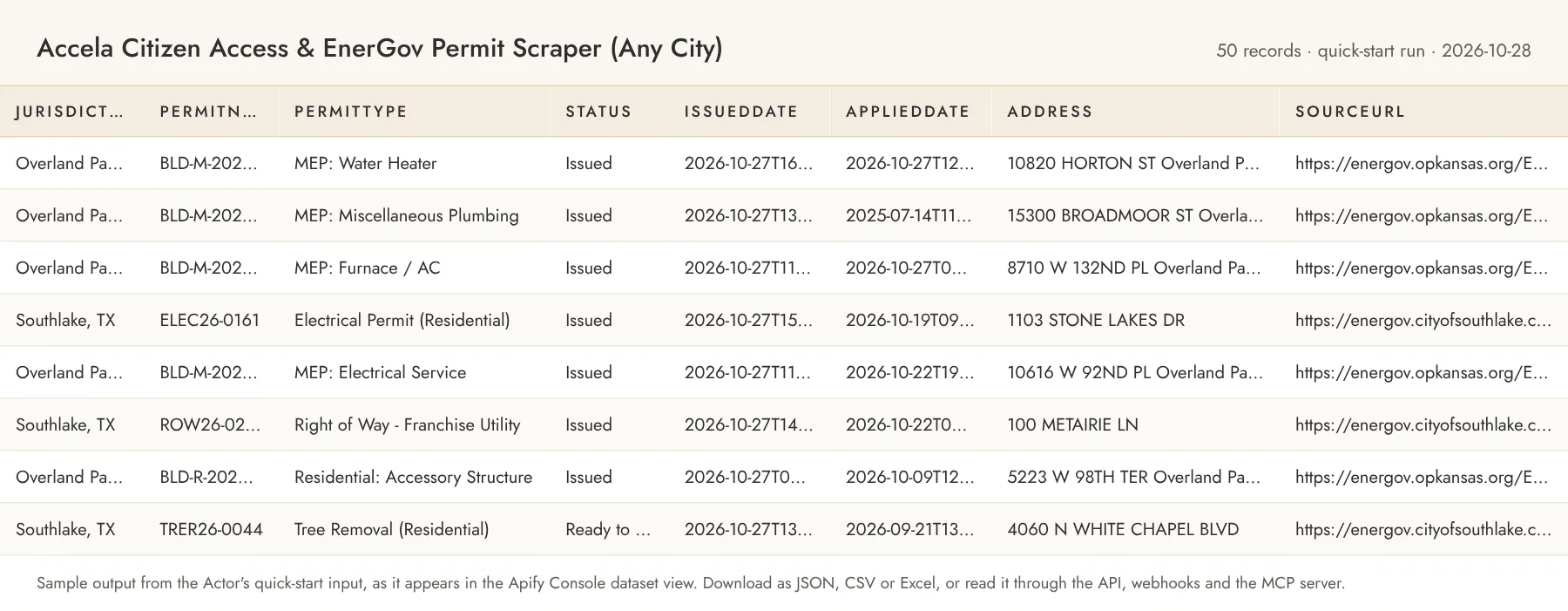
One dataset item per permit:
sourceApi is energov, accela-aca or accela-api. Without includeDetails, estimatedCost, contractorName, contractorLicense, ownerName and applicantName are null and detailFetched is false. On Accela Citizen Access the list page has no issue date, so issuedDate is null and appliedDate carries the record date. Coordinates are only available through the Accela API engine.
A portal that cannot be queried produces one error item instead of failing the run:
Error codes: HTTP_<status>, RATE_LIMITED, BAD_RESPONSE, PORTAL_ERROR, NOT_ENERGOV, UNSUPPORTED_PORTAL, CAPTCHA, API_FORBIDDEN, TIME_BUDGET (the portal stalled or its time budget ran out before it produced anything), FETCH_FAILED. The run's SUMMARY record (default key-value store) lists per-jurisdiction counts, pages, requests, megabytes received, seconds, truncated (TIME_BUDGET or LIMIT when paging stopped early), portal version and charges.
If the output saves you time, a review on the Store page helps other buyers find this Actor; the Store invites you to leave one after you have run it a few times.
Alerts and delivery
Monitor mode is built for a daily schedule; this is how new permits reach your CRM or inbox.
- Schedule in the Console. Save the input (with
onlyNewSinceLastRun: true) as a Task, then create a schedule under Schedules (daily is the natural cadence) and attach the Task. Use onestateStoreNameper schedule when different filters run against the same portal. The first run is the baseline: it emits every permit in the window. - The Actor's own webhook. Set
webhookUrland the Actor POSTs one JSON document when the run finishes, including runs that found nothing new (10 second timeout, two retries; the result is recorded aswebhookDeliveredin theSUMMARYrecord and a failed delivery never fails the run). The body is the run summary (actor,runId,produced,permitsSaved,detailsFetched,errors,jurisdictions,issuedWithinDays,maxSecondsPerJurisdiction,includeDetails,monitor,perJurisdictionwith engine, fetched, saved, pages, requests, megabytes and seconds per id,charges,limitReached,finishedAt) pluspermits, the first 500 emitted permit records in dataset shape (only the new ones in monitor mode), anderrorItemsfor portals that could not be queried. Larger runs continue in the dataset. - Apify run webhooks. On the Actor's Integrations tab add a webhook for run events such as
ACTOR.RUN.SUCCEEDED,ACTOR.RUN.FAILEDorACTOR.RUN.TIMED_OUT; Apify POSTs the run id and the default dataset id to your URL, which is all your own code needs to fetch the items. - Slack, Make, Zapier, Google Sheets, email. The same Integrations tab lists Apify's ready-made integrations: a Slack message when a run finishes, Make and Zapier modules that start runs and read the dataset, an export of each run's dataset to a Google Sheet, and an email notification. They are configured per Actor or per task, without code.
- API and dataset endpoints. Start a run with
POST https://api.apify.com/v2/acts/owlabee~accela-energov-permit-scraper/runs, read the newest results withGET https://api.apify.com/v2/acts/owlabee~accela-energov-permit-scraper/runs/last/dataset/items?format=json(alsocsvorxlsx, andfieldsto pick columns), or read any run's dataset athttps://api.apify.com/v2/datasets/<datasetId>/items.
Jurisdictions
Every portal was verified live from a datacenter IP with the exact requests the Actor sends: the first 31 on 2026-10-17, the 15 marked new on 2026-11-07 (docs/jurisdictions.md in the repository has the evidence and the rejected candidates). Volume is the number of permits the portal returned for the previous 7 days (for the new portals, the 8 days 2026-10-31 to 2026-11-07, counted from the result pager; "100+" is ACA's own cap on the displayed count). The new portals are in all-latest and its per-vendor groups; the fixed all, all-energov and all-accela groups keep the first 31.
| Id | Jurisdiction | Engine | Date filter | 7-day volume | Notes |
|---|---|---|---|---|---|
richmond-va | Richmond, VA | EnerGov | issued | ~270 | All permit modules incl. trades and right-of-way |
overland-park-ks | Overland Park, KS | EnerGov | issued | ~220 | Prefill / daily test |
southlake-tx | Southlake, TX | EnerGov | issued | ~70 | Prefill / daily test |
doral-fl | Doral, FL | EnerGov | issued | ~70 | |
hernando-county-fl | Hernando County, FL | EnerGov | issued | ~370 | |
riverside-county-ca | Riverside County, CA | EnerGov | issued | ~420 | Includes transport and land-use permits |
santa-fe-nm | Santa Fe, NM | EnerGov | issued | ~120 | |
danville-ca | Danville, CA | EnerGov | issued | ~40 | |
carson-ca | Carson, CA | EnerGov | issued | ~40 | |
imperial-beach-ca | Imperial Beach, CA | EnerGov | issued | 8 | |
wilmington-nc | Wilmington, NC | EnerGov | issued | ~40 | |
la-vergne-tn | La Vergne, TN | EnerGov | issued | ~40 | |
grand-traverse-county-mi | Grand Traverse County, MI | EnerGov | issued | ~220 | Incl. well & septic records |
reading-pa | Reading, PA | EnerGov | issued | 3 | Low volume |
shelton-wa | Shelton, WA | EnerGov | issued | 9 | Low volume |
snohomish-wa | Snohomish, WA | EnerGov | issued | 11 | Low volume |
rockland-county-ny | Rockland County, NY | EnerGov | issued | 3 | County plan review and health permits |
sacramento-ca | Sacramento, CA | Accela ACA | applied | 100+ | 10 rows per page |
tampa-fl | Tampa, FL | Accela ACA | applied | 100+ | |
hillsborough-county-fl | Hillsborough County, FL | Accela ACA | applied | 100+ | |
oakland-ca | Oakland, CA | Accela ACA | applied | 200+ | 20 rows per page |
san-mateo-county-ca | San Mateo County, CA | Accela ACA | applied | ~80 | 25 rows per page |
stockton-ca | Stockton, CA | Accela ACA | applied | 100+ | |
monterey-county-ca | Monterey County, CA | Accela ACA | applied | ~100 | 4 MB result pages; slower |
santa-clara-county-ca | Santa Clara County, CA | Accela ACA | applied | ~140 | 50 rows per page |
mesa-az | Mesa, AZ | Accela ACA | applied | 100+ | Module Permits |
omaha-ne | Omaha, NE | Accela ACA | applied | 100+ | Module Permits |
oklahoma-city-ok | Oklahoma City, OK | Accela ACA | applied | 100+ | Module Permits |
fort-worth-tx | Fort Worth, TX | Accela ACA | applied | 100+ | Module Development |
denver-co | Denver, CO | Accela ACA | applied | 100+ | Module Development |
charlotte-nc | Charlotte, NC | Accela ACA | applied | 100+ | City land-development records; building permits are Mecklenburg County's |
petaluma-ca | Petaluma, CA | EnerGov | issued | 51–75 | New. |
okeechobee-county-fl | Okeechobee County, FL | EnerGov | issued | 26–50 | New. |
pembroke-pines-fl | Pembroke Pines, FL | EnerGov | issued | 151–175 | New. Also lists garage-sale permits |
ashland-or | Ashland, OR | EnerGov | issued | 15 | New. Low volume |
clark-county-nv | Clark County, NV | Accela ACA | applied | 100+ | New. County building department |
pima-county-az | Pima County, AZ | Accela ACA | applied | 100+ | New. Incl. septic and manufactured homes; no description column (details add one) |
san-antonio-tx | San Antonio, TX | Accela ACA | applied | 100+ | New. Also lists garage-sale and occupancy requests |
pinellas-county-fl | Pinellas County, FL | Accela ACA | applied | 100+ | New. |
polk-county-fl | Polk County, FL | Accela ACA | applied | 100+ | New. |
osceola-county-fl | Osceola County, FL | Accela ACA | applied | 100+ | New. Many unsubmitted drafts, skipped |
chesterfield-county-va | Chesterfield County, VA | Accela ACA | applied | 50+ | New. 5 rows per page |
lincoln-lancaster-county-ne | Lincoln / Lancaster County, NE | Accela ACA | applied | 100+ | New. City and county share the portal; no description column |
olmsted-county-mn | Olmsted County, MN (incl. Rochester) | Accela ACA | applied | 25 | New. No description column |
butte-county-ca | Butte County, CA | Accela ACA | applied | 73 | New. No description column |
albany-or | Albany, OR | Accela ACA | applied | 75 | New. |
ACA's General Search caps its total at "100+" / "200+"; the Actor pages through until the window or maxResultsPerJurisdiction is exhausted. ACA rows that are unsubmitted application drafts (26TMP-…, OSCTEMP…, no record page) are skipped and counted in the summary. Where an agency's grid has no description column (Pima, Lincoln/Lancaster, Olmsted, Butte), workDescription is filled from the record page when Fetch permit details is on.
San Antonio's permits are also in our US Building Permits Scraper (city open data); this Actor reads the city's Accela portal instead, whose record pages add the licensed professional and license number.
Pricing
Pay per event. You pay only for what the Actor produces; set a maximum cost per run in the run options to cap spend (the Actor stops cleanly when the cap is reached).
| Event | Price | Notes |
|---|---|---|
permit-scraped | $0.003 | Per dataset item: a normalized permit or an error item for a portal that could not be queried |
permit-detail-fetched | $0.005 | Per permit whose detail record/page was fetched and merged (includeDetails); in addition to permit-scraped |
portal-page-fetched | $0.005 | Per results page downloaded from a portal: an EnerGov search page (up to 100 rows) or an Accela Citizen Access grid page (10–50 rows and 1–10 MB of HTML). Pages whose rows are all filtered out, or already seen in monitor mode, count too: the page is the work |
portal-run | $0.01 | Per jurisdiction portal queried per run, including portals that return an error item |
| Actor start | $0.00005 | Apify platform event |
Examples: 1,000 permits from 5 EnerGov portals without details (about 10 pages) ≈ $3.10; 1,000 permits with details ≈ $8.10; a daily monitor of 10 portals that finds 40 new permits with details ≈ $0.47 per day; a 365-day crawl of one Accela county whose filter matches nothing (165 pages, 0 permits) ≈ $0.84. Platform compute and transfer are included in the event prices; you pay only for events.
Limits and fair use
- Requests to each portal are spaced at least 1 s apart, with exponential backoff on 429/5xx; three portals run in parallel. A 30-day crawl of a large ACA city with details is a few hundred requests and takes a few minutes.
- Time budget. Each portal gets
maxSecondsPerJurisdiction(default 15 minutes) for bootstrap, paging and details. When it runs out, the permits collected so far are saved (and charged) and the portal is markedtruncated: "TIME_BUDGET"in the summary; a portal that has produced nothing by then returns aTIME_BUDGETerror item. Independently of that budget, a portal that delivers no results page or detail record for 60 s (stalling, timing out, rate limiting or blocking) is abandoned the same way. Requests time out after 30 s including retries, andRetry-Afterpauses are capped at 10 s. So a dead or blocked portal costs oneportal-runplus one error item and about a minute, never an hour. issuedWithinDaysis capped at 365 and ACA agencies commonly cap their own date range at one year. Year-long crawls of large Accela cities with details can need a highermaxSecondsPerJurisdiction(Sacramento pages 10 rows at a time, about 1.1 s per page).- Only public data is read. No login, no proxies, no CAPTCHA solving, no browser. A portal that shows a CAPTCHA or blocks datacenter IPs returns an
UNSUPPORTED_PORTAL/CAPTCHAerror item and is listed as unsupported indocs/jurisdictions.md. - Portal software changes: EnerGov releases differ per city (2022.3 to 2026.2 are in the registry) and Accela updates ACA several times a year. When a portal changes shape the Actor emits an error item rather than wrong data; failures are watched daily and patched.
- Memory. Default run memory is 512 MB (256–1024 MB allowed). The Actor is network-bound: it holds one portal page at a time per worker (the largest, Monterey County's grid pages of 4.7 MB and up to about 9 MB deep into a year-long crawl, parse with a peak of about 240 MB of process memory for three portals in parallel), so 512 MB is the lowest setting that runs the daily test and an
allcrawl with details without pressure, and more memory does not make portals answer faster. It only raises the compute cost per minute.
Related Actors
- Building Permits Scraper — Roofing & Construction Leads: the same schema for 61 open-data cities, counties and states (Socrata, CKAN, ArcGIS, Carto) plus Socrata auto-discovery. Use it for the big open-data cities and this Actor for the Accela and EnerGov portals, then merge both outputs in one pipeline.
- US Professional License Verifier: verify the contractor licenses that appear in these permits.
- Website Change Monitor: watch a permit-office news page for fee or process changes.
Guide and code examples
- Guide: Accela Citizen Access and EnerGov Permit Data as JSON, covering the source, its fields and limits, and curl and MCP examples.
- No-code recipe: Building Permits to Google Sheets with Make, step by step with Apify's official Make app and a ready input.
- Runnable examples (curl, Python, Node.js and an MCP config): owlabee/owlabee on GitHub.
Use from AI agents (MCP)
Pin this Actor in the Apify MCP server with one link: https://mcp.apify.com?tools=owlabee/accela-energov-permit-scraper, or let the agent find it with the search-actors tool. It is pay-per-event with limited permissions, so agents can discover it, inspect the input schema with fetch-actor-details and pay per run through agentic payments. Prompts that map directly onto the input:
- "List the roofing and solar permits applied for in Sacramento and Tampa in the last 7 days with contractor names."
- "Every morning, find new residential permits in Overland Park and Hernando County, only ones not seen before, and POST them to my CRM webhook."
- "Which contractors pulled the most electrical permits in Richmond, VA over the last 30 days?"
The agent receives the same dataset records shown in the output example above.
To call it from an agent that already has the Apify MCP server connected, copy this tool call and change only the input object (shown with the quick-start input; any input that validates in the Console works here too). The server returns the run's dataset items, and its per-call maximum total charge (maxTotalChargeUsd) caps spend the same way the run option does in the Console.
FAQ
Does this need proxies? No. Both portal families answer plain HTTP from datacenter IPs for every jurisdiction in the registry; the Actor never uses residential proxies. If an agency starts blocking, it is marked unsupported rather than worked around.
How is cost controlled? Every item and every results page is charged as it is fetched or saved, so the bill follows the work the portals actually did. Set the run's maximum cost, maxResultsPerJurisdiction, maxSecondsPerJurisdiction, a short issuedWithinDays window and leave includeDetails off unless you need valuation and contractor fields. Narrow permitTypes or keyword filters do not reduce the pages fetched on Accela portals (they filter client-side), so combine them with a short window. Monitor mode pays for details only on new permits, and for the pages it has to read to find them.
Why is issuedDate null on Accela portals? ACA's General Search filters and lists by the record (application) date and shows no issue date in the grid or on the detail page, so appliedDate is filled and status (Issued, Finaled, Applied…) tells you where the permit is. EnerGov portals filter on the issue date and fill issuedDate.
What does accelaAppId do? Accela's Construct API has a "no authorization required" mode for citizen apps: with a free developer-portal app id the Actor can read records (with addresses, parcels, professionals and owners in one JSON call) from agencies that allow anonymous access. The engine follows the public v4 reference and was not exercised against a live agency during the build, so treat it as best-effort: agencies that refuse return an API_FORBIDDEN error item, and removing the id switches back to the page engine.
Can you add my city? If it runs EnerGov Citizen Self Service or Accela Citizen Access with a public General Search page, usually yes. Agencies that load their search panel through partial postbacks (San Diego, Detroit, Salt Lake City, Alameda County, Santa Barbara County in our survey) or show reCAPTCHA (Fresno, Detroit) are not supported.
Can an AI agent use this? Yes; see "Use from AI agents (MCP)" above for the pin link and example prompts. Schedules and webhooks work the same way from the Console or the API.
Can I try it for free? Yes. The Apify free plan comes with monthly platform credit, and the quick-start input above costs a few cents per run, so you can test it on your own inputs before paying anything.
How do I find this Actor again? Bookmark it on the Store page (the bookmark icon next to the title); bookmarked Actors are listed in your Console, and the Store page shows new versions as they ship.
Support
Questions, bugs or a source you'd like added? Open an issue on the Actor's Issues tab, or email jacob@owlabee.com.
Changelog
- 2026-11-07 — 15 more portals, verified live: Accela Citizen Access for Clark County NV, Pima County AZ, San Antonio TX, Pinellas, Polk and Osceola Counties FL, Chesterfield County VA, Lincoln / Lancaster County NE, Olmsted County MN, Butte County CA and Albany OR; EnerGov for Petaluma CA, Okeechobee County FL, Pembroke Pines FL and Ashland OR. New groups
all-latest,all-energov-latestandall-accela-latest;all,all-energovandall-accelakeep their first-release 31 portals so saved inputs return the same portals at the same cost. Fixes: the address is read from the hidden permit-address column where an agency has no address column; when a record page shows a project name above the description,workDescriptionkeeps only the description; ZIP and state are read from more ACA address forms; full state names from EnerGov become USPS codes. No new output fields and no price changes. - 2026-10-28 — README: banner and output screenshot, comparison table, ready-to-run inputs for a re-roof lead list, a daily monitor and larger projects, alerts and delivery, MCP call example, cross-link to the US Building Permits Scraper.
- 2026-10-23 — Per-portal time budget (
maxSecondsPerJurisdiction) with a 60 second idle limit, results pages as their own work-based event, chargedTIME_BUDGETerror items, 512 MB default memory. - 2026-10-19 — First release: 31 verified portals (17 EnerGov, 14 Accela), monitor mode, optional permit details, end-of-run webhook with the emitted permits.
Legal
Public records from public portals, read with the same requests the portal's own web page sends, at a polite rate, without login or circumvention. Owner, applicant and contractor names appear as published by the agency.
Not a consumer report. Not for employment, credit, insurance, housing or tenant-screening decisions. This Actor is not a consumer reporting agency and its output is not a consumer report; it may not be used for credit, employment, insurance, housing or any other purpose covered by the Fair Credit Reporting Act (FCRA). The same sentence travels with every run as the notice field of the SUMMARY record and the webhook body. The Actor has no search by a person's name (inputs are jurisdictions, date windows, permit types, keywords and valuation), and an owner's mailing address, a contractor's e-mail or phone number and other contact details stay inside raw, behind includeRaw, never as top-level fields. owlabee keeps no copy of the records: results exist only in your Apify storage, nothing is aggregated across runs or users, and no dataset is resold. Respect do-not-contact rules and telemarketing laws (the TCPA and the National Do Not Call Registry) when using the records for outreach. Verify permits with the issuing agency before relying on them.
Not affiliated with Accela, Inc. or Tyler Technologies, Inc.; portal and product names belong to their owners and identify the portal software a jurisdiction runs.


