

Website SEO Audit, Broken Links & Change Monitor
Pricing
from $0.38 / site audit, up to 50 pages
Website SEO Audit, Broken Links & Change Monitor
Technical SEO audit of a website, up to 5,000 pages: broken links, redirects, duplicate titles and descriptions, sitemap and indexing problems. A health score and a fix for every issue. Several sites per run. Schedule it for website monitoring: each site audit shows what changed since the last run.
Pricing
from $0.38 / site audit, up to 50 pages
Rating
0.0
(0)
Developer

Ozzie Bagadirov
Maintained by CommunityActor stats
0
Bookmarked
1
Total users
0
Monthly active users
a month ago
Last modified
Categories
Share
Run a technical SEO audit of a website, up to 5,000 pages per run: broken links, redirects, duplicate titles and descriptions, and sitemap and indexing problems. Each run gives you a health score, a list of issues sorted by how serious they are with how to fix each one, and a row of data for every page.
- You pay once per audit, by the pages it checks. Before the crawl starts, the run log shows the most the run can cost.
- Run the audit again and it lists what changed since the last run: a page that now answers 404, a page that became noindex, a new redirect.
- A link counts as broken only when it answers 404 or 410, or its domain no longer exists.
Sites such as LinkedIn turn away automated checks, so a link to another site that answers 401,
403, 429 or LinkedIn's 999 is marked
blocked-by-targetinstead. - Apify's free plan needs no credit card and includes $5 of usage a month. Apify starts no run of this Actor once less than $2.00 of it is left, so the $5 covers at most seven audits of up to 50 pages, or two of up to 250. Runs that check fewer than 10 pages are free.
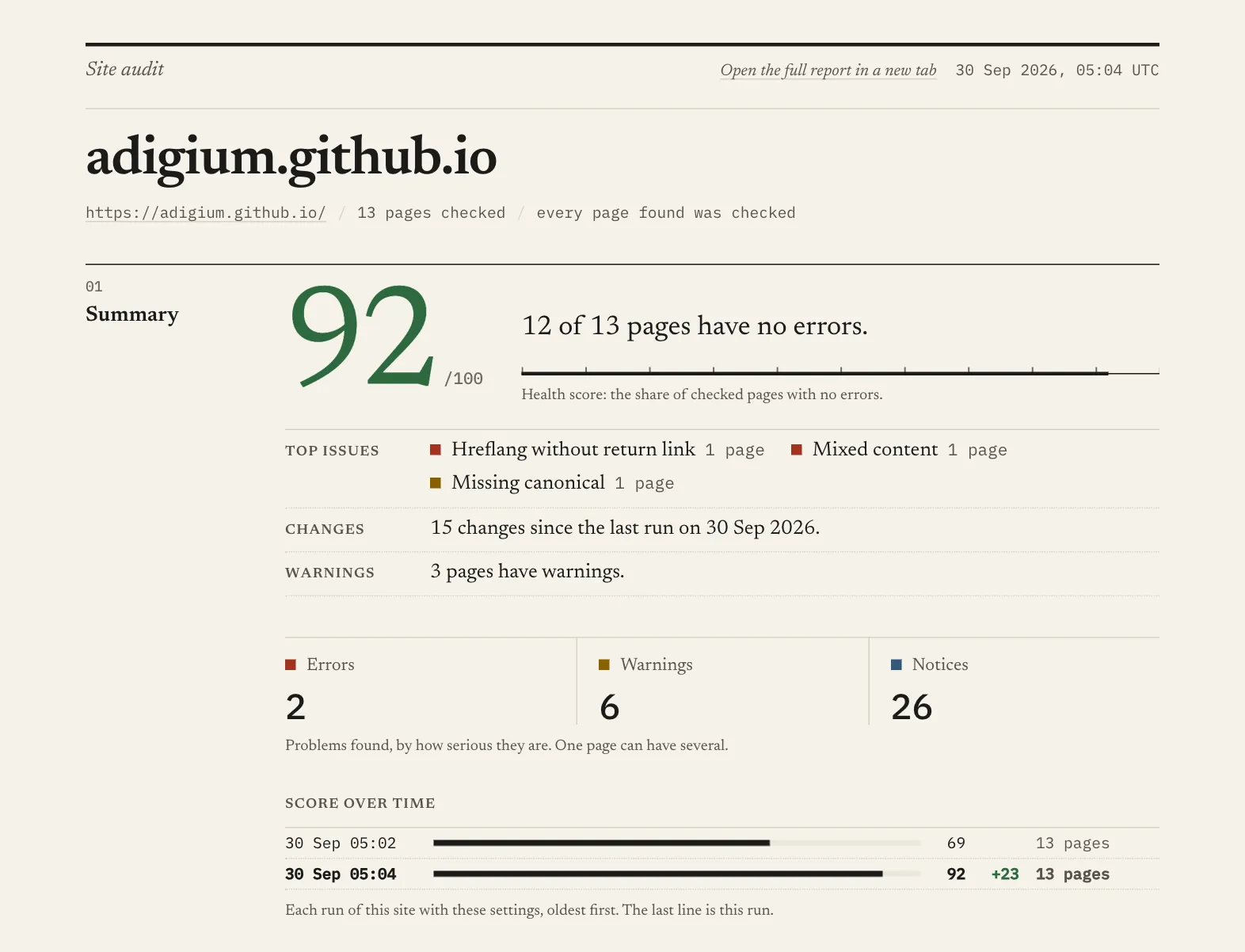
The screenshots come from two real runs on adigium.github.io, a made-up bakery site with
deliberate problems, checked before and after an edit.
Open the whole report of the second run.
Who it's for
- SEO and web freelancers, and small agencies, who audit a few client sites now and then.
- Developers and site owners checking a site before and after a deploy, a redesign or a migration on the same domain.
- Anyone who checks a site on a schedule and wants to see what changed.
- AI agents and automations that need a site's problems as data, through the Apify API, Make or n8n: see Use it from the API.
Try it
The form comes filled in with https://example.com, a one-page site, so clicking Start
right away is free. Max pages starts at 9, so putting in your own address and clicking
Start is a free preview; raise it to check the whole site. Up to 50 pages costs $0.50,
or $0.38 to $0.45 on paid Apify plans, and up to 250 pages costs $2.00, or $1.50 to $1.80.
A larger site costs $5.00 for up to 1,000 pages and $15.00 for up to 5,000, less on paid
plans. An audit of over 1,000 pages costs more than the free plan's $5 a month, so it needs a
paid Apify plan.
Several client sites can go in one run: put the other sites' addresses in More URLs, and each site is checked and charged as an audit of its own (see Several sites in one run). Or save one task per site in Apify Console and add them to a weekly schedule (up to 10 tasks each). Public pages only. Results stay in your Apify account, and support is in writing, through the Issues tab.
What you get
| View | What is in it |
|---|---|
| Report | A readable summary: health score and the top three issues, errors, warnings and notices, what changed since the last run, every issue with where it is and how to fix it, problems by area, Google's speed figures for the pages tested, the pages to fix first, and from the second run the scores of earlier runs. The header says how much of the site the run covered: every page found was checked, some pages found were left out, or stopped before checking every page found. |
| Issues | One row per problem, errors first. Each row has the URL, the exact value that is wrong, and how to fix it. |
| Pages | One row per page checked: status code, a score from 0 to 100, how many errors, warnings and notices and their names, title, every heading in order, word count, indexability, sitemap membership, the images it uses with their status and size, and each problem on the page with how to fix it. |
| Changes | One row per thing that changed since the last run, with the value before and after. |
The Issues, Pages and Changes views download as CSV, Excel or JSON. The FAQ says how to export the Issues and how to read or send the whole Report.
What it checks
| Area | Checks | For example |
|---|---|---|
| Titles and descriptions | 9 | Missing or duplicate titles, missing or too long meta descriptions |
| Canonicals and indexing | 8 | A canonical that points to a broken page, a redirect or another domain; noindex pages |
| Sitemap | 8 | Orphan pages; sitemap URLs that redirect, fail, are noindex or are blocked |
| HTTPS | 6 | Mixed content, invalid or expiring certificates, http pages |
| Accessibility | 6 | Buttons and form fields without a name, frames without a title, zoom turned off |
| Redirects | 5 | Loops, long chains, temporary and meta refresh redirects |
| Images | 5 | Broken images, missing alt text, files over 100 KB |
| Speed | 5 | Slow responses; slow main content, layout shift and a busy main thread from Google PageSpeed Insights on 5 pages by default; Core Web Vitals from real Chrome visitors when Google has them |
| Content | 5 | Duplicate and thin content, pages that seem to need JavaScript |
| Status | 4 | 4xx and 5xx pages, pages that did not answer |
| Links | 4 | Broken links, links without text, links to redirects, internal nofollow links |
| Headings | 4 | Missing H1, more than one H1, a skipped heading level, empty headings |
| Mobile, International | 2 each | Missing viewport, hreflang without return link |
| Structured data, Social sharing | 1 each | Invalid JSON-LD, missing sharing tags |
75 checks, in the three levels most SEO tools use:
- Errors stop pages from working or from ranking. Fix these first.
- Warnings hurt how well pages rank, how they look in search results, or whether everyone can use them.
- Notices are worth knowing about but are often fine.
Each issue in the Report opens to say what it means, how to fix it, and where it is:
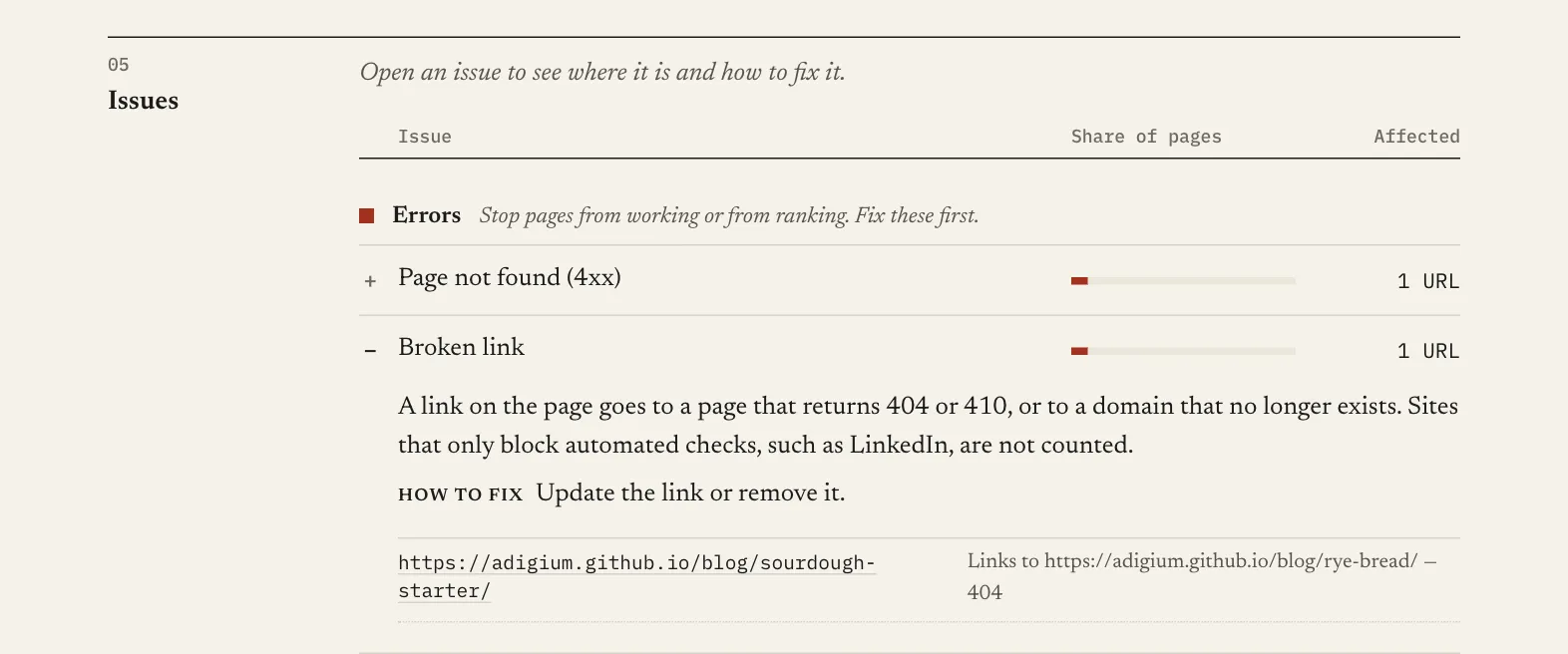
| Issue | Severity | What it means | issue value |
|---|---|---|---|
| Page did not respond | Error | The server did not answer at all. | unreachable |
| Redirect loop | Error | The URL keeps redirecting and never reaches a page. | redirectLoop |
| Server error (5xx) | Error | The page answered with a 5xx server error. | serverError |
| Page not found (4xx) | Error | The page answered with a 4xx error, usually 404. | brokenPage |
| Broken link | Error | A link on the page goes to a page that returns 404 or 410, or to a domain that no longer exists. Sites that only block automated checks, such as LinkedIn, are not counted. | brokenOutlink |
| Missing title | Error | The page has no <title>, or an empty one. | titleMissing |
| Duplicate title | Error | Another page on the site has exactly the same title. Pages set to noindex, or whose canonical tag points to another page, are not counted. | duplicateTitle |
| Duplicate content | Error | Another page on the site has exactly the same text. Pages set to noindex, or whose canonical tag points to another page, are not counted. | duplicateContent |
| Hreflang without return link | Error | The page names a language version that does not name it back. Pages that were not crawled are not counted. | hreflangNotReciprocal |
| Canonical points to a broken page | Error | The canonical tag points at a URL that answered with a 4xx or 5xx error. 401, 403 and 429 are not counted. | canonicalToBroken |
| More than one canonical | Error | The page has canonical tags that name different URLs, so search engines may ignore them all. | multipleCanonicals |
| Missing viewport tag | Error | The page has no viewport meta tag, or an empty one, so phones show it at desktop width. | viewportMissing |
| Meta refresh redirect | Error | The page sends visitors to another URL with a meta refresh tag instead of a server redirect. A refresh that only reloads the page is not counted. | metaRefresh |
| Invalid JSON-LD | Error | A JSON-LD structured data block on the page is not valid JSON, so search engines cannot read it. Line breaks inside a text value are not counted. | jsonLdInvalid |
| Broken internal image | Error | An image on this site returns 404 or 410, or its domain no longer exists, so visitors see a broken image. One row per image, naming the pages that use it. A server that only refuses automated checks is not counted. | brokenInternalImage |
| Password field on an http page | Error | The page has a password field and loads over plain http, so browsers mark it as not secure. | nonSecurePage |
| Mixed content | Error | The page loads over https, but a tag in its HTML loads a script, style sheet, frame, image or media file over http. Browsers block such a file, switch it to https, or mark the page not fully secure. Not counted: files that scripts or style sheets load, and pages that send upgrade-insecure-requests. | mixedContent |
| Invalid certificate | Error | The certificate this host serves has expired, or does not name the host, so browsers show a warning instead of the site. One row per host, not per page. | certificateInvalid |
| Long redirect chain | Warning | More than two redirects before the page answers. | redirectChainLong |
| Page stopped loading | Warning | The page started to load and then stopped, so it could not be checked. | incompleteResponse |
| Page too large to check | Warning | The page is over about 1.6 MB, so its content was not checked and its links were not followed. | pageTooLarge |
| Missing meta description | Warning | The page has no meta description, or an empty one. | metaDescriptionMissing |
| Missing H1 | Warning | The page has no <h1> heading. | h1Missing |
| Missing canonical | Warning | The page has no canonical link tag. | canonicalMissing |
| Canonical points to another domain | Warning | The canonical tag points at a different domain, so search engines credit that domain instead. | canonicalOffDomain |
| Image without alt text | Warning | At least one image has no alt attribute. alt="" is right for a decorative image and is not counted, unless the image is the only thing in a link: then the link has no text, which Link without text reports. | imagesMissingAlt |
| Thin content | Warning | The page has fewer than 100 words of visible text. | thinContent |
| Orphan page | Warning | The page is in the sitemap, but no other page that was checked links to it. Only reported when every page the crawl found was checked. | orphanPage |
| Sitemap URL blocked by robots.txt | Warning | The sitemap lists this URL, but robots.txt tells crawlers not to fetch it. | sitemapUrlBlocked |
| Canonical points to a redirect | Warning | The canonical tag points at a URL that redirects. | canonicalToRedirect |
| Canonical points to a noindex page | Warning | The canonical tag points at a page that tells search engines not to index it. | canonicalToNoindex |
| Sitemap URL redirects | Warning | The sitemap lists this URL, but it redirects. | sitemapUrlRedirects |
| Sitemap URL returns an error | Warning | The sitemap lists this URL, but it answered with a 4xx or 5xx error. 401, 403 and 429 are not counted. | sitemapUrlBroken |
| Noindex page in sitemap | Warning | The sitemap lists this page, but the page tells search engines not to index it. | sitemapUrlNoindex |
| Canonicalised page in sitemap | Warning | The sitemap lists this page, but its canonical tag points to another URL. | sitemapUrlCanonicalised |
| HTTP URL in sitemap | Warning | The site uses https, but its sitemap lists this URL with http. | sitemapHttpUrl |
| Temporary redirect | Warning | The URL redirects with a 302, 303 or 307, which tells search engines the move is temporary, so they may keep showing the old URL. | temporaryRedirect |
| Viewport without width | Warning | The viewport meta tag sets neither width nor initial-scale, so phones lay the page out at desktop width. | viewportWidthMissing |
| Missing language | Warning | The <html> tag has no lang attribute, or an empty one, so browsers and screen readers have to guess the page's language. | langMissing |
| Internal links with nofollow | Warning | The page links to pages of this site with rel="nofollow", which asks search engines not to follow those links. A URL the page also links to without nofollow is not counted. | internalNofollowLinks |
| Broken external image | Warning | An image hosted on another site returns 404 or 410, or its domain no longer exists. One row per image, naming the pages that use it. A server that only refuses automated checks is not counted. | brokenExternalImage |
| Page served over http | Warning | The site uses https, but this page loads over plain http and does not redirect to https. | httpPage |
| Links to http pages | Warning | The page loads over https and links to pages of this site at http addresses. | linksToHttp |
| Certificate expiring soon | Warning | The certificate this host serves expires in less than 14 days. A certificate that lasts only days is counted once less than a third of its life is left. One row per host. | certificateExpiringSoon |
| Slow main content (lab) | Warning | In Google's PageSpeed Insights test as a phone, the largest image or block of text took more than 4 seconds to appear (LCP over 4,000 ms). Only the pages tested for speed are checked. | slowLcp |
| Page moves while loading (lab) | Warning | In Google's PageSpeed Insights test as a phone, content moved while the page loaded (CLS over 0.25). Only the pages tested for speed are checked. | layoutShift |
| Fails Core Web Vitals (real visitors) | Warning | Chrome's real visitors to this page on phones, over 28 days: more than a quarter of visits missed Google's good level for LCP (2.5 s), INP (200 ms) or CLS (0.1). Only tested pages with enough visitors for Google to report are checked. | coreWebVitalsFailed |
| Link without text | Warning | A link has no text a search engine or screen reader can use: no words, no alt text on its image and no label. An image with alt="" as the only thing in a link leaves it without text. Links hidden in the HTML, and links a script fills in, are not counted. | linkWithoutText |
| Button without a name | Warning | A button has no text, label or title, so a screen reader says only "button". Buttons hidden in the HTML, and buttons a script builds, are not counted. | buttonWithoutText |
| Form field without a label | Warning | A text box, list or other form field has no label, aria-label, title or placeholder, so a screen reader cannot say what to enter. Hidden fields, fields a script builds, and switches outside a form are not counted. | fieldWithoutLabel |
| Frame without a title | Warning | An <iframe>, often an embedded video or map, has no title, so a screen reader cannot say what it holds. | iframeWithoutTitle |
| Low text-to-HTML ratio | Notice | Visible text is 10% or less of the page's HTML, so most of what the page downloads is markup, scripts and styles. | lowTextHtmlRatio |
| Redirect | Notice | The URL redirects before the page answers. | redirected |
| Title too long | Notice | The title is wider than 600 pixels in 20px Arial, so it may be cut off in search results. Google does not publish its limit or its font: 600 pixels in 20px Arial is an estimate. | titleTooLong |
| Title too short | Notice | The title is under 15 characters. | titleTooShort |
| Meta description too long | Notice | The meta description is over 160 characters, so it may be cut off in search results. | metaDescriptionTooLong |
| More than one H1 | Notice | The page has more than one <h1> heading. | h1Multiple |
| Skipped heading level | Notice | A heading is more than one level below the heading before it, such as an <h4> right after an <h2>, so screen readers and search engines see a gap in the page's outline. | headingLevelSkipped |
| Not indexable | Notice | The page tells search engines not to index it. In the issues column it reads notIndexable: followed by the reason: meta-robots, x-robots-tag or canonicalised-away. The directives that count are noindex and none, set for all crawlers or for Googlebot. | notIndexable |
| Duplicate meta description | Notice | Another page on the site has exactly the same meta description. Pages set to noindex, or whose canonical tag points to another page, are not counted. | duplicateMetaDescription |
| Page missing from sitemap | Notice | The page can be indexed but is not in the sitemap. Only reported when the site has a sitemap. Subdomains that sitemap lists no pages for are not checked. | notInSitemap |
| Links to redirects | Notice | The page links to URLs on this site that redirect. | linksToRedirect |
| More than one title tag | Notice | The page has more than one <title> tag. Titles inside SVG images are not counted. | titleMultiple |
| More than one meta description | Notice | The page has more than one meta description tag. | metaDescriptionMultiple |
| Page set to nofollow | Notice | The robots meta tag or the X-Robots-Tag header asks search engines not to follow any link on the page, with nofollow or none, for all crawlers or for Googlebot. | nofollowPage |
| Slow response | Notice | The page's HTML took more than 2 seconds to arrive. It was timed from Apify's servers while the crawl was loading the site, so check it yourself before acting on it. | slowResponse |
| Missing social title and image | Notice | The page has no Open Graph or Twitter card tag for a title or an image, so apps that preview a shared link to it choose their own. | socialTagsMissing |
| Image over 100 KB | Notice | An image file is over 100 KB, a common limit in SEO tools. Large files slow the page, most of all on phones. Counted only when the server states the size, not for SVG files, and not for files offered in a srcset, where the browser picks one for the screen. One row per image. | imageTooLarge |
| Image without width and height | Notice | At least one image has no width and height in the HTML, so the page can shift while it loads. Sizes set in a stylesheet are not seen. | imagesMissingDimensions |
| Busy main thread (lab) | Notice | In Google's PageSpeed Insights test as a phone, scripts kept the page from responding for more than 600 ms in total (TBT). Only the pages tested for speed are checked. | longBlockingTime |
| Zoom turned off | Notice | The viewport tag sets user-scalable=no or a maximum-scale below 2, so people cannot zoom in on phones that obey it. | zoomDisabled |
| Tab order forced | Notice | An element has a tabindex above 0, so the Tab key reaches it before everything else, out of the page's order. | positiveTabindex |
| Label points at a repeated id | Notice | A <label for> or an aria-labelledby names an id that more than one element on the page has, so the label goes to the first of them only. Ids inside custom elements are not counted. | duplicateLabelId |
| Empty heading | Notice | A heading has no text, not even alt text on an image in it, so screen readers announce a heading with nothing in it and the page's outline has a gap. | emptyHeading |
| Page seems to need JavaScript | Notice | The page runs scripts and its HTML has almost no text: under 20 words, an empty app container such as #root on a page of under 150 words, or its text only inside <noscript>. This audit reads the HTML only, so the page's other content checks describe it before its scripts run. A page that checks for automated visitors looks the same. | needsJavaScript |
Content checks only run on pages that loaded (status 2xx) and are HTML. A 404 page is reported once, as a 404, and not again for its missing description.
The checks of canonical URLs, links to redirects and sitemap URLs use the answer the crawl got when it fetched each URL, and make no extra requests. A URL the crawl did not fetch, such as one past the page limit, is not checked. When that leaves a canonical or a sitemap URL unchecked, the Report says the check was made in part.
The accessibility checks read the HTML only. They do not see stylesheets or run scripts, so
they cannot check colour contrast, and they leave out what is hidden in the HTML and the
controls a script owns: those inside a custom element, a framework template or a shadow root.
Each Pages row says how many links, buttons, fields and frames were left out that way, in
accessibility.notChecked, and gives up to three examples of each finding.
Each Pages row lists the JSON-LD, microdata and RDFa types in the page's HTML. JSON-LD that is not valid JSON is reported. A page without structured data is not, because markup a script adds, as a tag manager does, is not seen here and search engines may still find it.
Images are read from src, data-src, srcset, data-srcset and <picture>, and each
image file is checked once, however many pages use it: up to 1,000 a run, those on your own
site first, within five minutes. Each check asks for the file's first 4 KB, which is enough to
learn whether it loads, how large the file is, and its width and height in pixels. A server that
sends the whole file anyway is cut off after its first 4 KB. A broken or large image is
one row in the Issues view, naming the pages that use it, and each of those pages lists it
as a problem too. The Pages to fix first list leaves image rows out.
Speed is tested by Google PageSpeed Insights, from Google's servers, as a phone on a slow connection: 5 pages a run by default, at most 10 with this Actor's key, or up to 50 with your own free Google API key under Speed. The start page goes first, then one page for each kind of address (such as blog posts or product pages), the ones most linked within the site first; copies of a page are left out. Where Google has enough Chrome visitors, the Chrome UX Report adds real visitors' Core Web Vitals over the last 28 days, for the address your start page lands on and for each page tested. A free run, under 10 pages, tests the start page only, unless you give your own key. Each page tested has a Test again link to the same test on pagespeed.web.dev. The speed checks are never compared with the last run: the pages tested can change, and a lab test gives a slightly different figure every time. They are warnings and notices, so the health score is the same with speed on or off.
A check the run could not make is listed under Not checked this run, never as passed. The three duplicate checks, for example, compare only indexable pages, so a site that is entirely noindex has nothing for them to compare. In the Report's Passed checks, a check the run made on only part of the site says how much next to its name, for example that 19 of the 351 pages linked within the site were checked, because the rest were past the page limit.
The health score is the share of checked pages that have no errors, from 0 to 100. An
invalid certificate is one row for its host, but every page on that host counts as a page
with an error, since visitors see a browser warning before the page. Each Pages row has its
own score, pageScore: 50 or more when the page has no error, under 50 when it has one, so
the health score is the share of pages scoring 50 or more. Each kind of warning takes 8 points
off a page with no error, and each kind of notice 1. The weights are our choice; the line at
50 is not. A certificate that
expires soon does not change the score. Under a score below 100, the Report names the one
error whose fixing on every page would raise the score most, and the score that would give.
When an update adds checks, the first run after it can score lower with nothing changed on your site. That run's Report says so next to the score, with the score counting only the checks the last run had, and the next run compares every check as usual.
How to run a website audit
- Enter your website address in Website URL, for example
https://www.example.com. - Set Max pages above your site's size (the form starts at 9, a free preview). For more than 250 pages, also set a maximum cost per run that covers the price: $5.00 covers up to 1,000 pages and $15.00 up to 5,000.
- Click Start. A 250-page site usually takes a few minutes.
- Read the Report. Click an issue to see which pages have it.
- Fix the errors, then run it again to see what changed.
The default timeout is 60 minutes, and a 5,000-page audit needs most of it. With a shorter timeout, up to half of it is kept for checking links to other sites, images and certificates, which run side by side, and for saving the results, so a 5-minute run crawls for about two and a half minutes. With a timeout of about 4 minutes or less, neither links to other sites nor images are checked, and the run log says so. With a timeout under about 40 seconds there is not enough time left after the crawl for one slow page, and the run log warns that the run could end before its results are saved.
Audit a list of URLs
To check only some pages of a site, put the first in Website URL and the rest in More URLs, one per line, and turn Follow links off. The run checks exactly those URLs, up to Max pages, and follows no link on them. It is priced like any audit, by the pages checked, and fewer than 10 are free.
- A URL on another site than Website URL is checked as a site of its own, in a run of its own: see Several sites in one run. The URLs you list for each site are that site's list.
- Your settings apply to the list. A URL in More URLs that Skip URLs matching matches, or that Only check URLs matching does not, is left out; Website URL itself is always checked. With Include subdomains off, every URL must be on the host of Website URL. robots.txt applies to each URL, as in a crawl.
- The links on the listed pages to your site's other pages are checked for broken pages with one request each, the way links to other sites are: up to 500 a run, no faster than two a second or than Requests per minute, and only to pages a crawl would fetch: not to pages robots.txt disallows or your URL patterns leave out. At two a second, 500 take about four minutes. They are checked beside your site's images: at 120 Requests per minute or more, that is up to 8 image checks and 2 of these a second, 10 in all; below that, and with a Crawl-delay, the two together keep to the crawl's pace. Those pages are not audited and have no row.
- The sitemap is read only to say which listed pages are in it. The orphan page check and the check for sitemap URLs that robots.txt blocks are skipped.
- A list keeps its own change history: the next run with the same list compares against it. Changing the list, or switching between a list and a crawl, is said once as a change in what the run could reach, never as pages removed.
- The run fails, and is free, only when none of the URLs returns a page.
- A listed URL that redirects to another site has no row.
With Follow links on, More URLs are more places for the crawl to start from, so pages that nothing links to are reached too. Max link depth counts from each of them.
Several sites in one run
Put one site's address in Website URL and the other sites' in More URLs, one per line.
Each site is then checked in a run of its own, one after another, as if you had started it
alone: with its own report, its own change history and its own charge. The run you started
charges nothing itself. Its Report has one row per site, with the health score, pages checked,
errors, warnings and notices, changes found and what the site was charged, and links to that
site's own report and run. Its Pages, Issues and Changes hold every site's rows, with the site
in the site column, so one export has them all; the Report says so when some could not be
copied.
- How each site is charged. Once per site, by the pages checked on that site, at the prices below, and fewer than 10 pages is free. Max pages is per site, so on Apify's free plan three sites of up to 250 pages cost up to $6.00.
- One maximum cost covers all the sites. Before each site, what the sites before it were charged is taken off, and a site the money left does not cover is checked up to 250 or 50 pages, whichever the money covers, or up to 9 pages, free. The run log says so. When you set none, Apify's maximum cost is what your account has left of its monthly usage limit (measured on our own account). So set Maximum cost per run to the sites' prices added up.
- At least $2.00 for each site's run. Apify starts no run with a maximum cost below $2.00, so each site's run is given at least that. It is a limit, not a charge: a site is never charged more than the price for the pages it checked, nor more than the money left. Once your account has less than $2.00 left of its monthly usage limit, Apify starts no more sites' runs, and the Report says so for each site not checked.
- Each site keeps its own history. A site's run uses that site's change history, the same one its runs on their own use, so it compares with the site's last run either way. History name works with one site per run only.
- Your settings apply to every site: Max pages, URL patterns, link depth, Include
subdomains and the rest. With Include subdomains off,
www.example.comandexample.comare two sites, two audits and two charges, and the run log and the Report say so. - The sites share the run's timeout. Each gets the time left over the sites left, and at least 5 minutes, so its links and images are still checked. The default 60 minutes fits 9 sites at 5 minutes each, and more when sites finish sooner. A site no time is left for is listed as not checked: raise the timeout to check more. A run checks up to 25 sites; split more over several runs.
- A site that fails gets a row saying why, and the other sites are still checked. The run fails only when no site could be checked.
- Your Google API key is not passed on to each site's run, where it would be saved unencrypted. Each site's run tests speed with this Actor's key instead: up to 10 pages, and only the start page of a site under 10 pages, which is free. To test up to 50 pages with your key, check the site in a run of its own.
- It works on the Apify platform only, where a run can start runs.
Website monitoring on a schedule
In the Apify Console, open Schedules (Apify's guide), click Create new, set it to run weekly, and add this Actor with your Website URL, and Max pages set above your site's size so new and removed pages show. For a site over 250 pages, also set a maximum cost per run that covers the price. For several sites, schedule one run with all of them in More URLs, and set its maximum cost per run to the sites' prices added up.
A weekly schedule runs 52 times a year. On the Starter plan, a month of weekly audits costs $1.95 on average for a site of up to 50 pages, $7.80 up to 250, $19.50 up to 1,000 and $58.50 up to 5,000. Starter is $19 a month and includes $19 of credit.
Every successful run ends with a one-line status, for example:
Checked 250 pages. Health score 82/100. 3 changes found. Charged: audit-small. To see it in
Slack or email, connect an integration; a
message template can show it with {{resource.statusMessage}}. Integrations fire on every
successful run, whether or not anything changed; to act only on changes, read
changes.changesTotal from summary.json in a webhook, Make or n8n step.
Changes since the last run
The first run saves a snapshot of your site. A free preview that stops at its page limit is
not saved, so the first full audit is not compared with it. Every later run on the same site compares
against the last run with the same URL patterns, link depth, sitemap and subdomain settings,
and lists what changed. The first run with new settings compares against the site's last run and says
that what the crawl could reach has changed. The last eight snapshots are kept, plus the
last one for each of the five settings used most recently. example.com and
www.example.com share one history store. Each spelling compares against its own last
crawl, so switching between them reports the change of address once and nothing as removed.
The history is a key-value store named wcm-… in your Storage, and Apify keeps it until you
delete it. Delete it, or set a History name, to start the history again.
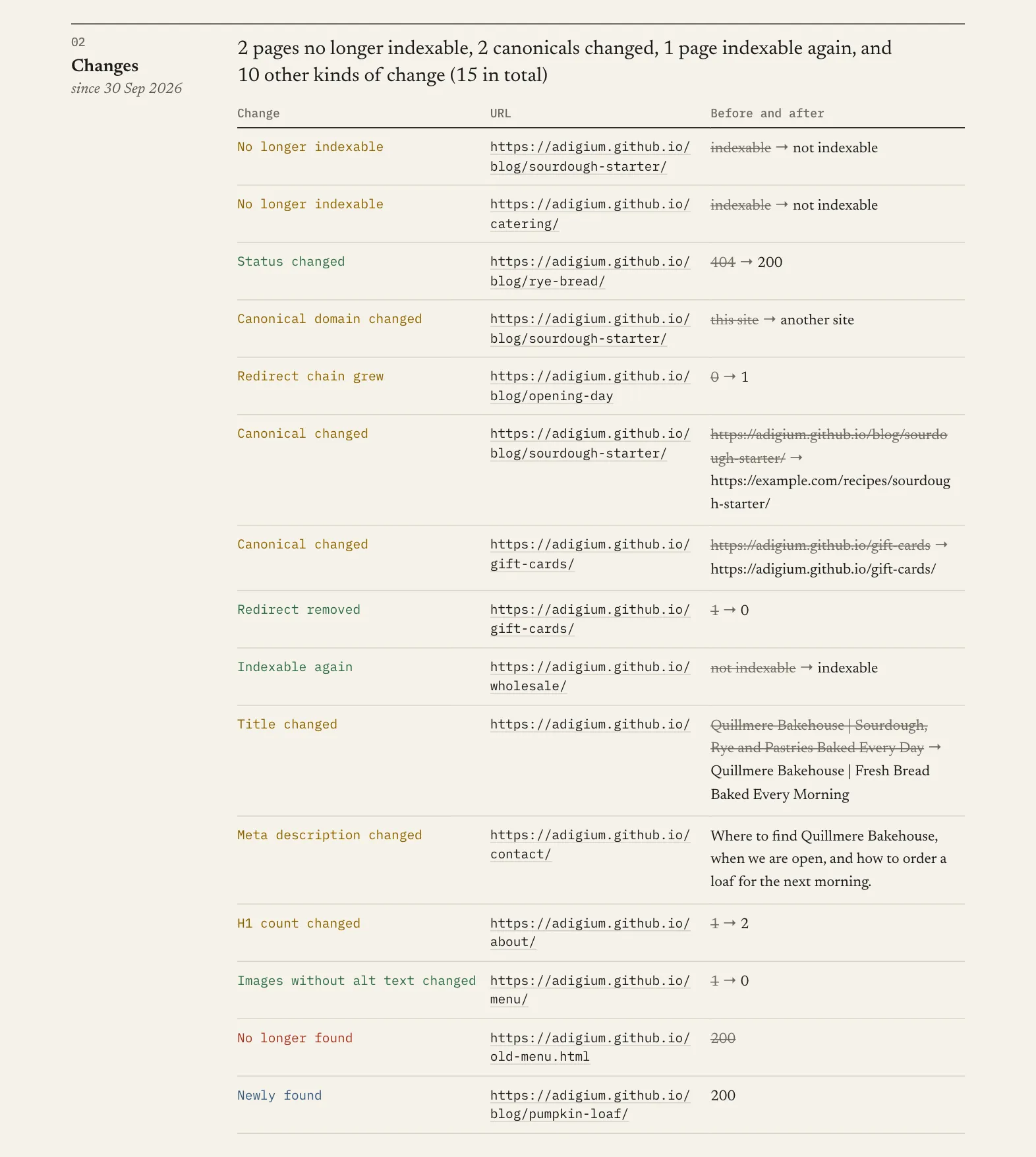
The Report lists the changes, and shows how the count for each issue moved since the last
run. It shows up to 50 changes, worst first: a page that became noindex, then a status that
changed, then canonical and redirect changes, then titles and meta descriptions, and URLs
newly found or no longer found last. Every kind of change the run found gets at least one
row, so a site-wide rewrite of one field cannot fill the table on its own. The Changes view
has every row: the URLs no longer found first, then every other change, each in URL order,
with changeStatus:
- NEW: the crawl found the URL this time and not last time
- GONE: the crawl found the URL last time and not this time;
previousValueis its last status - FIXED: something was repaired, such as a page that works again
- CHANGED: anything else that differs
If a run stops before checking every page it found (for example, at the page limit), pages it did not reach are not reported as GONE. Newly found and no-longer-found URLs, and the Since last run counts, also need runs that check every page they find: set Max pages above the size of your site, with a maximum cost that covers its price, or use Only check URLs matching to keep the crawl under 5,000 pages. Until then you still get every change to the pages the run did check.
Every changeType you can filter on
changeType | changeStatus | When |
|---|---|---|
url-added | NEW | Found this time, not found by the previous crawl |
url-removed | GONE | Found by the previous crawl, not found this time: removed, or no longer linked |
status-changed | FIXED / CHANGED | FIXED when it went from 4xx/5xx back to 2xx. A page that starts returning 404 gets this one row, not one for every field of its error page |
title-changed | CHANGED | The title text differs |
meta-description-changed | CHANGED | The meta description differs |
canonical-changed | CHANGED | The canonical URL differs |
canonical-off-domain | CHANGED / FIXED | The canonical newly points to another domain, or stopped |
became-noindex | CHANGED | The page went from indexable to not |
became-indexable | FIXED | And back again |
redirect-chain-grew | CHANGED | More redirects than last time |
redirect-chain-removed | FIXED / CHANGED | Fewer redirects. FIXED when the URL now answers directly |
h1-count-changed | CHANGED | The number of H1 headings differs |
images-missing-alt-changed | FIXED / CHANGED | FIXED when fewer images lack alt text |
How much does a site audit cost?
You pay once per audit. The price depends on how many pages were checked, not on how long the run took. Apify platform usage is included.
| Pages checked | Free plan | Starter | Scale | Business and up |
|---|---|---|---|---|
| Up to 50 | $0.50 | $0.45 | $0.40 | $0.38 |
| 51 to 250 | $2.00 | $1.80 | $1.60 | $1.50 |
| 251 to 1,000 | $5.00 | $4.50 | $4.00 | $3.75 |
| 1,001 to 5,000 | $15.00 | $13.50 | $12.00 | $11.00 |
Before the crawl starts, the run log shows the most this run can cost.
- Runs that check fewer than 10 pages are free, and so is a run that cannot reach your site. A page counts as checked when your site answered it. A page that answers 401, 403 or 429 was not read, so it does not count.
- You are never charged for more pages than you set in Max pages.
- If a run's maximum cost is below the price for your Max pages, the run checks fewer pages: at most 1,000, 250 or 50, whichever the maximum cost covers, or 9 (free) if it covers none. The run log says so before the crawl starts, and so does the Report's first note.
- In a run of several sites, each site is an audit of its own, charged by its own pages: see Several sites in one run.
Input
Only Website URL is required.
| Field | Default | What it does |
|---|---|---|
| Website URL | — | Where to start: a domain name, not an IP address. Public pages only. See What counts as my site? |
| Max pages | 250 | The most pages to check on each site, from 1 to 5,000. |
| Check links to other sites | On | Checks up to 500 external links per run, and the images your pages load from other sites. |
| Use sitemap.xml | On | Also starts from the sitemap, and runs the three sitemap checks. |
| More URLs | — | More pages, one per line. See Audit a list of URLs. A page on another site is checked as a site of its own: see Several sites in one run. |
| Follow links | On | Off: only Website URL and More URLs are checked, and links on them are not followed. |
| Max link depth | 10 | How many links deep to follow from the start page and from sitemap pages. |
| Include subdomains | On | Checks the whole domain. Off: only the host you enter. |
| Only check URLs matching | — | Only URLs that contain one of these texts, such as /blog/. |
| Skip URLs matching | — | Leaves out URLs that contain one of these texts, such as /tag/. |
| Requests per minute | 120 | Lower it if your site is slow. |
| History name | — | Usually left empty. A name keeps a separate change history for the same site. |
| Pages to test for speed | 5 | From 0 to 50. 0 turns the speed test off and sends nothing to Google. Above 10 needs your own Google API key. |
| Your Google API key | — | Optional, and kept encrypted. It tests up to 50 pages. On a free run, it is not limited to the start page. A free Google Cloud key with the PageSpeed Insights API and the Chrome UX Report API turned on. |
Text matches in any case. A pattern with *, [ or { is a glob instead, and must match
the whole URL, case included: **/blog/**, not **blog**. A pattern that matched no URL the
crawl found is named in the run log and the Report.
When the URL patterns, the link depth limit, the crawl-trap filter or your robots.txt leave
pages out, the orphan page check is skipped, and the Report says so. Links skipped only
because of a session id, a tracking tag, or add-to-cart, replytocom, orderby or
filter in the address do not count.
Example input:
Output
The Issues view, one row per problem:
The Pages view, one row per page (shortened here):
A page row also has the title's and description's widths in pixels (titleWidthPx at 20px
Arial, metaDescriptionWidthPx at 14px, both estimates of how a result shows them), the
Flesch reading ease of its paragraphs (readingEase, 0 to 100, higher is easier; only for
pages in English with 100 words of prose or more, and not an issue, since the right score
depends on who reads it) and their word count (proseWordCount), how many scripts it runs
and any empty app container (scriptCount, emptyAppContainer, noscriptWordCount), the
canonical, what the canonical URL answered, H1 count, every heading from
h1 to h6 in order (the first 50) and the first place the outline skips a level, response time,
the redirect chain with the status code of each step, links to URLs that redirect, hreflang
tags, the viewport, language, meta refresh, robots meta tag and X-Robots-Tag values as written,
the HTML's size and share of text, and the time to first byte. Response times are measured from
Apify's servers while the crawl itself is loading your site, up to ten requests at once, so
they show how your server answered this crawl, not what your visitors see. It also has the
structured data types in the HTML, in jsonLdTypes, microdataTypes and rdfaTypes, and the
Open Graph and Twitter card tags, such as ogTitle and ogImage, the images the page uses,
each with its status and size, and what the accessibility checks found, in accessibility. The
pages tested for speed have speed, with Google's lab figures (lcpMs, cls, tbtMs,
performanceScore and more), real visitors' figures where Google has them (fieldLcpMs,
fieldInpMs, fieldCls, fieldCoreWebVitals), the testUrl to run the test again, and a
note when a figure is missing; other pages have speed: null.
depth counts links from the start page or, for pages found in the sitemap, from the sitemap.
The Changes view, one row per change:
Run totals for automation are in the summary.json record in the run's key-value store:
the health score, counts by severity, by issue and by area, the ten pages to fix first,
status codes, the change headline and the price band charged. certificates gives each https
host's certificate: when it expires, the days left, and whether it names the host. newChecks
lists the checks new since the last run, which is empty except on the first run after an update
that adds some, and healthScoreWithoutNewChecks gives the score without them, so an alert on
the score can skip a drop the update caused. speed says how many pages Google tested, whose
key was used, why fewer were tested than asked for (notTestedReason), and the real-visitor
figures for the origin your start page landed on in speed.origin. It also gives the ids of the run's three datasets, in
datasets.pages, datasets.issues and datasets.changes, and, when the maximum cost
lowered Max pages, maxCostCap with the pages asked for, the pages checked and the maximum
cost. followLinks is false when the run checked a list of URLs, and urlsListed then gives how
many there were.
Every Pages, Issues and Changes row ends with site: the host of Website URL as you typed it,
such as www.example.com. A run of several sites also has sites in summary.json: for each
site, what became of it, its pages, health score and changes, the band its own run charged, and
links to that site's report and run.
Use it from the API
Apify's usual routes — run-sync-get-dataset-items, runs/last/dataset and
defaultDatasetId — return the Pages rows, each with its problems. The Issues and Changes
rows are in datasets of their own, and the run object gives their ids:
In Make, n8n or an AI agent, read the Issues rows from storageIds.datasets.issues and the
Changes rows from storageIds.datasets.changes, not from defaultDatasetId.
The Issues and Changes links in a run's Output need your Apify API token when they are read outside the Console, because Apify does not sign links to named datasets. The Report, Pages and Summary links are signed.
Use it from an AI agent
An AI agent can run it through Apify's MCP server. Add this server to your MCP client:
Then ask, for example: "Audit https://www.example.com and list the errors to fix first." The server asks you to sign in to Apify the first time. Each run needs an Apify account and is paid from it, like a run you start in the Console.
FAQ
Does it run JavaScript?
No, not in the audit. It reads the HTML your server sends. Pages that build their content in the browser look almost empty to it, and it says so: such a page gets the notice Page seems to need JavaScript, and when the start page has it, the Report and the run's status say so too. Search engines also read the HTML first, so this is worth fixing. Structured data a script adds, such as through a tag manager, is not seen. The speed test is the exception: Google PageSpeed Insights loads the pages it tests in Google's own browser, scripts included.
Does it follow robots.txt?
Yes. Pages on your site that robots.txt disallows are not fetched, and images on your site that
it disallows are not checked. A Crawl-delay set for all crawlers in the robots.txt of the
address you enter is followed, down to one request a minute, by the crawl and by the image
check on your own site. If that robots.txt answers with a server error or cannot be read, the run log and
the Report both say so, and the crawl goes ahead as if it allowed everything. Search engines
read a 5xx robots.txt as "do not crawl this site", so it is worth fixing.
What counts as my site?
The whole domain you enter, including its subdomains. Starting at blog.example.com also
covers example.com and shop.example.com. Turn Include subdomains off to check only the
host you enter; links to the domain's other hosts are then checked as links to other sites.
Use Only check URLs matching to stay in one section. On a hosted address such as
name.wordpress.com or name.substack.com, only that address is checked; links to the
platform and to other sites on it are checked as links to other sites. If the address you
enter redirects outside what the run checks, the run checks where it leads instead, and the
run log says so.
It has to be a domain name. An IP address, localhost, any host without a dot, or an address
that carries a username or password is refused before the run starts.
Can it check pages behind a login?
No. Public pages only: the Actor cannot sign in. Do not put a secret token in the address: it is saved with the results and in the change history.
A link works for me. Why does its row say 403?
Some sites, such as LinkedIn and Stack Overflow, refuse automated requests but work fine
in a browser. Those links keep their real status with blocked-by-target as the reason,
and they are not reported as broken.
Why did the crawl stop before my page limit?
A run stops early rather than fail when it is about to run out of memory or time. You get everything it found, the Report says why it stopped, and the price is set by the pages it checked. Very large pages, and pages with several hundred links or about a hundred image files, use the most memory. A run gets 1 GB by default and at most 2 GB: set Memory to 2 GB in the run options to go further. A run that already had 2 GB can check the rest of the site in parts with Only check URLs matching or Skip URLs matching. A run stopped for time can be run again with a longer timeout.
What does it look like in my server logs?
Like an ordinary desktop browser: it sends a desktop browser's own headers — Chrome's,
Edge's, Safari's or Firefox's — from Apify's cloud servers, whose addresses change. There is
no crawler name or fixed IP address to allow, and only the robots.txt rules for all crawlers
(User-agent: *) apply. If your site's bot protection blocks the run, lower Requests per
minute, or relax the protection while the run is going. Pages it refuses do not count
toward the price.
The speed test's visits come from Google's servers, not Apify's: Google PageSpeed Insights loads the pages it tests, 5 by default, as a phone browser would, with their scripts, images, fonts, and any analytics or ad tags, at Google's own pace. Requests per minute does not apply to them. Set Pages to test for speed to 0 to stop them.
What happens if I abort a run?
Results are saved only after the crawl and the link, image and speed checks have finished. If you abort a run before then, nothing is saved and you are not charged. For a shorter audit, lower Max pages instead.
A run of several sites checks each site in a run of its own. Abort the run you started and the site being checked stops too and is not charged: at once when you abort gracefully, and within about 3 minutes when you abort at once. Its run ends with a line saying why. A site that was already saving its results finishes and is charged, as a run of one site would be. The sites already checked keep their own runs, reports and charges.
What happens if a run is restarted?
If Apify moves a run to another server during the crawl, the crawl starts again and you are charged once. A resurrected run that finished its audit stops at once, because its results are already saved. Start a new run to check the site again. A run of several sites goes on from where it was, and follows a site's run that had started instead of starting another.
Does my data go anywhere?
Results and history stay in your Apify account. Apart from the speed test below, the Actor only sends requests to your site, to wherever your own redirects lead, to the external links your pages contain, and to the hosts your pages load images from: your own site, and any image CDN or other site named in an image's address. That is up to 500 links and 1,000 images a run, one or two requests each plus any redirects, and at most 2 requests a second to any one host of another site, apart from the image CDNs below, each redirect step included. Image checks on your own site go faster, because each asks only for the first 4 KB of the file: up to 8 a second and 2 at a time, for all your site's hosts together, when Requests per minute is 120 or more. In a list, the check of links to your site's other pages adds up to 2 a second of its own beside them, so your site gets at most 10 requests a second. Below 120 they keep to your Requests per minute, and when your robots.txt sets a Crawl-delay, to the crawl's pace. A JPEG whose size in pixels comes later in the file gets one more request, for 1 KB. Images on five large image CDNs that answer such requests go at up to 8 a second and 2 at a time too, each CDN on its own: static.wixstatic.com, images.squarespace-cdn.com, cdn.prod.website-files.com, res.cloudinary.com and cdn.sanity.io. A server that sends a whole image anyway is cut off after its first 4 KB, and its other images are checked with header-only requests, 2 a second. A host that answers 429 or 503 is slowed down at once, and left alone if it keeps doing so. Turning off Check links to other sites stops the external link check and the check of images on other sites; images on your own site are always checked. To read your certificates it also opens one secure connection to each of your hosts that served https pages, up to 20, and closes it without requesting a page.
To test speed, the Actor sends the addresses of the pages it tests, 5 by default and at most 50, to Google PageSpeed Insights, which loads them from Google's servers, and asks Google's Chrome UX Report for your site's real-visitor figures. Only those addresses and your site's address are sent. Your results and history are not. Google handles these requests under its own terms. Google's browser loads each tested page in full, with its images and scripts, and the limits above do not apply to it. Set Pages to test for speed to 0 to send nothing to Google.
Why are my speed numbers different from PageSpeed Insights?
They are PageSpeed Insights numbers from one test. Every test varies a little, and a first visit to a page can be much slower than the next. Use the Test again link on the page's row or in the Report to run the same test yourself. Real-visitor figures cover 28 days and change slowly.
How do I export the Issues, or read the whole Report?
To export Issues from the Console, open the run's Storage tab, choose issues under
Dataset, and download it under Export dataset. The Console shows the Report in a short
window that does not scroll: click Open the full report in a new tab at its top. Printed
from Chrome, or saved there as PDF, it shows every issue open, in light colours.
How do I get help?
Open an issue in the Issues tab on this Actor's page in Apify Store (not the Issues view of a run). Support is in writing only. Issues there are public, so share the run from the issue form rather than pasting private addresses or data.
If the audit helped you, an honest rating or review on this page helps other people find it. If something is wrong, open an issue first, so it can be fixed.
Limits
- Up to 5,000 pages per run.
- HTML pages only. PDFs and images are listed with their status but not read.
- Up to 500 links per page are recorded. A link to a page of this site is checked with the answer the crawl got for that page, so a page the crawl did not reach, such as one past the page limit, is not checked, and the Report says how many were. A list of URLs asks those pages instead, with one request each.
- When a redirect ends at a server error, at 401, 403 or 429, or at a file that is not HTML, the row shows only the final status, under the URL that redirected.
- Canonicals are read from the page's HTML, not from an HTTP
Linkheader. - In a list of URLs, a URL that redirects to another site has no row.
- Certificates are checked once per host, for up to 20 hosts a run, and only two problems are
reported: expired, and not naming the host. Some other certificate problems, such as a
missing intermediate certificate, are ones browsers often work around, so the Report names
them as not checked instead. Pages on a host with a certificate problem are still checked.
A link to another site that fails its certificate check is listed with the reason
external-check-tlsand is not counted as broken. - Mixed content and links to http pages are read from the HTML. Files that scripts or style sheets load are not seen.
- The accessibility checks read the HTML only: no colour contrast, and nothing a stylesheet hides or a script adds. Controls a script owns, and those whose only name is text a script shows, are left out and counted, not reported.
- Up to 50 image files per page are recorded, and up to 1,000 per run are checked, within five minutes. An image that was not checked says why on its page's row, and is never counted as broken.
- An image's size is the one its server states. An image served without a size is not checked for size. Nor is an SVG file: it is text that servers usually send compressed, and the check sees its size before compression.
- Whether an image has a width and height is read from the HTML only. Sizes set in a stylesheet are not seen.
- An image's own width and height are read from the first 4 KB of JPEG, PNG, GIF, WebP and AVIF files, with one more small request for a JPEG whose size comes later. They are not read for SVG files, nor for images on a server that sends whole files instead, whose other images are checked with header-only requests. Where they were read, the Image without width and height row names the numbers to add for one of the page's images.
- Hidden images, and images whose
widthandheightare 1 pixel or less, such as most tracking pixels, are not requested. - Speed is tested on 5 pages a run by default, at most 10 with this Actor's key and at most 50 with your own Google API key, by Google PageSpeed Insights as a phone. A free run tests the start page only, unless you give your own key. Real-visitor data exists only for sites and pages with enough Chrome visitors. Google's daily limit for this Actor's key is shared by every run. Once it is reached, pages are not tested; give your own key to test them.
- Sitemaps are read up to 50,000 URLs and 50 sitemap files. Past that, the check for pages missing from the sitemap is skipped, and the Report says so.
- If the site's pages link to more than 100,000 different URLs in total, the orphan check is skipped, and the Report says so.


