

URL & HTML to Markdown: Article Extractor (Text, Author, Date)
Pricing
from $2.00 / 1,000 article extracteds
URL & HTML to Markdown: Article Extractor (Text, Author, Date)
Turn article URLs, whole web pages or your own HTML into clean Markdown or text, with title, author, publish date, site name and main image. Menus, ads and banners removed. Ready for LLMs and RAG.
Pricing
from $2.00 / 1,000 article extracteds
Rating
0.0
(0)
Developer

Pagecraft Tools
Maintained by CommunityActor stats
0
Bookmarked
2
Total users
1
Monthly active users
10 days ago
Last modified
Categories
Features
Share
URL & HTML to Markdown: Article Extractor with Clean Text, Author and Date
For AI, RAG and content teams who need web pages as clean Markdown or text. You get the article (or the whole page) without menus and ads, with title, author, publish date, site name and word count.
Real run (13 Nov 2026, Markdown mode): 2 pages (a Wikipedia article and a blog post) in 2 seconds, both read. Two pages cost 0.6 cents on Apify's Free plan; the plan's $5 of free monthly usage covers about 1,600 pages. Try it in one click with the ready-made task Convert web pages to Markdown for LLMs.
| page | title | author | published | words |
|---|---|---|---|---|
| blog.apify.com/what-is-web-scraping | What is web scraping? | David Barton | 2024-10-15 | 1,358 |
| en.wikipedia.org/wiki/Markdown | Markdown | Contributors to Wikimedia projects | 2005-08-09 | 2,799 |
Paste a list of news articles, blog posts or any page with a main body of text and get back the clean article text (or Markdown, ready for AI and RAG pipelines) with the title, author, publish date, site name, language and main image. Menus, ads, cookie banners, comments and footers are stripped out. You can also convert a whole page, or paste your own HTML, to Markdown or text (HTML to Markdown). Works in bulk, with no login and no browser.
Quick start
- Press Try for free. The form opens with a working example (
https://en.wikipedia.org/wiki/Web_scraping,https://blog.apify.com/what-is-web-scraping/). - Replace it with your own article URLs.
- Press Start. Results appear as they are found; download them as Excel, CSV or JSON, or use the API.
A result looks like this (some columns):
| url | title | author | publishedAt | modifiedAt |
|---|---|---|---|---|
| https://news.example.co.uk/business/rail... | Rail fares to rise by 4.6% in March | Aoife Byrne | 2026-11-06T07:00:00.000Z | 2026-11-06T09:30:00.000Z |
What it does
- 📰 Main text only: uses Mozilla Readability, the engine behind Firefox Reader View, to keep the article body and drop everything around it.
- 🧾 Metadata you can sort by: title, all authors, published and updated dates (ISO 8601), site name, description, language, canonical URL and the main image, read from the page's own schema.org data first, then Open Graph and meta tags.
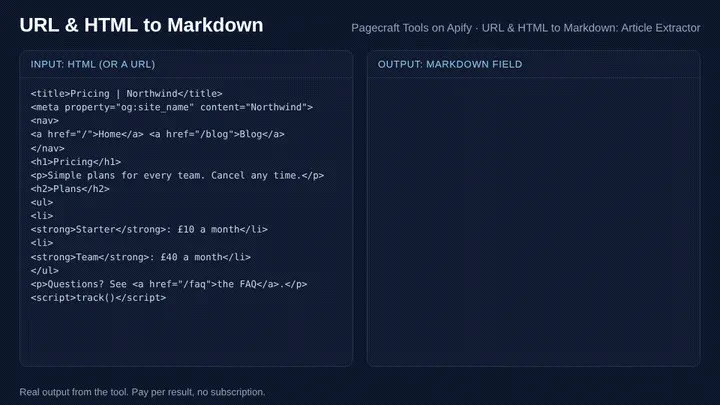
- 🧾 HTML to Markdown: paste HTML (or send a list through the API in
htmlDocuments) and get Markdown, text and metadata back, with nothing downloaded. - 🌐 Whole page or main article: keep only the article, or convert everything on the page (docs, product and landing pages).
- 🤖 Markdown for AI: headings, lists, links and code blocks kept as Markdown, ideal for LLM prompts, embeddings and RAG. Clean HTML is available too.
- 📏 Word count and reading time for every article, and an optional character limit to keep prompts short.
- 🧹 Clear failures: pages that need JavaScript or a login, or are not articles, come back with a plain-English reason instead of empty text.
Who it's for
- AI and RAG builders feeding clean article text into models and vector stores.
- Researchers, analysts and PR teams collecting coverage with authors and dates.
- Content and SEO teams auditing their own or competitors' articles in bulk.
- AI agents through the Apify MCP server, Make, n8n and Zapier.
Input
| Field | What to enter |
|---|---|
| Article URLs | One per line, e.g. https://www.example.com/news/story |
| HTML | Optional, one HTML document to convert instead of (or as well as) URLs |
| HTML documents (list) | Optional, for the API: many HTML documents at once |
| Output formats | Plain text (default), Markdown and/or clean HTML |
| What to keep | Main article only (default) or the whole page |
| Maximum characters per article | Optional, 0 = no limit |
| Proxy | Optional, under Advanced |
HTML to Markdown, through the API (the optional url resolves relative links):
Output
One row per URL:
Fields the page does not provide (an author on a company page, say) are null. Download the results as JSON, CSV or Excel, or read them through the API.
Pricing
| Event | When it is charged | Price per 1,000 (Free / Bronze / Silver / Gold plan) |
|---|---|---|
| Article extracted | Each page whose article text and metadata are returned. | $3 / $2.75 / $2.50 / $2 |
| Page failed | A page that could not be loaded or had no article text (it still uses server time). | $2 on every plan |
Example: 1,000 articles cost $3 on the Free plan. Pages that cannot be read are charged the smaller failed fee, because they still use server time.
Notes and limits
- The tool reads the page as the server sends it, without a browser. Sites that build their articles with JavaScript, or put them behind a login or paywall, return the "No article text found" reason.
- Each page has 25 seconds and 3 MB; four pages are read at a time.
- Some sites block cloud servers. If you see "refused access", try again with Apify datacenter proxies under Advanced.
- Respect each site's terms and copyright when you reuse the text.
Use with AI agents (MCP)
Connect this tool to Claude, Cursor, VS Code or any other MCP client through the Apify MCP server. To load only this tool, use this server URL:
Then ask, for example: "Get these five articles as Markdown with their authors and publish dates" or "Convert this HTML to Markdown". The agent gets back the article text or Markdown, title, authors, dates, site name and main image for each URL. Each call is charged per event at the prices in Pricing above. Agents without an Apify account can also pay per run through Apify's agentic payments.
Workflows with other Pagecraft tools
Pagecraft tools are built to work together. Ideas that use this one:
Turn documents and web pages into AI-ready text. Feed a RAG system, a vector database or an LLM prompt with clean text.
- Sitemap URL Extractor: List every page URL of a website from its sitemaps.
- This tool: Get clean text or Markdown, with title, author and date, for each page.
- PDF to Markdown & Text Extractor: Add the text of any PDF reports or papers, page by page.
- OCR Image to Text: Read text from scans, screenshots and images the other steps cannot.
Monitor news and social mentions. Follow a brand, topic or market across news and social platforms.
- Google News Scraper: News articles by keyword and country.
- RSS Feed Reader: Every new post from the blogs and news sites you follow.
- Hacker News Scraper: Stories and comments from the tech community.
- Bluesky Posts & Profiles Scraper: Posts mentioning your keywords on Bluesky.
- Telegram Channel Scraper: Posts from public Telegram channels.
- This tool: The full text of any article you want to analyse.
More Pagecraft tools
- Google News Scraper: find the articles first, by keyword and country.
- RSS Feed Reader: every new post from any blog or news feed.
- Website Contact Extractor: emails, phones and social links from any website.


