

Website Screenshot, PDF & Visual Change Monitor
Pricing
from $1.50 / 1,000 screenshots
Website Screenshot, PDF & Visual Change Monitor
Bulk full-page screenshots (PNG/JPEG/WebP) and PDFs of any page or whole website, plus visual change monitoring: changes framed in red and webhook alerts. No height cap, cookie banners handled, ads blocked, carousels unfolded, mobile emulation. Pay only for successful captures.
Pricing
from $1.50 / 1,000 screenshots
Rating
0.0
(0)
Developer

Paco Alberola
Maintained by CommunityActor stats
0
Bookmarked
2
Total users
1
Monthly active users
23 minutes ago
Last modified
Categories
Features
Share
Take clean, complete screenshots and PDFs of any website in bulk, capture every page of a website from its sitemap, and get alerted when a page changes, with every change framed in red.
Paste URLs or just a domain, pick a device and get PNG, JPEG, WebP or PDF files back. Cookie banners are accepted or removed, ads are blocked, products hidden in carousels can be unfolded so nothing is missed, and you only pay for screenshots that succeed.
Why this screenshot tool?
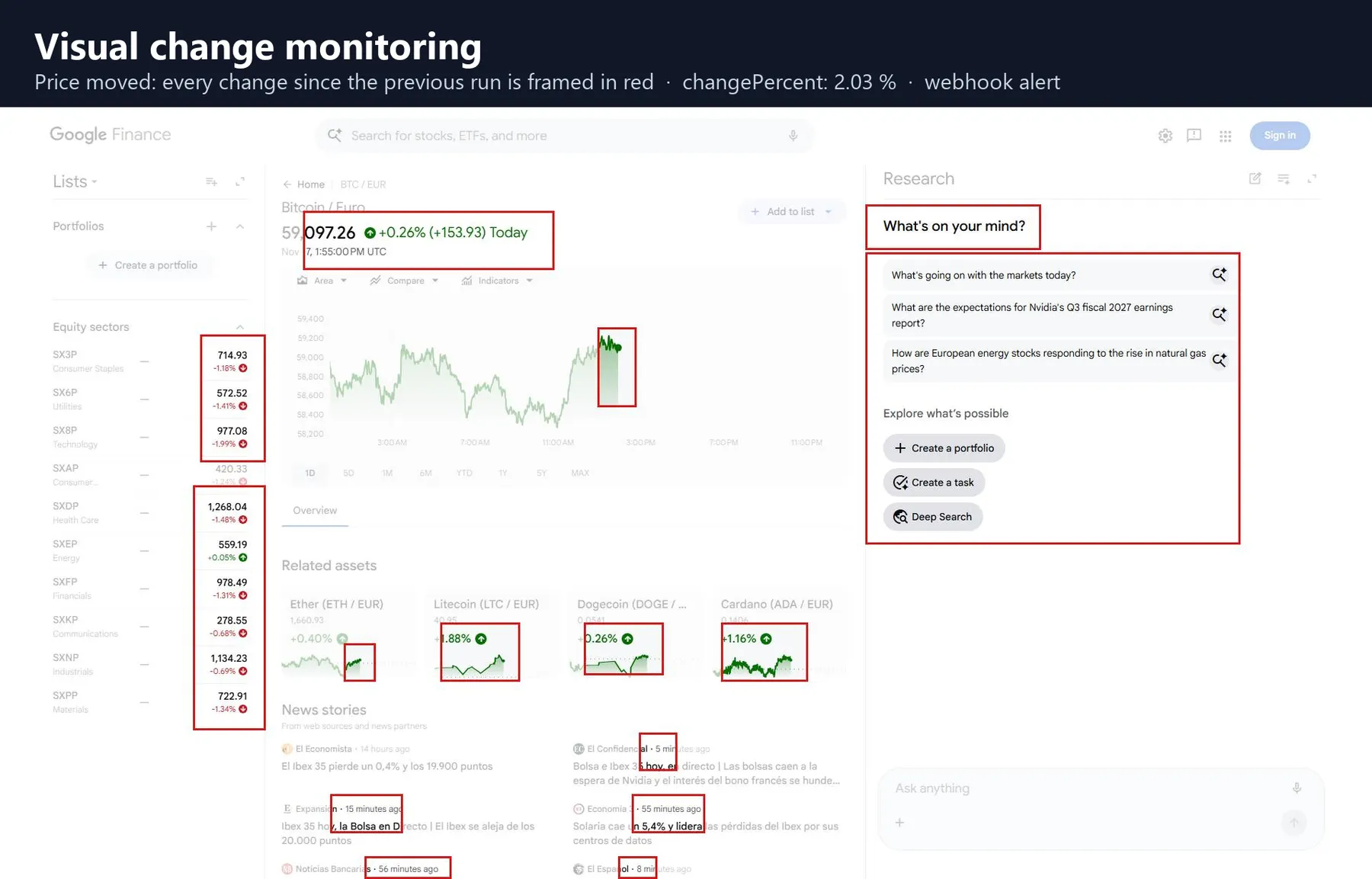
- 🔔 Visual change monitoring. Schedule it and know when a competitor changes a price, a landing page, a banner or its terms: you get the % of the page that changed, an image with every changed area framed in red and an optional webhook alert.
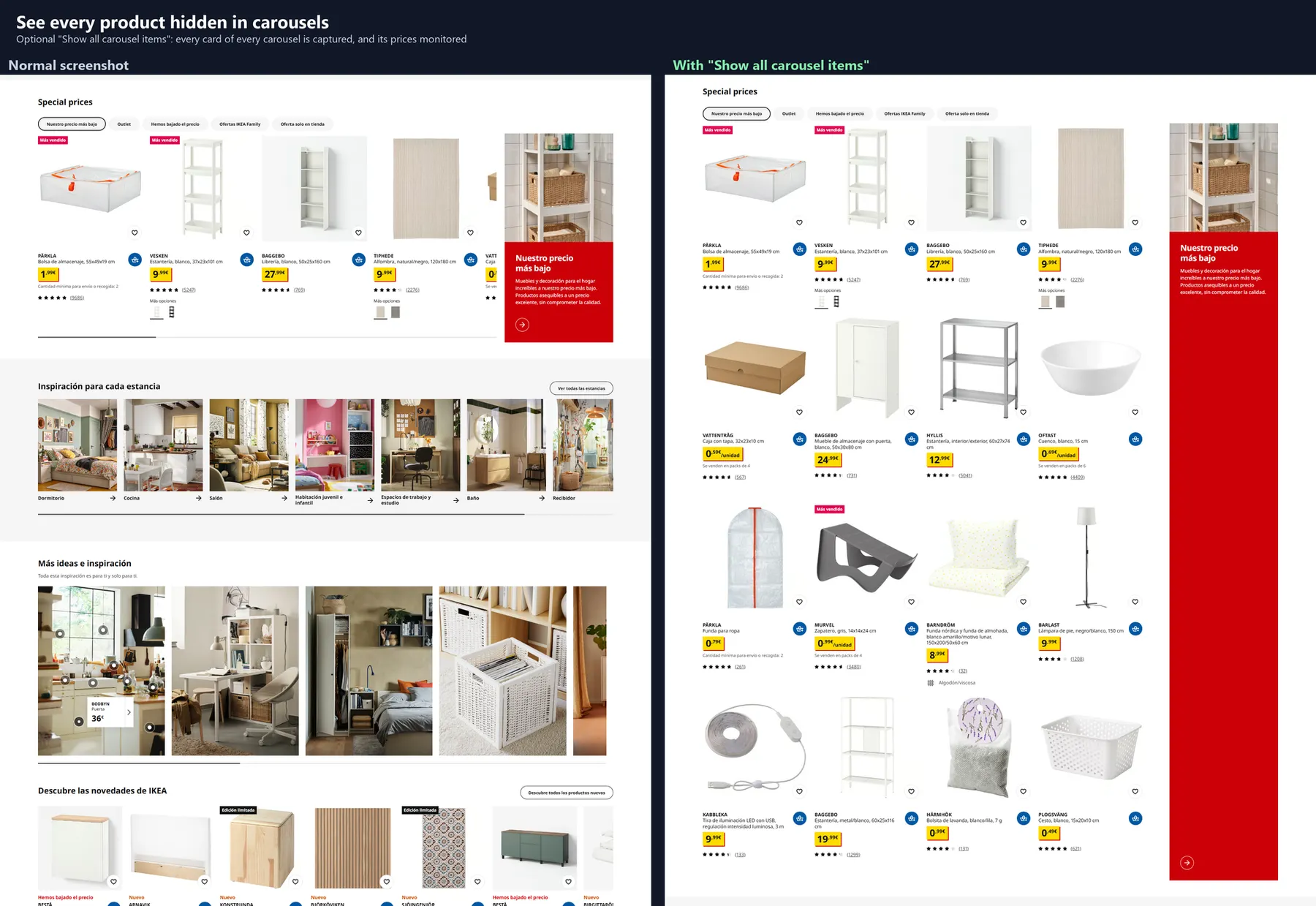
- 🎠 See (and monitor) what's hidden in carousels. Product rows and sliders only show a few items; the rest sit off-screen to the right, invisible to normal screenshots and change monitors. Turn on Show all carousel items: every carousel is swiped through and unfolded into a grid, so every product and price is captured, and price changes in them are detected too. Works with native scroll rows and Swiper, Slick, Glide, Splide and Owl sliders.
- 🌐 Whole websites in one run. Enter
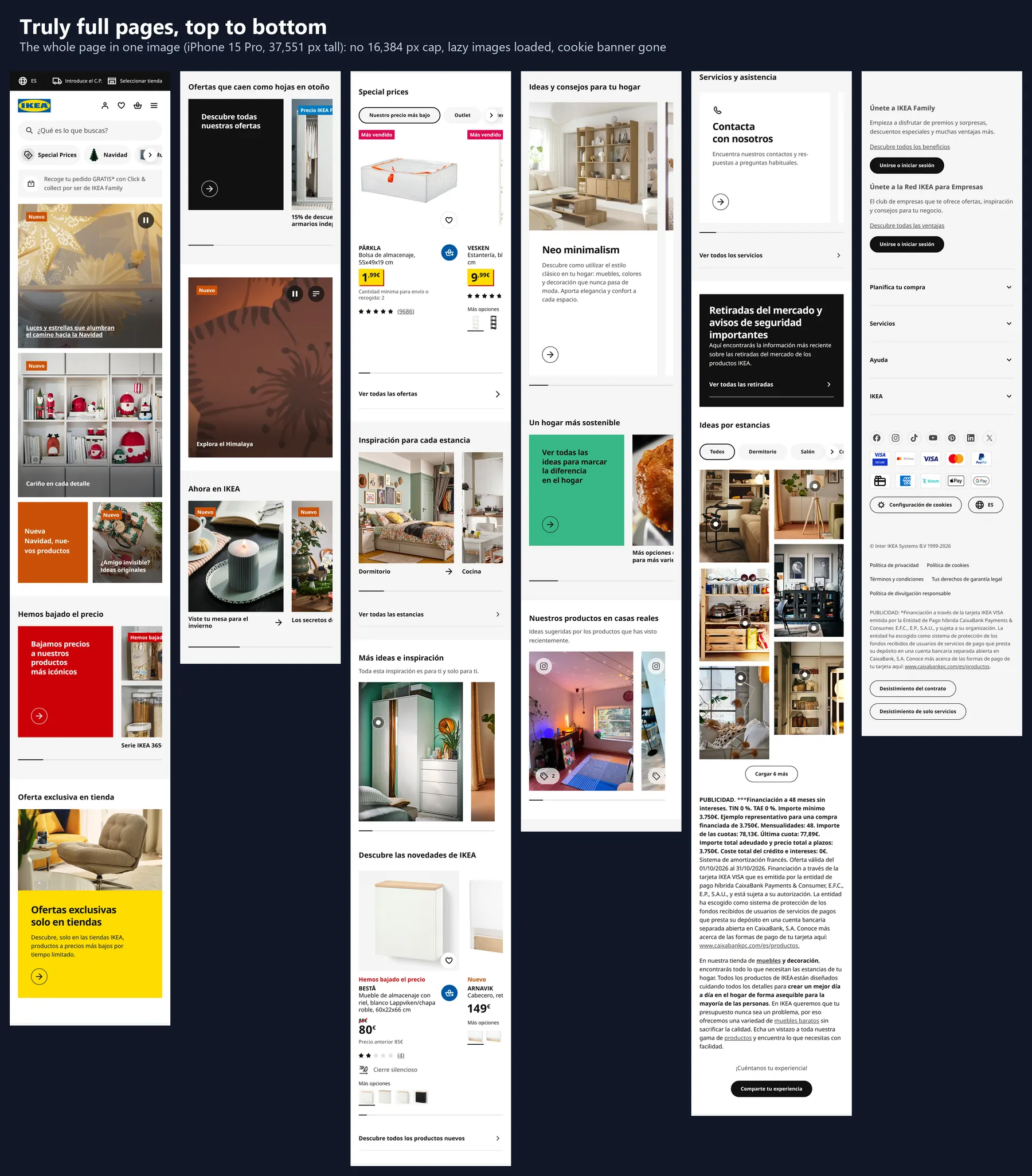
example.comand every page in its sitemap is captured (filter by URL pattern, limit the number of pages). - 📏 Truly full pages, no 16,384 px cap. Long pages are captured top to bottom, without the blank areas other tools leave on very tall pages or on sections the browser skips off-screen.
- 🧩 Web apps captured whole. Pages whose content scrolls inside a panel (Notion-, Gmail-, Spotify- or Stripe-docs-style layouts) are expanded automatically, so you get the full content instead of just the first screen. Boards that scroll sideways (Trello, Kanban apps) are captured with every column and every card. Mobile tab bars, floating chat buttons and promo pop-ups don't end up in the middle of the image.
- 🖼️ No blank or grey images. The page is scrolled first and every image is waited for, so lazy-loaded content actually appears.
- ♾️ Infinite-scroll mode for sites that unload images off-screen (AliExpress, Instagram, Pinterest, Shein…): the page is captured slice by slice and stitched into one clean image.
- 🍪 Cookie consent handled. Clicks "Accept" on OneTrust, Cookiebot, Didomi, Usercentrics, Quantcast, TrustArc and generic banners in 8 languages, then hides anything left (including Shadow-DOM banners like TikTok's), modal popups and chat widgets.
- 🚫 Ad & tracker blocking for faster loads and cleaner shots.
- 💸 Failed URLs are free. DNS errors, timeouts and blocked pages are reported but never charged.
Features
- Full-page or viewport screenshots in PNG, JPEG or WebP
- Website to PDF (A4, Letter, Legal, A3) with backgrounds
- Device emulation: desktop 1920×1080, laptop 1366×768, iPad Pro, iPhone 15 Pro, or any custom viewport
- Element screenshots: capture only
#pricing,headeror any CSS selector - Logged-in pages: pass your own cookies and HTTP headers (e.g.
Authorization) - Dark mode, custom browser locale and optional proxy for geo-specific pages
- Hide any extra element with your own CSS selectors
- Fast bulk processing in parallel with automatic retries
Visual change monitoring
- Turn on Monitor visual changes and give the monitor a name (e.g.
competitors). - Schedule the Actor (Apify Console → Schedules) to run daily or hourly.
- The first run saves a baseline. From then on, every result tells you:
changed— whether the page changed since the last runchangePercent— how much of the page changed (a single price counts)diffUrl— the new screenshot with each changed area framed in red (the rest of the page is dimmed)previousScreenshotUrl— the screenshot from the previous run
- Optional webhook: get a JSON POST only when something changes, and send it to Slack, Discord, email, Make, Zapier or n8n.
📖 Step-by-step tutorial: How to get a Slack alert when a competitor changes their prices (setup, Slack via Zapier/Make/n8n, avoiding false alarms).
Tip: pages with rotating banners, ads or clocks change all the time. Hide those areas with Extra elements to hide, or raise the Change threshold.
Webhook payload:
Whole-website screenshots
Add domains to Whole websites: the Actor reads robots.txt and the sitemaps (including sitemap indexes and .gz files) and captures every page, homepage first. Sites without a sitemap fall back to the links on their homepage. Use Only pages matching / Skip pages matching (regular expressions) and Max pages per website to control what's captured. Combine it with change monitoring to watch an entire site.
Use cases
- Competitor monitoring: get alerted when competitors change prices, plans, landing pages or promotions
- E-commerce & marketing: track bestseller pages and campaigns over time
- SEO & agencies: screenshot a client's whole site on mobile and desktop before and after a redesign
- Website monitoring & QA: detect unexpected visual changes or broken layouts after each deploy
- Compliance & evidence: save a PDF/PNG of a page exactly as it looked on a given date
- AI & automation: feed clean screenshots to vision models or n8n, Make and Zapier workflows
- Thumbnails & link previews for directories and catalogs
How to use it
- Add one or more URLs.
- Choose the format and the device.
- Click Start. Each screenshot appears in the Output tab with a preview and a direct download link.
If a long page shows grey or missing images (typical on infinite-scroll stores and social sites), turn on Infinite-scroll mode.
Input example
Logged-in page example:
Output example
Files are stored in the run's key-value store. Each dataset item looks like this:
Download results as JSON, CSV, Excel or HTML, or fetch them via the Apify API.
Pricing
Pay per successful screenshot, plus small optional fees: one per change comparison when monitoring is on, and one per page where carousels were actually unfolded when Show all carousel items is on (pages without carousels aren't charged for it), and one per page captured through Apify's residential proxy, only if you choose it (residential traffic is far more expensive than normal traffic; see the FAQ). See the Pricing tab. Failed captures are free, and the first run of a monitor (the baseline) has no comparison fee.
Integrations
Use it from the Apify API, the Python/JavaScript clients, or connect it to Make, Zapier, n8n, Google Sheets, Slack and webhooks. Schedule it to run daily for visual monitoring.
FAQ
Can it bypass CAPTCHAs or bot protection? No. It captures pages as a normal visitor would see them. For logged-in pages, pass your own cookies.
A site still shows a popup. Add the popup's CSS selector to Extra elements to hide, or open an issue with the URL and it will be added to the built-in rules.
Carousel items are missing even with Show all carousel items on. Some carousels only load the next item when you click an arrow, so those items don't exist on the page until then. Items that never load are left out and the result includes a note. On mobile, stores with many carousels can get very long and hit the maximum image height: use Desktop for those.
WebP or JPEG came back as PNG. WebP images can't be taller than 16,383 px (JPEG 65,500 px). Taller pages are saved as PNG automatically and the result includes a note.
How long are previous screenshots kept? The baseline used for comparisons is stored in a named key-value store (screenshot-monitor-<name>) in your account and kept until you delete it. Links to old screenshots and diff images follow your plan's data retention.
I get change alerts every run. The page has dynamic content (ads, carousels, dates, "X people viewing"). Hide it with Extra elements to hide or raise the Change threshold (e.g. 1). Personalised or randomly ordered feeds (marketplace search results, social timelines) change on every visit: monitor a specific product, pricing or landing page instead.
Some pages show "HTTP 403" or another HTTP error and no screenshot. The site answered with an error (often because it doesn't allow automated browsers). These URLs are reported in the dataset and not charged. Turn on Capture error pages if you want a screenshot of the error page anyway.
Some images are grey or empty boxes and the result has a note about images that didn't load. Some big sites serve less content to cloud servers than to home visitors (the page loads, but some photos or sections never appear). The Actor scrolls over them and waits before capturing; if they still don't load, it tells you instead of failing silently. Run it again, or set Proxy to Apify Proxy → Residential with the site's country.
Why does the residential proxy cost extra? It loads the page through a real home internet connection, which sites trust, so they show their full content. That traffic is paid per gigabyte and is many times more expensive than a normal connection: a heavy store homepage can download 50+ MB through it. So each page captured through the residential proxy has an extra fee (see the Pricing tab). Failed pages are still free, and the default proxy or your own proxy URLs have no extra fee.
A website only returned its homepage. Its sitemap couldn't be read and its homepage had no usable links (or it doesn't allow automated access). Add the pages you need to URLs directly.
Is it legal? Taking screenshots of public web pages is generally fine, but you're responsible for how you use the images (copyright, trademarks, personal data).
Need a custom feature? Open an issue in the Issues tab — feature requests are welcome.


