
The Odds API Sports Scraper
Pricing
from $7.50 / 1,000 results
The Odds API Sports Scraper
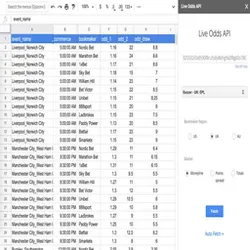
Scrapes live sports betting odds from The Odds API. Returns each event as a flat row with sport, league, teams, and odds. Filter by sport group or active season.
Pricing
from $7.50 / 1,000 results
Rating
0.0
(0)
Developer

ParseForge
Maintained by Apify PartnerActor stats
0
Bookmarked
6
Total users
1
Monthly active users
12 days ago
Last modified
Categories
Share

The Odds API Sports Scraper
Scrape live sports betting odds from The Odds API, up to a million events per run. Every event comes with its sport, league, teams, and current odds. No login or API key. Export to CSV, JSON, Excel, or XML.
The Odds API's official endpoint needs an API key, paid plans, and rate-limits you. This reads the public sports odds feeds directly, filtered by sport group or active season, and returns each match in one fixed schema.
| Who uses it | What they scrape The Odds API for |
|---|---|
| Sports bettors | Which games have the best odds right now |
| Odds comparison sites | Feed live odds into their own dashboards |
| Data analysts | Build historical odds datasets for modeling |
| Sports media | Track line movements for stories |
What it does
This Actor collects sports betting events from The Odds API by sport group or active status, and returns each one as a flat row.
- 🎯 Sport group filter: narrow to Soccer, American Football, Tennis, and more.
- 📅 Active only: include only sports currently in season.
- 🔢 Max events: cap the number of events per run, from 1 to 1,000,000.
Results export to CSV, JSON, Excel, or XML, or straight from the API.
What you can do with The Odds API data
📈 Track odds movements.
A sports bettor runs the Actor every hour with activeOnly true to see which lines are shifting and where the value is.
📊 Build an odds comparison site.
A developer pulls all events for Soccer and American Football into a database to power a public odds board.
🧠 Train betting models.
A data analyst collects historical odds by sport group to feed machine learning models that predict outcomes.
📰 Monitor sports news.
A sports journalist uses the Actor to spot big line moves that signal breaking news or injuries.
Why choose this scraper
| What you get | |
|---|---|
| Live odds | Current betting lines for every event |
| Sport groups | Filter by Soccer, American Football, Tennis, and more |
| Active seasons | Only sports currently in play |
| Scalable | Up to a million events per run |
How it compares
No other Store actor targets The Odds API the same way, so the honest comparison is with the alternatives teams actually weigh.
| The Odds API Sports Scraper | Build it in-house | By hand | |
|---|---|---|---|
| Setup | Run it now, zero config | Days of engineering | None, but hours per pull |
| When The Odds API changes | Maintained for you | You fix it | You re-learn the page |
| Proxies, retries, anti-bot | Built in | Your problem | Browser only |
| Output | Fixed JSON schema, CSV/Excel export | Whatever you build | Copy-paste |
| Cost | Pay per result | Engineering time | Analyst hours |
Configure the run
Drive the Actor from a sport group filter and an active-only toggle, and filters run as each event is read so only matches reach your dataset. The Input tab lists every parameter.
A first run with the defaults:
A larger pull:
Pricing
Pay-per-result: $0.0085 per result collected. You pay only for the results written to your dataset.
| Results collected | Approximate cost |
|---|---|
| 100 results | $0.85 |
| 1,000 results | $8.50 |
| 10,000 results | $85.00 |
New Apify accounts start with $5 in free credit.
Free users
Free-plan runs return up to 10 results as a preview. Upgrade your Apify plan to collect up to 1,000,000 results per run.
Run it
- Create a free Apify account with $5 in credit.
- Open the The Odds API Sports Scraper.
- Set your inputs and any filters, then click Start.
- Export the results as CSV, Excel, JSON, or XML from the Dataset tab.
Run it programmatically through the Apify API (run-sync-get-dataset-items) or the ApifyClient for JavaScript and Python.
Use with AI agents (MCP)
Give an AI agent live access to The Odds API through the Model Context Protocol. Add the Actor to Claude, Cursor, or any MCP client:
Then prompt it in plain language to run the scraper and read back the results.
Troubleshooting
Why am I getting no results?
Check your group filter. If you set a group that has no active events, you will get an empty dataset. Also, if activeOnly is true and no sports are in season, there will be no results.
Why is the run slow?
The Actor reads events one by one. If you set maxItems very high, it will take longer. Reduce maxItems or narrow the group filter.
Can I get odds for a specific team?
There is no team filter in the input. Collect events for the relevant sport group and then filter the results by team name in your code.
Why are some odds missing?
The Odds API may not have odds for every event at every moment. Try running again later or check the sport group.
How do I export to Google Sheets?
Use the Apify Google Sheets integration. After the run, click 'Export' and choose Google Sheets.
FAQ
| Question | Answer |
|---|---|
| Do I need an API key for The Odds API? | No. This Actor reads the public feeds directly, so no key or login is required. |
| Which sports are supported? | All sports available on The Odds API, including Soccer, American Football, Tennis, Basketball, Baseball, and more. Use the group filter to narrow down. |
| Can I get only live games? | Yes. Set activeOnly to true to include only sports currently in season. |
| How many events can I collect? | Up to 1,000,000 events per run, controlled by the maxItems field. |
| What format is the data in? | Each event is returned as a flat row with sport, league, teams, and odds. You can export to CSV, JSON, Excel, or XML. |
| Can I filter by league? | The group filter covers sport groups like Soccer or Tennis. For finer league filtering, use the group filter and then filter the results in your code. |
| How often should I run this Actor? | Odds change frequently. For live tracking, run it every few minutes. For historical data, a daily run is enough. |
| Is this legal to scrape? | The Odds API provides public data feeds. Always check the terms of service for your use case. |
| Can I get historical odds? | This Actor returns current odds. For historical data, you would need to run it regularly and store the results. |
| What is the difference between this and the official API? | The official API requires an API key and has rate limits. This Actor bypasses those by reading the public feeds directly. |
Related actors
Browse the full ParseForge collection for more scrapers.
🆘 Need help? Email parseforge@protonmail.com with your run ID, your input, and what you expected.
⚠️ Disclaimer. This Actor is unofficial and is not affiliated with, endorsed by, or sponsored by The Odds API, LLC. It collects only publicly available data. You are responsible for using the collected data in compliance with the source's terms of service and applicable data-protection laws, including GDPR, CCPA, and PIPL. Do not use it to collect personal data unlawfully.


