

LinkedIn Jobs Scraper: Applicants, Levels & Requirements
Pricing
from $1.20 / 1,000 jobs
LinkedIn Jobs Scraper: Applicants, Levels & Requirements
LinkedIn jobs in any country with applicant counts, Easy Apply or company site, seniority, industry, required languages and years of experience, recruiting e-mails and yearly salary. No login, no cookies.
Pricing
from $1.20 / 1,000 jobs
Rating
0.0
(0)
Developer

Paul Yu
Maintained by CommunityActor stats
0
Bookmarked
2
Total users
1
Monthly active users
2 days ago
Last modified
Categories
Features
Share
What does LinkedIn Jobs Scraper do?
It collects LinkedIn job listings in any country without a LinkedIn account, with what the search list does not show: how many people have applied, whether you apply on LinkedIn or on the company's site, the seniority level, and the languages and years of experience the job asks for. Pay is turned into a yearly figure, and on a schedule you get only new jobs, by e-mail if you like.
- Applicant numbers.
applicantswithapplicantsPrecision, exactly as LinkedIn shows them: "98 applicants", "Over 200 applicants", "Be among the first 25 applicants". Sort by fewest applicants, or set a maximum. The number is the one LinkedIn showed publicly at run time; LinkedIn can show a different count to visitors in other regions. - How to apply.
applyMethodis "easy apply" or "company website". Filter for either. - Requirements read from the ad. Languages it requires or calls a plus ("fluent German required", "Japanese is a plus"), and the years of experience it asks for ("3-5 years"). Skip jobs that need a language you do not speak, or that ask for more experience than you have.
- Seniority and field. LinkedIn's own seniority level, job function and industry, with a seniority filter.
- Recruiting contacts. Role addresses written in the ad (jobs@, careers@, hr@). Personal addresses are never collected.
- Clean and comparable. Pay as a yearly figure in the job's currency, remote / hybrid / on-site from the ad's wording, recruitment agencies flagged, visa sponsorship read from the description.
- Job alerts. Only new jobs on a schedule returns, and charges for, only jobs you have not received before, and can e-mail you a digest.
Price: $0.002 per job saved on the Apify Free plan, down to $0.0012 on Gold. $1 ≈ 500 jobs on the Free plan, up to 833 on Gold. Jobs removed by your filters, duplicates and jobs already delivered to an alert are free. Each run also has a start fee of $0.003 ($0.002 on Gold), so a scheduled alert run that finds no new jobs costs a third of a cent. To cap spending, set Maximum cost per run in Run options: the run never goes over it, and with a small limit it only asks LinkedIn for about as many jobs as the limit can pay for. The cost limit always uses your own plan's price.
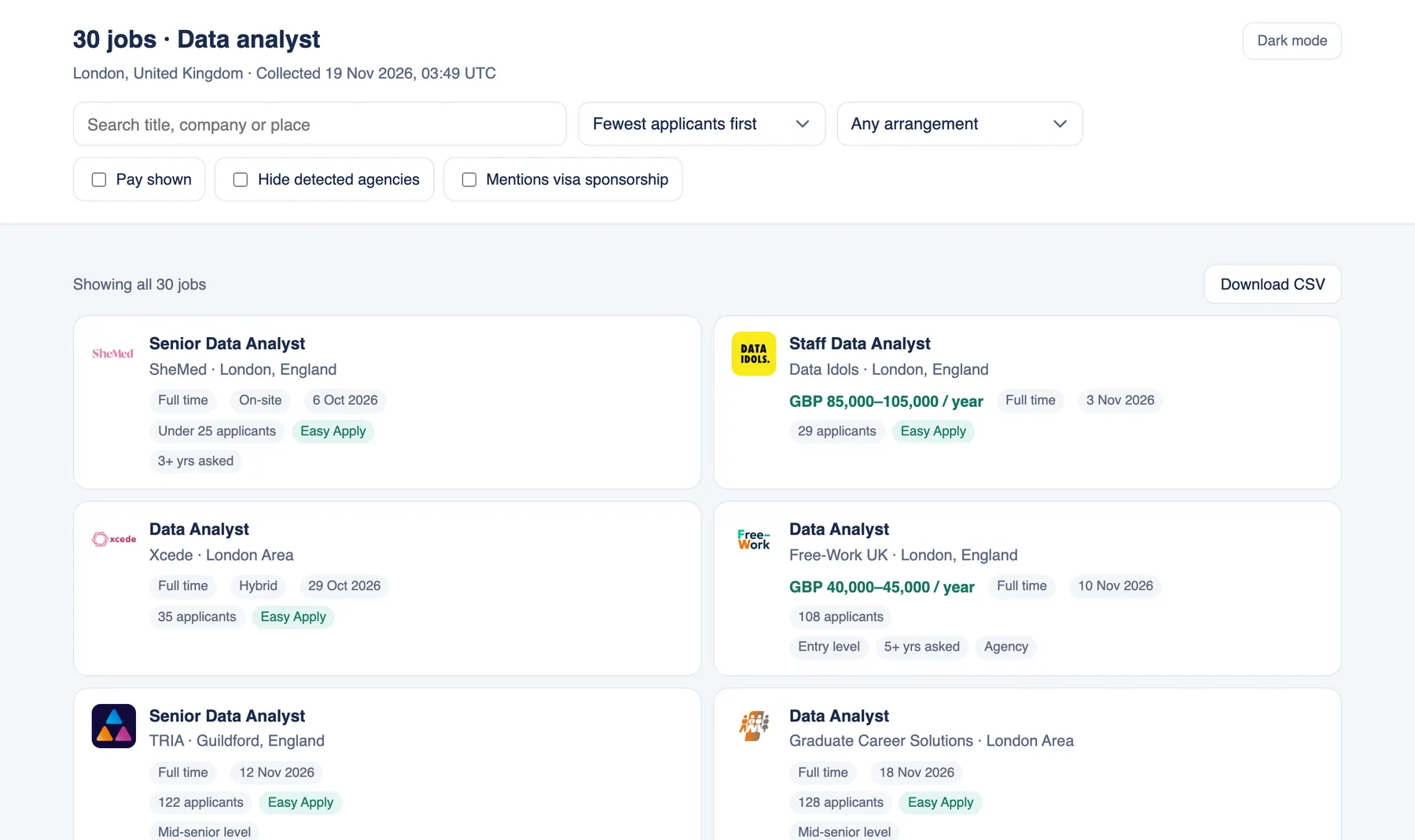
What you get for each job
| Job | Applying | Requirements |
|---|---|---|
| Title, link, company, logo, location | Applicants and precision | Languages required |
| Posted date, job type, seniority | Easy Apply or company site | Languages that are a plus |
| Job function, industry | Recruiting e-mail addresses | Years of experience (min and max) |
| Remote, hybrid or on-site | Agency or direct employer | Visa sponsorship offered or ruled out |
| Pay as shown, yearly min and max | ||
| Full description (Markdown or HTML) |
After each run, the Results page in the Output tab lists the jobs with search, sorting (newest, highest pay, fewest applicants), filters, light and dark mode, and a CSV download.
How to use it
- Enter job titles, one per line, e.g.
data analyst. - Enter places, e.g.
SydneyorBerlin, and pick the country. - Set filters if you like: at most 50 applicants, Easy Apply only, entry level, at most 2 years of experience, skip jobs that require German.
- Click Start.
For a daily alert, turn on Only new jobs, give the alert a name, add your e-mail and a schedule.
Input example
Output example
Use cases
- Job seekers: find the jobs you qualify for with the least competition, every morning by e-mail.
- International applicants: skip ads that require a language you do not speak; find the ones that offer sponsorship.
- Recruiters and sales teams: companies hiring now, by seniority and industry, with their recruiting addresses.
- Market research and AI: clean rows with full descriptions and consistent pay.
FAQ
Why are some applicant counts or apply methods empty?
They come from each job's own page. LinkedIn sometimes does not show the count, or does not answer for a page during a busy run; that job is still saved with everything else, and the At most this many applicants filter keeps it.
Can I get the company's own application link?
LinkedIn shows that link only to signed-in members, and this Actor does not sign in. applyMethod tells you whether the job is applied for on the company's site.
How reliable are the language and experience fields?
They are read from the ad's wording, in English: ads written in other languages (for example German ads in Berlin) keep these fields empty. A language is "required" unless its sentence calls it a plus, an advantage or preferred. Ads that do not mention languages or years leave the fields empty, never guessed.
How many jobs can a search return?
LinkedIn returns at most 1,000 jobs per search. Use Skip the first results to continue a search in a second run.
Is it legal to scrape LinkedIn jobs?
The Actor reads public job listings without signing in and does not collect members' personal data. Make sure your use complies with LinkedIn's terms and privacy law.
Use it from AI assistants and code
Works as a tool in Claude, ChatGPT, Cursor and other assistants through the Apify MCP server. Add https://mcp.apify.com?tools=paul_studio/linkedin-jobs-scraper to your MCP client and ask, for example: "Find entry-level data analyst jobs in London that do not require French and have fewer than 50 applicants."
Pricing
You pay per job saved, the same price with every field included. Jobs removed by your filters, duplicates and jobs already delivered to an alert are free. Proxies are included. Set a maximum cost per run in the run options and the Actor never goes over it.
Feedback
Something missing or wrong? Open an issue on the Issues tab with the search you ran.


