

YouTube Channel Scraper: Stats, Links & Growth
Pricing
from $0.60 / 1,000 channels
YouTube Channel Scraper: Stats, Links & Growth
YouTube channel data from handles, links, IDs, videos or keyword searches: exact total views, subscribers, country, join date, links, upload rate and recent average views. Track growth between runs.
Pricing
from $0.60 / 1,000 channels
Rating
0.0
(0)
Developer

Paul Yu
Maintained by CommunityActor stats
0
Bookmarked
2
Total users
1
Monthly active users
2 days ago
Last modified
Categories
Features
Share
What does YouTube Channel Scraper do?
It collects YouTube channel data from a list of channels or from keyword searches: subscribers, exact total views, video count, country, join date, description, links, and, when you want it, how the channel's latest uploads are doing. One row per channel, ready to compare.
- Paste anything.
@handles, any channel link (/channel/,/c/,/user/,/@name/videos), channel IDs, or a video link to get the channel behind it. Lines without a link are searched as keywords to find channels. - Find creators by niche. A keyword search returns the channels YouTube ranks for it, filtered by subscriber range and country. Channels outside your filters are not charged.
- Real activity, not just size. Turn on the uploads analysis to get the average and median views of the latest videos, uploads per month and the last upload date, so a channel with 1M subscribers and 3K views per video stands out.
- Growth over time. With tracking on, each run adds how many subscribers, views and videos a channel gained since the previous run. Put it on a schedule to follow competitors or creators you work with.
- Links you can use. Websites and social profiles come back as real addresses, with YouTube's redirect removed.
Price: $0.001 per channel on the Free plan ($0.0006 on Gold), or $0.002 with the uploads analysis ($0.0012 on Gold). $1 ≈ 1,000 channels on the Free plan, up to 1,666 on Gold. Each run also has a start fee of $0.001 ($0.0007 on Gold), so a scheduled run that finds nothing new costs a tenth of a cent. To cap spending, set Maximum cost per run in Run options; the run never goes over it. The cost limit always uses your own plan's price. When the limit cannot cover the uploads analysis, the channel is saved at the plain price instead.
What you get for each channel
| Profile | Numbers | Latest uploads (optional) |
|---|---|---|
| Name, @handle, link, channel ID | Subscribers (and as YouTube shows them) | Average and median views |
| Description, keywords | Exact total views | Uploads in the last 30 days (among those analysed), per month |
| Country, join date, verified | Video count | Last upload |
| Avatar, banner | Change since the last run (tracking) | The videos: title, views, date, length |
| Links, business email offered |
Lines that cannot be found (a deleted channel, a handle that does not exist, a search with no results) get a row with the reason, free of charge.
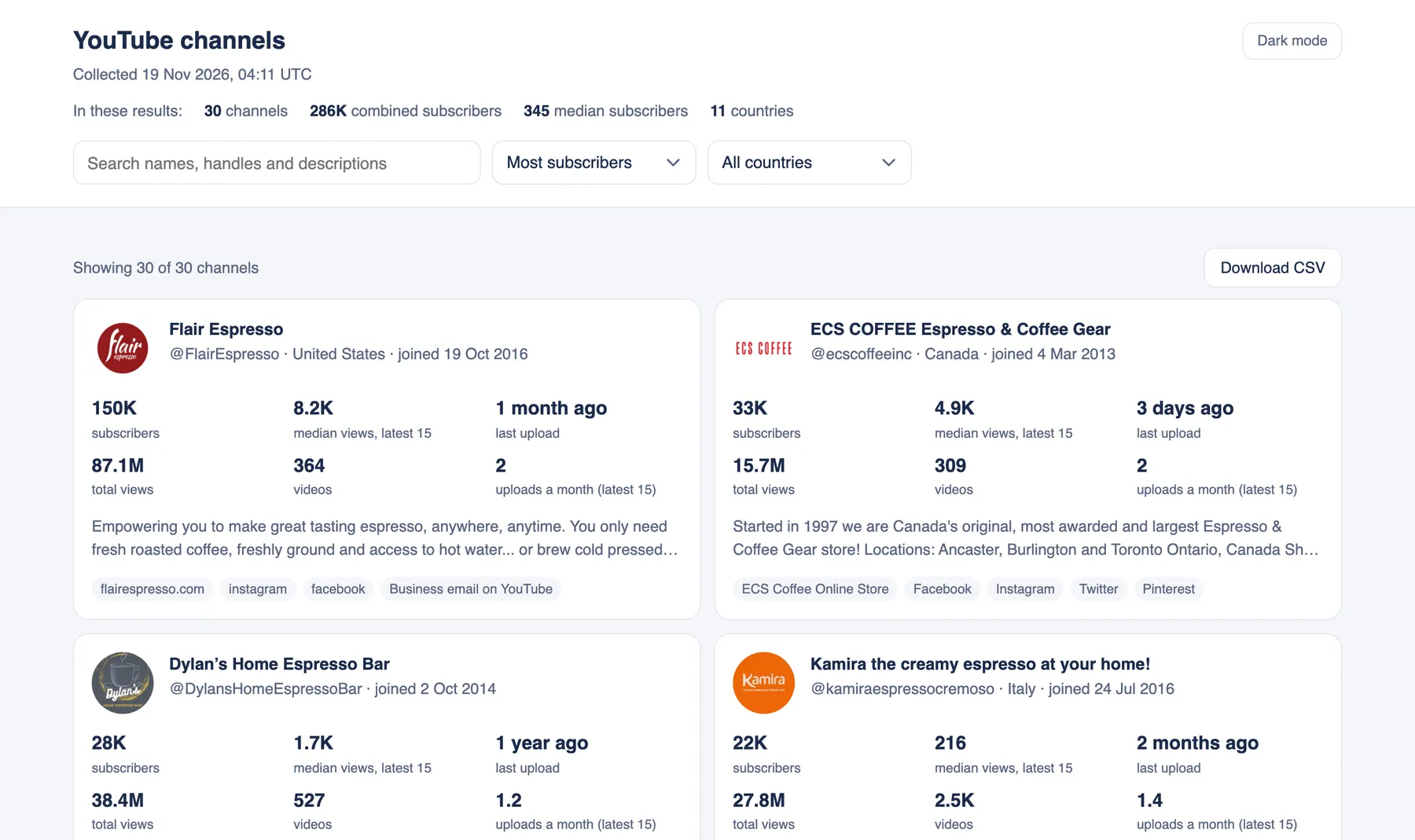
After each run, the Results page in the Output tab shows the channels as cards you can search, sort (subscribers, total views, recent views, upload rate, growth, newest) and filter by country, in light or dark mode, with a CSV download.
How to use it
- Paste channels or search words, one per line.
- Set Channels per search. End a search line with
| 50to take 50 channels from that line. - Choose what to collect: links (on by default) and the uploads analysis.
- Optionally set a subscriber range or countries.
- Click Start. Ten channels take about ten seconds.
To follow channels over time, turn on Track changes, give the tracker a name and add a schedule.
Input example
Output example
Use cases
- Influencer and creator outreach: find channels in a niche and size range, check they still upload and that their views match their subscribers, then reach them through their links.
- Competitor tracking: follow rival channels on a schedule and see their subscriber and view growth run by run.
- Market research: map who publishes on a topic, where they are based and how big they are.
- Lead lists and AI: clean, one-row-per-channel data for spreadsheets, CRMs and your own models.
FAQ
How exact are the numbers?
Total views and video count are exact. YouTube rounds subscribers (8.76M), so subscribers is the rounded number and subscribersText keeps what YouTube shows. In the uploads analysis, views are the rounded figures YouTube shows on the Videos tab, and dates come from text like "2 weeks ago", so uploads per month is an estimate. uploadsLast30Days counts the uploads analysed: when all of them are from the last 30 days, analyse more uploads to see the full number. Live streams in progress are left out of the view averages.
Do you get the business email?
No. YouTube shows a channel's business email only to signed-in viewers after a check, and this Actor does not sign in to YouTube or solve those checks. hasBusinessEmail tells you the channel offers one, and links often include a website or contact page.
Why do some channels have no country or subscriber count?
The country is set by the channel owner and is often left empty. Some channels hide their subscriber count, and channels YouTube generates itself (Music, Gaming, artist "Topic" channels) have no About page. Those fields are left empty, never guessed. A filter on subscribers or country skips such channels.
How does tracking work?
The Actor stores the last numbers it saw for each channel under your tracker name. The next run with the same name adds subscribersChange, totalViewsChange, videoCountChange and previousCheckAt. Use a new name to start over.
What happens when YouTube blocks a request?
Each request is retried from new IP addresses, and the run switches to residential IPs when your plan includes them. A channel that still cannot be read gets a free row that says so.
Is it legal to scrape YouTube channels?
The Actor reads what YouTube shows publicly to any viewer, without signing in. Channel pages can contain personal data, so make sure your use complies with privacy law such as the GDPR, and with YouTube's terms.
Use it from AI assistants and code
Works as a tool in Claude, ChatGPT, Cursor and other assistants through the Apify MCP server. Add https://mcp.apify.com?tools=paul_studio/youtube-channel-scraper to your MCP client and ask, for example: "Find 30 home espresso channels with 10K to 200K subscribers that uploaded this month."
Pricing
You pay per channel saved: one price for a channel, a higher one when its latest uploads are analysed (never both). Channels that cannot be found, channels outside your filters and duplicates are free. Proxies are included. Set a maximum cost per run in the run options and the Actor never goes over it; if the limit is reached part way, the last channel is saved without the uploads analysis rather than dropped.
Feedback
Something missing or wrong? Open an issue on the Issues tab with the channel link.


