

YouTube Comments Scraper: Replies & Channels
Pricing
from $0.50 / 1,000 comments
YouTube Comments Scraper: Replies & Channels
YouTube comments with replies from videos, Shorts, channels, playlists, hashtags and searches. Threads kept together, creator replies and pins marked, keyword and question filters, only-new-comments monitoring.
Pricing
from $0.50 / 1,000 comments
Rating
0.0
(0)
Developer

Paul Yu
Maintained by CommunityActor stats
0
Bookmarked
2
Total users
1
Monthly active users
2 days ago
Last modified
Categories
Features
Share
What does YouTube Comments Scraper do?
It collects YouTube comments in bulk, with their replies, from single videos or from whole channels, playlists, hashtags and searches. Each comment comes back with its author, likes, date, reply count and the creator's signals, already grouped into threads.
- Paste anything. Video and Shorts links,
@handles, channel and playlist links,#hashtagsor search words in one list. For a channel or search, the newest or top videos are read. - Threads kept together. Replies carry
parentIdandthreadId, and the results page shows them under their comment. Replies are optional and capped per comment, so one busy thread cannot fill your quota. - The creator's voice marked. Comments written by the channel itself, comments the creator hearted, and pinned comments are flagged.
- Honest numbers. The report shows, per video, how many comments were read against the number YouTube displays, and why they can differ. Dates and likes are kept exactly as YouTube shows them and converted with their precision stated.
- Filters that save money. Keywords, words to skip, minimum likes, only questions, posted after a date. Filtered comments are not charged.
- Only new comments. On a schedule, each run delivers, and charges for, only comments you have not received before.
Price: $0.0008 per comment on the Free plan, down to $0.0005 on Gold; replies count as comments. $1 ≈ 1,250 comments on the Free plan, up to 2,000 on Gold. Each run also has a start fee of $0.001 ($0.0007 on Gold), so a scheduled run that finds nothing new costs a tenth of a cent. To cap spending, set Maximum cost per run in Run options; the run never goes over it. The cost limit always uses your own plan's price.
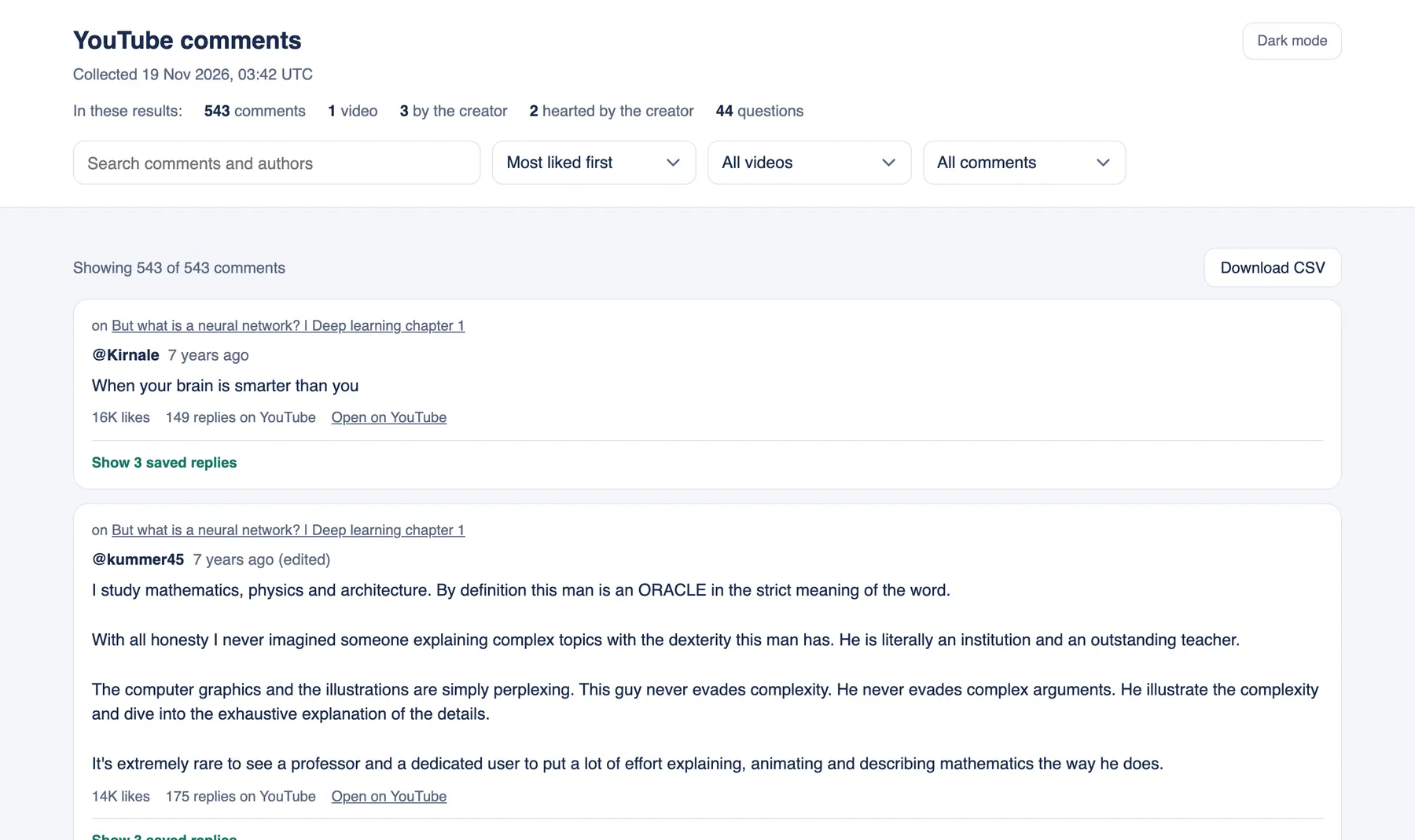
What you get for each comment
| Comment | Author and thread | Video |
|---|---|---|
| Text, link to the comment | Author handle and channel link | Title, link |
| Likes (and as YouTube shows them) | Written by the creator, verified | Channel |
| Posted (as shown, and as a date with its precision), edited | Reply or top comment, parent, thread | The line from your input |
| Pinned, hearted by the creator | Reply count |
Videos without comments to save (no comments yet, comments turned off, private, members only, removed) and sources that cannot be found get a row with the reason, free of charge.
After each run, the Results page in the Output tab shows the comments as threads with search, sorting (most liked, newest), a video filter, creator-only, questions-only and top-level-only views, light and dark mode, and a CSV download.
How to use it
- Paste videos, channels, playlists, hashtags or search words, one per line.
- Set Comments per video. End a line with
| 500to take a different number from that line. - Choose Top comments or Newest first, and whether to include replies.
- Click Start. Fifty comments from one video take a few seconds.
To follow comments on a video or a channel, turn on Only new comments, pick Newest first, give the monitor a name and add a schedule.
Input example
Output example
Use cases
- Audience research: what viewers ask, praise and complain about, with the questions filter as a ready FAQ list.
- Brand and product monitoring: follow review channels or your own videos and get new comments on a schedule.
- Sentiment analysis and AI: clean text, threads and like counts as input for your own models.
- Creator and community management: find unanswered questions, see what the creator replied to and hearted.
FAQ
Why are fewer comments read than YouTube shows?
Two reasons. YouTube lists only about 1,000 to 1,500 comments in each order (Top or Newest), even on videos with millions; when you ask for more, the Actor reads both orders and combines them without duplicates, which roughly doubles what any single listing gives. And the number under a video counts comments YouTube hides: held for review, removed, filtered as spam, or from deleted accounts. The report lists, for every video, the comments read and the number YouTube shows.
How exact are dates and likes?
YouTube shows comment dates as "3 weeks ago" and rounds likes above 1,000 (1.8K). publishedText and likesText keep exactly what YouTube shows; publishedAt and likes turn them into a date (a UTC time for comments from the last day) and a number, and publishedPrecision says how far the date can be off (a "2 years ago" comment can be up to a year older). A like count YouTube shows in a form that cannot be read is left empty, never guessed.
Are replies charged?
Yes, each saved reply is a comment. They are off by default and capped per comment when on.
What happens when YouTube blocks a request?
Each request is retried from new IP addresses, and the run switches to residential IPs when your plan includes them. If a video stops answering part way through, or a reply thread cannot be read, the comments read so far are kept and the report says so for that video.
Can I get comments on community posts?
Not yet. Videos, Shorts and live stream replays are supported.
Is it legal to scrape YouTube comments?
The Actor reads comments YouTube shows publicly to any viewer, without signing in. Comments contain personal data (names and handles), so make sure your use complies with privacy law such as the GDPR, and with YouTube's terms.
Use it from AI assistants and code
Works as a tool in Claude, ChatGPT, Cursor and other assistants through the Apify MCP server. Add https://mcp.apify.com?tools=paul_studio/youtube-comments-scraper to your MCP client and ask, for example: "Get the 100 top comments on my latest video and list the questions viewers ask."
Pricing
You pay per comment saved (replies count as comments). Videos without comments, filtered comments, duplicates and comments already delivered to a monitor are free. Proxies are included. Set a maximum cost per run in the run options and the Actor never goes over it.
Feedback
Something missing or wrong? Open an issue on the Issues tab with the video link.


