

Broken Link Checker: Find Dead Links and 404s on Any Website
Pricing
from $2.00 / 1,000 page scanneds
Broken Link Checker: Find Dead Links and 404s on Any Website
Crawl a website and check every link and image once: 404s, dead domains, server errors, redirects and missing #sections. Get a fix list grouped by broken link, with every page and link text, a plain-language report, and monitoring for new problems.
Pricing
from $2.00 / 1,000 page scanneds
Rating
0.0
(0)
Developer

Elliott Tyson
Maintained by CommunityActor stats
0
Bookmarked
2
Total users
1
Monthly active users
10 days ago
Last modified
Categories
Share
Broken Link Checker crawls a website and checks every link on every page, once each: links to its own pages, links to other websites, and (if you like) images, scripts, stylesheets, videos and #section links. You get a fix list grouped by broken link, with every page that links to it and the link text people see there, so you know exactly what to change and where.
It keeps "broken" apart from "couldn't check". A link that answers 404 is broken; a link to a site that turns away automated checks is not, so it isn't counted as broken. Every result is explained in plain words, with a suggested fix and a readable HTML report you can hand to whoever maintains the site.
It's built for website owners, SEO specialists, agencies and developers who want a clean site, and for anyone who wants a weekly check that only reports new problems.
What can this broken link checker do?
- Check a whole website: it follows the site's own links from the start page, respecting robots.txt, and checks every link it finds. Or scan only the pages in the sitemap, only the pages you list, or just check a list of URLs.
- Fix list grouped by broken link: one row per broken address, with every page that links to it (up to 50 listed) and the link text on each. Links in the header, footer or menu (on most pages) are marked, so you fix them once in the template.
- Broken, warning or couldn't check: 404s, removed pages, server errors, domains that no longer exist, refused connections, invalid certificates, redirect loops and malformed addresses are broken. Old addresses that redirect, "page not found" pages that answer OK, missing #sections and http links on an https site are warnings. Bot protection, robots.txt, logins and timeouts are couldn't check, never "broken".
- Every link checked properly, once: a real GET request (many servers answer HEAD requests wrongly), redirects followed one by one with the full chain (keeping cookies along the way, like a browser), and each address checked once per run however many pages link to it. An old
http://link whose site now only answers onhttps://is a warning to update, not "broken". - Images and files too (optional): broken images, scripts and stylesheets, and insecure http files that browsers block on https pages.
- Missing #sections (optional): for links like
/guide#install, checks that the page really has that section. - Plain-language report: an HTML report with what's broken, where, and how to fix it, worst and most widespread first.
- Monitoring: schedule it weekly and get only new problems, plus a list of problems fixed since last time.
- Orphan pages: in "Both" mode it also lists pages in the sitemap that no page links to.
How to find broken links on a website
- Click Try for free (you'll need a free Apify account).
- Add one or more websites, one per line, for example
example.com. To check one section only, give its address, likehttps://example.com/blog/. - Choose how many pages to scan, and optionally turn on images and files, #section links, or monitoring.
- Click Start.
- Open the Broken links tab for the fix list, or the Report for a readable summary. Download results as JSON, CSV or Excel, or send them to Google Sheets, Slack, Make or Zapier.
Input example
Output example
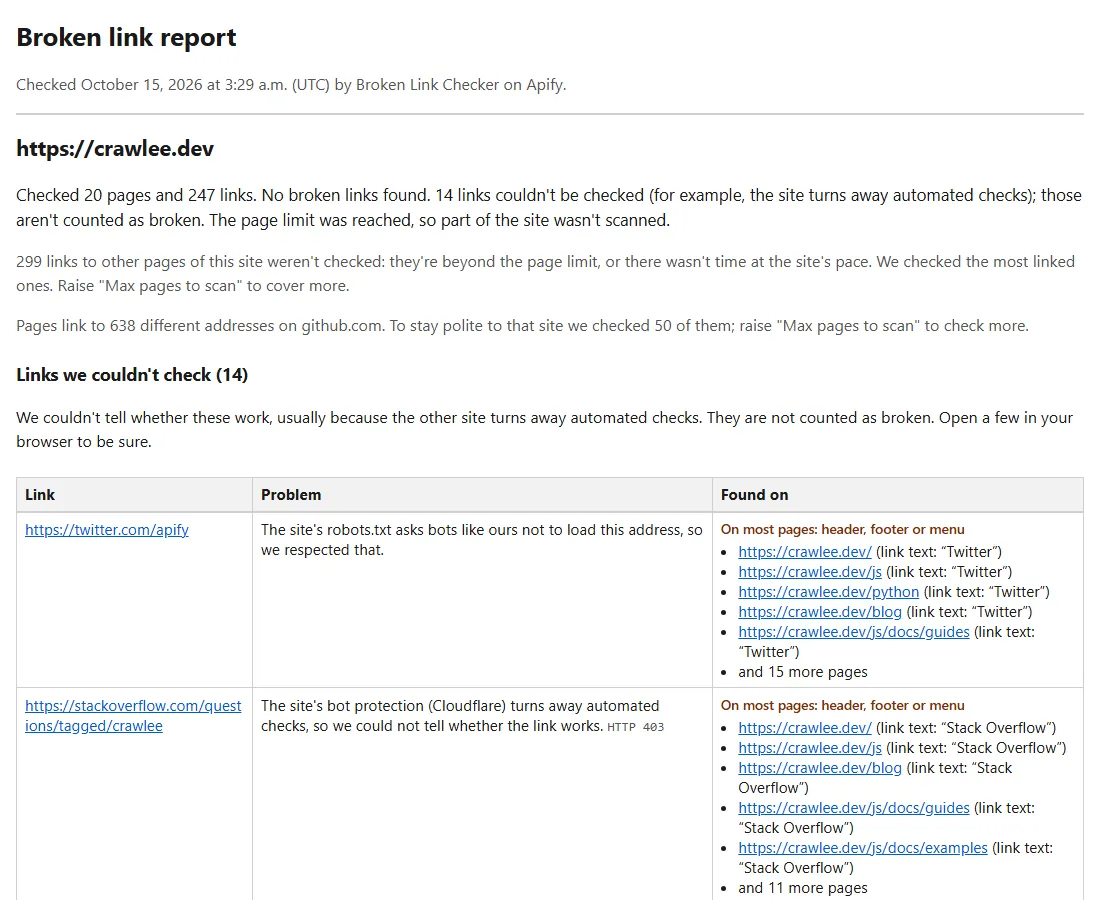
Each row of the Broken links fix list is one address with a problem, with the pages that link to it (shortened):
A link to a site that turns away automated checks is listed apart, and not counted as broken:
The Pages scanned tab has one row per page with its own counts and problem links, and the Websites tab has one row per site with totals and a short summary. From the same real run (shortened):
How much does it cost?
You pay $2.00 per 1,000 pages scanned, plus a tiny start fee per run. Every link on those pages is checked at no extra cost, however many there are. In "Only the URLs I list" mode, you pay $1.00 per 1,000 URLs checked.
- A 50-page small business site: about $0.10
- A 500-page website: about $1.00
- A weekly monitor of a 200-page site: about $1.70 a month
You aren't charged for websites that block us or can't be reached, or for pages that fail to load. Apify's free plan includes $5 of monthly credit, which covers about 2,500 pages. To cap a run, set Max pages to scan or a maximum cost when you start it.
Sites that block bots
Some websites use bot protection (Cloudflare, Akamai, DataDome and similar) that turns away automated tools. This Actor identifies itself honestly and never tries to get around these protections.
- The website you're checking: it loads the start page first, so a site that blocks us is stopped within seconds, listed as
blockedin the Websites tab, and not charged. If it's your own site, allow our bot (its name starts withBrokenLinkChecker) in your bot protection settings. - Other websites your pages link to: if one of them turns us away, that link is listed under couldn't check, not as broken. Open those in a browser to check them by hand.
Good to know
- Polite by default: at most 4 requests a second to the website being checked (you can raise it for your own site), and at most one a second to each other website. A site's robots.txt Crawl-delay always wins.
- robots.txt is respected, for the website being checked and for the other websites it links to. Links that robots.txt asks bots not to load are listed under couldn't check.
- LinkedIn and Meta sites (Facebook, Instagram, WhatsApp, Threads) are never contacted; links to them are listed under couldn't check.
- Page limit: we stop scanning new pages at Max pages to scan, but the links on the pages already scanned are still checked, including the most linked pages beyond the limit. When a site links to one other website hundreds of times (for example its code on GitHub), we check a sample to stay polite, and the Websites tab says how many.
- Long runs end cleanly: a run stops shortly before its time limit and saves everything found so far, so it ends successfully.
- JavaScript websites: we read each page's HTML without running its scripts. Sites that build their links with JavaScript may show only a few links; the Websites tab says when that seems to be the case.
- No personal data is collected. Only addresses, link text and page titles.
FAQ
How is this different from other broken link checkers?
Most report every link they couldn't load as broken, so sites behind bot protection fill the report with false alarms. This one keeps "broken" and "couldn't check" apart, groups the fix list by broken link with every page and its link text, marks links in the site-wide header or footer, explains each problem in plain words, and charges per page rather than per link.
Can I check only some pages, or a list of URLs?
Yes. Choose Only the pages I list to check the links on specific pages, or Only the URLs I list to check that each address on a list works (for example after a site move). You can also limit scanning to a section with Only scan pages containing.
Can it tell me about new broken links every week?
Yes. Turn on monitoring and schedule the run weekly. The first run reports everything; after that you get only new problems, and the Websites tab lists the links fixed since last time.
Can I use it through the API or with AI agents?
Yes. Start runs and read results through the Apify API (JavaScript and Python clients are available), call it from AI agents through Apify's MCP server, or schedule it and send results to Google Sheets, Slack, Make or Zapier.
Something's wrong or unclear?
Please open an issue on the Issues tab with the website and what you expected.


