

Sitemap Extractor: Every Page URL of Any Website
Pricing
from $0.25 / 1,000 url founds
Sitemap Extractor: Every Page URL of Any Website
Get every page URL of a website from its sitemaps, found automatically (robots.txt, sitemap indexes, compressed, text and RSS sitemaps), with a link-following fallback when there's no sitemap. Track new and removed pages, and check pages for broken links, redirects and noindex.
Pricing
from $0.25 / 1,000 url founds
Rating
0.0
(0)
Developer

Elliott Tyson
Maintained by CommunityActor stats
0
Bookmarked
2
Total users
1
Monthly active users
10 days ago
Last modified
Categories
Share
Sitemap Extractor gets every page URL of a website in one clean list. Type a website and it finds the sitemaps for you: in robots.txt, at the usual addresses, inside sitemap indexes, compressed (.gz), plain-text and RSS or Atom sitemaps. If a site has no sitemap, it follows the site's links instead, so you still get its pages rather than an error.
It can also watch a site for new, updated and removed pages on a schedule, and check every listed page for the problems search engines complain about: broken pages, redirects, "noindex" and canonical links that point elsewhere.
It's built for SEO specialists auditing sites, developers and AI builders who need a site's pages to crawl or feed into a pipeline, and anyone keeping an eye on a competitor's new products or articles.
What can this sitemap extractor do?
- Find sitemaps on its own: robots.txt first, then the usual places (
/sitemap.xml,/sitemap_index.xml,/wp-sitemap.xmland others) and links on the homepage. Sitemap indexes are followed down to every child sitemap. - Read sloppy sitemaps too: compressed files, missing namespaces, stray characters, unclosed tags, relative addresses and odd date formats. A web page served at a sitemap address is recognised and skipped instead of producing junk.
- Fall back to following links when there's no sitemap, staying on the site, respecting robots.txt and "nofollow", and stopping at a page limit you choose.
- Find pages missing from the sitemap: in "Both" mode it reads the sitemaps and follows the links, and marks pages that are linked on the site but not in its sitemap.
- Track changes: in monitoring mode it remembers what it found and returns only new, updated and removed URLs on the next run.
- Check pages (optional): final status after redirects, the redirect chain, response time, noindex (meta tag or header), canonical URL, whether robots.txt blocks Google, and the page title.
- Explain sitemap problems in plain words: a "Websites" table lists each site's sitemaps and issues such as URLs on the wrong site, http URLs on an https site, unreadable dates, duplicates, oversized files, or a sitemap missing from robots.txt.
- Filter before you pay: keep only URLs containing
/blog/, drop/tag/, or keep only pages changed in the last 7 days. - Group by section: each URL comes with its top-level folder (
/blog/,/products/, or/en/services/on sites that start with a language), and each site gets a count per section.
How to get all URLs of a website
- Click Try for free (you'll need a free Apify account).
- Add one or more websites, one per line:
example.com, a sitemap address, or a section likehttps://example.com/blog/. - Optionally add filters, turn on Check each page, or turn on monitoring.
- Click Start.
- Download the URLs as JSON, CSV or Excel, or connect the results to Google Sheets, Slack, Make or Zapier. For monitoring, schedule the run daily or weekly.
Input example
Output example
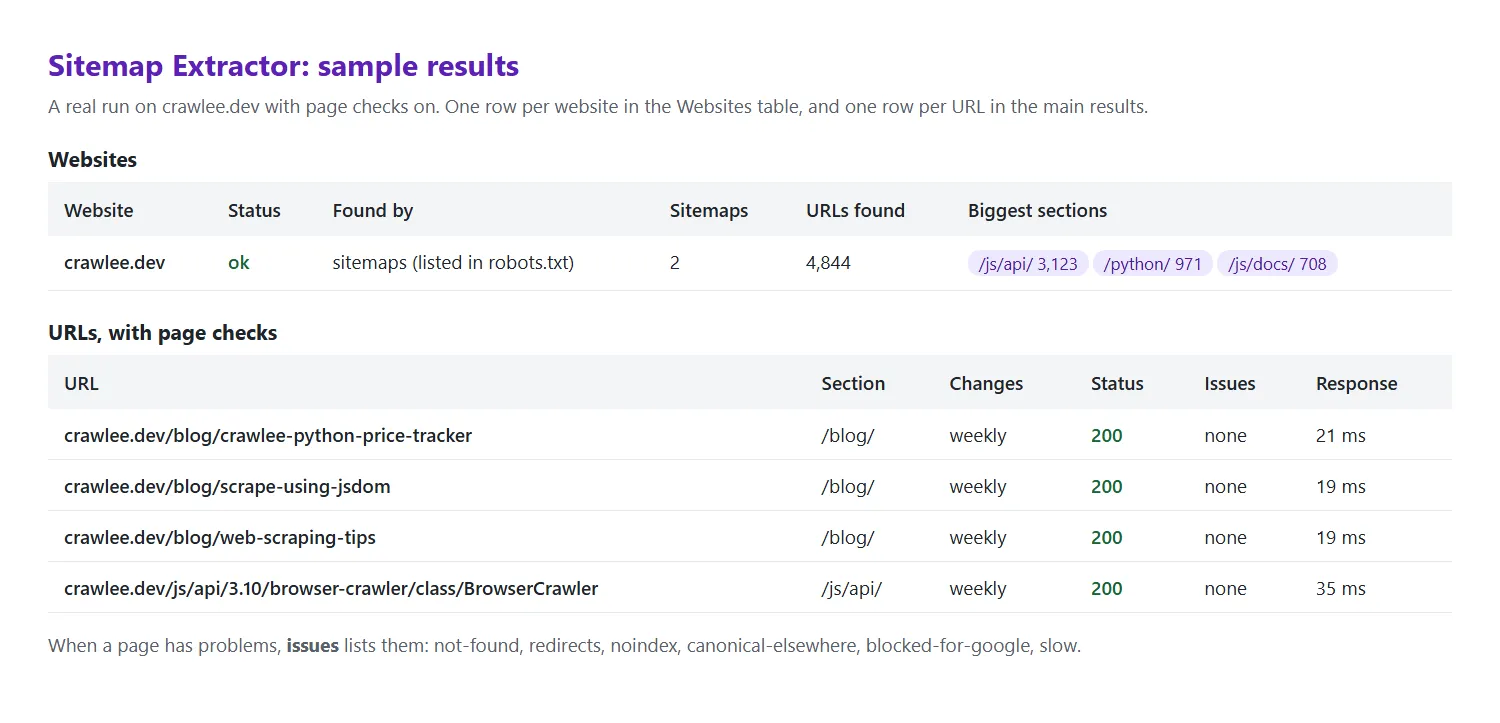
One URL as JSON, from a real run with page checks on:
The page check finds what a sitemap hides. In this example, based on a real run on a large news site (its name is changed here), the sitemap still lists an old address that goes through four redirects before reaching the page (shortened):
The Websites table has one row per site. A real example (shortened) from a monitoring run that kept only /blog/ URLs:
How much does it cost?
You pay $0.25 per 1,000 URLs, plus a tiny start fee per run. With Check each page on, each page checked adds $1.00 per 1,000 pages.
- A 500-page website: about $0.13 (about $0.63 with page checks)
- A 20,000-URL online store: about $5.00
- A daily monitor of a blog that adds a few posts a day: a few cents a month, because only new and changed URLs are charged
You aren't charged for websites that block us, for URLs filtered out, or for pages we couldn't check. Apify's free plan includes $5 of monthly credit, which covers about 20,000 URLs. To cap any single run, set Max URLs or a maximum cost when you start it.
Sites that block bots
Some websites use bot protection (Cloudflare, Akamai, DataDome and similar) that turns away automated tools. This Actor identifies itself honestly and never tries to get around these protections. Instead:
- It checks each site first, so a site that blocks us is stopped within seconds.
- The site is listed in the Websites table as
blocked, with the protection service when we can tell. - You aren't charged for URLs from a blocked site, because there aren't any.
- Sitemaps are often left open even when pages are protected; in that case you still get the URLs.
If it's your own site, allow our bot (its name starts with SitemapExtractor) in your bot protection settings.
Good to know
- Polite by default: at most 4 requests a second to any one site, and a site's robots.txt Crawl-delay always wins. Reading a sitemap is usually only a handful of requests, however many URLs it lists.
- robots.txt is respected. If a site asks bots to stay out, we do, and the Websites table says so.
- Big sites: sitemaps can list millions of URLs. Reading them is fast (200,000 URLs took under 3 minutes in our tests). Use Max URLs per website for a first look, and the run's maximum cost setting to cap spending. A run also stops by itself shortly before its time limit, so it ends successfully with the URLs found so far.
- Last-modified dates come from the site. Many sites leave them out or set them all to today, so treat them as hints.
- Following links finds what's linked. Pages that aren't linked from anywhere (and aren't in a sitemap) can't be found. Sites that build their pages with JavaScript may show only a few links; the Websites table says when that seems to be the case.
- Removed pages are only reported when every sitemap was read successfully, and not after a sudden large drop (more often a temporary fault on the site than real deletions), so you don't get false alarms.
- No personal data is collected. Only page addresses and the site's own sitemap details.
FAQ
How is this different from other sitemap extractors?
Most stop with an error when a site has no sitemap, or when the sitemap isn't where they expect it. This one looks in every usual place, reads broken and compressed sitemaps, and falls back to following links, so you get a result for almost any website. It also tracks changes, checks pages, and explains sitemap problems in plain words.
Can I find pages that are missing from my sitemap?
Yes. Choose Both under "How to find URLs". Pages that are linked on the site but not listed in its sitemaps have inSitemap: false.
Can I get only new pages, for example a competitor's new products?
Yes. Turn on monitoring, add a filter such as /products/, and schedule the run. The first run returns everything; after that you get only new, updated and removed URLs.
Can I use it through the API or with AI agents?
Yes. Start runs and read results through the Apify API (JavaScript and Python clients are available), call it from AI agents through Apify's MCP server, or schedule it and send results to Google Sheets, Slack, Make or Zapier.
Something's wrong or unclear?
Please open an issue on the Issues tab with the website and what you expected.


