

Website Health Audit: Speed, SEO & Accessibility
Pricing
from $10.00 / 1,000 page audits
Website Health Audit: Speed, SEO & Accessibility
Lighthouse speed, SEO and best-practice scores plus a plain-language accessibility check for any web page, with a prioritized fix list, Core Web Vitals and the manual checks to do next. Built for agencies and site owners. Never claims compliance.
Pricing
from $10.00 / 1,000 page audits
Rating
0.0
(0)
Developer

Elliott Tyson
Maintained by CommunityActor stats
0
Bookmarked
2
Total users
1
Monthly active users
10 days ago
Last modified
Categories
Share
Website Health Audit checks any web page for speed, SEO, best practices and accessibility, and explains the results in plain language. You get a short prioritized list of what to fix and why it matters to real people. It runs Google's Lighthouse (the same engine behind PageSpeed Insights) on each page, then turns the technical output into something a busy site owner, marketer or client can act on.
It's built for agencies and freelancers doing client audits, site owners checking their own pages, and AI tools that need a quick, reliable read on a page's health.
This is not a compliance check. Automated tools can only find some accessibility problems. Each result includes the manual checks to do next (keyboard, screen reader, zoom). For a full assessment, test with people who use assistive technology, or consider a review by an accessibility specialist.
What can this website audit do?
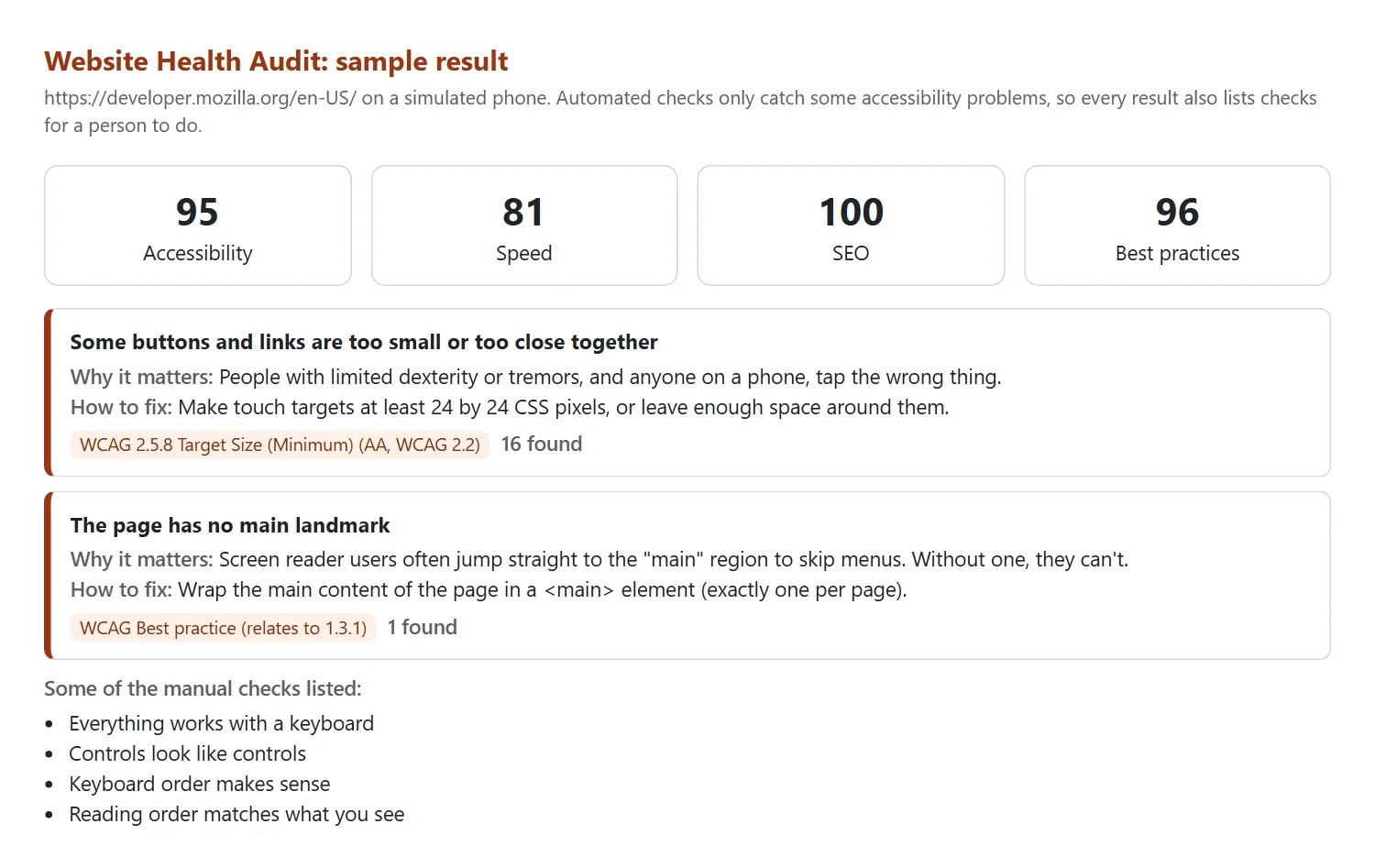
- Speed and Core Web Vitals: a Lighthouse performance score plus lab measurements (Largest Contentful Paint, Total Blocking Time, Cumulative Layout Shift and more). Speed improvements are ranked by estimated time saved.
- Accessibility, in plain language: each problem automated checks find comes with:
- why it matters;
- how to fix it;
- the related WCAG success criterion;
- how many elements are affected, with examples you can hand to a developer.
- A manual checklist: keyboard order, focus, screen reader and zoom checks that no automated tool can do for you.
- SEO basics: indexability, titles, meta descriptions, link text, robots.txt, canonical links and more.
- Best practices: HTTPS, browser errors, image quality, permission pop-ups and similar issues.
- AI agent readiness: Lighthouse's new agentic-browsing score (how well AI agents can read and use the page).
- Top 10 fixes across all areas, highest priority first.
- The full Lighthouse report (optional), saved as an HTML file you can send to a developer.
- Mobile, desktop or both: mobile simulates a mid-range phone on a slower connection, like PageSpeed Insights.
How to audit a website
- Click Try for free (you'll need a free Apify account).
- Add the pages to audit, one per line. Start with the pages that matter most: home, contact, and your main product or service page.
- Choose Mobile, Desktop or Both, and whether to save the full Lighthouse report.
- Click Start. Each page takes about 15 to 30 seconds.
- Read the Overview and Top fixes tabs, or download everything as JSON, CSV or Excel. You can also schedule monthly audits and connect them to Google Sheets, Slack, Make or Zapier.
Input example
Output example
One result as JSON:
The example is shortened. Each row also includes accessibilityIssues, seoIssues, bestPracticeIssues, speedImprovements and, if you asked for it, htmlReportUrl.
How much does a website audit cost?
You pay $0.01 per page audit, plus a tiny start fee. Choosing Both devices counts as two audits per page. You aren't charged for pages that couldn't be audited.
- 10 pages on mobile: about $0.10
- A 50-page site on mobile and desktop: about $1.00
Apify's free plan includes $5 of monthly credit, which covers about 500 page audits. To cap any single run, set a maximum cost when you start it.
Good to know
- Scores vary a little between runs. Lighthouse measures in a simulated environment, so expect a few points of difference, just like PageSpeed Insights.
- One page at a time. Each page is audited separately, so a long list takes a while (roughly 2 to 4 pages a minute).
- Very long lists: a run stops by itself a couple of minutes before its time limit (one hour by default), so it still finishes successfully. You're only charged for pages audited, and the pages not reached are listed under
notAuditedin RUN_SUMMARY. For big lists, raise the run's timeout or split the list. - robots.txt is respected. If a site asks automated tools not to load a page, it's skipped. If it's your own site, you can allow
WebsiteHealthAuditin your robots.txt. - Logins and pages behind forms can't be audited. Only public pages are checked.
- No personal data is collected. Examples only include the element's location in the page (a CSS selector), never its text.
FAQ
Does a 100 accessibility score mean my site is accessible?
No. The score only reflects automated checks, which can only spot some kinds of problem. A page can score 100 and still be hard or impossible to use with a keyboard or screen reader. Use the manualChecks list, and test with real assistive technology users if you can.
Is this the same as Google PageSpeed Insights?
It uses the same Lighthouse engine and mobile settings, so scores are comparable. Differences come from network and timing. PageSpeed Insights also shows real-visitor data from Chrome (the Chrome UX Report); this tool shows lab data only.
Which accessibility rules are checked?
Lighthouse's accessibility checks are powered by axe-core and cover things like text alternatives, form labels, contrast, page language, headings, landmarks, ARIA and touch-target size. Each problem includes the related WCAG 2.2 success criterion, or "best practice" when it isn't a WCAG requirement.
Can I use it through the API or with AI agents?
Yes. Start audits and read results through the Apify API (JavaScript and Python clients are available), call it from AI agents through Apify's MCP server, or schedule it and send results to Google Sheets, Slack, Make or Zapier.
Something's wrong or unclear?
Please open an issue on the Issues tab with the page address and what you expected.


