

SAM.gov RFP Compliance Matrix & Bid/No-Bid Analyzer
Pricing
from $7.00 / rfp analysis completed
SAM.gov RFP Compliance Matrix & Bid/No-Bid Analyzer
Turn SAM.gov opportunities or direct RFP attachments into a bid/no-bid brief, source-cited requirements, deadlines, risks, clarification questions, and an Excel-ready compliance matrix CSV.
Pricing
from $7.00 / rfp analysis completed
Rating
0.0
(0)
Developer

Cedric De Schaut
Maintained by CommunityActor stats
1
Bookmarked
3
Total users
1
Monthly active users
3 months ago
Last modified
Share

What does SAM.gov RFP Analyzer do?
SAM.gov RFP Analyzer turns public SAM.gov opportunities or direct RFP attachments into a source-cited bid/no-bid brief, compliance matrix CSV, deadlines, risks, clarification questions, and downloadable analysis files.
It is built for capture managers, proposal writers, GovCon consultants, and small business teams that need to triage solicitations before spending serious proposal time.
Use it as a lightweight SAM.gov RFP analysis API. Start with a quick free scan, then run a paid standard or deep analysis when the opportunity is worth proposal time. It does not generate a complete proposal and it does not replace legal, procurement, or contracting review.
Why use this SAM.gov RFP analysis Actor?
- Extract source-cited requirements from PDF, DOCX, HTML, and TXT attachments.
- Generate an Excel-ready compliance matrix with requirement IDs, sources, response flags, status, and risk level.
- OCR scanned image-only PDFs when no embedded text is available.
- Detect proposal deadlines, question deadlines, and other key date/time language.
- Identify submission and compliance risks such as late-proposal rejection language.
- Produce a human-readable bid/no-bid summary in
SUMMARY.md. - Save machine-readable artifacts for downstream workflows, review, or automation.
- Run from the Apify Console, API, schedules, integrations, or monitoring workflows.
What data does it produce?
| Output | Type | Description |
|---|---|---|
| Verdict | string | Bid/no-bid recommendation such as bid, consider, no_bid, or unknown. |
| Response deadline | string | Detected proposal due date when available. |
| Requirement | string | Source-cited obligation extracted from the RFP documents. |
| Source | string | Filename and page number when available. |
| Risk | object | Risk ID, level, category, reason, and recommended action. |
| Artifacts | files | SUMMARY.md, summary.json, compliance_matrix.csv, requirements.json, plus advanced debug detail in all_rows.json. |
How to analyze a SAM.gov RFP
- Open the Actor input tab.
- Paste a public SAM.gov opportunity URL, a SAM.gov notice ID, a batch list of known SAM.gov URLs or notice IDs, or one or more direct attachment URLs.
- Choose an analysis depth.
quickis a quick free scan for triage;standardanddeeprun full paid analysis. - Keep
useLlmset tofalsefor deterministic extraction. If you enable LLM enrichment, providellmApiKeyand optionallyllmBaseUrl. - Start the Actor.
- Download
compliance_matrix.csvfor Excel or reviewSUMMARY.mdfor the decision brief.
Which analysis depth should I choose?
| Depth | Best for | Billing behavior |
|---|---|---|
quick | First-pass triage, confirming that attachments are reachable, and checking whether the RFP has enough extractable requirements to continue. | Free scan; capped document and page limits. |
standard | The normal paid run for a full compliance matrix, bid/no-bid brief, requirements list, deadlines, and risk review. | Charges one completed-analysis event. |
deep | Larger, scanned, or especially important RFPs where broader document/page limits matter. | Charges one completed-analysis event. |
Recommended workflow: run quick first, review SUMMARY.md, then rerun the same input with analysisDepth: "standard" if the opportunity looks real and proposal-worthy.
Examples
The proof pack in docs/examples/ contains five live public SAM.gov quick scans plus one paid standard run, including sample inputs, source URLs, run links, and observed output counts.
| Example | Run | Documents | Requirements | Risks |
|---|---|---|---|---|
| VA CMOP TCA and sorting loops | AtBjIsBSmaMXAWHtQ | 3 | 2 | 0 |
| USCGC Oliver Berry drydock | UNrJEvL5W8XiLN77y | 3 | 108 | 0 |
| NASA FY26 MTS purchase | wNvn4BLCwOZfoi50C | 3 | 2 | 0 |
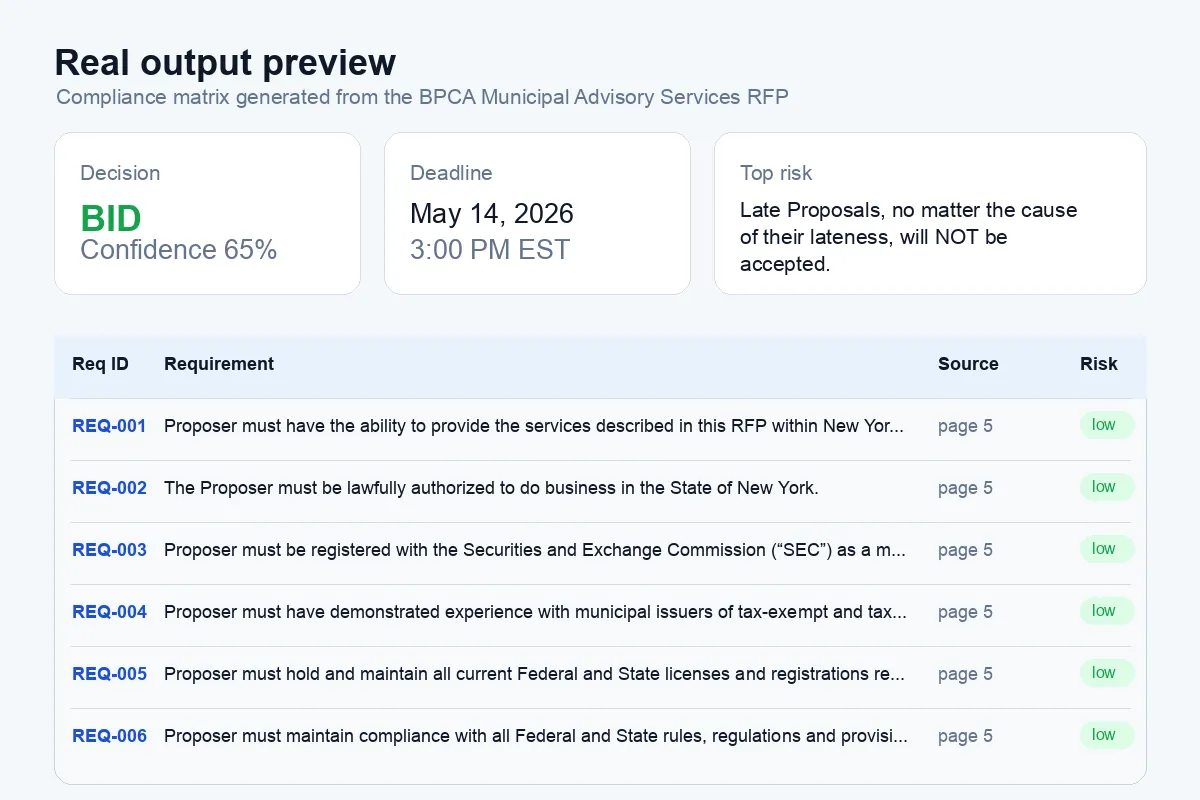
| BPCA municipal advisory services RFP | WgmN3VlNpIMdK8bGh | 1 | 39 | 1 |
| Batch SAM.gov quick scan | tBHSlaRNgHHJwvjik | 6 | 110 | 0 |
| BPCA municipal advisory services RFP standard run | nwrSoDydzEFeofzzv | 1 | 59 | 1 |
Live output screenshots
These screenshots are generated from public Apify run artifacts and show the kind of summary and compliance matrix preview the Actor produces.


Quick free scan from a direct RFP attachment
Use this first when you have a public PDF, DOCX, HTML, or TXT attachment and want to confirm that the document is reachable and has extractable requirements.
Batch quick scan for known SAM.gov URLs
Use batch mode when you already have several opportunity URLs and want one combined compliance matrix with batchTargetId, opportunityTitle, and opportunitySourceUrl columns.
Standard compliance matrix from a SAM.gov opportunity
Use this when the opportunity is worth a full paid analysis and you want the bid/no-bid summary, source-cited compliance rows, deadlines, risks, and downloadable files.
Input
You can use any of these input modes:
samOpportunityUrl: public SAM.gov opportunity page URL.samOpportunityUrls: batch mode for up to 10 known public SAM.gov opportunity page URLs.noticeId: SAM.gov notice or opportunity identifier.noticeIds: batch mode for up to 10 known SAM.gov notice or opportunity identifiers.attachmentUrls: direct public PDF, DOCX, HTML, or TXT files.companyProfile: optional capabilities, certifications, NAICS codes, or past-performance context.analysisDepth:quick,standard, ordeep. Usequickfor a quick free scan.useLlm: set tofalsefor deterministic extraction ortruefor optional enrichment.enableOcr: turn OCR fallback on or off for scanned PDFs.ocrMaxPages: maximum pages to OCR per scanned PDF.maxAttachments,maxPagesPerDocument, andmaxFileMb: controls for scope and cost.
Provide exactly one target mode. At least one of samOpportunityUrl, samOpportunityUrls, noticeId, noticeIds, or attachmentUrls is required. A run with only the default limit settings will fail because there is no RFP to analyze.
Minimal direct-attachment input:
Output
The default dataset is optimized for Apify table views and exports. Each dataset row is one compliance matrix row. Run-level summary fields such as verdict, deadline, counts, risks, and generated file names are stored in summary.json and SUMMARY.md to keep dataset exports clean.
You can download the default dataset in Apify-supported formats such as JSON, HTML, CSV, or Excel. For proposal workflows, compliance_matrix.csv is usually the easiest artifact to open in Excel or Google Sheets.
Simplified example:
The key-value store also contains:
SUMMARY.md: human-readable bid/no-bid brief.summary.json: machine-readable run summary.compliance_matrix.csv: Excel-ready compliance matrix.requirements.json: extracted source-cited requirements.all_rows.json: advanced debug detail. This intentionally mixes summary, opportunity, document, requirement, compliance, deadline, risk, and clarification records for troubleshooting.
How much does it cost?
This Actor uses pay-per-event pricing for completed standard and deep analyses, plus Apify platform usage. analysisDepth: "quick" is a quick free scan that skips the completed-analysis event while still respecting Apify platform usage.
To control cost, start with analysisDepth: "quick" and useLlm: false. For paid full runs, keep practical limits for maxAttachments, maxPagesPerDocument, ocrMaxPages, and maxFileMb.
Best practices
- Use direct
attachmentUrlswhen you already have the RFP documents; this usually gives the cleanest run. - Use
samOpportunityUrlornoticeIdwhen you want the Actor to discover public opportunity context. - Start with a quick free scan before paying for a standard or deep analysis.
- Start with
useLlm: falsefor predictable, low-cost extraction. - Download
compliance_matrix.csvand assign owners/statuses in your proposal workflow. - Review
SUMMARY.mdbefore spending time on a full proposal. - Review the original source documents before submitting anything to an agency.
Limitations
- OCR is available for scanned PDFs, but OCR is slower and capped by
ocrMaxPages. - Password-protected, private, expired, or blocked attachments may not be accessible.
- The Actor extracts and structures planning intelligence; it does not write a complete proposal.
- The output is analysis support, not legal, procurement, or contracting advice.
- Source citations depend on the quality of the underlying document text.
FAQ
Can I analyze direct RFP attachment URLs instead of a SAM.gov page?
Yes. Use attachmentUrls when you have public document links. This is often the fastest and most reliable input mode.
Does it work with scanned PDFs?
Yes, if enableOcr is true. The Actor first tries embedded PDF text, then OCRs up to ocrMaxPages pages when no embedded text is found.
Does it generate a complete proposal?
No. It produces a bid/no-bid brief, compliance matrix, deadlines, risks, and planning artifacts. Proposal writing remains a separate workflow.
Can I call this Actor by API?
Yes. Use the API tab on the Actor page to run it from your own app, workflow, CRM, or proposal automation tool.
Why does all_rows.json contain many different row types?
all_rows.json is a developer/debug artifact. It intentionally includes the run summary, opportunity metadata, documents, raw requirements, compliance rows, deadlines, risks, and clarification questions. For normal proposal work, use SUMMARY.md, summary.json, compliance_matrix.csv, or the default dataset.
Support
If a public RFP does not parse correctly, open an Actor issue with the run ID, the input JSON, and a short description of what you expected to see. Do not include private proposal material or credentials in public issues.


