

Airbnb Listing Scraper: Ratings, Rooms, Guests, Photos ($5/1K)
Pricing
from $4.00 / 1,000 listings
Airbnb Listing Scraper: Ratings, Rooms, Guests, Photos ($5/1K)
$5 per 1,000 listings, failed inputs free. Airbnb listing details by ID or room URL: name, type, bedrooms, beds, baths, max guests, rating, reviews, location, and photos.
Pricing
from $4.00 / 1,000 listings
Rating
0.0
(0)
Developer

Plumbline
Maintained by CommunityActor stats
0
Bookmarked
2
Total users
1
Monthly active users
2 days ago
Last modified
Categories
Features
Share
Airbnb listing details by ID or room URL: name, type, bedrooms, beds, baths, max guests, rating, reviews, location, and photos. For hosts, property managers, and travel analysts who research rental competitors.
Last verified working: 2026-11-21 (automatic live test run passed).
- Price: $5.00 per 1,000 listings. No subscription; you pay only for listings saved. Failed inputs are free. Try it on Apify's free plan (up to 20 listings per run).
- Export: JSON, CSV, Excel, Google Sheets, or the API. Works with Make, Zapier, n8n, and AI agents (MCP).
Every run tells you plainly what worked and what did not: no silent empty runs.
What can Airbnb Listing Scraper do?
- Competitor sets: compare rating, reviews, and room counts for listings near yours.
- Market research: map listings with
latitudeandlongitude. - Listing audits: export names, descriptions, and photos.
What data does Airbnb Listing Scraper extract?
| Field | What it is | Example |
|---|---|---|
input | The ID or URL you submitted. | 11984394 |
type | listing or error. | listing |
listingId | Airbnb room id. | 11984394 |
url | Listing page URL. | https://www.airbnb.com/rooms/11984394 |
title | Headline Airbnb shows for the listing, with type, rating, and room counts. | Home in Costa da Caparica · ★4.96 · 2 bedrooms · 3 beds · 1 bath |
description | Full listing description. | Bright and airy beach house in Fonte da Telha, perfect for relaxed st… |
name | Name the host gave the listing. | Salty Soul Beach House – Spacious Beach Retreat |
propertyType | Type from the listing headline, for example Home, Apartment, Condo, or Room. | Home |
bedrooms | Bedrooms (0 for a studio). | 2 |
beds | Beds. | 3 |
baths | Bathrooms. | 1 |
maxGuests | Maximum number of guests. | 6 |
rating | Average guest rating (out of 5). | 4.96 |
reviewsCount | Number of guest reviews. | 342 |
latitude | Approximate latitude Airbnb publishes for the listing. | 38.57553 |
longitude | Approximate longitude Airbnb publishes for the listing. | -9.19756 |
price | Price when the page shows one. Airbnb usually shows prices only for chosen dates, so this is often empty. | |
currency | ISO currency code when present. | |
location | City / region / country when present. | Costa da Caparica |
imageUrl | Primary photo URL. | https://a0.muscache.com/im/pictures/hosting/Hosting-U3RheVN1cHBseUxpc… |
images | Listing photo URLs. | [https://a0.muscache.com/im/pictures/hosting/Hosti…, …] |
Examples come from a real run. Every row has every field; a value the page did not show is null, never guessed.
One row per listing.
How to use Airbnb Listing Scraper
- Click Try for free (or Start) on this page.
- Enter one listing ID or room URL per line in the first field. The form is prefilled with a working example.
- Optional: set Max results and the other options.
- Click Start. Open the Output tab, or export JSON, CSV, Excel, or HTML.
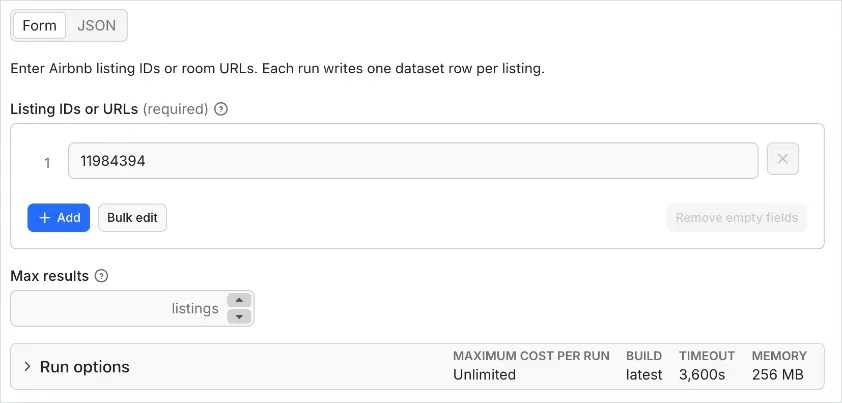
Example input
Example output
One real row from a run on 17 October 2026 (long values shortened here):
How much does Airbnb Listing Scraper cost?
Pay per result: $5.00 per 1,000 listings, plus $0.001 per run start. No subscription. With Apify's Store discounts: $4.50 per 1,000 on the Silver tier, $4.00 on Gold and above.
| Event | When | Price |
|---|---|---|
| Actor start | Once per run (per GB of memory; the default 256 MB counts as one) | $0.001 |
| Listing | Each listing saved to the dataset | $0.005 |
| Example | Rows | Cost |
|---|---|---|
| 10 listings | 10 | $0.001 + $0.05 = $0.051 |
| 100 listings | 100 | $0.001 + $0.50 = $0.501 |
| 1,000 listings | 1,000 | $0.001 + $5.00 = $5.001 |
- Retries after a bot check or a temporary error cost you nothing. You pay only for rows saved.
- An input that fails after all retries saves one error row so you can see what failed and why. Error rows are free.
- On Apify's free plan a run stops at 20 rows. Any paid Apify plan removes this limit.
- Set Max total charge per run in the run options. The Actor stops cleanly at that limit and keeps every row saved so far.
What you can count on
- Same columns on every row. Missing values are
null, so spreadsheets and databases never break. - No silent failures. An input that fails gets an error row with
errorCodeand a plain-languageerrorMessage. The other inputs keep running. - A clear run summary. The run status says how many results were saved, how many inputs failed, and why. The same numbers are saved as the
RUN_SUMMARYrecord in the run's key-value store, for automations. - Automatic retries. Bot checks and temporary errors are retried with a fresh request before an input counts as failed.
- Limits respected. Max results and your spending limit stop the run cleanly.
Airbnb Listing Scraper API for code, automations, and AI agents
API (returns the rows when the run finishes):
Python (pip install apify-client):
JavaScript (npm install apify-client):
No-code: connect the Actor in Make, Zapier, n8n, or Google Sheets through Apify's integrations, or add a webhook to get notified when a run finishes.
AI agents (MCP): add https://mcp.apify.com?tools=plumblinedata/airbnb-listing-scraper to Claude, Cursor, or any MCP client. The agent can call this Actor as a tool with the same input as above.
Limitations
- Nightly prices are usually empty: Airbnb shows them only after a guest picks dates.
- Calendars and review texts are not included.
- Coordinates are the approximate location Airbnb publishes.
FAQ
Where is the listing ID?
It is the number in https://www.airbnb.com/rooms/11984394. You can paste the full URL.
How do I scrape Airbnb listing data?
Paste listing IDs or room URLs into Listing IDs or URLs (listingIds). Each listing returns name, type, bedrooms, beds, baths, max guests, rating, reviews, location, and photos.
How to compare Airbnb competitors near my listing
Put the nearby listings in Listing IDs or URLs (listingIds) and compare rating, reviewsCount, bedrooms, and maxGuests across the rows.
How to download photos from Airbnb listings
Paste the listings into Listing IDs or URLs (listingIds). The images field lists each listing's photo URLs.
What does an error row mean?
It marks an input that failed after retries. errorCode is short (blocked, empty_result, not_available, http_404, or invalid_... for a bad ID or URL) and errorMessage says what to do. Remove error rows with a filter on type.
Can I run it on a schedule?
Yes. Create a task with your input in Apify Console, then add a schedule (for example every day at 8:00).
Is it legal to collect this data?
The Actor reads public pages that anyone can open without logging in. You are responsible for how you use the data, including copyright, personal data rules such as GDPR, and the site's terms. If you are not sure, ask a lawyer.
Related Actors
| Actor | What it does |
|---|---|
| Airbnb URL Scraper | Airbnb page data from any Airbnb URL |
| Zillow Scraper | Zillow property data from any property or search URL |
Support
Found a problem or need a field? Open an issue on the Issues tab. Include the run ID and one input that shows the problem. We read every issue.


