
LinkedIn People Watcher 🕶️ ✅
DeprecatedPricing
from $6.00 / 1,000 per urls
LinkedIn People Watcher 🕶️ ✅
DeprecatedMonitor LinkedIn profiles for signals like job changes, new posts, and topic-specific posts. Sends email notifications when changes are detected. Uses LLM-based intelligent change detection.
Pricing
from $6.00 / 1,000 per urls
Rating
0.0
(0)
Developer

Pratik Dani
Maintained by CommunityActor stats
5
Bookmarked
50
Total users
2
Monthly active users
7 months ago
Last modified
Categories
Share
Track LinkedIn profile changes and get instant email notifications powered by AI.
LinkedIn People Watcher monitors LinkedIn profiles for meaningful changes like job transitions, new posts, and other important updates. Using AI-powered analysis, it intelligently detects what matters and sends you beautiful email notifications when changes occur.
Perfect for recruiters, sales teams, investors, and anyone who needs to stay updated on their professional network.
🌟 Key Features
- 🎯 Smart Change Detection: AI analyzes profiles to identify meaningful changes, not just data differences
- 📧 Beautiful Email Notifications: Get professionally designed emails with direct links to changes
- 🔄 Automated Monitoring: Set it and forget it - runs on your schedule
- 🎨 Multiple Signal Types: Track job changes, new posts, and more
- 💾 Efficient Storage: Only keeps the latest snapshot per profile to minimize costs
- 🔒 Secure & Private: Your data is encrypted and stored securely
🚀 Quick Start
1. Configure Your Input
Click on the Input tab and configure the following fields:
Profile URLs (Required)
Add the LinkedIn profile URLs you want to monitor. You can add multiple profiles.
Example:
Tips:
- Use the full LinkedIn profile URL
- Both
/in/usernameand/in/username/formats work - The actor will automatically normalize URLs
Email Recipients (Required)
Enter email addresses where notifications should be sent. You can add multiple recipients.
Example:
Signal Configurations (Required)
Select which types of changes you want to track:
job_change: Detects when someone changes jobs, gets promoted, or updates their work experiencenew_post: Detects when someone publishes new content on LinkedIn
Example: Select both to track all changes
💡 Need custom signals? Contact support@datamagnet.co for custom monitoring solutions (headline changes, location updates, skills tracking, etc.)
2. Run the Actor
First Run - Baseline
On your first run, the actor will:
- Fetch current profile data
- Store baseline snapshots
- Send a baseline notification email
- No changes will be detected (this is expected!)
Example Baseline Email:
"Your LinkedIn People Watcher is now actively monitoring 3 profile(s)."
Subsequent Runs - Change Detection
On future runs, the actor will:
- Fetch current profile data
- Compare with previous snapshot
- Detect changes using AI
- Send email notifications for meaningful changes
- Update snapshots
Example Change Email:
"LinkedIn Profile Updates - 2 change(s) detected"
- Bill Gates: Job Change - Joined Microsoft AI as Chief Advisor
- Satya Nadella: New Post - Shared insights on AI transformation
📅 Scheduling
Recommended Schedules
For most use cases, we recommend running the actor:
- Daily
- Twice Daily
- Weekly
How to Schedule
- Click on Schedules in the actor
- Click Create new schedule
- Choose your preferred frequency
- Set the time
- Click Create
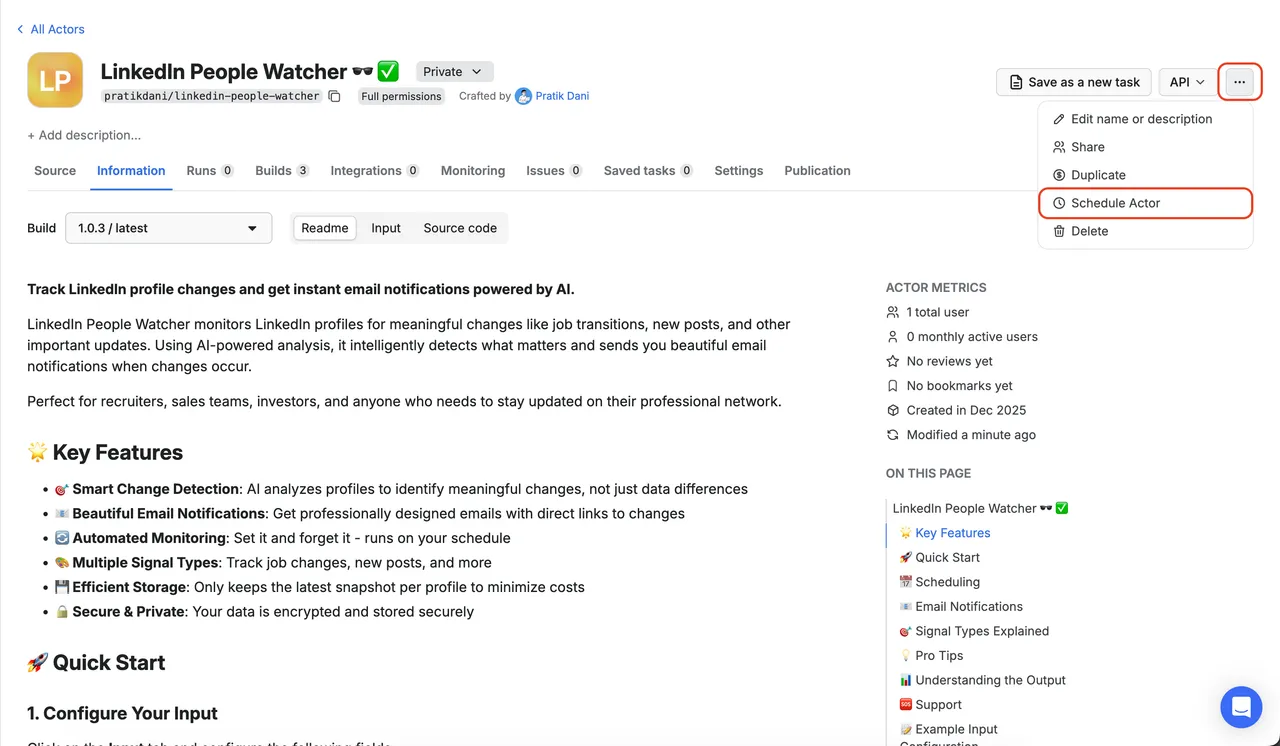
Tip: Don't run too frequently (e.g., every hour) as LinkedIn profiles don't change that often and you'll waste credits.
📧 Email Notifications
What You'll Receive
The actor sends two types of emails:
1. Baseline Notification
Sent on first run to confirm monitoring is active.
Contains:
- List of profiles being monitored
- Confirmation message
- Datamagnet branding
2. Change Notification
Sent when changes are detected.
Contains:
- Profile name and photo link
- Change type (Job Change, New Post, etc.)
- AI-generated summary of the change
- Direct links to view the changes
- Timestamp of detection
Email Features
- ✅ Professional design with Datamagnet branding
- ✅ Mobile-responsive layout
- ✅ Direct action links (View Experience, View Posts)
- ✅ Color-coded by change type
- ✅ Confidence scores (when available)
🎯 Signal Types Explained
Job Change
Detects when someone:
- Changes companies
- Gets a promotion
- Updates their job title
- Adds new work experience
- Changes their current role
Use Cases:
- Recruiters tracking candidate moves
- Sales teams monitoring decision-maker changes
- Investors tracking portfolio company executives
Example Detection:
"Bill Gates has joined Microsoft AI as Chief Advisor, transitioning from his previous role as Co-chair at Bill & Melinda Gates Foundation."
New Post
Detects when someone:
- Publishes a new LinkedIn post
- Shares an article
- Posts company updates
Use Cases:
- Content teams tracking thought leaders
- Sales teams identifying engagement opportunities
- Recruiters finding active candidates
Example Detection:
"Satya Nadella published 2 new posts in the last 24 hours, including insights on 'The Future of AI in Enterprise'."
Need Custom Signals?
Looking for specific signals that aren't listed above? We can create custom monitoring solutions tailored to your needs!
Examples of custom signals:
- Profile headline changes
- Location changes
- Skills updates
- Endorsement tracking
- Company page updates
- Education changes
- And much more!
Contact us: support@datamagnet.co
We'll work with you to build exactly what you need.
💡 Pro Tips
Optimize Your Monitoring
- Start Small: Monitor 5-10 profiles first, then scale up
- Choose Relevant Signals: Don't track everything - focus on what matters
- Set Appropriate Schedule: Daily or weekly is usually sufficient
- Monitor High-Value Profiles: Focus on decision-makers, top candidates, or key contacts
Reduce Costs
- Limit Profile Count: Each profile fetched costs API credits
- Optimize Schedule: Less frequent runs = lower costs
- Use Targeted Signals: Only enable signals you need
- Clean Up Old Profiles: Remove profiles you're no longer interested in
Best Practices
- Verify Email Setup: Test with one recipient first
- Check Spam Folder: Initial emails might go to spam
- Whitelist Sender: Add the sender email to contacts
- Monitor Actor Runs: Check logs for any errors
- Keep Database Healthy: The actor auto-cleans old snapshots
📊 Understanding the Output
Dataset Output
After each run, the actor saves a record to the dataset with:
Fields:
run_id: Unique identifier for this runuser_id: Your user identifierprofiles_processed: Number of profiles checkedchanges_detected: Number of changes foundbaseline_established: Number of new profiles addederrors: Any errors encounteredtimestamp: When the run completed
🆘 Support
Need Help?
- Check Logs: Actor run logs contain detailed error messages
- Review This Guide: Most issues are covered above
- Datamagnet Support: For API issues, contact support@datamagnet.co
- Apify Support: For platform issues, contact Apify support
Feature Requests & Custom Monitoring
- Custom Signals: Need to track specific changes like headline updates, location changes, or skills? We can build custom monitoring solutions for you.
- Feature Ideas: Have an idea for a new signal type or feature?
- Enterprise Solutions: Need to monitor hundreds or thousands of profiles?
Contact us: support@datamagnet.co
📝 Example Input Configuration
Here's a complete example input configuration:
🎉 Getting Started Checklist
- Configure input (profiles + recipients)
- Select signal types
- Run actor (baseline)
- Check email for baseline notification
- Set up schedule
- Wait for changes to be detected!
📄 License
This actor is powered by Datamagnet - Professional LinkedIn Data API.
Ready to start monitoring? Configure your input and run the actor! 🚀


![Profile Reactions Scraper for LinkedIn [No Cookies] avatar](https://images.apifyusercontent.com/qlnT6NzgG-VAzMGK9diufCCw1IAUtZWeE6s5MEJM9I4/rs:fill:76:76/cb:1/aHR0cHM6Ly9hcGlmeS1pbWFnZS11cGxvYWRzLXByb2QuczMudXMtZWFzdC0xLmFtYXpvbmF3cy5jb20vdFhKaEQ5SFNvdTY4N2NEUTQtYWN0b3ItRk5oS0ZqZUw4aFdRdE1lWkktWW8wVmRrTUFiSS1hbS1sb2dvLnBuZw.webp)

